---
title: "14.3 Extended BPMN-BPEL Mapping"
chapter: "14 Mapping BPMN Models to WS-BPEL"
source: "OMG BPMN 2.0.2 — formal/2013-12-09"
pages: "469-474"
---
> 14 Mapping BPMN Models to WS-BPEL · páginas 469-474 · [índice](../README.md)
## 14.3 Extended BPMN-BPEL Mapping
Additional sound **BPMN Process** models whose block hierarchy contains blocks that have not been addressed in the previous sub clause can be mapped to WS-BPEL. For such **BPMN Process** models, in many cases there is no preferred single mapping of a particular block, but rather, multiple WS-BPEL patterns are possible to map that block to. Also, additional **BPMN** constructs can be mapped by using capabilities not available at the time of producing this specification, such as the upcoming OASIS BPEL4People standard to map **BPMN User Tasks**, or other WS-BPEL extensions. Rather than describing or even mandating the mapping of such **BPMN** blocks, this specification allows for a semantic mapping of a **BPMN Process** model to an executable WS-BPEL process: The observable behavior of the target WS- BPEL process MUST match the operational semantics of the mapped **BPMN Process**. Also, the mappings described in sub clause 15.1 SHOULD be used where applicable.
### 14.3.1 End Events
**End Events** can be combined with other **BPMN** objects to complete the merging or joining of the paths of a WSBPEL structured element (see Figure 7.3).
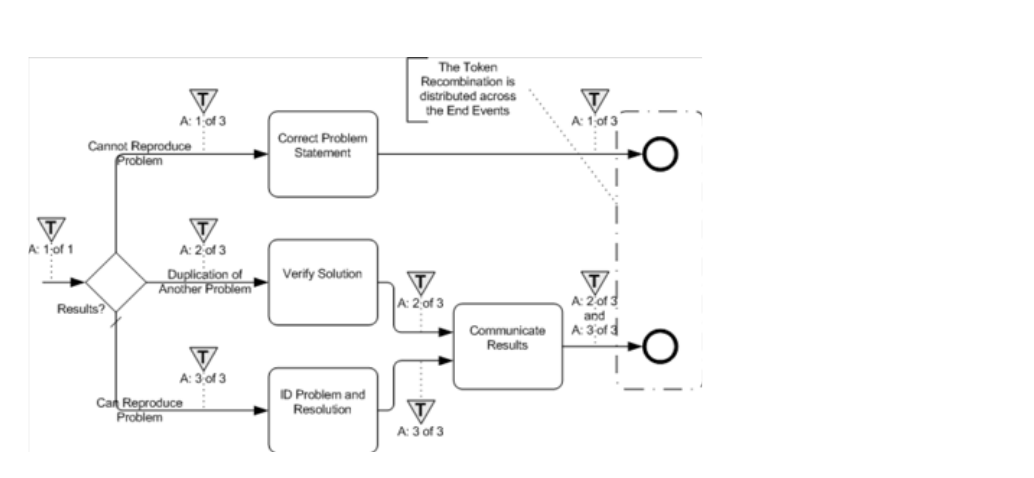
*Figure 14.2 – An example of distributed token recombination* (p. 469)
### 14.3.2 Loop/Switch Combinations From a Gateway
This type of *loop* is created by a **Gateway** that has three or more *outgoing* **Sequence Flows**. One **Sequence Flow** *loops* back *upstream* while the others continue *downstream* (see Figure 14.3). Note that there might be intervening **Activities** prior to when the **Sequence Flow** *loops* back *upstream*.
- This maps to both a WSBPEL while and a switch. Both activities will be placed within a sequence, with the *while* preceding the *switch*.
- For the while: The Condition for the Sequence Flow that loops back upstream will map to the condition of the while. All the Activities that span the distance between where the loop starts and where it ends, will be mapped and placed within the **Activity** for the *while*, usually within a *sequence*.
- For the switch: For each additional outgoing Sequence Flows there will be a case for the switch.
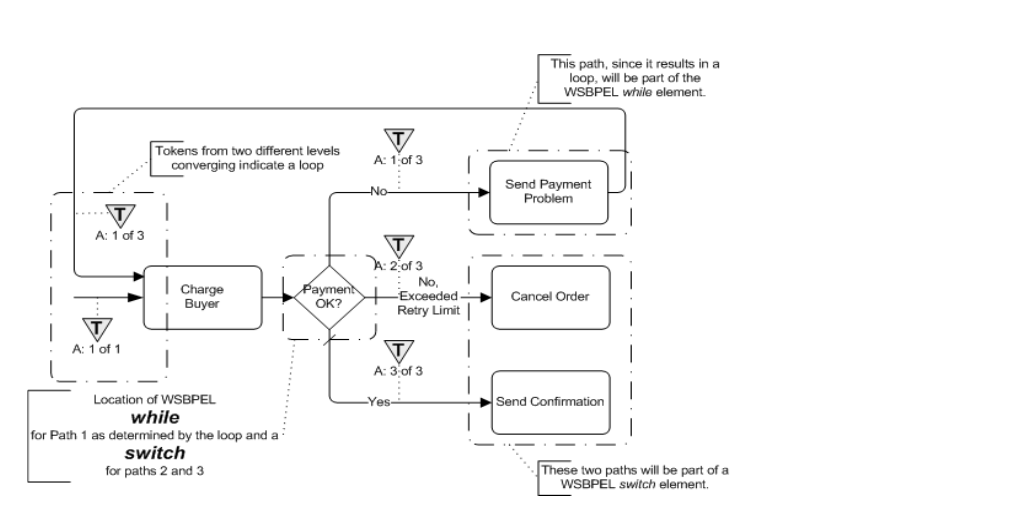
*Figure 14.3 – An example of a loop from a decision with more than two alternative paths* (p. 470)
### 14.3.3 Interleaved Loops
This is a situation where there are at least two *loops* involved and they are not nested (see Figure 14.4). Multiple looping situations can map, as described above, if they are in a sequence or are fully nested (e.g., one *while* inside another *while*). However, if the *loops* overlap in a non-nested fashion, as shown in the figure, then the structured element *while* cannot be used to handle the situation. Also, since a *flow* is acyclic, it cannot handle the behavior either.
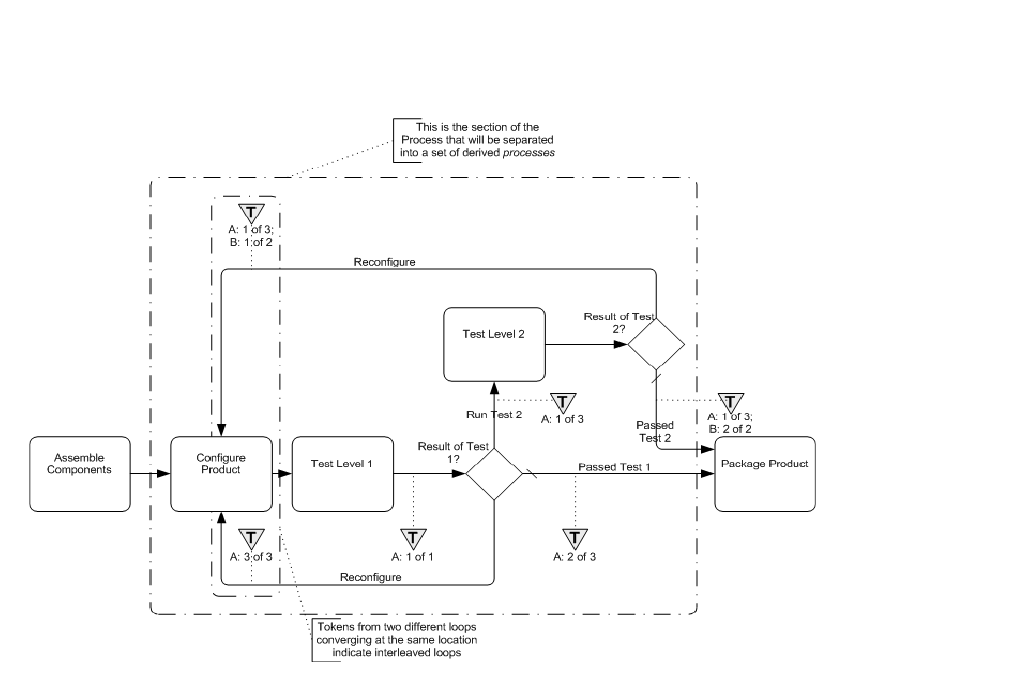
*Figure 14.4 – An example of interleaved loops* (p. 471)
To handle this type of behavior, parts of the WSBPEL *process* will have to be separated into one or more derived *processes* that are spawned from the main *process* and will also spawn or call each other (note that the examples below are using a spawning technique). Through this mechanism, the linear and structured elements of WSBPEL can provide the same behavior that is shown through a set of cycles in a single **BPMN** diagram. To do this:
- The looping section of the Process, where the loops first merge back (upstream) into the flow until all the paths have merged back to *Normal Flow*, SHALL be separated from the main WSBPEL *process* into a set of derived *processes* that will spawn each other until all the looping conditions are satisfied.
- The section of the process that is removed will be replaced by a (one-way) invoke to spawn the derived *process*, followed by a *receive* to accept the *message* that the looping sections have completed and the main *process* can continue (see Figure 14.5).
- The name of the invoke will be in the form of: “Spawn_[(loop target)activity.Name]_Derived_Process” The name of the receive will be in the form of: [(loop target)activity.Name]_Derived_Process_Completed”
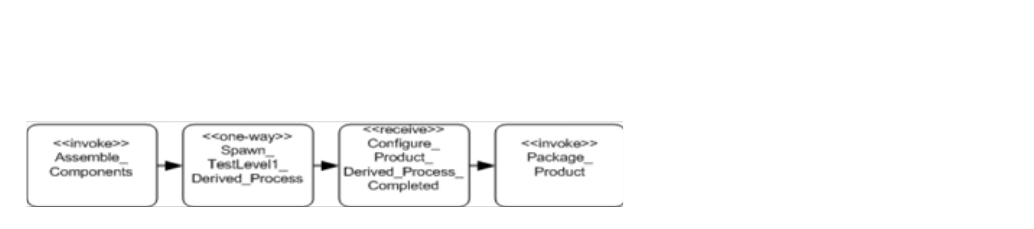
*Figure 14.5 – An example of the WSBPEL pattern for substituting for the derived Process* (p. 472)
For each location in the **Process** where a **Sequence Flow** connects *upstream*, there will be a separate derived WSBPEL *process*.
- The name of the derived process will be in the form of: “[(loop target)activity.Name]_Derived_Process”
- All Gateways in this sub clause will be mapped to switch elements, instead of while elements (see Figure below).
- Each time there is a Sequence Flow that loops back upstream, the Activity for the switch case will be a (one-way) *invoke* that will spawn the appropriate derived *process*, even if the *invoke* spawns the same *process* again.
- The name of the invoke will be the same as the one described above.
- At the end of the derived process a (one-way) invoke will be used to signal the main process that all the derived activities have completed and the main *process* can continue.
- The name of the invoke will be in the form of: “[(loop target)activity.Name]_Derived_Process_Completed”
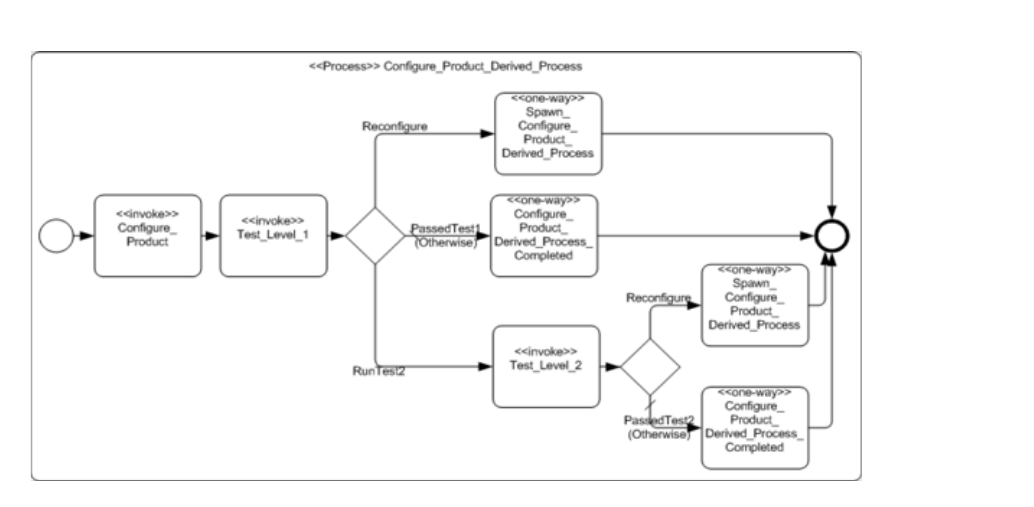
*Figure 14.6 – An example of a WSBPEL pattern for the derived Process* (p. 472)
### 14.3.4 Infinite Loops
This type of *loop* is created by a **Sequence Flow** that *loops* back without an intervening **Gateway** to create alternative paths (see Figure 14.7). While this can be a modeling error most of the time, there can be situations where this type of *loop* is desired, especially if it is placed within a larger **Activity** that will eventually be interrupted.
- This will map to a while activity.
- The condition of the while will be set to an Expression that will never evaluate to true, such as condition ”1 = 0.”
- All the activities that span the distance between where the loop starts and where it ends, will be mapped and placed within the activity for the *while*, usually within a *sequence*.
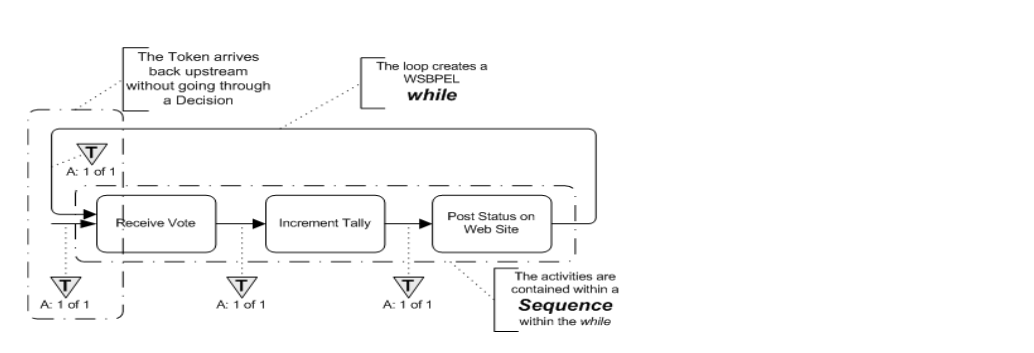
*Figure 14.7 – An example: An infinite loop* (p. 473)
### 14.3.5 BPMN Elements that Span Multiple WSBPEL Sub-Elements
Figure 14.8 illustrates how **BPMN** objects can exist in two separate sub-elements of a WSBPEL structured element at the same time. Since **BPMN** allows free form connections of **Activities** and **Sequence Flows**, it is possible that two (or more) **Sequence Flows** will merge before all the **Sequence Flows** that map to a WSBPEL structure element have merged. The sub-elements of a WSBPEL structured elements are also self-contained and there is no cross sub-element flow. For example, the *cases* of a *switch* cannot interact; that is, they cannot share activities. Thus, one **BPMN Activity** will need to appear in two (or more) WSBPEL structured elements. There are two possible mechanisms to deal with the situation:
- First, the activities are simply duplicated in all appropriate WSBPEL elements.
- Second, the activities that need to be duplicated can be removed from the main Process and placed in a derived process that is called (*invoked*) from all locations in the WSBPEL elements as needed. The name of the derived process will be in the form of: “[(target)object.Name]_Derived_Process”
Figure 14.8 displays this issue with an example. In that example, two **Sequence Flows** merge into the “Include History of Transactions” **Task**. However, the Decision that precedes the **Task** has three alternatives. Thus, the Decision maps to a WSBPEL *switch* with three *cases*. The three *cases* are not closed until the “Include Standard Text” **Task**, downstream. This means that the “Include History of Transactions” **Task** will actually appear in two of the three *cases* of
**Note –** the use of a WSBPEL *flow* will be able to handle the behavior without duplicating activities, but a *flow* will not always be available for use in these situations, particularly if a WSBPEL *pick* is requested.
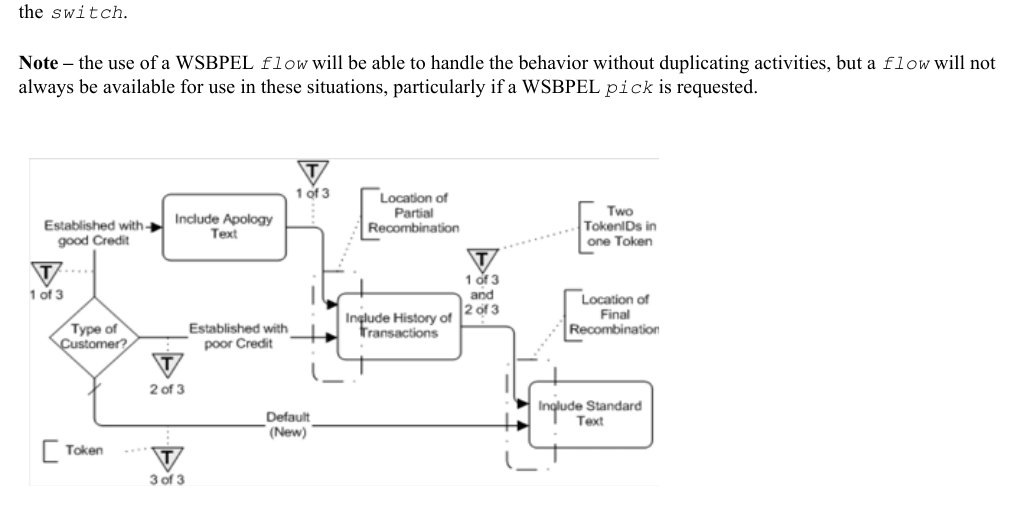
*Figure 14.8 – An example: Activity that spans two paths of a WSBPEL structured element* (p. 474)