---
title: "12.4 Example(s)"
chapter: "12 BPMN Notation and Diagrams"
source: "OMG BPMN 2.0.2 — formal/2013-12-09"
pages: "412-422"
---

> 12 BPMN Notation and Diagrams · páginas 412-422 · [índice](../README.md)


<a id="sec-12-4"></a>
## 12.4 Example(s)


This sub clause provides examples to support interpretation of the BPMN DI specification. Some BPMN diagram depictions along with their XML BPMN DI serializations are provided. The XML samples provided in this sub clause present only BPMN DI instances and omit the BPMN 2.0 abstract syntax. For readability purposes, the bpmnElement that is referenced by the BPMNPlane, BPMNShape, and BPMNEdge use a representative string pattern. This string pattern is:


- BPMNModelClassName_BPMNModelNameAttributeValue


For example: “Task_Activity” for a Task named “Activity.” In the provided XML serializations, the di namespace refers to the Diagram Interchange namespace defined in Annex B, and the dc namespace refers to the Diagram Common namespace also defined in Annex B.


<a id="sec-12-4-1"></a>
### 12.4.1 Depicting Content in a Sub-Process


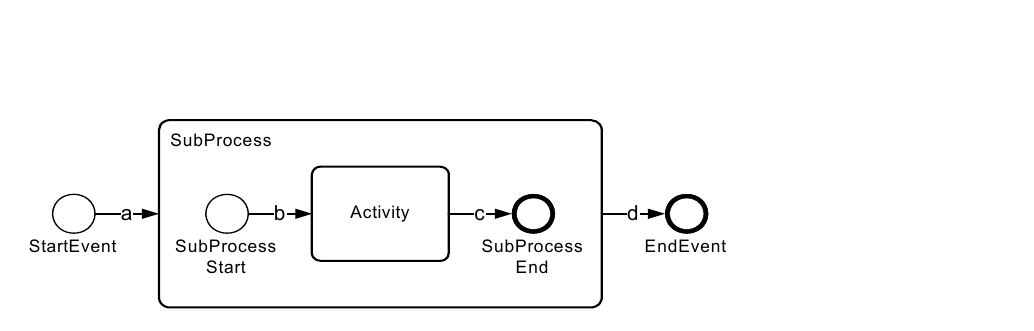
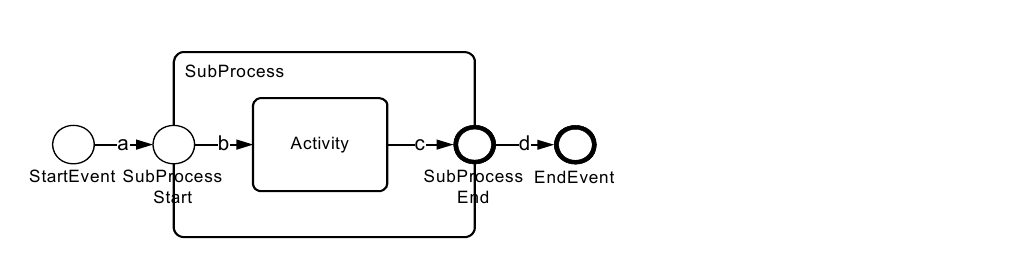
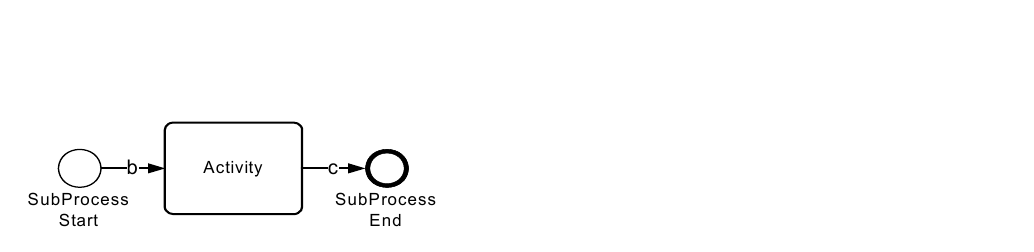
This sub clause shows various ways of depicting the content of a Sub-Process of the same BPMN model. The BPMN model contains a process composed of a none start event (named “StartEvent”), a sub-process (named “SubProcess”) and a none end event (named “EndEvent”). There is a sequence flow (named “a”) between the start event (named “StartEvent”) and the sub-process (named “SubProcess”) and a sequence flow (named “d”) between the subprocess (named “SubProcess”) and the end event (named “EndEvent”). The sub-process (named “SubProcess”) is composed of a none start event (named “SubProcessStart”), an abstract task (named “Activity”) and a none end event (named “SubProcessEnd”). There is a sequence flow (named “b”) between the start event (named “SubProcessStart”) and the task (named “Activity”) and a sequence flow (named “c”) between the task (named “Activity”) and the end event (named “SubProcessEnd”).


<a id="sec-expanded-sub-process"></a>
#### Expanded Sub-Process


First, a BPMN diagram depicts the BPMN model with the expanded sub-process showing its content (see Figure 12.8). This leads to a BPMN DI serialization of a single diagram that depicts this process (see Table 12.37).


StartEvent SubProcess SubProcess EndEvent

<a id="fig-12-8"></a>
![Figure 12.8 – Expanded Sub-Process Example](../figures/fig-12-8.png)

*Figure 12.8 – Expanded Sub-Process Example* (p. 413)


<a id="tab-12-36"></a>
**Table 12.36 – Expanded Sub-Process BPMN DI instance**

```xml
<BPMNDiagram name=" Events Inside the Sub Process " resolution="72">
    <BPMNPlane bpmnElement="Process_Process">
        <BPMNShape bpmnElement="StartEvent_StartEvent" >
            <dc:Bounds height="30.0" width="30.0" x="120.0" y="225.0"/>
            <BPMNLabel/>
        </BPMNShape>
        <BPMNShape bpmnElement="SubProcess_SubProcess" isExpanded="true">
            <dc:Bounds height="168.0" width="348.0" x="192.0" y="156.0"/>
            <BPMNLabel/>
        </BPMNShape>
        <BPMNShape bpmnElement="StartEvent_SubProcessStart" id="BorderStart" >
            <dc:Bounds height="30.0" width="30.0" x="228.0" y="225.0"/>
            <BPMNLabel/>
        </BPMNShape>
        <BPMNShape bpmnElement="Task_Activity">
            <dc:Bounds height="68.0" width="83.0" x="324.0" y="206.0"/>
            <BPMNLabel/>
        </BPMNShape>
        <BPMNShape bpmnElement="EndEvent_SubProcessEnd">
            <dc:Bounds height="32.0" width="32.0" x="468.0" y="224.0" id ="BorderEnd" />
            <BPMNLabel/>
        </BPMNShape>
        <BPMNShape bpmnElement="EndEvent_EndEvent">
            <dc:Bounds height="32.0" width="32.0" x="604.0" y="224.0"/>
            <BPMNLabel/>
        </BPMNShape>
        <BPMNEdge bpmnElement="SequenceFlow_a" targetElement="BorderStart" >
            <di:waypoint x="150.0" y="240.0"/>
            <di:waypoint x="192.0" y="240.0"/>
            <BPMNLabel/>
        </BPMNEdge>
        <BPMNEdge bpmnElement="SequenceFlow_b" sourceElement="BorderStart" >
            <di:waypoint x="258.0" y="240.0"/>
            <di:waypoint x="324.0" y="240.0"/>
            <BPMNLabel/>
        </BPMNEdge>
        <BPMNEdge bpmnElement="SequenceFlow_c" targetElement="BorderEnd" >
            <di:waypoint x="407.0" y="240.0"/>
            <di:waypoint x="468.0" y="240.0"/>
            <BPMNLabel/>
        </BPMNEdge>
            <BPMNEdge bpmnElement="SequenceFlow_d" sourceElement="BorderEnd" >
            <di:waypoint x="540.0" y="240.0"/>
            <di:waypoint x="604.0" y="240.0"/>
            <BPMNLabel/>
        </BPMNEdge>
    </BPMNPlane>
</BPMNDiagram>
```


<a id="sec-expanded-sub-process-with-start-and-end-events-on-border"></a>
#### Expanded Sub-Process with Start and End Events on Border


An alternative to depicting the same BPMN model of 12.4.1 would be to place the sub-process start and end events on the border of the sub-process (see Figure 12.9). In the BPMN DI serialization of this diagram (see Table 12.40), the target of the sequence flow named “a” and the source of the sequence flow named “d” are the start and end events on the boundary of the sub-process. Compare the target of the sequence flow named “a” and the source of the sequence flow named “d” of Table 12.37 with that of Table 12.38.


StartEvent SubProcess SubProcess EndEvent

<a id="fig-12-9"></a>
![Figure 12.9 – Start and End Events on the Border Example](../figures/fig-12-9.png)

*Figure 12.9 – Start and End Events on the Border Example* (p. 414)


<a id="tab-12-37"></a>
**Table 12.37 – Start and End Events on the Border BPMN DI instance**

```xml
<BPMNDiagram name=" StartAndEdnEventsOnTheBorder " resolution="72">
    <BPMNPlane bpmnElement="Process_Process">
        <BPMNShape bpmnElement="StartEvent_StartEvent" >
            <dc:Bounds height="30.0" width="30.0" x="120.0" y="225.0"/>
            <BPMNLabel/>
        </BPMNShape>
        <BPMNShape bpmnElement="SubProcess_SubProcess" isExpanded="true">
            <dc:Bounds height="168.0" width="348.0" x="192.0" y="156.0"/>
            <BPMNLabel/>
        </BPMNShape>
        <BPMNShape bpmnElement="StartEvent_SubProcessStart">
            <dc:Bounds height="30.0" width="30.0" x="177.0" y="225.0"/>
            <BPMNLabel/>
        </BPMNShape>
        <BPMNShape bpmnElement="Task_Activity">
            <dc:Bounds height="68.0" width="83.0" x="324.0" y="206.0"/>
            <BPMNLabel/>
        </BPMNShape>
        <BPMNShape bpmnElement="EndEvent_SubProcessEnd">
            <dc:Bounds height="32.0" width="32.0" x="524.0" y="224.0"/>
            <BPMNLabel/>
        </BPMNShape>
        <BPMNShape bpmnElement="EndEvent_EndEvent">
            <dc:Bounds height="32.0" width="32.0" x="604.0" y="224.0"/>
            <BPMNLabel/>
        </BPMNShape>
        <BPMNEdge bpmnElement="SequenceFlow_a">
            <di:waypoint x="150.0" y="240.0"/>
            <di:waypoint x="177.0" y="240.0"/>
            <BPMNLabel/>
        </BPMNEdge>
        <BPMNEdge bpmnElement="SequenceFlow_b">
            <di:waypoint x="207.0" y="240.0"/>
            <di:waypoint x="324.0" y="240.0"/>
            <BPMNLabel/>
        </BPMNEdge>
        <BPMNEdge bpmnElement="SequenceFlow_c">
            <di:waypoint x="407.0" y="240.0"/>
            <di:waypoint x="524.0" y="240.0"/>
            <BPMNLabel/>
        </BPMNEdge>
        <BPMNEdge bpmnElement="SequenceFlow_d">
            <di:waypoint x="556.0" y="240.0"/>
            <di:waypoint x="604.0" y="240.0"/>
            <BPMNLabel/>
        </BPMNEdge>
    </BPMNPlane>
</BPMNDiagram>
```


<a id="sec-collapsed-sub-process"></a>
#### Collapsed Sub-Process


Alternatively, one could depict the same BPMN model of 12.4.1 as two diagrams. A first diagram (Figure 12.10) depicts the process with the sub-process collapsed, while a second diagram (Figure 12.11) depicts the content of the sub-process.


<a id="fig-12-10"></a>
![Figure 12.10 – Collapsed Sub-Process](../figures/fig-12-10.png)

*Figure 12.10 – Collapsed Sub-Process* (p. 415)

<a id="fig-12-11"></a>
![Figure 12.11 – Contents of Collapsed Sub-Process](../figures/fig-12-11.png)

*Figure 12.11 – Contents of Collapsed Sub-Process* (p. 416)


<a id="tab-12-38"></a>
**Table 12.38 – Collapsed Sub-Process BPMN DI instance**

```xml
<BPMNDiagram name="Collapsed Sub-Process" resolution="72">
    <BPMNPlane bpmnElement="Process_Process">
        <BPMNShape bpmnElement="StartEvent_StartEvent">
            <dc:Bounds height="30.0" width="30.0" x="96.0" y="189.0"/>
            <BPMNLabel/>
        </BPMNShape>
        <BPMNShape bpmnElement="EndEvent_EndEvent">
            <dc:Bounds height="32.0" width="32.0" x="308.0" y="188.0"/>
            <BPMNLabel/>
        </BPMNShape>
        <BPMNShape bpmnElement="SubProcess_SubProcess" isExpanded="false">
            <dc:Bounds height="68.0" width="83.0" x="168.0" y="170.0"/>
            <BPMNLabel/>
        </BPMNShape>
        <BPMNEdge bpmnElement="SequenceFlow_a">
            <di:waypoint x="126.0" y="204.0"/>
            <di:waypoint x="168.0" y="204.0"/>
            <BPMNLabel/>
        </BPMNEdge>
        <BPMNEdge bpmnElement="SequenceFlow_d">
            <di:waypoint x="251.0" y="204.0"/>
            <di:waypoint x="308.0" y="204.0"/>
            <BPMNLabel/>
        </BPMNEdge>
    </BPMNPlane>
</BPMNDiagram>
```


<a id="tab-12-39"></a>
**Table 12.39 – Sub-Process Content BPMN DI instance**

```xml
<BPMNDiagram name="SubProcess" resolution="72">
    <BPMNPlane bpmnElement="SubProcess_SubProcess">
        <BPMNShape bpmnElement="StartEvent_SubProcessStart">
            <dc:Bounds height="30.0" width="30.0" x="208.0" y="219.0"/>
            <BPMNLabel/>
        </BPMNShape>
        <BPMNShape bpmnElement="Task_Activity">
            <dc:Bounds height="68.0" width="83.0" x="304.0" y="200.0"/>
            <BPMNLabel/>
        </BPMNShape>
        <BPMNShape bpmnElement="EndEvent_SubProcessEnd">
            <dc:Bounds height="32.0" width="32.0" x="448.0" y="218.0"/>
            <BPMNLabel/>
        </BPMNShape>
        <BPMNEdge bpmnElement="SequenceFlow_b">
            <di:waypoint x="238.0" y="234.0"/>
            <di:waypoint x="304.0" y="234.0"/>
            <BPMNLabel/>
        </BPMNEdge>
        <BPMNEdge bpmnElement="SequenceFlow_c">
            <di:waypoint x="387.0" y="234.0"/>
            <di:waypoint x="448.0" y="234.0"/>
            <BPMNLabel/>
        </BPMNEdge>
    </BPMNPlane>
</BPMNDiagram>
```


<a id="sec-12-4-2"></a>
### 12.4.2 Multiple Lanes and Nested Lanes


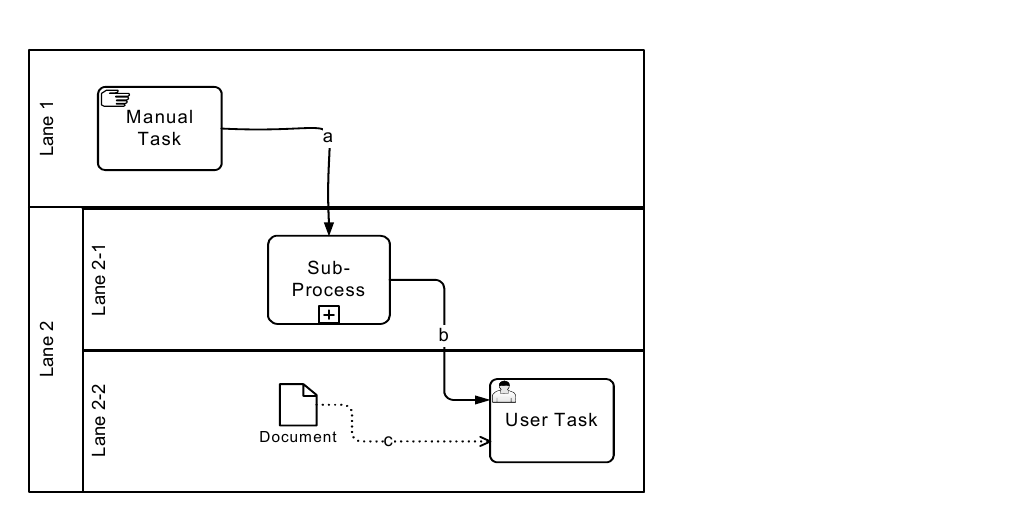
In this next example, a diagram depicting a BPMN Process is composed of a LaneSet that contains 2 lanes is presented. The second lane contains 2 sub lanes (See Figure 12.12).

<a id="fig-12-12"></a>
![Figure 12.12 – Nested Lanes Example](../figures/fig-12-12.png)

*Figure 12.12 – Nested Lanes Example* (p. 417)


<a id="tab-12-40"></a>
**Table 12.40 – Multiple Lanes and Nested Lanes BPMN DI instance**

```xml
<BPMNDiagram name="Lanes and Nested Lanes" resolution="72">
    <BPMNPlane bpmnElement="Process_LanesAndNestedLanes">
        <BPMNShape bpmnElement="Lane_Lane1" isHorizontal="true">
            <dc:Bounds height="144.0" width="498.0" x="87.0" y="144.0"/>
            <BPMNLabel/>
        </BPMNShape>
        <BPMNShape bpmnElement="Lane_Lane2" isHorizontal="true">
            <dc:Bounds height="162.0" width="498.0" x="87.0" y="288.0"/>
            <BPMNLabel/>
        </BPMNShape>
        <BPMNShape bpmnElement="Lane_Lane2_2" isHorizontal="true">
            <dc:Bounds height="78.0" width="474.0" x="111.0" y="372.0"/>
            <BPMNLabel/>
        </BPMNShape>
            <BPMNShape bpmnElement="Lane_Lane2_1" isHorizontal="true">
            <dc:Bounds height="84.0" width="474.0" x="111.0" y="288.0"/>
            <BPMNLabel/>
        </BPMNShape>
```


<a id="sec-12-4-3"></a>
### 12.4.3 Vertical Collaboration


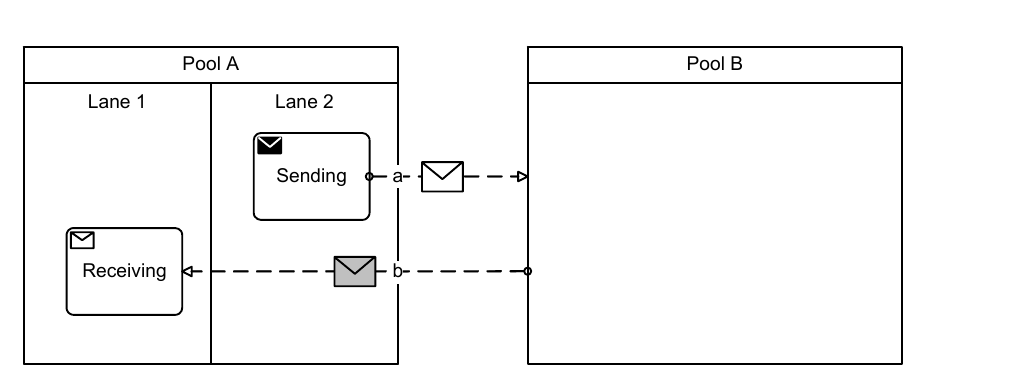
In this example, a Collaboration between two Participants (Pool A and Pool B) is depicted. The first Participant is depicted with a white box Pool and the second Participant is depicted with a black box Pool. This diagram also depicts message flows that are decorated with message envelopes (See Figure 12.13).

<a id="fig-12-13"></a>
![Figure 12.13 – Vertical Collaboration Example](../figures/fig-12-13.png)

*Figure 12.13 – Vertical Collaboration Example* (p. 418)


<a id="tab-12-41"></a>
**Table 12.41 – Vertical Collaboration BPMN DI instance**

```xml
<BPMNDiagram name="Vertical Collaboration" resolution="72">
    <BPMNPlane bpmnElement="Collaboration_Vertical_Collaboration">
        <BPMNShape bpmnElement="Participant_Pool_A" isHorizontal="false">
            <dc:Bounds height="258.0" width="336.0" x="96.0" y="276.0"/>
        <BPMNLabel/>
        </BPMNShape>
            <BPMNShape bpmnElement="Lane_Lane1" isHorizontal="false">
            <dc:Bounds height="228.0" width="168.0" x="96.0" y="306.0"/>
        <BPMNLabel/>
        </BPMNShape>
            <BPMNShape bpmnElement="Lane_Lane2" isHorizontal="false">
            <dc:Bounds height="228.0" width="168.0" x="264.0" y="306.0"/>
        <BPMNLabel/>
        </BPMNShape>
            <BPMNShape bpmnElement="Participant_Pool_B" isHorizontal="false">
            <dc:Bounds height="258.0" width="336.0" x="624.0" y="279.0"/>
        <BPMNLabel/>
        </BPMNShape>
            <BPMNShape bpmnElement="TaskReceiving_Receiving">
            <dc:Bounds height="68.0" width="83.0" x="145.0" y="436.0"/>
        <BPMNLabel/>
        </BPMNShape>
            <BPMNShape bpmnElement="TaskSending_Sending">
            <dc:Bounds height="68.0" width="83.0" x="282.0" y="338.0"/>
        <BPMNLabel/>
        </BPMNShape>
        <BPMNEdge bpmnElement="MessageFlow_a" messageVisibleKind="initiating">
            <di:waypoint x="366.0" y="372.0"/>
            <di:waypoint x="624.0" y="374.0"/>
            <BPMNLabel/>
        </BPMNEdge>
        <BPMNEdge bpmnElement="MessageFlow_b" messageVisibleKind="non_initiating">
            <di:waypoint x="624.0" y="470.0"/>
            <di:waypoint x="228.0" y="470.0"/>
            <BPMNLabel/>
        </BPMNEdge>
    </BPMNPlane>
</BPMNDiagram>
```


<a id="sec-12-4-4"></a>
### 12.4.4 Conversation


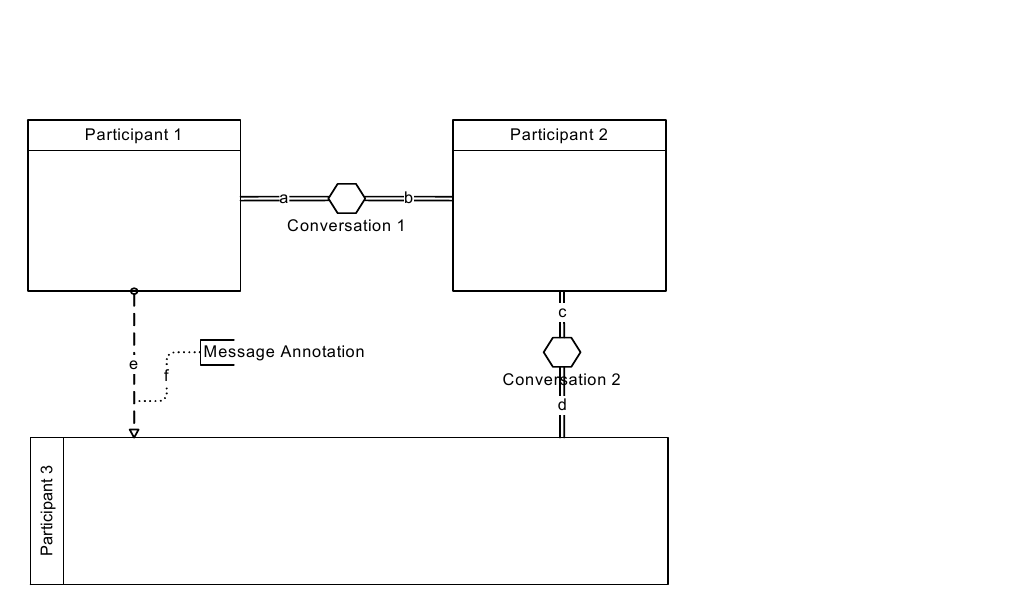
The following diagram depicts a Collaboration between 3 Participants (Participants 1, 2, and 3) including two Conversations. The diagram also has an annotation connected to a message flow (see Figure 12.14).

<a id="fig-12-14"></a>
![Figure 12.14 – Conversation Example](../figures/fig-12-14.png)

*Figure 12.14 – Conversation Example* (p. 420)


<a id="tab-12-42"></a>
**Table 12.42 – Conversation BPMN DI instance**

```xml
<bpmndi:BPMNDiagram name="Conversation " resolution="72">
    <bpmndi:BPMNPlane bpmnElement="Collaboration_Conversation">
        <bpmndi:BPMNShape bpmnElement="Participant_Participant_1" isHorizontal="false">
            <dc:Bounds height="144.0" width="132.0" x="97.0" y="108.0"/>
            <bpmndi:BPMNLabel/>
        </bpmndi:BPMNShape>
        <bpmndi:BPMNShape bpmnElement="Participant_Participant_2" isHorizontal="false">
            <dc:Bounds height="144.0" width="120.0" x="360.0" y="108.0"/>
            <bpmndi:BPMNLabel/>
        </bpmndi:BPMNShape>
        <bpmndi:BPMNShape bpmnElement="Conversation_Conversation_1">
            <dc:Bounds height="38.0" width="38.0" x="274.0" y="168.0"/>
            <bpmndi:BPMNLabel/>
        </bpmndi:BPMNShape>
        <bpmndi:BPMNEdge bpmnElement="ConversationLink_A">
            <di:waypoint x="229.0" y="187.0"/>
            <di:waypoint x="274.0" y="187.0"/>
            <bpmndi:BPMNLabel/>
        </bpmndi:BPMNEdge>
        <bpmndi:BPMNEdge bpmnElement="ConversationLink_B">
            <di:waypoint x="312.0" y="187.0"/>
            <di:waypoint x="360.0" y="187.0"/>
            <bpmndi:BPMNLabel/>
        </bpmndi:BPMNEdge>
        <bpmndi:BPMNShape bpmnElement="Participant_Participant_3" isHorizontal="true">
            <dc:Bounds height="108.0" width="384.0" x="96.0" y="396.0"/>
            <bpmndi:BPMNLabel/>
        </bpmndi:BPMNShape>
        <bpmndi:BPMNShape bpmnElement="Conversation_Conversation_2">
            <dc:Bounds height="38.0" width="38.0" x="406.0" y="305.0"/>
            <bpmndi:BPMNLabel/>
        </bpmndi:BPMNShape>
        <bpmndi:BPMNEdge bpmnElement="ConversationLink_C">
            <di:waypoint x="425.0" y="252.0"/>
            <di:waypoint x="425.0" y="305.0"/>
            <bpmndi:BPMNLabel/>
        </bpmndi:BPMNEdge>
        <bpmndi:BPMNEdge bpmnElement="ConversationLink_D">
            <di:waypoint x="425.0" y="343.0"/>
            <di:waypoint x="425.0" y="396.0"/>
            <bpmndi:BPMNLabel/>
        </bpmndi:BPMNEdge>
        <bpmndi:BPMNShape bpmnElement="TextAnnotation_MessageAnnotation">
            <dc:Bounds height="23.0" width="108.0" x="210.0" y="313.0"/>
            <bpmndi:BPMNLabel/>
        </bpmndi:BPMNShape>
        <bpmndi:BPMNEdge bpmnElement="MessageFlow_E">
            <di:waypoint x="164.0" y="252.0"/>
            <di:waypoint x="163.0" y="396.0"/>
            <bpmndi:BPMNLabel/>
        </bpmndi:BPMNEdge>
        <bpmndi:BPMNEdge bpmnElement="Association_F">
            <di:waypoint x="163.0" y="360.0"/>
            <di:waypoint x="181.0" y="360.0"/>
            <di:waypoint x="181.0" y="324.0"/>
            <di:waypoint x="210.0" y="324.0"/>
            <bpmndi:BPMNLabel/>
        </bpmndi:BPMNEdge>
    </bpmndi:BPMNPlane>
</bpmndi:BPMNDiagram>
```


<a id="sec-12-4-5"></a>
### 12.4.5 Choreography


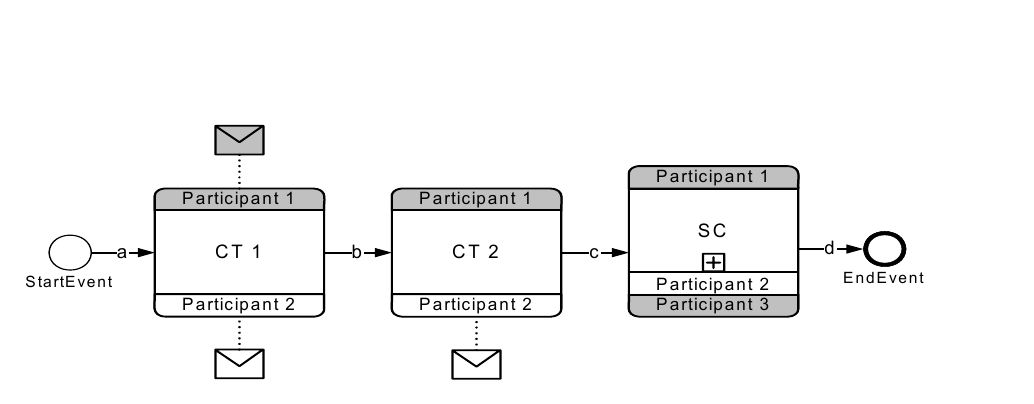
The following diagram depicts a Choreography consisting of 3 Choreography Activities (2 Choreography Tasks and 1 SubChoreography). This diagram also depicts Participant Bands with and without envelope decorator.


S ta rtE ve n t P a rticip an t 2 E n d E ve n t

<a id="fig-12-15"></a>
![Figure 12.15 – Choreography Example](../figures/fig-12-15.png)

*Figure 12.15 – Choreography Example* (p. 422)


<a id="tab-12-43"></a>
**Table 12.43 – Choreography BPMN DI instance**

```xml
<bpmndi:BPMNDiagram name="Choreography" resolution="72">
    <bpmndi:BPMNPlane bpmnElement="Choreography_Choreography">
        <bpmndi:BPMNShape bpmnElement="StartEvent_StartEvent">
            <dc:Bounds height="30.0" width="30.0" x="72.0" y="138.0"/>
            <bpmndi:BPMNLabel/>
        </bpmndi:BPMNShape>
        <bpmndi:BPMNShape bpmnElement="ChoreographyTask_CT1" id="DI_ChoreographyTask_CT1">
            <dc:Bounds height="114.0" width="96.0" x="156.0" y="96.0"/>
            <bpmndi:BPMNLabel/>
        </bpmndi:BPMNShape>
        <bpmndi:BPMNShape bpmnElement="Participant_Participant1"
                choreographyActivityShape="DI_ChoreographyTask_CT1" isMessageVisible="true"
                participantBandKind="top_non_initiating">
            <dc:Bounds height="20.0" width="96.0" x="156.0" y="96.0"/>
            <bpmndi:BPMNLabel/>
        </bpmndi:BPMNShape>
        <bpmndi:BPMNShape bpmnElement="Participant_Participant2"
                choreographyActivityShape="DI_ChoreographyTask_CT1" isMessageVisible="true"
                participantBandKind="bottom_initiating">
            <dc:Bounds height="20.0" width="96.0" x="156.0" y="190.0"/>
            <bpmndi:BPMNLabel/>
        </bpmndi:BPMNShape>
        <bpmndi:BPMNShape bpmnElement="ChoreographyTask_CT2" id="DI_ChoreographyTask_CT2">
            <dc:Bounds height="114.0" width="96.0" x="312.0" y="96.0"/>
            <bpmndi:BPMNLabel/>
        </bpmndi:BPMNShape>
        <bpmndi:BPMNShape bpmnElement="Participant_Participant1"
                choreographyActivityShape="DI_ChoreographyTask_CT2" isMessageVisible="false"
                participantBandKind="top_non_initiating">
            <dc:Bounds height="20.0" width="96.0" x="312.0" y="96.0"/>
            <bpmndi:BPMNLabel/>
        </bpmndi:BPMNShape>
        <bpmndi:BPMNShape bpmnElement="Participant_Participant2"
                choreographyActivityShape="DI_ChoreographyTask_CT2" isMessageVisible="true"
                participantBandKind="bottom_initiating">
            <dc:Bounds height="20.0" width="96.0" x="312.0" y="190.0"/>
            <bpmndi:BPMNLabel/>
        </bpmndi:BPMNShape>
        <bpmndi:BPMNShape bpmnElement="SubChoreography_SC" isExpanded="false">
            <dc:Bounds height="117.0" width="96.0" x="468.0" y="94.0"/>
            <bpmndi:BPMNLabel/>
        </bpmndi:BPMNShape>
        <bpmndi:BPMNShape bpmnElement="Participant_Participant1"
                choreographyActivityShape="DI_SubChoreography_SC" isMessageVisible="false"
                participantBandKind="top_non_initiating">
            <dc:Bounds height="20.0" width="96.0" x="468.0" y="94.0"/>
            <bpmndi:BPMNLabel/>
        </bpmndi:BPMNShape>
        <bpmndi:BPMNShape bpmnElement="Participant_Participant3"
                choreographyActivityShape="DI_SubChoreography_SC" isMessageVisible="false"
                participantBandKind="bottom_non_initiating">
            <dc:Bounds height="20.0" width="96.0" x="468.0" y="191.0"/>
            <bpmndi:BPMNLabel/>
        </bpmndi:BPMNShape>
        <bpmndi:BPMNShape bpmnElement="Participant_Participant2"
                choreographyActivityShape="DI_SubChoreography_SC" isMessageVisible="false"
                participantBandKind="middle_initiating">
            <dc:Bounds height="20.0" width="96.0" x="468.0" y="171.0"/>
            <bpmndi:BPMNLabel/>
        </bpmndi:BPMNShape>
        <bpmndi:BPMNShape bpmnElement="EndEvent_EndEvent">
            <dc:Bounds height="32.0" width="32.0" x="624.0" y="137.0"/>
            <bpmndi:BPMNLabel/>
        </bpmndi:BPMNShape>
        <bpmndi:BPMNEdge bpmnElement="SequenceFlow_a">
            <di:waypoint x="102.0" y="153.0"/>
            <di:waypoint x="156.0" y="153.0"/>
            <bpmndi:BPMNLabel/>
        </bpmndi:BPMNEdge>
        <bpmndi:BPMNEdge bpmnElement="SequenceFlow_b">
            <di:waypoint x="252.0" y="153.0"/>
            <di:waypoint x="312.0" y="153.0"/>
            <bpmndi:BPMNLabel/>
        </bpmndi:BPMNEdge>
        <bpmndi:BPMNEdge bpmnElement="SequenceFlow_c">
            <di:waypoint x="408.0" y="153.0"/>
            <di:waypoint x="468.0" y="153.0"/>
            <bpmndi:BPMNLabel/>
        </bpmndi:BPMNEdge>
        <bpmndi:BPMNEdge bpmnElement="SequenceFlow_d">
            <di:waypoint x="564.0" y="153.0"/>
            <di:waypoint x="624.0" y="153.0"/>
            <bpmndi:BPMNLabel/>
        </bpmndi:BPMNEdge>
    </bpmndi:BPMNPlane>
</bpmndi:BPMNDiagram>
```

