---
title: "12.3 Notational Depiction Library and Abstract Element Resolutions"
chapter: "12 BPMN Notation and Diagrams"
source: "OMG BPMN 2.0.2 — formal/2013-12-09"
pages: "380-411"
---
> 12 BPMN Notation and Diagrams · páginas 380-411 · [índice](../README.md)
## 12.3 Notational Depiction Library and Abstract Element Resolutions
As a notation, BPMN specifies the depiction for each of the BPMN elements. Serializing a BPMN diagram for interchange requires the specification of a collection of BPMNShape(s) (see page 372) and BPMNEdge(s) (see page 375) on the BPMNPlane (see page 371) of the BPMNDiagram (see page 370). The BPMNShape(s) and BPMNEdge(s) attributes must be populated in such a way as to allow the unambiguous rendering of the BPMN diagram by the receiving party. More specifically, the BPMNShape(s) and BPMNEdge(s) must reference BPMN model element [bpmnElement]. If no bpmnElement is referenced or if the reference is invalid, it is expected that this shape or edge should not be depicted. The only exception is for a Data Association connected to a Sequence Flow (See Figure 10.68). This is a visual short cut that actually normalizes two Data Associations within the BPMN model. In this case, the resolution is made from the BPMN DI attributes rather than the abstract syntax reference [bpmnElement] (See Table 12.35 - Depiction Resolution for Connecting Objects). When rendering a BPMN diagram, the correct depiction of a BPMNShape or BPMNEdge depends mainly on the referenced BPMN model element [bpmnElement] and its particular attributes and/or references. The purpose of this sub clause is to: provide a library of the BPMN element depictions, and to provide an unambiguous resolution between the referenced BPMN model element [bpmnElement], BPMNShape or BPMNEdge and their depiction. Depiction resolution tables are provided below for both BPMNShape (sub clause 12.3.2) and BPMNEdge (sub clause 12.3.3).
### 12.3.1 Labels
Both BPMNShape and BPMN Edge may have labels (e.g., its name) placed inside the shape/edge, or above or below the shape/edge, in any direction or location, depending on the preference of the modeler or modeling tool vendor. Labels are optional for BPMNShape and BPMNEdge. When there is a label, the position of the label is specified by the bounds of the BPMNLabel of the BPMNShape or BPMNEdge. Simply put, label visibility is defined by the presence of the BPMNLabel element. The bounds of the BPMNLabel are optional and always relative to the containing BPMNPlane’s origin point (see page 376). The depiction resolution tables provided below exemplify default label positions for BPMNShape kinds (sub clause 12.3.2) and BPMNEdge kinds (sub clause 12.3.3) if no BPMNLabel bounds are provided. The text of the label to be rendered is obtained by resolving the name attribute of the referenced BPMN model element [bpmnElement] from the BPMNShape or BPMNEdge. In the particular case when the referenced BPMN model element [bpmnElement] is a DataObjectReference, the text of the label to be rendered is obtained by concatenating the name attribute of the referenced BPMN model element [bpmnElement] and the name attribute of the dataState attribute of this DataObjectReference (see Figure 12.6 - Depicting a Label for a DataObjectReference with its state).

*Figure 12.6 – Depicting a Label for a DataObjectReference with its state* (p. 381)
The properties of the font to be used for rendering the label are optional and provided by the labelStyle of the BPMNLabel. If not provided, the tool should use its default style to depict the label.
### 12.3.2 BPMNShape
#### Markers for Activities
Various BPMN Activities can be decorated with markers at the bottom center of the shape. Loop Characteristic markers may need to be rendered when the referenced BPMN model element [bpmnElement] of a BPMNShape is a Task, ServiceTask, SendTask, ReceiveTask, UserTask, ManualTask, BusinessRuleTask, ScriptTask, SubProcess, AdHocSubProcess, Transaction or CallActivity. Note that Loop Characteristic Markers (Loop, Multi-Instance
- Parallel, and Multi-Instance - Sequential) are mutually exclusive markers. That is, only one of them can be present on a single shape (see Table 10.8). Note that the patterns of Markers depicted in Table 10.8 also apply to Transaction and Call Activity which have different border depictions (i.e., double border or thick border). A Compensation marker may need to be rendered when the referenced BPMN model element [bpmnElement] of a BPMNShape is a Task, ServiceTask, SendTask, ReceiveTask, UserTask, ManualTask, BusinessRuleTask, ScriptTask, SubProcess, AdHocSubProcess, Transaction or CallActivity (see Table 12.8). In the case of expandable kind of shapes, the markers (Compensation or Loop Characteristic) are placed to the left of the + on the shape. The Compensation marker may be combined with a Loop Characteristic Marker. All the markers that are present must be grouped and the whole group centered to the bottom of the shape (see Figure 12.7). Note that in the case where the referenced BPMN model element [bpmnElement] of a BPMNShape is an AdHocSubProcess, the shape has its tilde marker to the right of the + (See page 386).
**Table 12.8 – Depiction Resolution for Loop Compensation Marker**
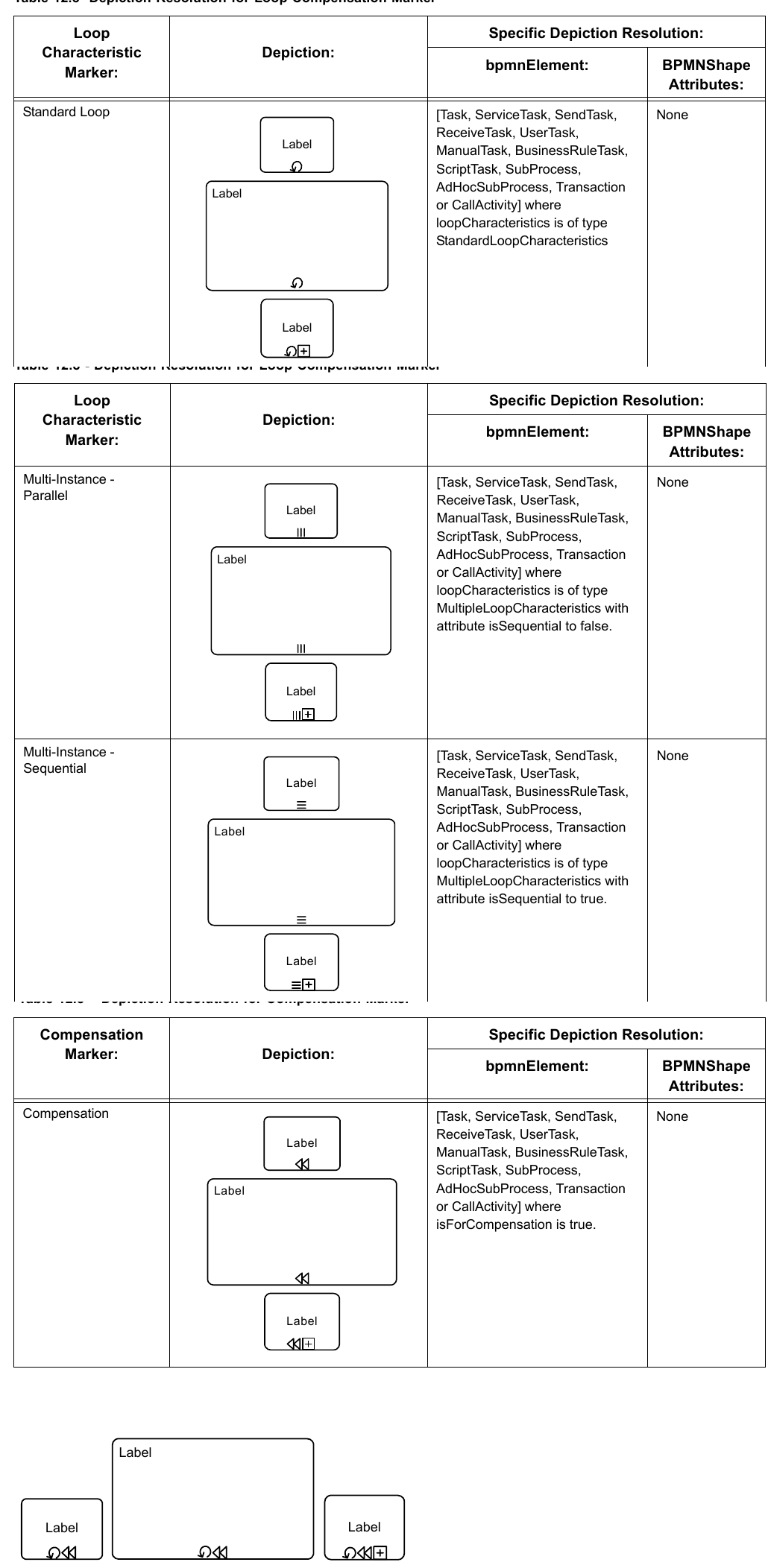

*Figure 12.7 – Combined Compensation and Loop Characteristic Marker Example* (p. 384)
#### Tasks [BPMNShape]
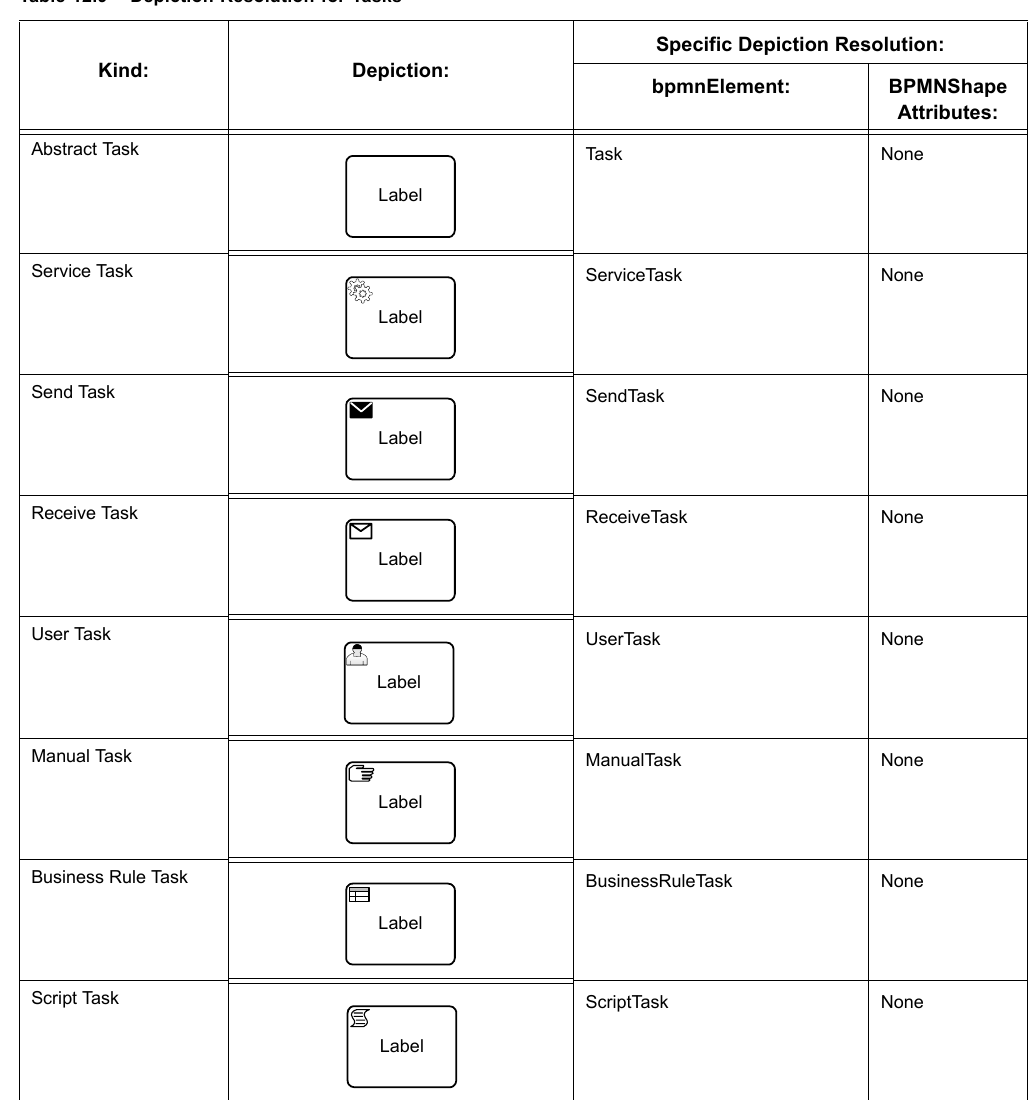
There are different types of Tasks identified within BPMN. The specific Task type depiction is obtained by placing a Task type maker in the upper left corner of the Task shape. A Task that is no further specified is called an Abstract Task. Tasks (Abstract, Service, Send, Receive, User, Manual, Business Rule or Script) can also have Compensation and/or Loop Characteristic markers at the bottom center of the shape as defined above (see page 381).
**Table 12.9 – Depiction Resolution for Tasks**
#### Collapsed Sub-Processes [BPMNShape]
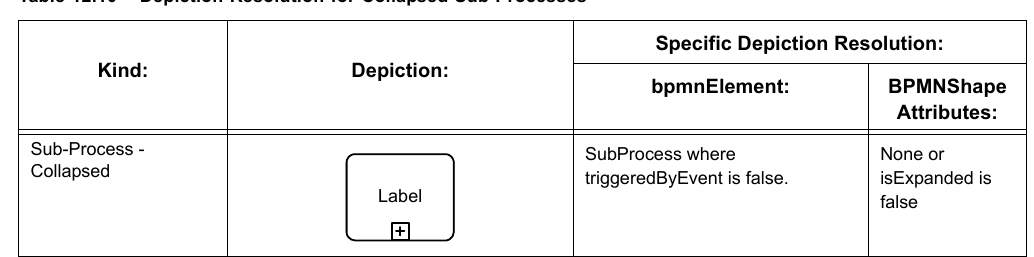
Collapsed Sub-Processes can also have Compensation and/or Loop Characteristic markers at the bottom center of the shape as defined above (see page 381).
**Table 12.10 – Depiction Resolution for Collapsed Sub-Processes**
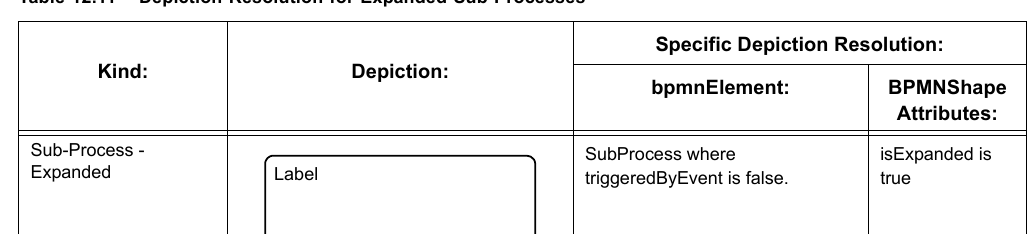
#### Expanded Sub-Processes [BPMNShape]
Expanded Sub-Processes can also have Compensation and/or Loop Characteristic markers at the bottom center of the shape as defined above (see page 381).
**Table 12.11 – Depiction Resolution for Expanded Sub-Processes**
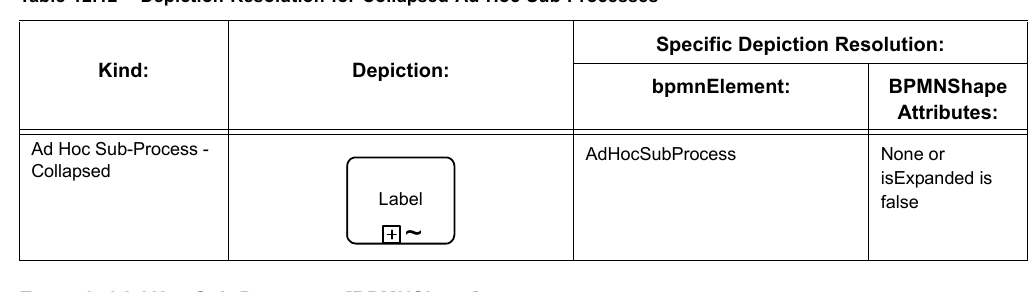
#### Collapsed Ad Hoc Sub-Processes [BPMNShape]
Collapsed Ad Hoc Sub-Processes can also have a Compensation marker at the bottom center of the shape as defined above (see page 381).
**Table 12.12 – Depiction Resolution for Collapsed Ad Hoc Sub-Processes**
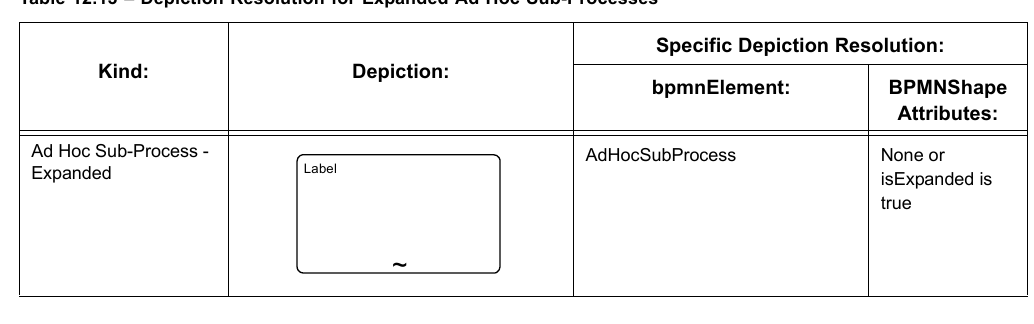
#### Expanded Ad Hoc Sub-Processes [BPMNShape]
Expanded Ad Hoc Sub-Processes can also have a Compensation marker at the bottom center of the shape as defined above (see page 381).
**Table 12.13 – Depiction Resolution for Expanded Ad Hoc Sub-Processes**
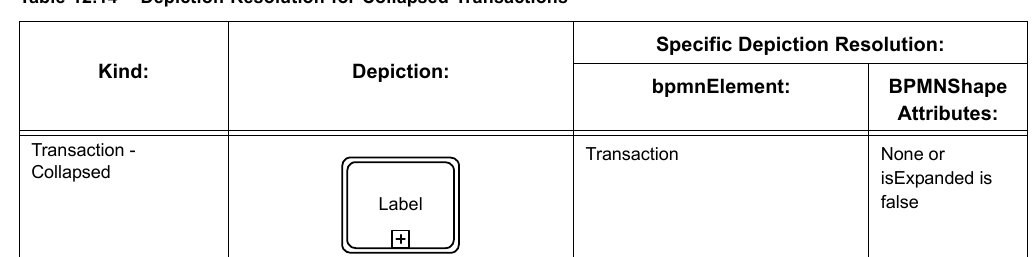
#### Collapsed Transactions [BPMNShape]
Collapsed Transactions can also have Compensation and/or Loop Characteristic markers at the bottom center of the shape as defined above (see page 381).
**Table 12.14 – Depiction Resolution for Collapsed Transactions**
#### Expanded Transactions [BPMNShape]
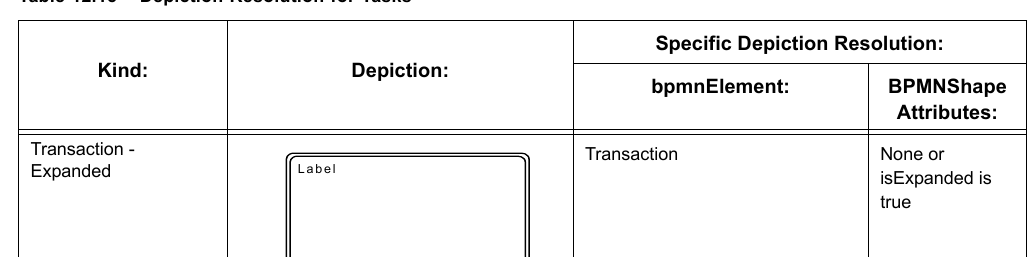
Expanded Transactions can also have Compensation and/or Loop Characteristic markers at the bottom center of the shape as defined above (see page 381).
**Table 12.15 – Depiction Resolution for Tasks**
#### Collapsed Event Sub-Processes [BPMNShape]
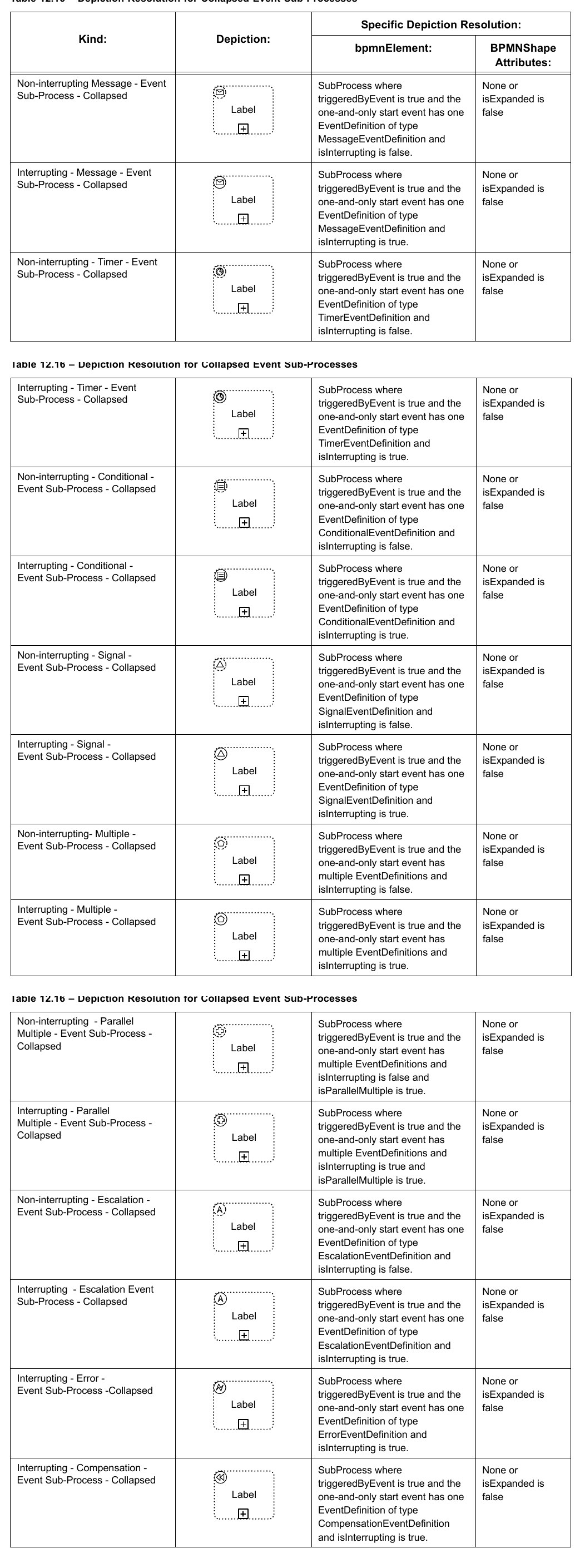
**Table 12.16 – Depiction Resolution for Collapsed Event Sub-Processes**
#### Expanded Event Sub-Processes [BPMNShape]
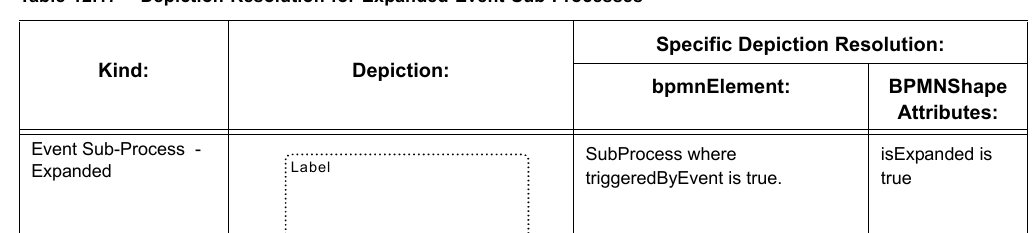
**Table 12.17 – Depiction Resolution for Expanded Event Sub-Processes**
#### Call Activities (Calling a Global Task) [BPMNShape]
A Call Activity (Calling a Global Task) must display the Task type marker of the Global Task it calls. Call Activities (Calling a Global Task) can also have Compensation and/or Loop Characteristic markers at the bottom center of the shape as defined above (see page 381).
**Table 12.18 – Depiction Resolution for Call Activities (Calling a Global Task)**

#### Collapsed Call Activities (Calling a Process) [BPMNShape]
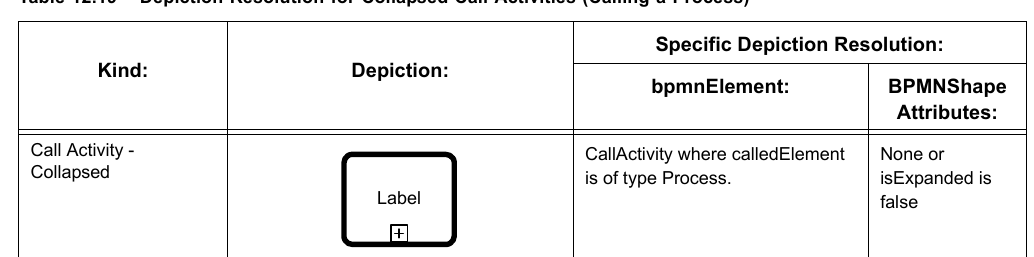
**Table 12.19 – Depiction Resolution for Collapsed Call Activities (Calling a Process)**
#### Expanded Call Activities (Calling a Process) [BPMNShape]
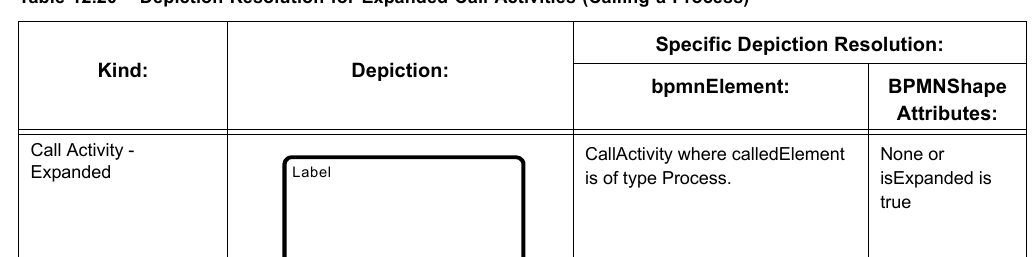
**Table 12.20 – Depiction Resolution for Expanded Call Activities (Calling a Process)**
#### Data [BPMNShape]
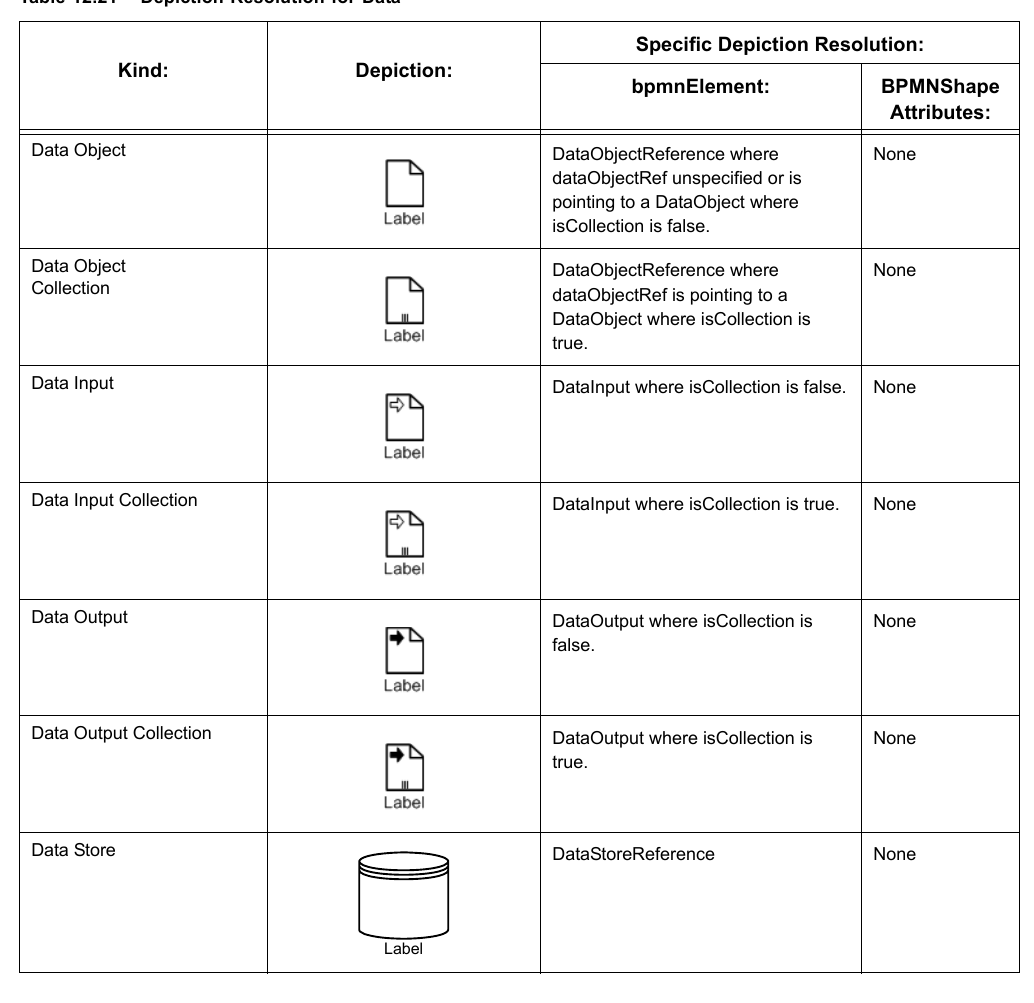
Data Inputs and Data Outputs rendering are optional and only allowed for Processes.
**Table 12.21 – Depiction Resolution for Data**
#### Events [BPMNShape]
**Table 12.22 – Depiction Resolution for Events**

#### Gateways [BPMNShape]
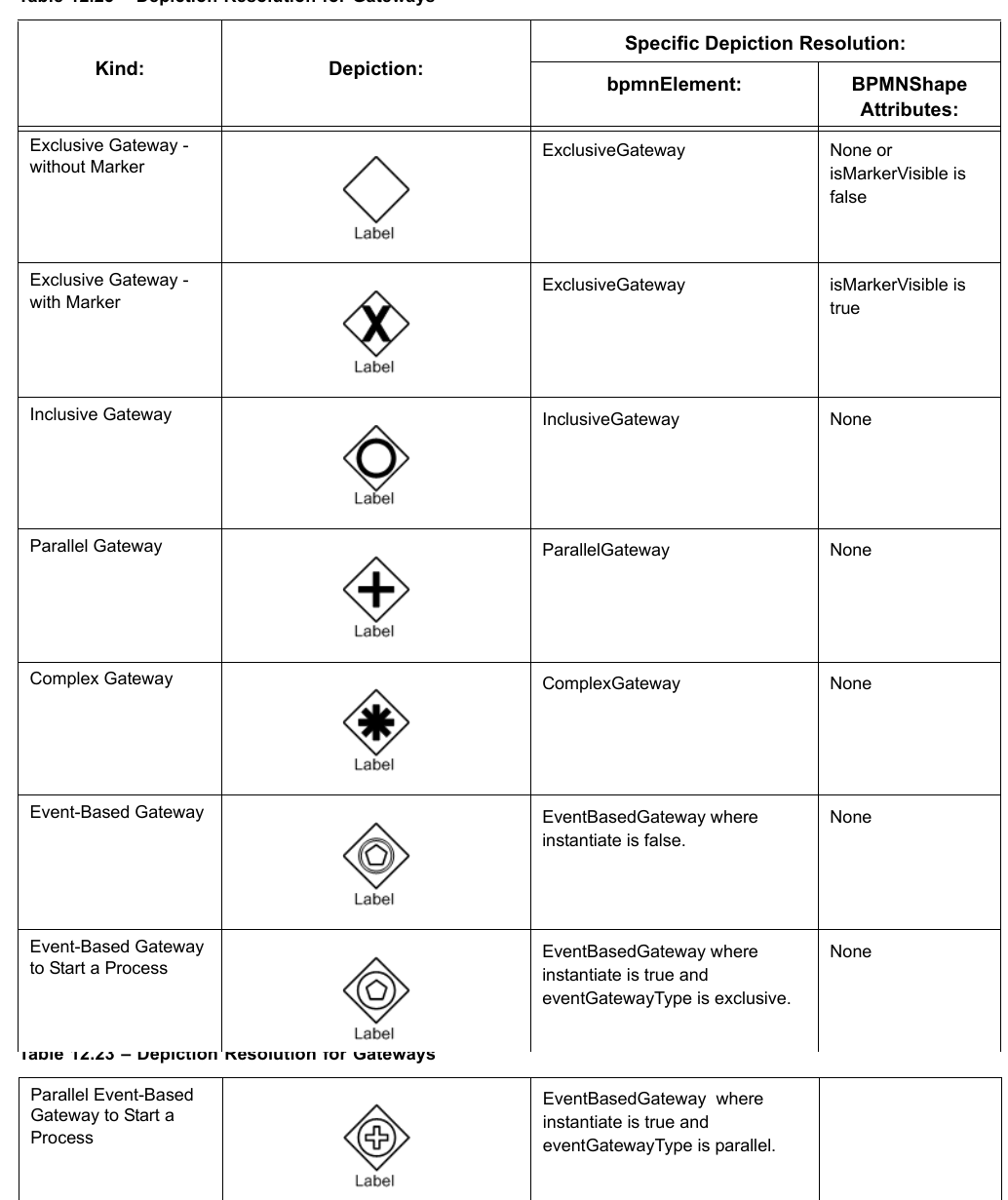
**Table 12.23 – Depiction Resolution for Gateways**
#### Artifacts [BPMNShape]
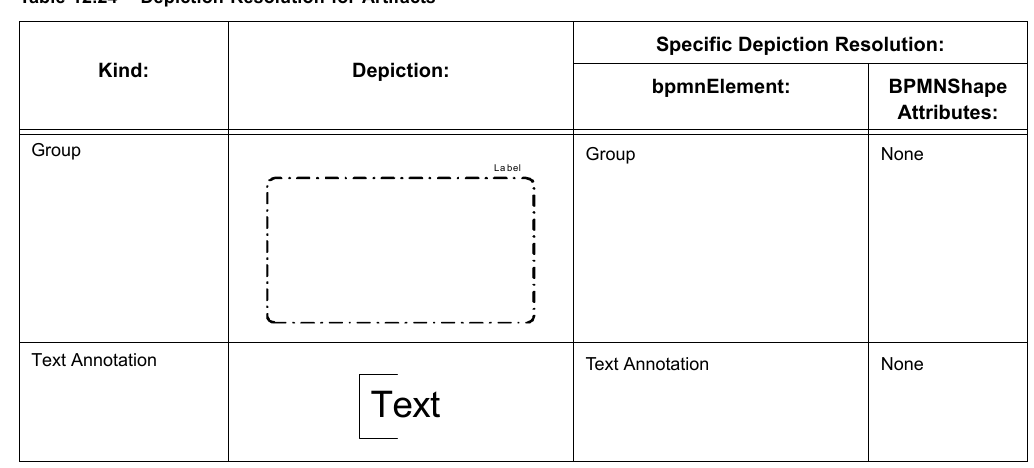
**Table 12.24 – Depiction Resolution for Artifacts**
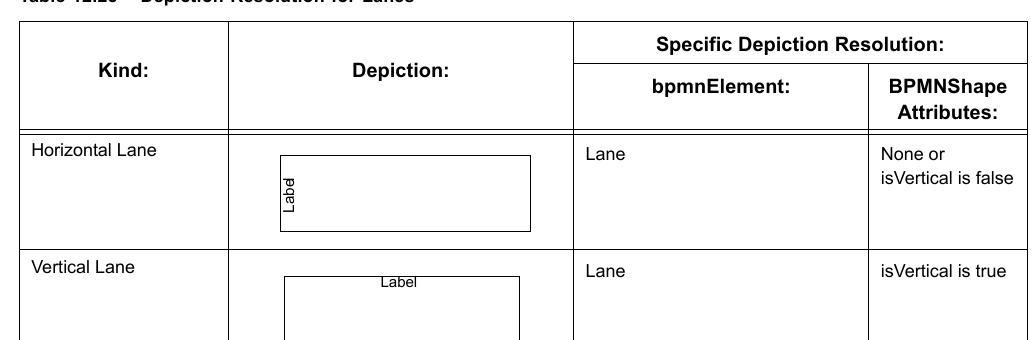
#### Lanes [BPMNShape]
**Table 12.25 – Depiction Resolution for Lanes**
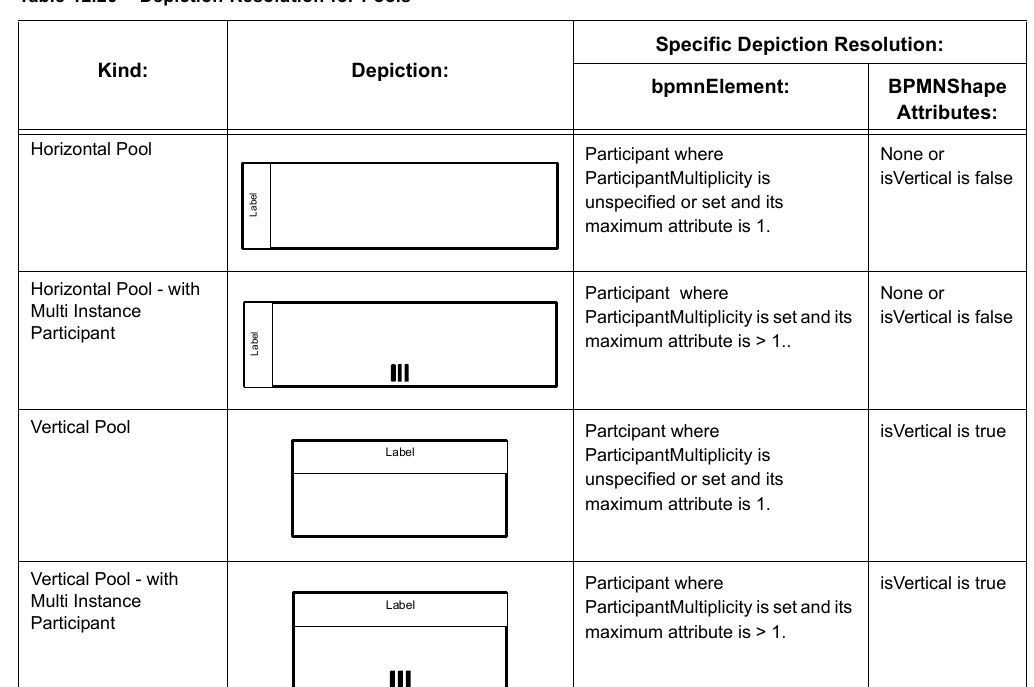
#### Pools [BPMNShape]
**Table 12.26 – Depiction Resolution for Pools**
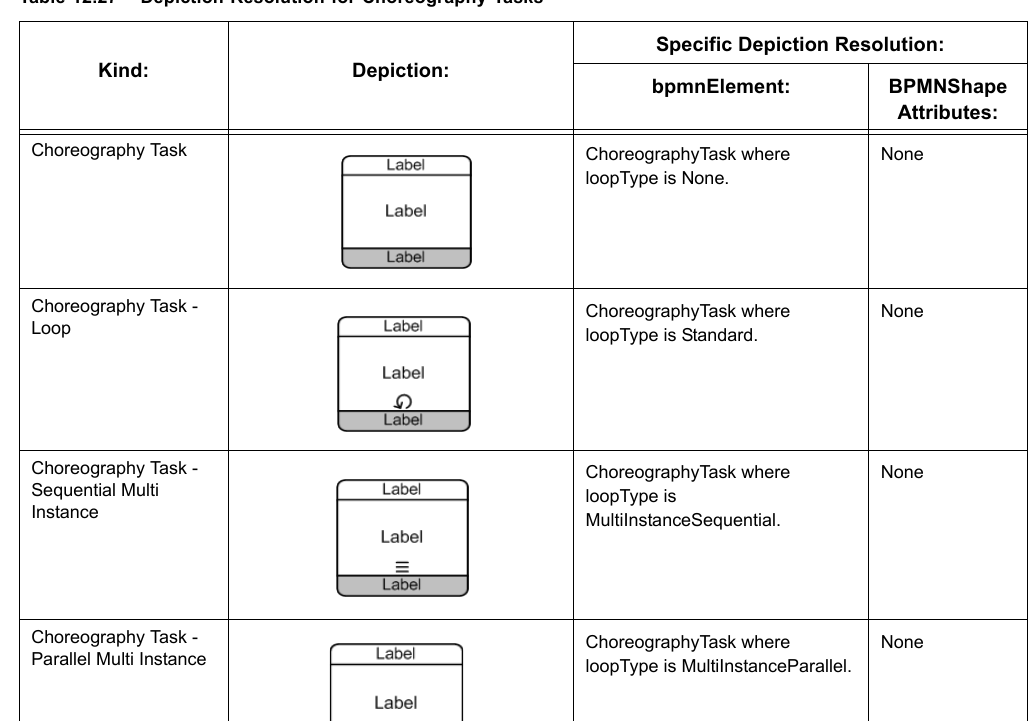
#### Choreography Tasks [BPMNShape]
While the depictions provided in Table 12.27 - Depiction Resolution for Choreography Tasks contain Participant Bands, Participant Bands are separate shapes that need to be separately defined. Individual Participant Bands are rendered by separate BPMNShape(s), each Participant Band referencing the corresponding participant. See page 407.
**Table 12.27 – Depiction Resolution for Choreography Tasks**
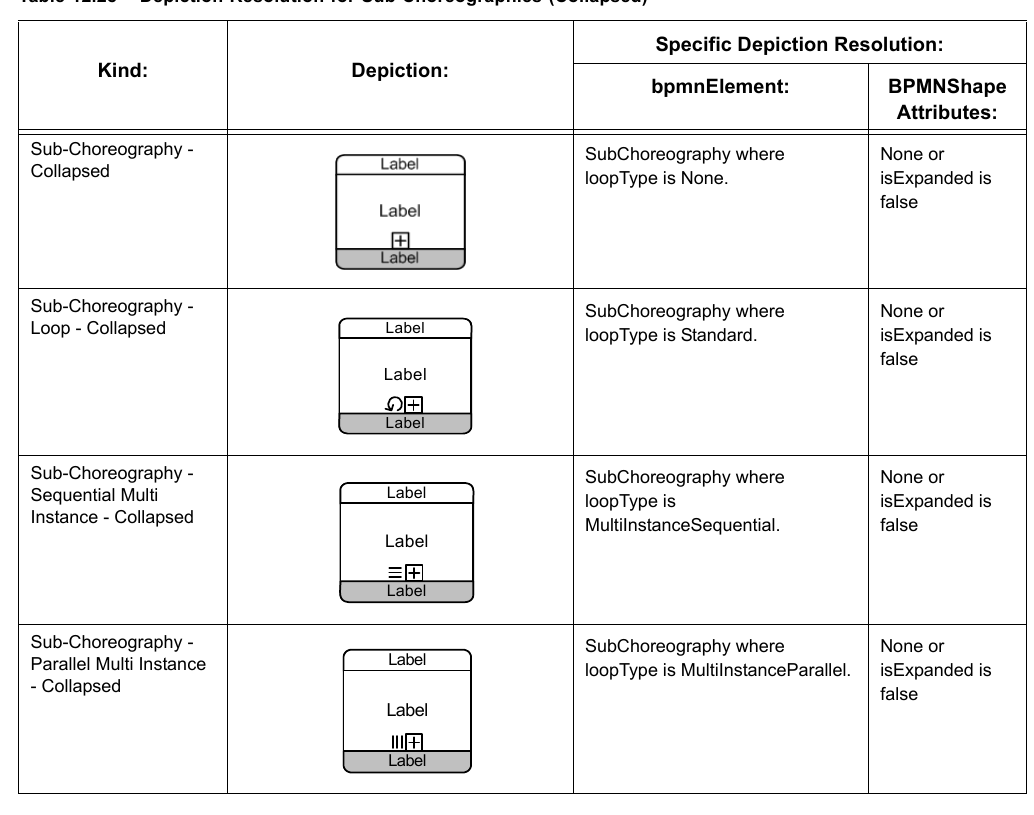
#### Collapsed Sub-Choreographies [BPMNShape]
While the depictions provided in Table 12.28 - Depiction Resolution for Collapsed Sub-Choreographies contain Participant Bands, Participant Bands are separate shapes that need to be separately defined. Individual Participant Bands are rendered by separate BPMNShape(s), each Participant Band referencing the corresponding participant (see page 407).
**Table 12.28 – Depiction Resolution for Sub-Choreographies (Collapsed)**
#### Expanded Sub-Choreographies [BPMNShape]
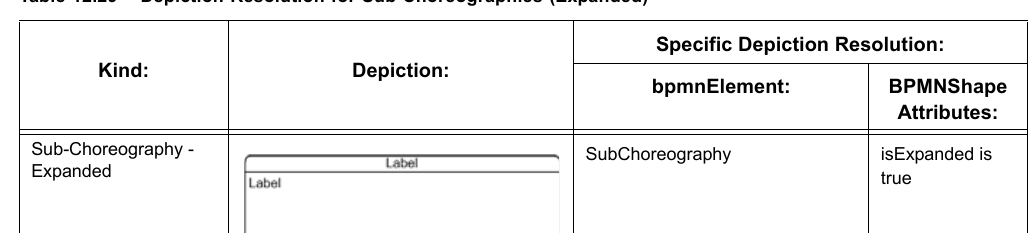
While the depiction provided in Table 12.29 - Depiction Resolution for Expanded Sub-Choreographies contains Participant Bands, Participant Bands are separate shapes that need to be separately defined. Individual Participant Bands are rendered by separate BPMNShape(s), each Participant Band referencing the corresponding participant (see page 407). An expanded Sub Choreography has a loop type that is depicted exactly like the collapsed version in Table 12.28.
**Table 12.29 – Depiction Resolution for Sub-Choreographies (Expanded)**
#### Call Choreographies (Calling a Global Choreography Task) [BPMNShape]
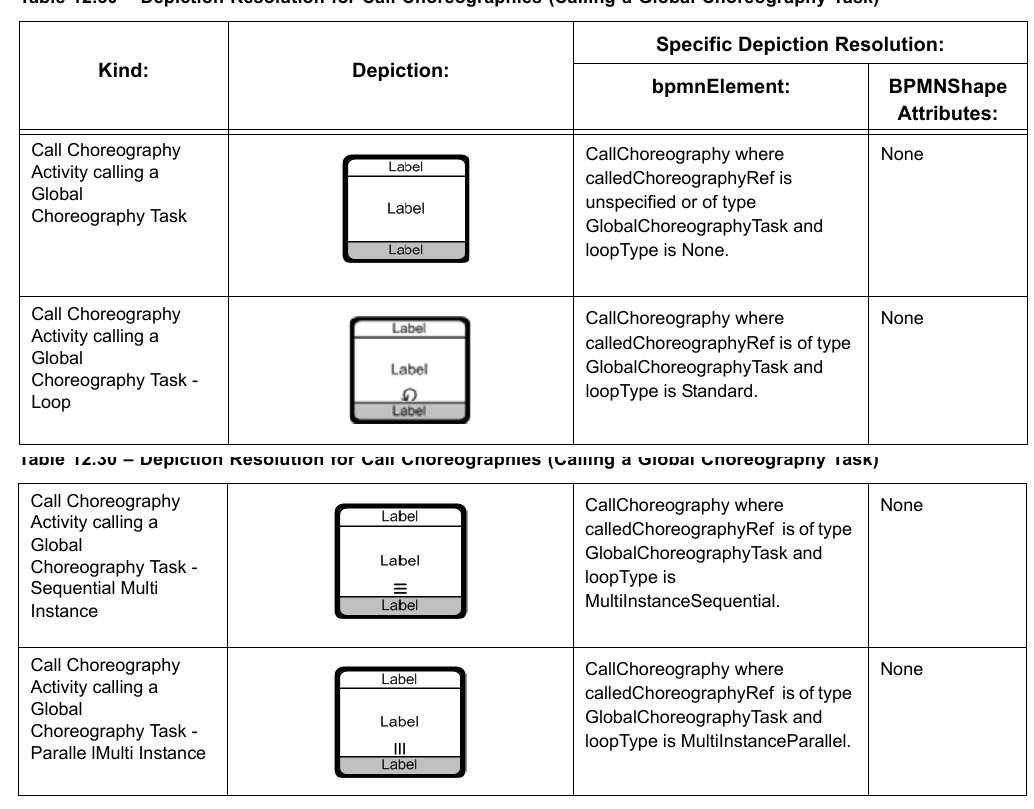
While the depictions provided in Table 12.30 - Depiction Resolution for Call Choreographies (Calling a Global Choreography Task) contain Participant Bands, Participant Bands are separate shapes that need to be separately defined. Individual Participant Bands are rendered by separate BPMNShape(s), each Participant Band referencing the corresponding participant (see page 407).
**Table 12.30 – Depiction Resolution for Call Choreographies (Calling a Global Choreography Task)**
#### Collapsed Call Choreographies (Calling a Choreography) [BPMNShape]
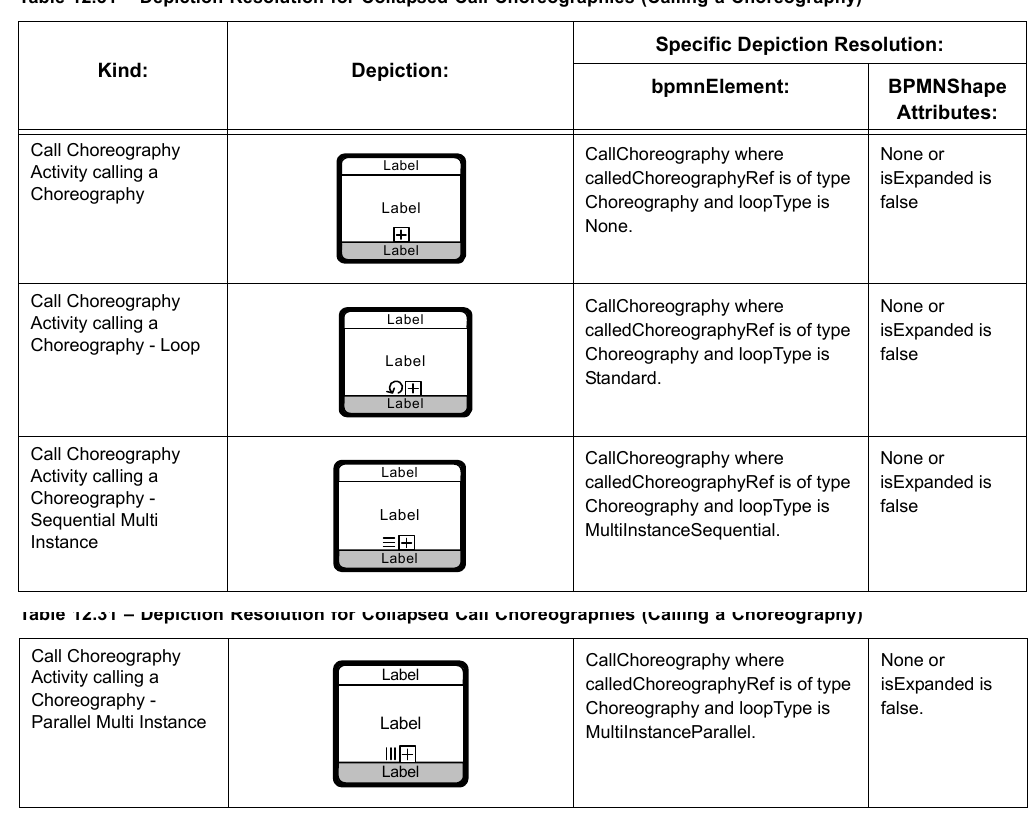
While the depictions provided in Table 12.31 contain Participant Bands, Participant Bands are separate shapes that need to be separately defined. Individual Participant Bands are rendered by separate BPMNShape(s), each Participant Band referencing the corresponding participant (see page 407).
**Table 12.31 – Depiction Resolution for Collapsed Call Choreographies (Calling a Choreography)**
#### Expanded Call Choreographies (Calling a Choreography) [BPMNShape]
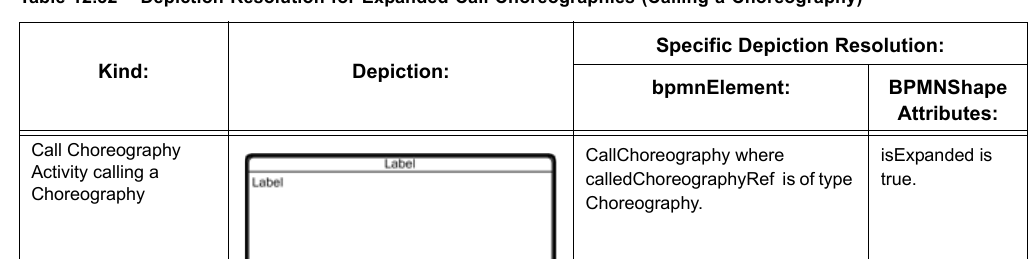
While the depiction provided in Table 12.32 contains Participant Bands, Participant Bands are separate shapes that need to be separately defined. Individual Participant Bands are rendered by separate BPMNShape(s), each Participant Band referencing the corresponding participant (see page 407). An expanded Use Sub Choreography has a loop type that is depicted exactly like the collapsed version in Table 12.31.
**Table 12.32 – Depiction Resolution for Expanded Call Choreographies (Calling a Choreography)**
#### Choreography Participant Bands [BPMNShape]
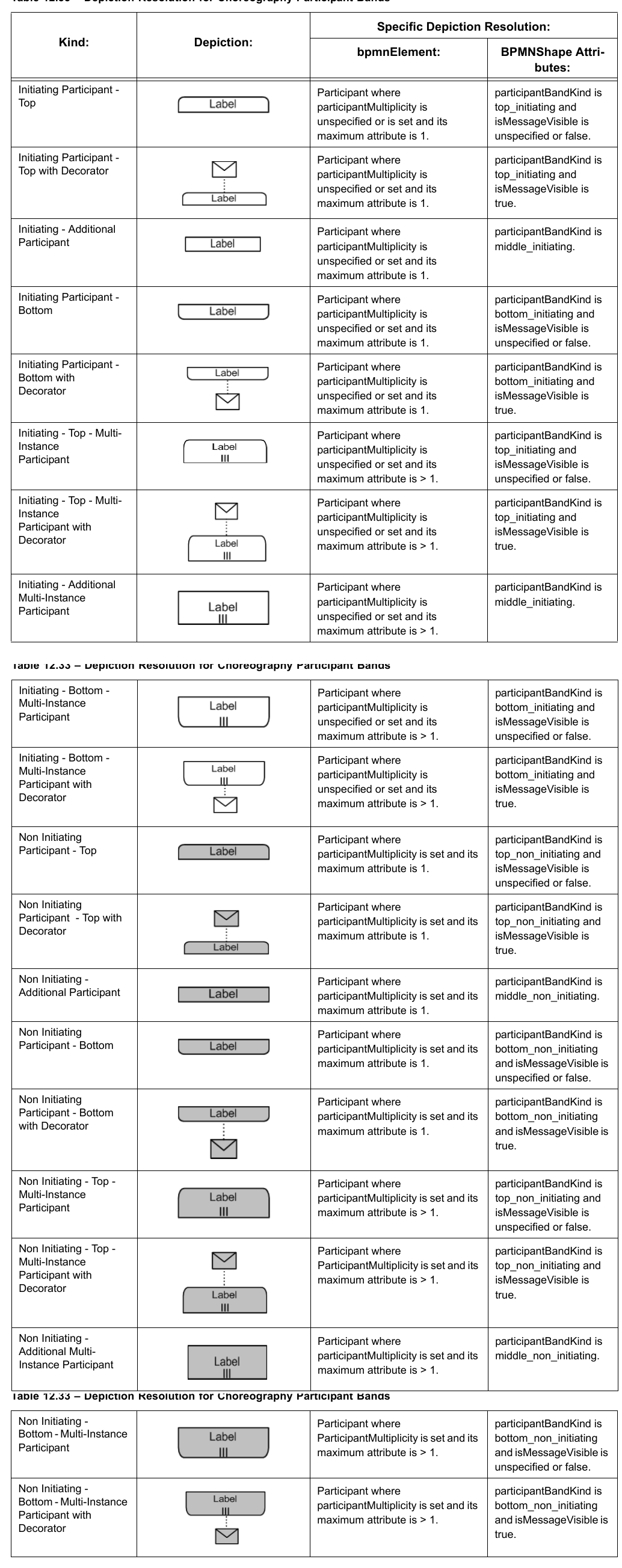
Participant Bands (used in Choreography shapes) are separate shapes that need to be separately defined. Individual Participant Bands are rendered by separate BPMNShape. Each Participant Band referencing the corresponding participant. Note that for Participant Bands with the envelope decorator, the envelope decorator should be depicted close to the band, vertically centered with the band, and linked to the band using a dotted line. The name of the message may be used as a label for the envelop decorator. BPMN DI does not provide an interchange of the bounds of the label of the envelope decorator. The bounds of the BPMNShape representing the band do not include the envelope decorator. The envelope decorator is therefore outside of the BPMNShape bounds. BPMN DI does not provide an interchange of the bounds of the envelope decorator.
**Table 12.33 – Depiction Resolution for Choreography Participant Bands**
#### Conversations [BPMNShape]
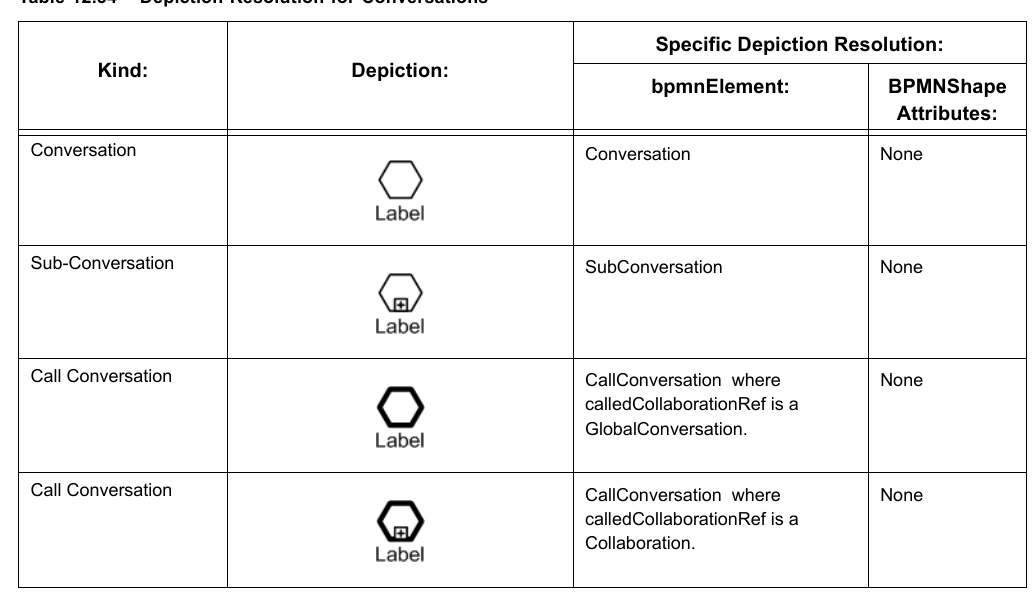
**Table 12.34 – Depiction Resolution for Conversations**
### 12.3.3 BPMNEdge
#### Connecting Objects [BPMNEdge]
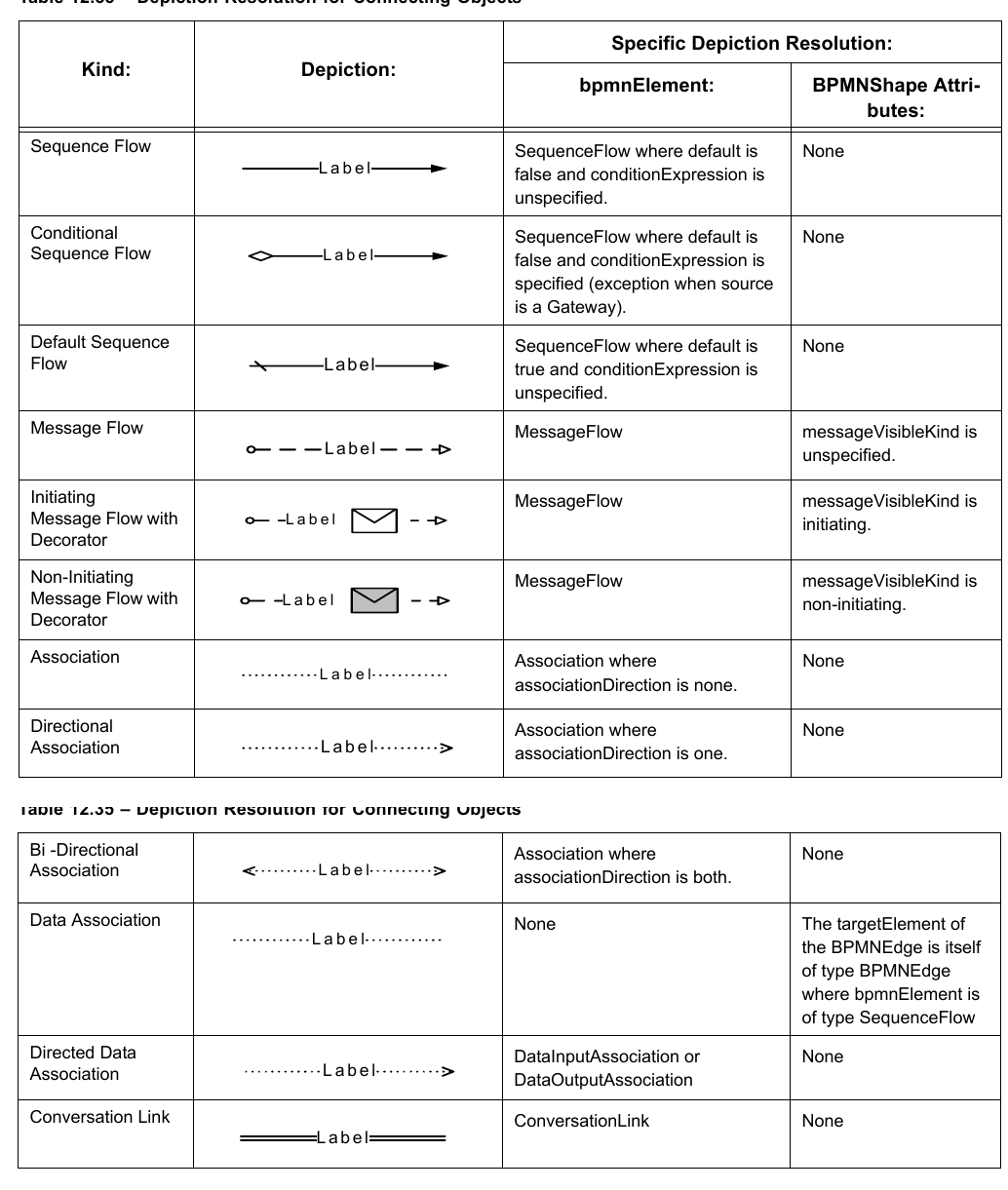
The target [targetElement] and source [sourceElement] of a BPMNEdge may be redefined when the depiction of the source or target of the edge is different than the target [targetRef] and source [sourceRef] of the referenced model element [bpmnElement] (e.g., Message flow finishing on the border of a black box Pool or a collapsed Sub-Process rather than the actual Flow Node within the Pool or Sub-Process). In such case, the targetElement and/or sourceElement of the BPMNEdge must point to the appropriate BPMNShape or BPMNEdge.
The source [sourceElement] and target [targetElement] of a BPMNEdge can never be a BPMNShape with participantBandKind set (i.e., only Choreography Activity can be source or target of the BPMNEdge not the Participant Bands). Note that for Message Flow with an envelope decorator, the envelope decorator should be at the midpoint of the message flow. BPMN DI does not provide an interchange of the bounds of the envelope decorator. The “diamond” at the source of the Conditional Sequence Flow should not be depicted when the source of a Conditional Sequence Flow is a Gateway. In other words, when the source of a Conditional Sequence Flow is a Gateway, the Conditional Sequence Flow looks like a Sequence Flow. Even though DataInputAssociation(s) and DataOutputAssociation(s) (Directed Data Associations) always point to DataInput(s) or DataOutput(s) as sources or targets within the BPMN model, they are mostly depicted as starting or finishing on the border of a different depicted element and thus, the target [targetElement] or source [sourceElement] of the BPMNEdge must be specified.
**Table 12.35 – Depiction Resolution for Connecting Objects**