---
title: "11.5 Choreography Activities"
chapter: "11 Choreography"
source: "OMG BPMN 2.0.2 — formal/2013-12-09"
pages: "321-339"
---
> 11 Choreography · páginas 321-339 · [índice](../README.md)
## 11.5 Choreography Activities
A **Choreography Activity** represents a point in a **Choreography** flow where an *interaction* occurs between two or more *Participants*. The **Choreography Activity** class is an abstract element, sub-classing from FlowElement (as shown in Figure 11.6). When **Choreography Activities** are defined they are contained within a **Choreography** or a **Sub-Choreography**, **Choreography Activities**).
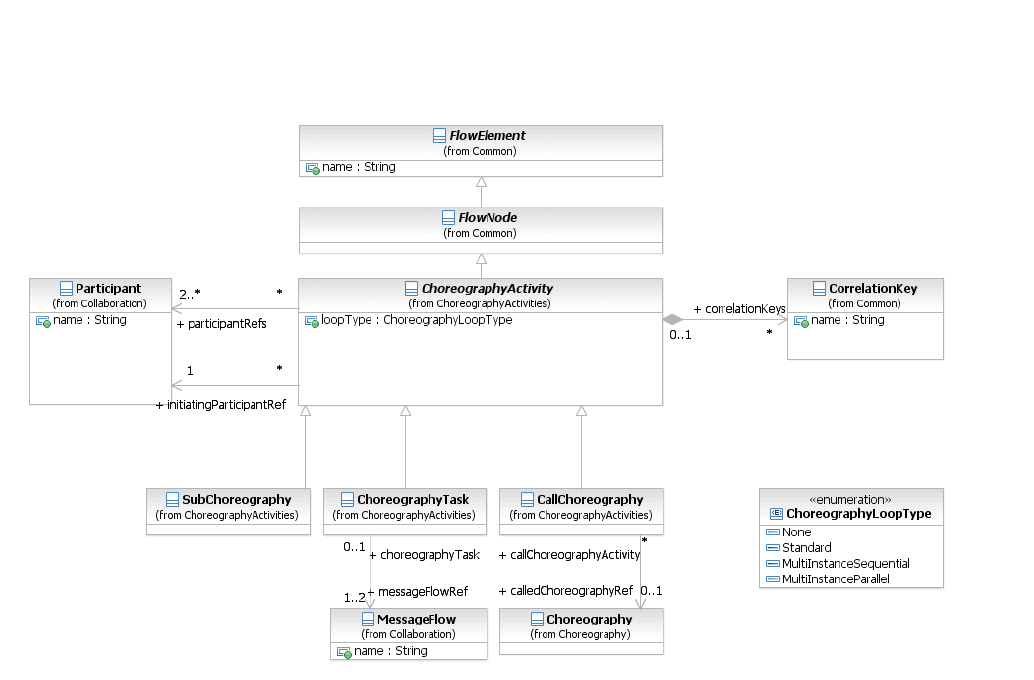
*Figure 11.6 – The metamodel segment for a Choreography Activity* (p. 322)
The **Choreography Activity** element inherits the attributes and model associations of FlowElement (see Table 8.44) through its relationship to FlowNode. Table 11.1 presents the additional model associations of the **Choreography**
**Table 11.1 – Choreography Activity Model Associations**
| Attribute Name | Description/Usage |
| --- | --- |
| **participantRefs:** Participant [2..*] | A **Choreography Activity** has two or more *Participants* (see page 113 for more information on *Participants*). |
| **initiatingParticipantRef:** Participant | One of the *Participants* will be the one that initiates the **Choreography Activity**. |
| **loopType:** ChoreographyLoopType = None | A **Choreography Activity** MAY be performed once or MAY be repeated. The loopType attribute will determine the appropriate marker for the **Choreography Activity** (see below). |
| **correlationKeys:** CorrelationKey [0..*] | This association specifies used by the **Message Flow** correlationKeys in the **Choreography Activity**, including **Sub-Choreographies** and called **Choreographies**. |
### 11.5.1 Choreography Task
A **Choreography Task** is an atomic **Activity** in a **Choreography Process**. It represents an *Interaction*, which is one or two **Message** exchanges between two *Participants*. Using a **Collaboration** diagram to view these elements (see page 107 for more information on **Collaboration**), we would see the two **Pools** representing the two *Participants* of the *Interaction* (see Figure 11.7). The communication between the *Participants* is shown as a **Message Flow**.
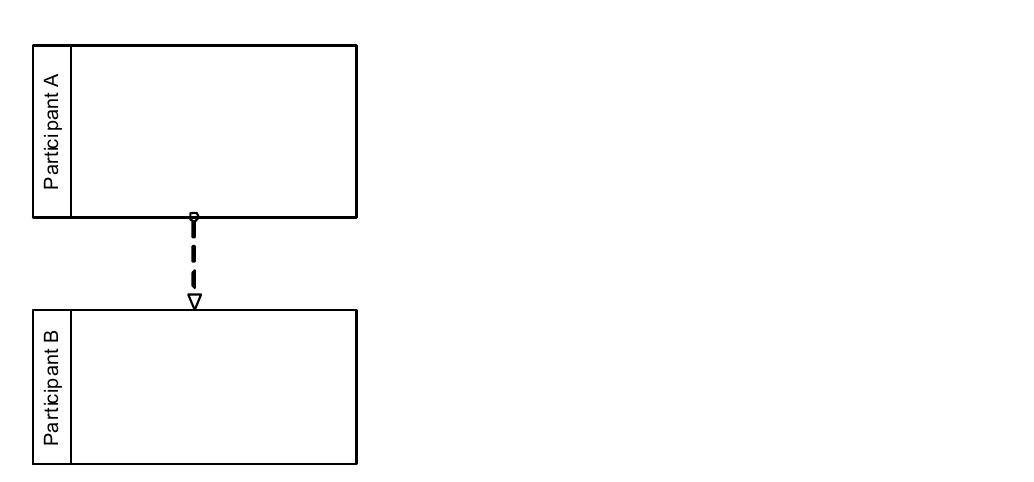
*Figure 11.7 – A Collaboration view of Choreography Task elements* (p. 323)
In a **Choreography** diagram, this *Interaction* is collapsed into a single object, a **Choreography Task**. The name of the **Choreography Task** and each of the *Participants* are all displayed in the different bands that make up the shape’s graphical notation. There are two or more **Participant Bands** and one **Task Name Band** (see Figure 11.8). The **Participant Band** of the *Participant* that does not initiate the interaction MUST be shaded with a light fill.
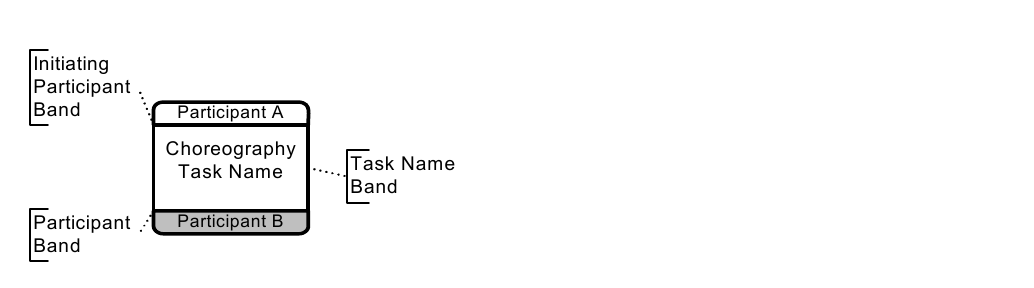
*Figure 11.8 – A Choreography Task* (p. 323)
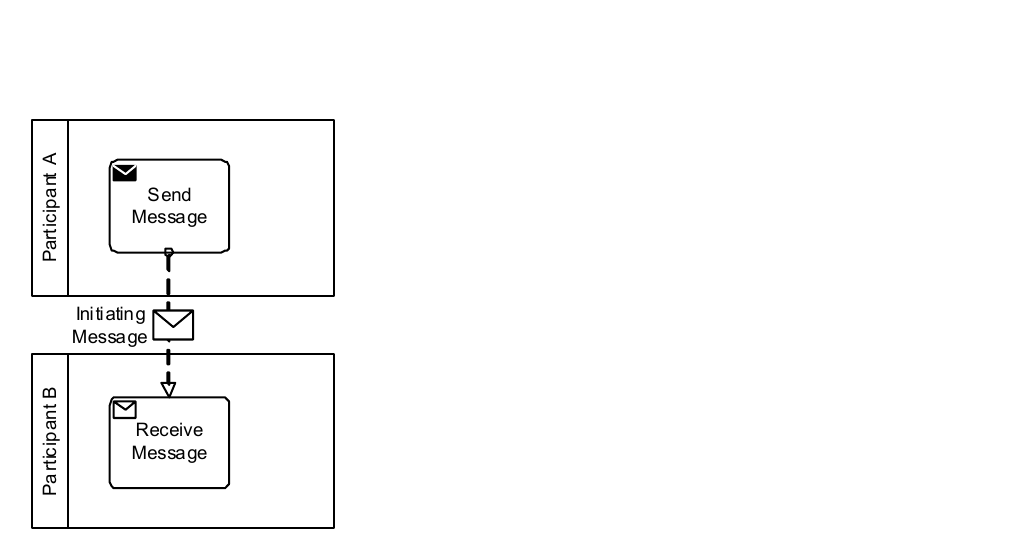
*Figure 11.9 – A Collaboration view of a Choreography Task* (p. 324)
The interaction defined by a **Choreography Task** can be shown in an expanded format through a **Collaboration** diagram (see Figure 11.9 and see page 107 for more information on **Collaborations**). In the **Collaboration** view, the *Participants* of the **Choreography Task Participant Band’s** will be represented by **Pools**. The interaction between them will be a **Message Flow**.
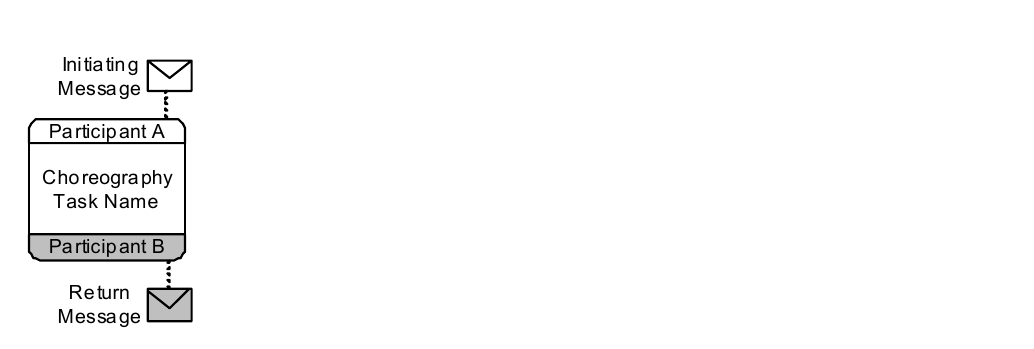
*Figure 11.10 – A two-way Choreography Task* (p. 324)
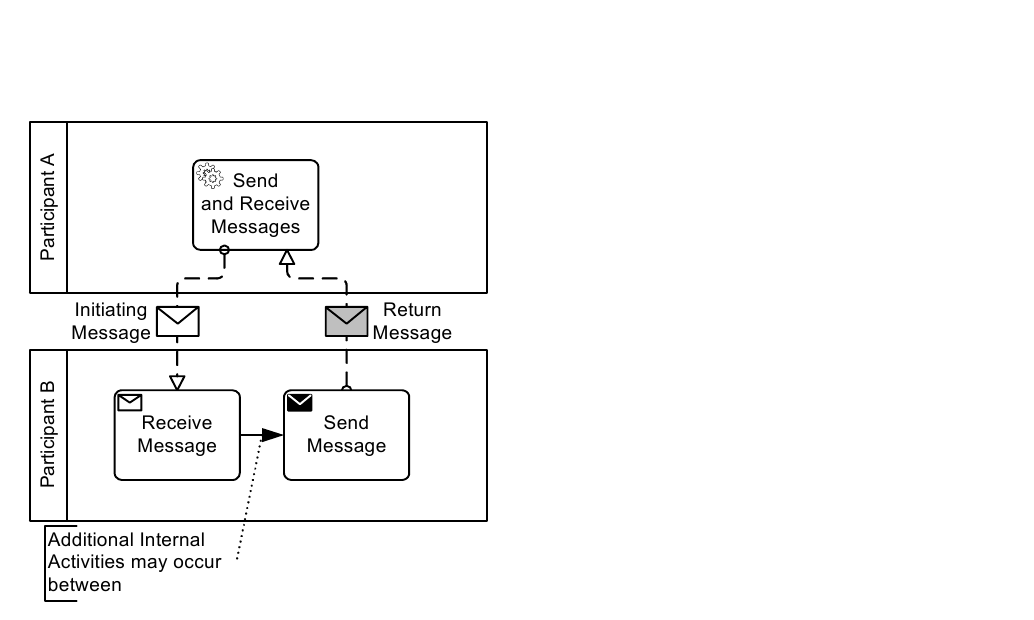
*Figure 11.11 – A Collaboration view of a two-way Choreography Task* (p. 325)
In a **Choreography** Diagram, the **Choreography Task** object shares the same shape as a **Task** or any other **BPMN Activity**, which is a rectangle that has rounded corners. A **Choreography Task** is a rounded corner rectangle that MUST be drawn with a single line.
The three bands in the **Choreography Task** shape provide the distinction between this type of **Task** and an Orchestration **Task** (in a traditional **BPMN** diagram). The **Message** sent by either one or both of the *Participants* of the **Choreography Task** can be displayed (see Figure 11.10, above). The **Message** icon is shown tethered to the *Participant* that is the sender of the **Message**. If the **Message** is the initiating **Message** of the **Choreography Task**, then the **Message** icon MUST be unfilled. If the **Message** is a return **Message** for the **Choreography Task**, then the **Message** icon MUST have a light fill. Note that **Messages** can be tethered to a **Call Choreography** that references a GlobalChoreographyTask, but cannot be used for **Sub-Choreographies** or **Call Choreography** that references another **Choreography**. As with a standard Orchestration **Task**, the **Choreography Task** MAY have internal markers to show how the **Choreography Task** MAY be repeated. There are two types of internal markers (see Figure 11.12):
- A **Choreography Task** MAY have only one of the three markers at one time.
The marker that is present MUST be centered at the bottom of the **Task Name Band** of the shape.
P articip an t A P articip an t A P a rti cipa nt A C h ore og ra p hy C h oreo g ra ph y C ho re o grap h y T a sk N a m e T a sk N a me T ask N am e P articip an t B P articip an t B P a rti cipa nt B
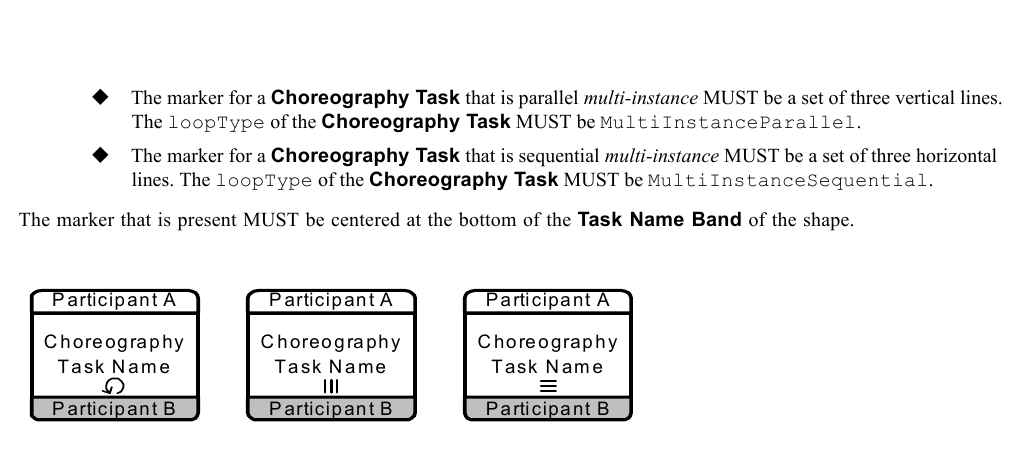
*Figure 11.12 – Choreography Task Markers* (p. 326)
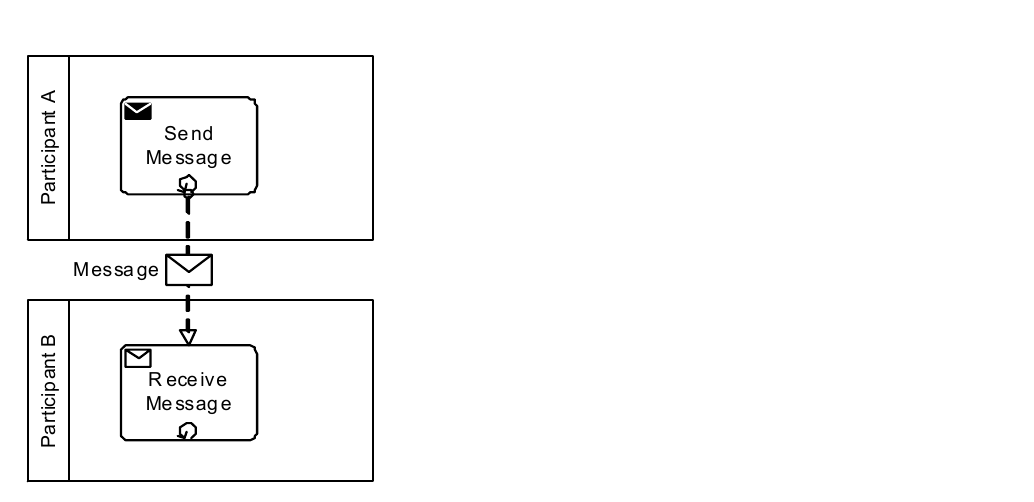
*Figure 11.13 – The Collaboration view of a looping Choreography Task* (p. 326)
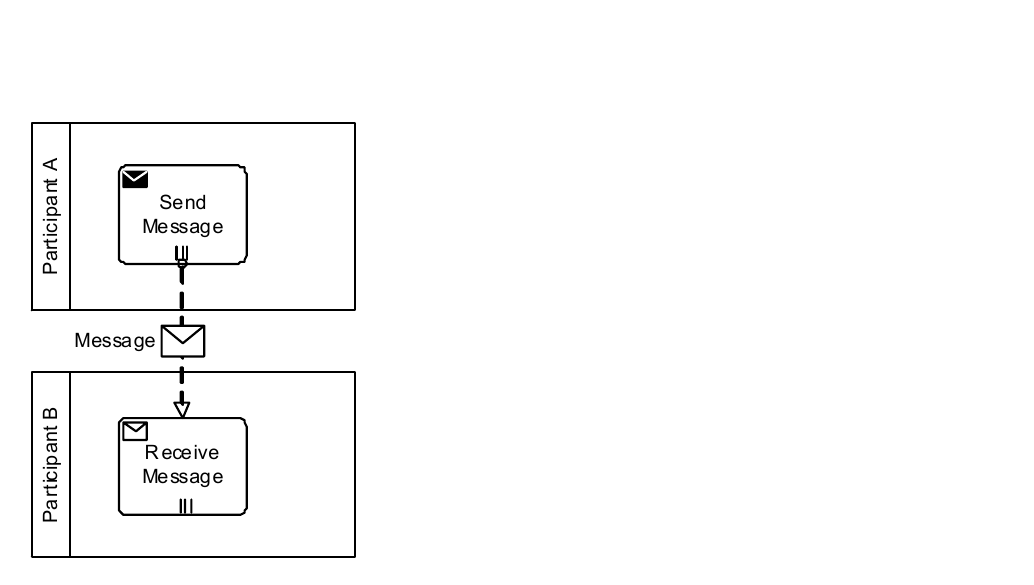
*Figure 11.14 – The Collaboration view of a Parallel Multi-Instance Choreography Task* (p. 327)
There are situations when a *Participant* for a **Choreography Task** is actually a *multi-instance Participant*. A *multi- instance Participant* represents a situation where there are more than one possible related *Participants* (PartnerRoles/ PartnerEntities) that might be involved in the **Choreography**. For example, in a **Choreography** that involves the shipping of a product, there can be more than one type of shipper used, depending on the destination. When a *Participant* in a **Choreography** contains multiple *instances*, then a *multi-instance* marker will be added to the **Participant Band** for that *Participant* (see Figure 11.15). The marker for a **Choreography Task** that is *multi-instance* MUST be a set of three vertical lines. The marker that is present MUST be centered at the bottom of the **Participant Band** of the shape. The width of the **Participant Band** will be expanded to contain both the name of the *Participant* and the *multi-instance* marker.
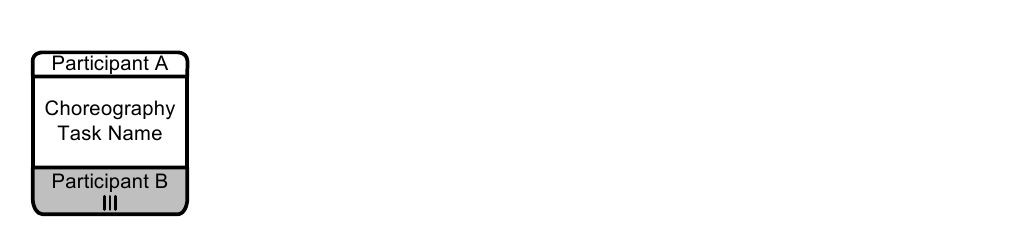
*Figure 11.15 – A Choreography Task with a multiple Participant* (p. 327)
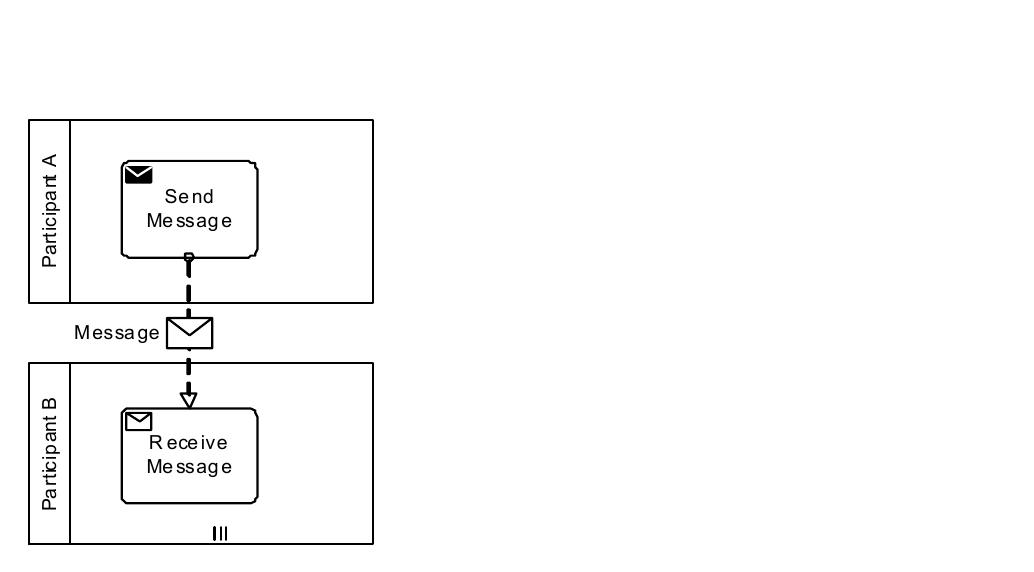
*Figure 11.16 – A Collaboration view of a Choreography Task with a multiple Participant* (p. 328)
The **Choreography Task** element inherits the attributes and model associations of **Choreography Activity** (see Table 11.1). Table 11.2 presents the additional model associations of the **Choreography Task** element.
**Table 11.2 – Choreography Task Model Associations**
| Attribute Name | Description/Usage |
| --- | --- |
| **messageFlowRef:** Message Flow | Although not graphical represented, **Choreography Task** contains one or |
| [1..*] | more **Message Flows** that represent the interaction(s) between the *Participants* referenced by the **Choreography Task**. |
### 11.5.2 Sub-Choreography
A **Sub-Choreography** is a compound **Activity** in that it has detail that is defined as a flow of other **Activities**, in this case, a **Choreography**. Each **Sub-Choreography** involves two or more *Participants*. The name of the **Sub- Choreography** and each of the *Participants* are all displayed in the different bands that make up the shape’s graphical notation. There are two or more **Participant Bands** and one **Sub-Process Name Band**. The **Sub-Choreography** can be in a collapsed view that hides its details (see Figure 11.17) or a **Sub-Choreography** can be expanded to show its details (a **Choreography Process**) within the **Choreography Process** in which it is contained (see Figure 11.19). In the collapsed form, the **Sub-Process** object uses a marker to distinguish it as a **Sub- Choreography**, rather than a **Choreography Task**. The **Sub-Process** marker MUST be a small square with a plus sign (+) inside. The square MUST be positioned at the bottom center of the **Sub-Process Name Band** within the shape. The **Participant Band** of the *Participant* that does not initiate the interaction MUST be shaded with a light fill.
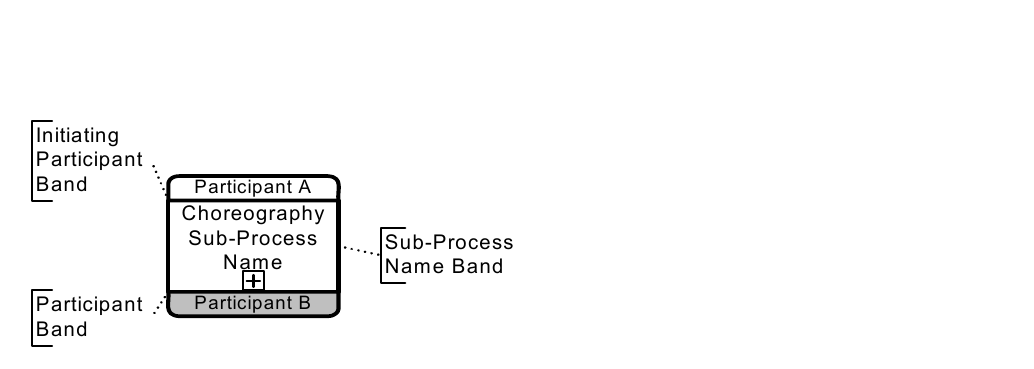
*Figure 11.17 – A Sub-Choreography* (p. 329)
Figure 11.18 shows an example of a potential **Collaboration** view of the above **Sub-Choreography**.
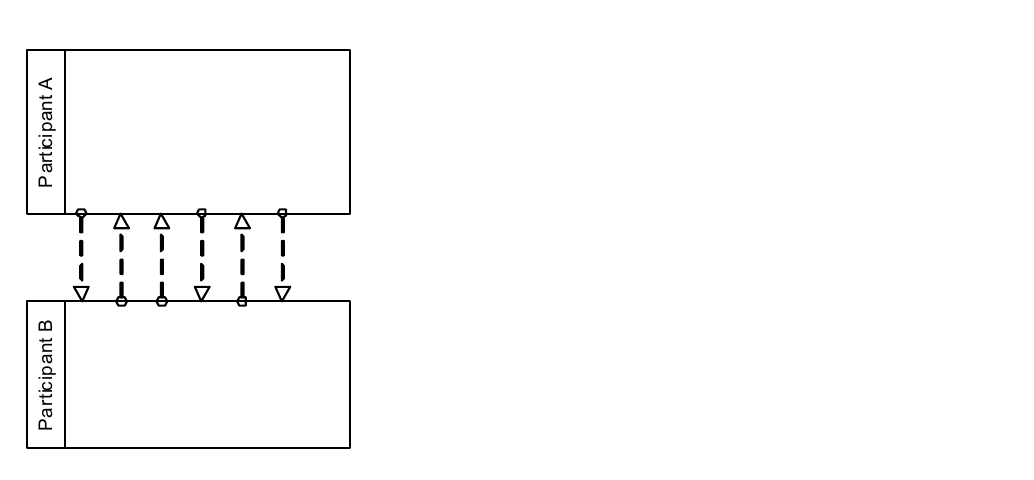
*Figure 11.18 – A Collaboration view of a Sub-Choreography* (p. 329)
Figure 11.19 shows an example of an expanded Sub-Choreography.
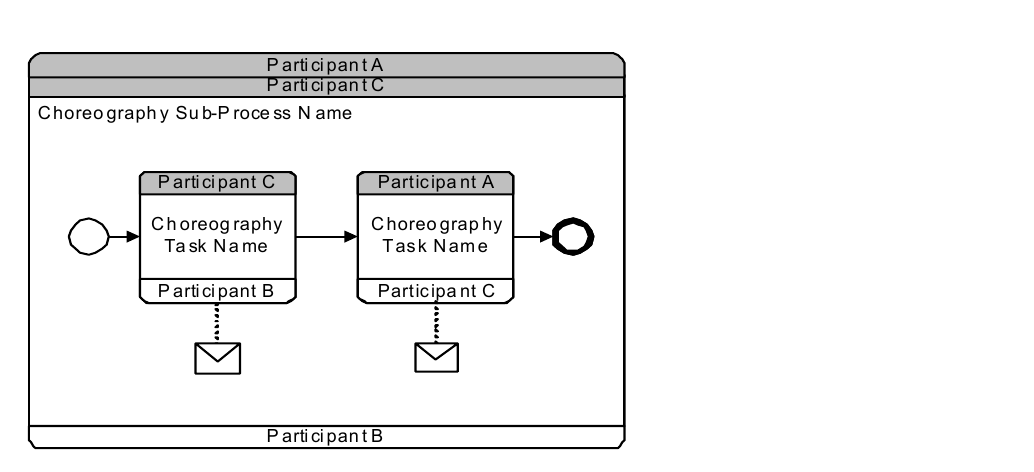
*Figure 11.19 – An expanded Sub-Choreography* (p. 330)
Figure 11.20 shows an example of a potential **Collaboration** view of the above **Sub-Choreography**.
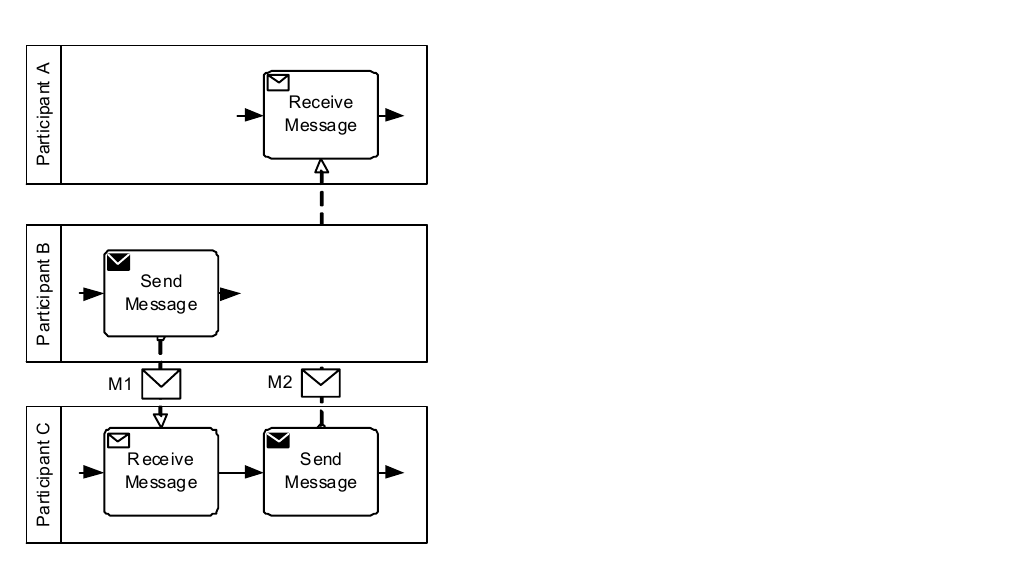
*Figure 11.20 – A Collaboration view of an expanded Sub-Choreography* (p. 330)
#### The Parent Sub-Choreography (Expanded)
The **Choreography Activity** shares the same shape as a **Sub-Process** or any other **BPMN Activity**, which is in this state. A **Sub-Choreography** is a rounded corner rectangle that MUST be drawn with a single thin line.
The three or more partitions in the **Sub-Choreography** shape provide the distinction between this type of **Task** and an Orchestration **Sub-Process** (in a traditional **BPMN** diagram). It is possible for a **Sub-Choreography** to involve more than two *Participants*. In this case, an additional **Participant Band** will be added to the shape for each additional *Participant* (see Figure 11.21). The ordering and position of the **Participant Band** (either in the upper or lower positions) is up to the modeler or modeling tool. In addition, any **Participant Band** beyond the first two optional; it is displayed at the discretion of the modeler or modeling tool. However, each **Participant Band** that is added MUST be added to the upper and lower sections of the **Sub- Choreography** in an alternative manner.
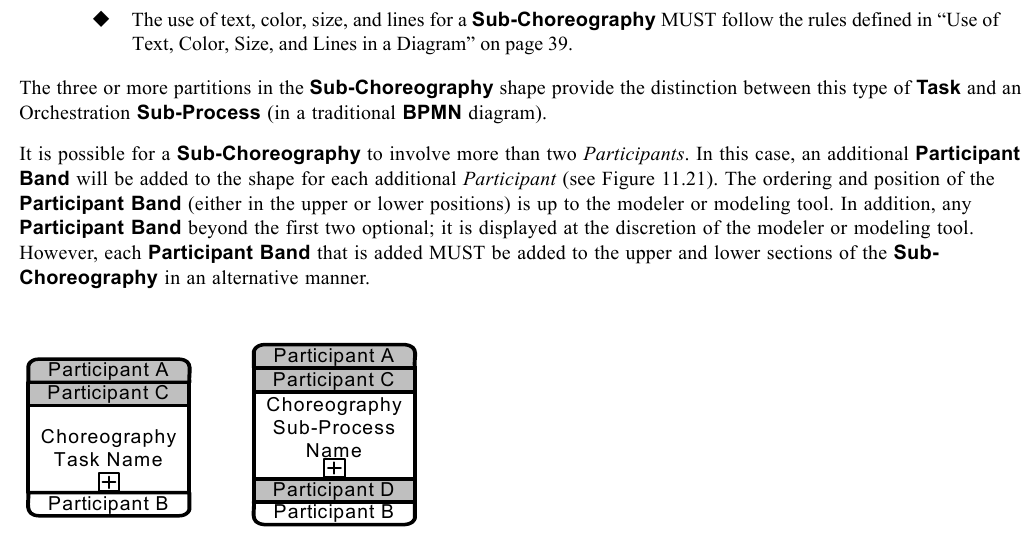
*Figure 11.21 – Sub-Choreography (Collapsed) with More than Two Participants* (p. 331)
As with a standard Orchestration **Sub-Process**, the **Sub-Choreography** MAY have internal markers to show how the **Sub-Choreography** MAY be repeated. There are two types of internal markers (see Figure 11.22):
- A **Sub-Choreography** MAY have only one of the three markers at one time.
- The marker that is present MUST be centered at the bottom of the **Sub-Process Name Band** of the shape.
Pa rticipa n t A P a rticipa n t A P a rticipa n t A C ho reo gra ph y C ho reo gra ph y C h oreo g ra ph y S ub -Proc ess S ub -Proc ess S u b-P ro cess
Pa rticipa n t B P a rticipa n t B P a rticipa n t B

*Figure 11.22 – Sub-Choreography Markers* (p. 332)
There are situations when a *Participant* for a **Sub-Choreography** is actually a *multi-instance Participant*. A *multi- instance Participant* represents a situation where there are more than one possible related *Participants* (PartnerRoles/ PartnerEntities) that can be involved in the **Choreography**. For example, in a **Choreography** that involves the shipping of a product, there can be more than one type of shipper used, depending on the destination. When a *Participant* in a **Choreography** contains multiple *instances*, then a *multi-instance* marker will be added to the **Participant Band** for that *Participant* (see Figure 11.23). The marker for a **Sub-Choreography** that is multi*-instance* MUST be a set of three vertical lines. The marker that is present MUST be centered at the bottom of the **Participant Band** of the shape.
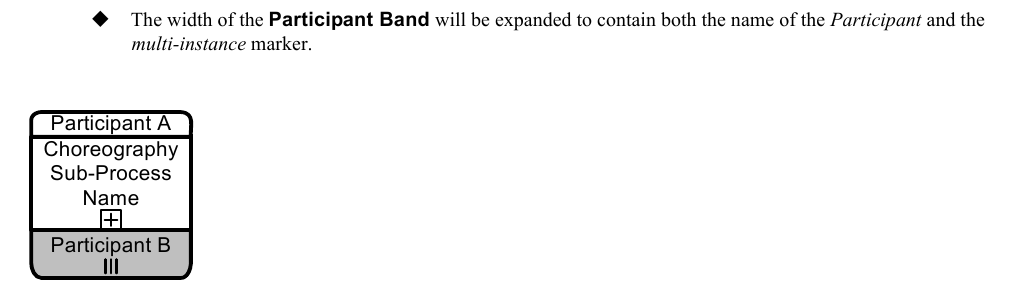
*Figure 11.23 – Sub-Choreography Markers with a multi-instance Participant* (p. 332)
This includes **Compensation Event Sub-Processes** (contained within a **Sub-Choreography**) as well as the external **Compensation Activity** connected through an **Association**. The **Sub-Choreography** element inherits the attributes and model associations of **Choreography Activity** (see Table 11.1) and FlowElementsContainer (see Table 8.45). Table 11.3 presents the additional model associations of the
**Table 11.3 – Sub-Choreography Model Associations**
| Attribute Name | Description/Usage |
| --- | --- |
| **artifacts:** Artifact [0..*] | This attribute provides the list of **Artifacts** that are contained within the **Sub- Choreography**. |
### 11.5.3 Call Choreography
A **Call Choreography** identifies a point in the **Process** where a global **Choreography** or a **Global Choreography Task** is used. The **Call Choreography** acts as a place holder for the inclusion of the **Choreography** element it is calling. This pre-defined called **Choreography** element becomes a part of the definition of the *parent* **Choreography**. A **Call Choreography** object shares the same shape as the **Choreography Task** and **Sub-Choreography**, which is a rectangle that has rounded corners, two or more **Participant Bands**, and an **Activity Name Band**. However, the target of what the **Choreography Activity** calls will determine the details of its shape. If the **Call Choreography** calls a Global Choreography Task, then the shape will be the same as a **Choreography Task**, but the boundary of the shape MUST have a thick line (see Figure 11.24). If the **Call Choreography** calls a **Choreography**, then there are two options:
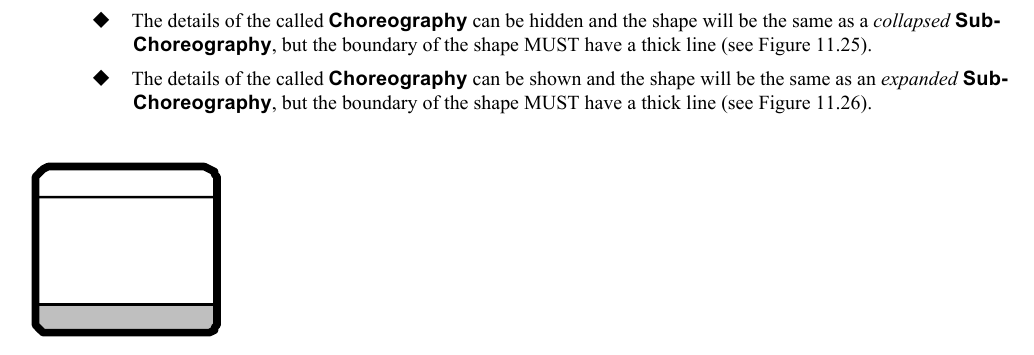
*Figure 11.24 – A Call Choreography calling a Global Choreography Task* (p. 333)
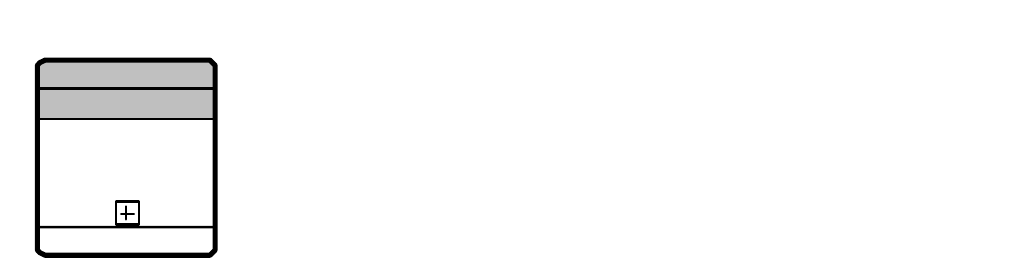
*Figure 11.25 – A Call Choreography calling a Choreography (Collapsed)* (p. 333)
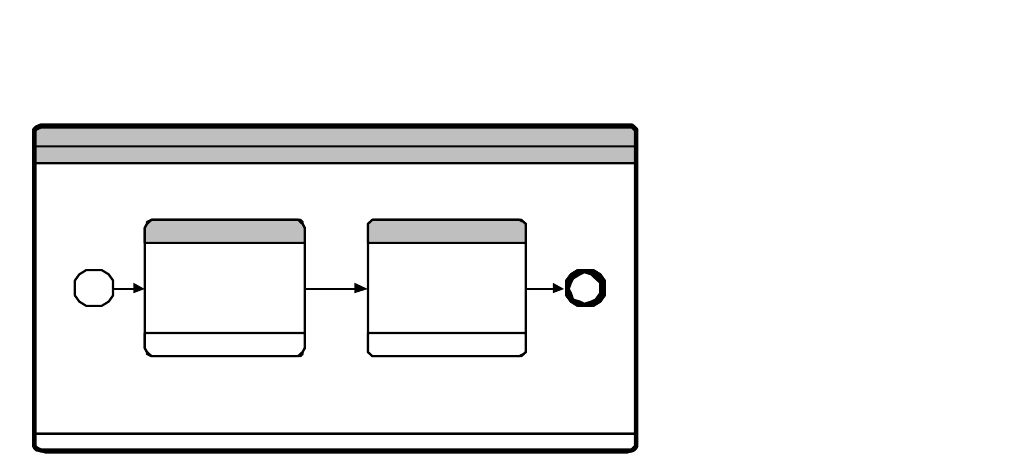
*Figure 11.26 – A Call Choreography calling a Choreography (expanded)* (p. 334)
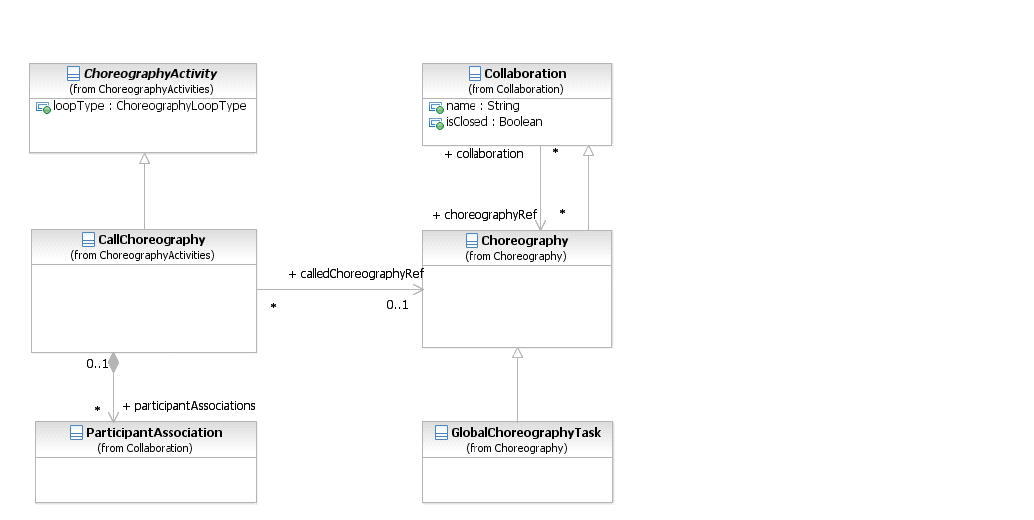
*Figure 11.27 – The Call Choreography class diagram* (p. 334)
The **Call Choreography** element inherits the attributes and model associations of ChoreographyActivity (see Figure 11.27 and Table 11.1). Table 11.4 presents the additional model associations of the **Call Choreography** element.
**Table 11.4 – Call Choreography Model Associations**
| Attribute Name | Description/Usage |
| --- | --- |
| **calledChoreographyRef:** CallableElement [0..1] | The element to be called, which will be either a **Choreography** or a GlobalChoreographyTask. |
| **participantAssociations:** ParticipantAssociation [0..*] | Specifies how *Participants* in a nested **Choreography** or GlobalChoreographyTask match up with the *Participants* in the **Choreography** referenced by the **Call Choreography**. |
### 11.5.4 Global Choreography Task
A GlobalChoreographyTask is a reusable, atomic **Choreography Task** definition that can be called from within any **Choreography** by a **Call Choreography**. The GlobalChoreographyTask element inherits the attributes and model associations of **Collaboration** (see Table 9.1), through its relationship to Choreography. Table 11.5 presents the additional model associations of the
**Table 11.5 – Global Choreography Task Model Associations**
| Attribute Name | Description/Usage |
| --- | --- |
| **initiatingParticipantRef:** Participant | One of the *Participants* will be the one that initiates the Global Choreography Task. |
A GlobalChoreographyTask is a restricted type of **Choreography**, it is an “empty” **Choreography**. A GlobalChoreographyTask MUST NOT contain any *Flow Elements*. Since a GlobalChoreographyTask does not have any *Flow Elements*, it does not require basically a set of *Participants* and **Message Flows** intended for reuse.
### 11.5.5 Looping Activities
Both **Sub-Choreographies** can have *standard loops* and *multi-instances*. Examples of **Choreography Activities** with the appropriate markers can be seen in Figure 11.12 and Figure 11.22.
### 11.5.6 The Sequencing of Activities
There are constraints on how **Choreography Activities** can be sequenced (through **Sequence Flows**) in a **Choreography**. These constraints are due to the limited visibility of the *Participants*, which only know of the progress of the **Choreography** by the **Messages** that occur. When a *Participant* sends or receives a **Message**, then that
*Participant* knows exactly how far the **Choreography** has progressed. This means that the ordering of **Choreography Activities** need to take into account when the *Participants* send or receive **Messages** so that they *Participants* are NOT REQUIRED to guess about when it is their turn to send a **Message**. The basic rule of **Choreography Activity** sequencing is this:
- The *Initiator* of a **Choreography Activity** MUST have been involved (as *Initiator* or *Receiver*) in the previous
Of course, the first **Choreography Activity** in a **Choreography** does not have this constraint. Figure 11.28 shows a sequence of two **Choreography Activities** that follow this constraint. “Participant B” is the *Initiator* of “Choreography Task 2” after being the *Receiver* in “Choreography Task 1.” While there is no requirement that “Participant B” sends the **Message** immediately, since there can be internal work that the *Participant* needs to do prior to the **Message**. But in this situation there is no ambiguity that “Participant B” will be the *Initiator* of the next **Choreography Task**. “Participant C” does not know exactly when the **Message** will arrive from “Participant B,” but “Participant C” knows that one will arrive and there are not any additional requirements on the *Participant* until the **Message** arrives.
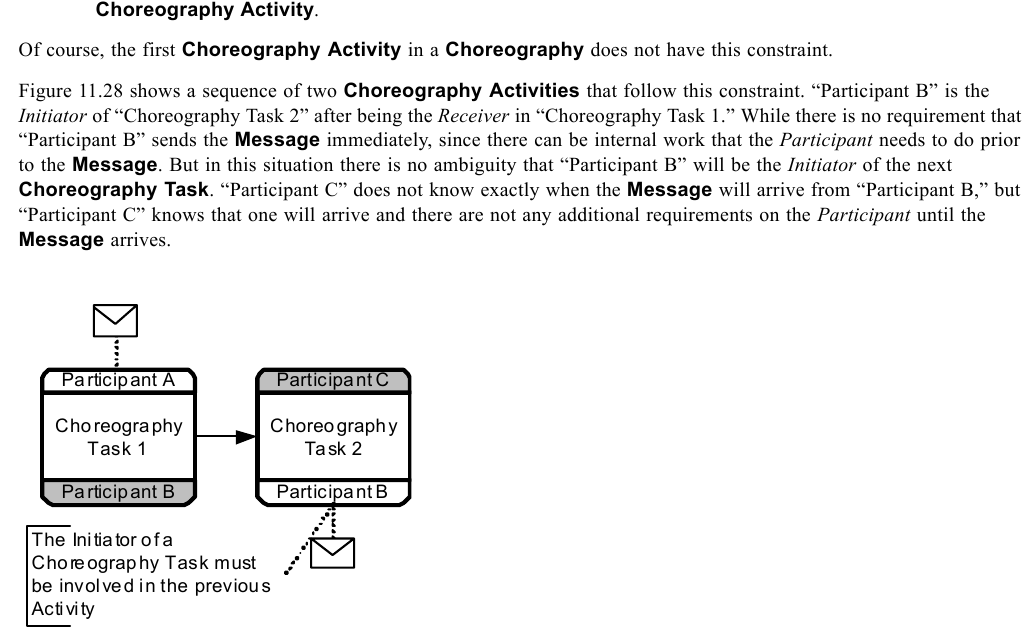
*Figure 11.28 – A valid sequence of Choreography Activities* (p. 336)
Naturally, the sequence of **Choreography Activities** shown in Figure 11.28, above can be expanded into a **Collaboration** diagram to show how the sequence can be enforced. Figure 11.29 shows the corresponding **Collaboration**. The diagram shows how the **Activities** within the individual **Pools** fit with the design of the
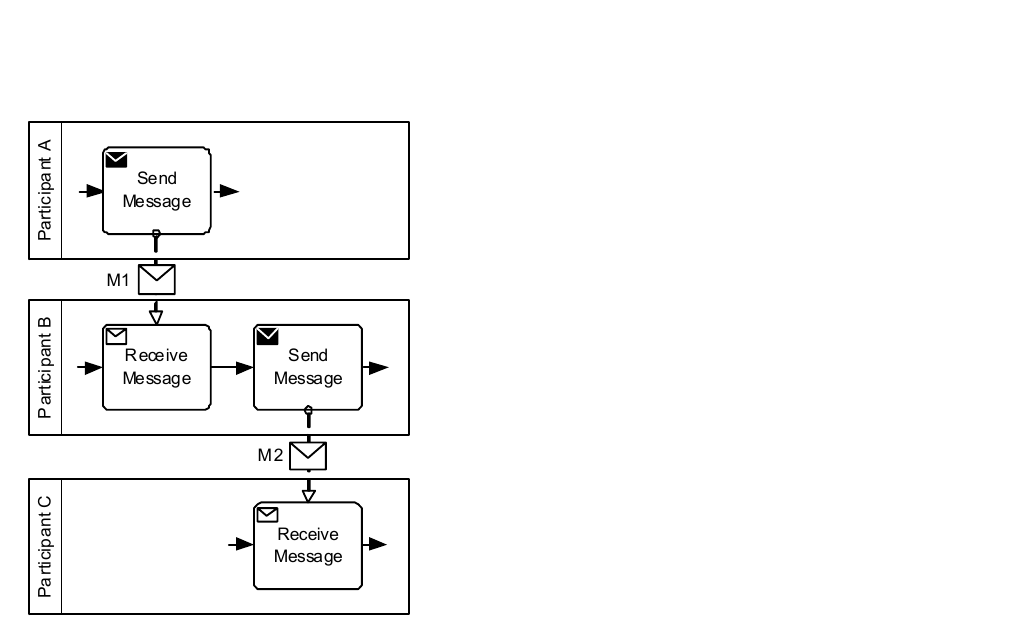
*Figure 11.29 – The corresponding Collaboration for a valid Choreography sequence* (p. 337)
When determining a valid sequence of **Choreography Tasks**, it is important to consider the type of **Choreography Tasks** that are being used. A single **Choreography Task** can be used for one or two **Messages**. Most of the time there will be one or two **Messages** for a **Choreography Task**. Figure 11.30 shows a sequence of **Choreography Tasks**, the first one being a two-way interaction, where the initiator sends a **Message** and gets a response from the other *Participant*.
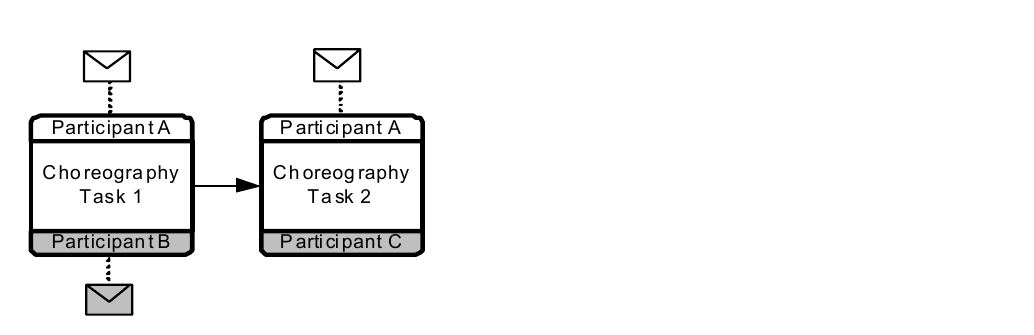
*Figure 11.30 – A valid sequence of Choreography Activities with a two-way Activity* (p. 337)
Figure 11.31 shows the corresponding **Collaboration** and how the two **Choreography Tasks** are reflected in the **Processes** within the **Pools**. The **Choreography Task** that has two **Messages** is reflected by three **Process Tasks**. Usually in these cases, the initiating Participant will use a single **Activity** to handle both the sending and receiving of the **Messages**. A **BPMN Service Task** can be used for this purpose and these types of **Tasks** are often referred to as “request-response” **Tasks** for **Choreography** modelers.
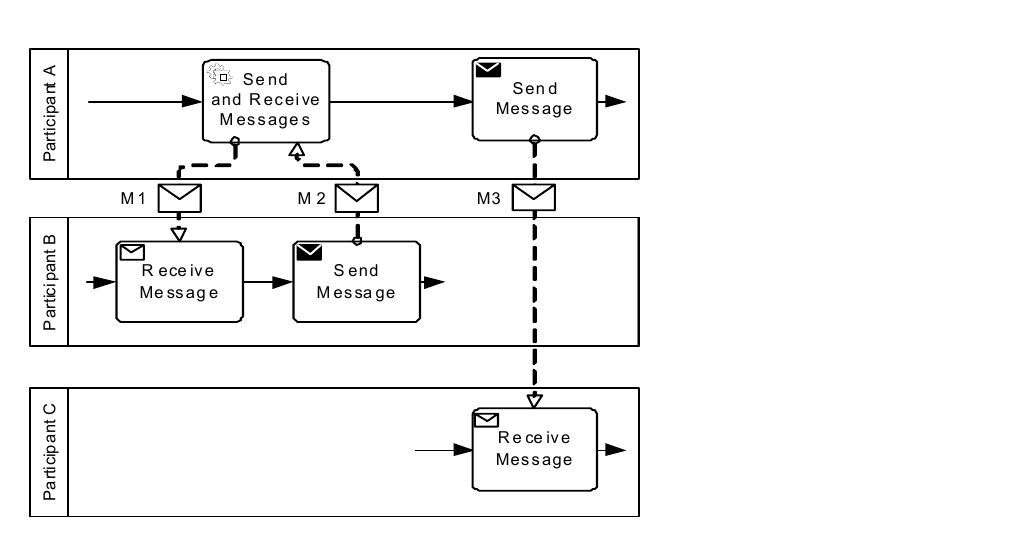
*Figure 11.31 – The corresponding Collaboration for a valid Choreography sequence with a two-way Activity* (p. 338)
Figure 11.32 shows how a sequence of **Choreography Activities** can be designed that would be invalid in the sense that an *Initiating Participant* would not know when the appropriate time would be to send a **Message**. In this example, “Participant A” is scheduled to send a **Message** to “Participant C” after “Participant B” sends a **Message** to “Participant C.” However, “Participant A” will not know when the **Message** from “Participant B” has been sent. So, there is no way to enforce the sequence that is modeled in the **Choreography**.
P articipant A P articipant C P articipant C C horeography C horeography C horeography
P articipant B P articipant B P articipant A

*Figure 11.32 – An invalid sequence of Choreography Activities* (p. 338)
Figure 11.33 shows the **Collaboration** view of the above **Choreography** diagram. It becomes clear that “Participant A” will not know the appropriate time to send **Message** “M3” to “Participant C.” If the **Message** is sent too soon, then “Participant C” will not be prepared to receive it. Thus, as a **Choreography**, the model in Figure 11.32, above, cannot be enforced.
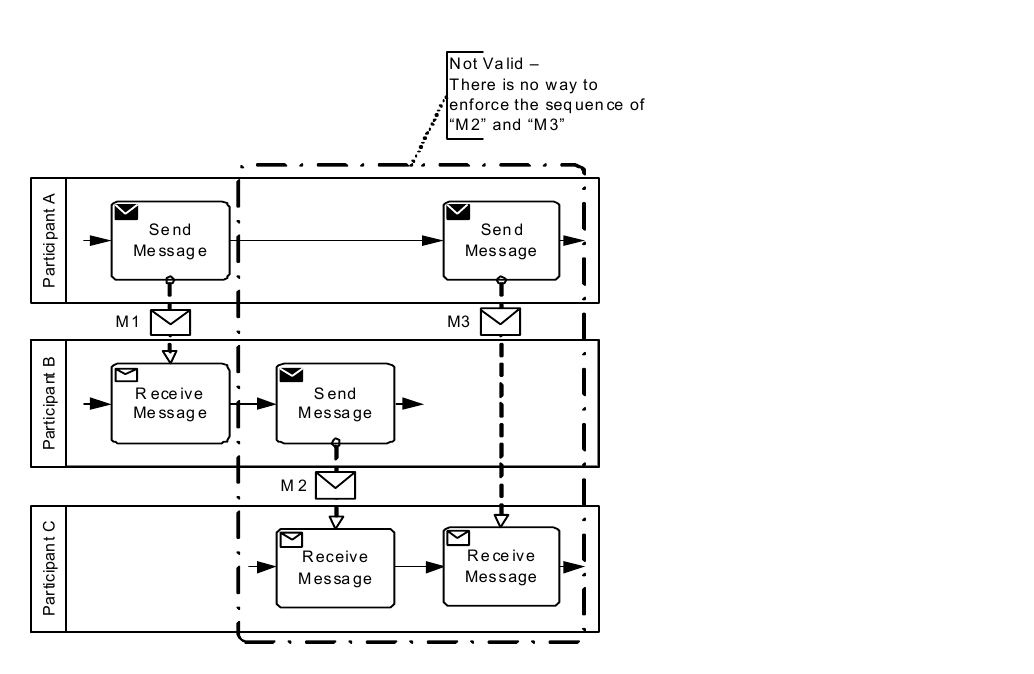
*Figure 11.33 – The corresponding Collaboration for an invalid Choreography sequence* (p. 339)