---
title: "10.5 Events"
chapter: "10 Process"
source: "OMG BPMN 2.0.2 — formal/2013-12-09"
pages: "232-285"
---
> 10 Process · páginas 232-285 · [índice](../README.md)
## 10.5 Events
An **Event** is something that “happens” during the course of a **Process**. These **Events** affect the flow of the **Process** and usually have a cause or an impact and in general require or allow for a reaction. The term “event” is general enough to cover many things in a **Process**. The start of an **Activity**, the end of an **Activity**, the change of state of a document, a **Message** that arrives, etc., all could be considered **Events**. **Events** allow for the description of “event-driven” **Processes**. In these **Processes**, there are three main types of
1. Start Events (see page 237), which indicate where a Process will start.
2. End Events (see page 245), which indicate where a path of a Process will end.
3. Intermediate Events (see page 248), which indicate where something happens somewhere between the start and end of a **Process**.
Within these three types, **Events** come in two flavors:
1. Events that catch a trigger. All Start Events and some Intermediate Events are catching Events.
2. Events that throw a Result. All End Events and some Intermediate Events are throwing Events that MAY eventually be *caught* by another **Event**. Typically the *trigger* carries information out of the scope where the *throw* **Event** occurred into the scope of the catching **Events**. The *throwing* of a *trigger* MAY be either implicit as defined by this standard or an extension to it or explicit by a *throw* **Event**.
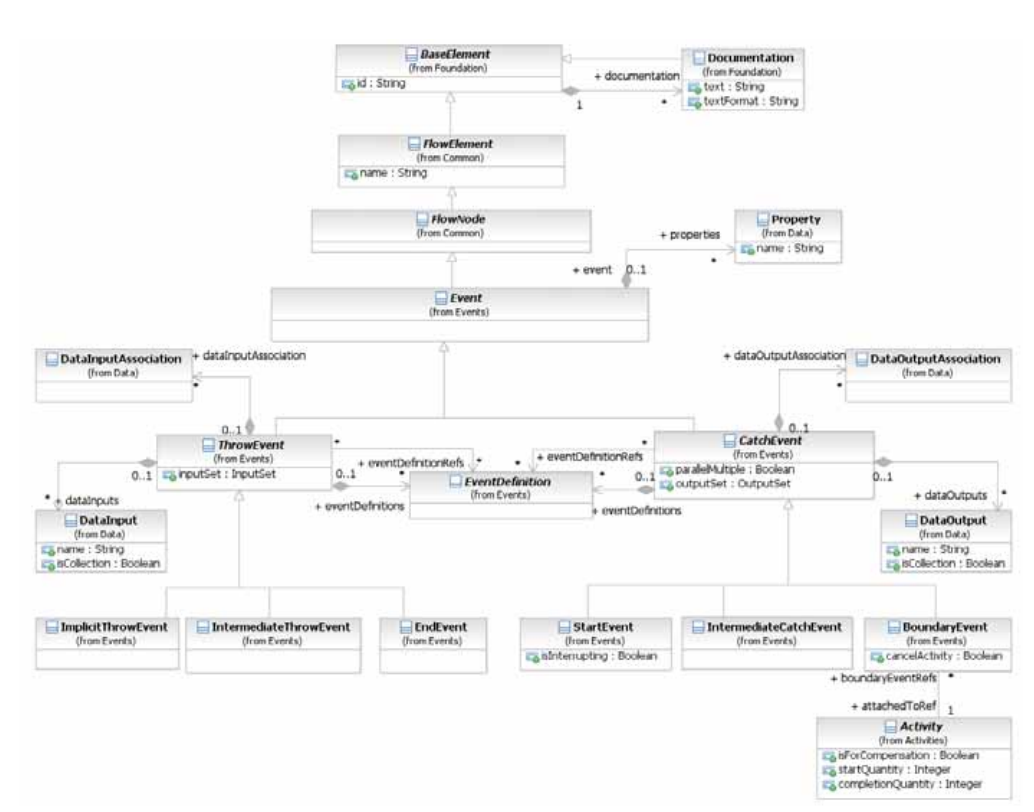
*Figure 10.69 – The Event Class Diagram* (p. 233)
### 10.5.1 Concepts
Depending on the type of the **Event** there are different strategies to forward the *trigger* to catching **Events**: publication, direct resolution, propagation, *cancellations*, and *compensations*.
With publication a *trigger* MAY be received by any catching **Events** in any scope of the system where the *trigger* is published. **Events** for which publication is used are grouped to **Conversations**. Published **Events** MAY participate in several **Conversations**. **Messages** are *triggers*, which are generated outside of the **Pool** they are published in. They typically describe B2B communication between different **Processes** in different **Pools**. When **Messages** need to reach a specific **Process** *instance*, *correlation* is used to identify the particular *instance*. **Signals** are *triggers* generated in the **Pool** they are published. They are typically used for broadcast communication within and across **Processes**, across **Pools**, and between **Process** diagrams. **Timer** and **Conditional** *triggers* are implicitly thrown. When they are activated they wait for a time based or status based condition respectively to trigger the *catch* **Event**. A *trigger* that is propagated is forwarded from the location where the **Event** has been thrown to the innermost enclosing scope *instance* (e.g., **Process** level) which has an attached **Event** being able to catch the *trigger*. **Error** *triggers* are critical and suspend execution at the location of throwing. **Escalations** are non critical and execution continues at the location of throwing. If no catching **Event** is found for an error or escalation *trigger*, this *trigger* is unresolved. Termination, *compensation*, and *cancellation* are directed towards a **Process** or a specific **Activity** *instance*. Termination indicates that all **Activities** in the **Process** or **Activity** should be immediately ended. This includes all *instances* of *multi-instances*. It is ended without *compensation* or *Event handling*. *Compensation* of a successfully completed **Activity** triggers its *compensation handler*. The *compensation handler* is either user defined or implicit. The implicit *compensation handler* of a **Sub Process** calls all *compensation handlers* of its enclosed **Activities** in the reverse order of **Sequence Flow** dependencies. If *compensation* is invoked for an **Activity** that has not yet completed, or has not completed successfully, nothing happens (in particular, no error is raised). *Cancellation* will terminate all running **Activities** and *compensate* all successfully completed **Activities** in the **Sub- Process** it is applied to. If the **Sub-Process** is a *Transaction*, the *Transaction* is rolled back.
#### Data Modeling and Events
Some **Events** (like the **Message**, **Escalation**, **Error**, **Signal**, and **Multiple Event**) have the capability to carry data. **Data Association** is used to push data from a *Catch* **Event** to a data element. For such **Events**, the following constraints apply:
2. If the **Event** is associated with multiple EventDefinitions, there MUST be one **Data Input** (in the case of *throw* **Events**) or one **Data Output** (in the case of *catch* **Events**) for each EventDefinition. The order of the EventDefinitions and the order of the **Data Inputs/Outputs** determine which **Data Input/Output** corresponds with which EventDefinition.
2. For each EventDefinition and **Data Input/Output** pair, if the **Data Input/Output** is present, it MUST have an ItemDefinition equivalent to the one defined by the **Message**, **Escalation**, **Error**, or **Signal** on the associated EventDefinition. In the case of a *throw* **Event**, if the **Data Input** is not present, the **Message**, **Escalation**, **Error**, or **Signal** will not be populated with data. In the case of a *catch* **Event**, if the **Data Output** is not present, the payload within the **Message**, **Escalation**, **Error**, or **Signal** will not flow out of the **Event** and into the **Process**.
The execution behavior is then as follows:
2. For *throw* **Events**: When the **Event** is activated, the data in the **Data Input** is assigned automatically to the **Message**, **Escalation**, **Error**, or **Signal** referenced by the corresponding EventDefinition.
2. For *catch* **Events**: When the *trigger* of the **Event** occurs (for example, the **Message** is received), the data is assigned automatically to the **Data Output** that corresponds to the EventDefinition that described that trigger.
#### Common Event attributes
The **Event** element inherits the attributes and model associations of FlowElement (see Table 8.44). Table 10.81 presents the additional model associations of the **Event** element.
**Table 10.81 – Event model associations**
| Attribute Name | Description/Usage |
| --- | --- |
| **properties**: Property [0..*] | Modeler-defined properties MAY be added to an **Event**. These properties are contained within the **Event**. |
#### Common Catch Event attributes
The CatchEvent element inherits the attributes and model associations of **Event** element (see Table 10.81). Table 10.82 presents the additional attributes and model associations of the CatchEvent element.
**Table 10.82 – CatchEvent attributes and model associations**
| Attribute Name | Description/Usage |
| --- | --- |
| **eventDefinitionRefs**: EventDefinition [0..*] | References the reusable EventDefinitions that are *triggers* expected for a *catch* **Event**. Reusable EventDefinitions are defined as top-level elements. These EventDefinitions can be shared by different *catch* and *throw* **Events**. • If there is no EventDefinition defined, then this is considered a *catch* **None Event** and the **Event** will not have an internal marker (see Figure 10.91). • If there is more than one EventDefinition defined, this is considered a *Catch* **Multiple Event** and the **Event** will have the pentagon internal marker (see Figure 10.90). This is an ordered set. |
| **eventDefinitions**: EventDefinition [0..*] | Defines the event EventDefinitions that are *triggers* expected for a *catch* **Event**. These EventDefinitions are only valid inside the current **Event**. • If there is no EventDefinition defined, then this is considered a *catch* **None Event** and the **Event** will not have an internal marker (see Figure 10.91). • If there is more than one EventDefinition defined, this is considered a *catch* **Multiple Event** and the **Event** will have the pentagon internal marker (see Figure 10.90). This is an ordered set. |
| **dataOutputAssociations**: Data | The **Data Associations** of the *catch* **Event**. |
| OutputAssociation [0..*] | The dataOutputAssociation of a *catch* **Event** is used to assign data from the **Event** to a data element that is in the scope of the **Event**. For a *catch* **Multiple Event**, multiple **Data Associations** might be REQUIRED, depending on the individual *triggers* of the **Event**. |
| **dataOutputs**: DataOutput [0..*] | The **Data Outputs** for the *catch* **Event**. This is an ordered set. |
| **outputSet**: OutputSet [0..1] | The OutputSet for the *catch* **Event.** |
| **parallelMultiple**: boolean = false | **This attribute is only relevant when the** *catch* **Event has more than** EventDefinition **(Multiple). If this value is true, then all of the types of triggers that are listed in the** *catch* **Event MUST be triggered before the Process is instantiated.** |
#### Common Throw Event Attributes
The ThrowEvent element inherits the attributes and model associations of **Event** element (see Table 10.81). Table 10.83 presents the additional attributes and model associations of the ThrowEvent element.
**Table 10.83 – ThrowEvent attributes and model associations**
| Attribute Name | Description/Usage |
| --- | --- |
| **eventDefinitionRefs**: EventDefinition [0..*] | References the reusable EventDefinitions that are *results* expected for a *throw* **Event**. Reusable EventDefinitions are defined as top-level elements. These EventDefinitions can be shared by different *catch* and *throw* **Events**. • If there is no EventDefinition defined, then this is considered a *throw* **None Event** and the **Event** will not have an internal marker (see Figure 10.91 ). • If there is more than one EventDefinition defined, this is considered a *throw* **Multiple Event** and the **Event** will have the pentagon internal marker (see Figure 10.90 ). This is an ordered set. |
| **eventDefinitions**: EventDefinition [0..*] | Defines the event EventDefinitions that are *results* expected for a *throw* **Event**. These EventDefinitions are only valid inside the current **Event**. • If there is no EventDefinition defined, this is considered a *throw* **None Event** and the **Event** will not have an Internal marker (see Figure 10.91 ). • If there is more than one EventDefinition defined, this is considered a *throw* **Multiple Event** and the **Event** will have the pentagon internal marker (see Figure 10.90 ). This is an ordered set. |
| **dataInputAssociations**: DataInput | The **Data Associations** of the *throw* Event. |
| Association [0..*] | The dataInputAssociation of a *throw* **Event** is responsible for the assignment of a data element that is in scope of the **Event** to the **Event** data. For a *throw* **Multiple Event**, multiple **Data Associations** might be REQUIRED, depending on the individual *results* of the **Event**. |
| **dataInputs**: DataInput [0..*] | The **Data Inputs** for the *throw* **Event**. This is an ordered set. |
| **inputSet**: InputSet [0..1] | The InputSet for the *throw* **Event**. |
#### Implicit Throw Event
A sub-type of *throw* **Event** is the ImplicitThrowEvent. This is a non-graphical Event that is used for **Multi- Instance Activities** (see page 190). The ImplicitThrowEvent element inherits the attributes and model associations of ThrowEvent (see Table 10.84), but does not have any additional attributes or model associations.
### 10.5.2 Start Event
As the name implies, the **Start Event** indicates where a particular **Process** will start. In terms of **Sequence Flows**, the **Start Event** starts the flow of the **Process**, and thus, will not have any *incoming* **Sequence Flows**—no **Sequence Flow** can connect to a **Start Event**. The **Start Event** shares the same basic shape of the **Intermediate Event** and **End Event**, a circle with an open center so that markers can be placed within the circle to indicate variations of the **Event**. A **Start Event** is a circle that MUST be drawn with a single thin line (see Figure 10.70).
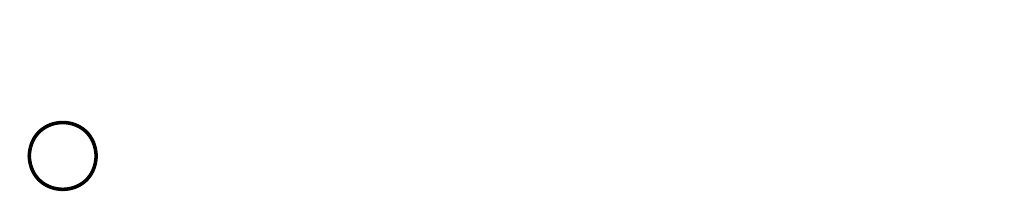
*Figure 10.70 – Start Event* (p. 238)
Throughout this document, we discuss how **Sequence Flows** are used within a **Process**. To facilitate this discussion, we employ the concept of a *token* that will traverse the **Sequence Flows** and pass through the elements in the **Process**. A *token* is a theoretical concept that is used as an aid to define the behavior of a **Process** that is being performed. The behavior of **Process** elements can be defined by describing how they interact with a *token* as it “traverses” the structure of the **Process**. **NOTE:** A *token* does not traverse a **Message Flow** since it is a **Message** that is passed down a **Message Flow** (as the name implies). Semantics of the **Start Event** include:
2. A **Start Event** is OPTIONAL: a **Process** level—a top-level **Process**, a **Sub-Process** (embedded), or a Global **Process** (called **Process**)—MAY (is NOT REQUIRED to) have a **Start Event**.
**NOTE:** A **Process** MAY have more than one **Process** level (i.e., it can include Expanded **Sub-Processes** or **Call Activ- ities** that call other **Processes**). The use of **Start** and **End Events** is independent for each level of the Diagram.
If a **Process** is complex and/or the starting conditions are not obvious, then it is RECOMMENDED that a **Start Event** be used. If a **Start Event** is not used, then the implicit **Start Event** for the **Process** SHALL NOT have a *trigger*. If there is an **End Event**, then there MUST be at least one **Start Event**. All *Flow Objects* that do not have an *incoming* **Sequence Flow** (i.e., are not a target of a **Sequence Flow**) SHALL be instantiated when the **Process** is instantiated.
There MAY be multiple **Start Events** for a given **Process** level.
If the **Process** is used as a global **Process** (a callable **Process** that can be invoked from **Call Activities** of other **Processes**) and there are multiple **None Start Events**, then when flow is transferred from the parent **Process** to the global **Process**, only one of the global **Process**’s **Start Events** will be triggered. The targetRef attribute of a **Sequence Flow** *incoming* to the **Call Activity** object can be extended to identify the appropriate **Start Event**.
**NOTE:** The behavior of **Process** can be harder to understand if there are multiple **Start Events**. It is RECOMMENDED that this feature be used sparingly and that the modeler be aware that other readers of the Diagram could have difficulty understanding the intent of the Diagram. When the *trigger* for a **Start Event** occurs, a new **Process** will be instantiated and a *token* will be generated for each *outgoing* **Sequence Flow** from that **Event**.
#### Start Event Triggers
**Start Events** can be used for these types of **Processes**:
- Top-level Processes
- Sub-Processes (embedded)
- Global Process (called)
- Event Sub-Processes
The next three sub clauses describe the types of **Start Events** that can be used for each of these three types of
#### Start Events for Top-level Processes
There are many ways that *top-level* **Processes** can be started (instantiated). The *trigger* for a **Start Event** is designed to show the general mechanisms that will instantiate that particular **Process**. There are seven (7) types of **Start Events** for *top-level* **Processes** in **BPMN** (see Table 10.84): *None*, **Message**, **Timer, Conditional**, **Signal**, **Multiple**, and
A top-level **Process** that has at least one **None Start Event** MAY be called by a **Call Activity** in another **Process**. The **None Start Event** is used for invoking the **Process** from the **Call Activity**. All other types of **Start Events** are only applicable when the **Process** is used as a top-level **Process**.
**Table 10.84 – Top-Level Process Start Event Types**
| Trigger | Description | Marker |
| --- | --- | --- |
| None | The **None Start Event** does not have a defined *trigger*. There is no specific EventDefinition subclass (see page 259) for **None Start Events**. If the **Start Event** has no associated EventDefinition, then the Event MUST be displayed without a marker (see the figure on the right). | |
| Message | A **Message** arrives from a *Participant* and triggers the start of the **Process**. See page 91 for more details on **Messages**. If there is only one EventDefinition associated with the **Start Event** and that EventDefinition is of the subclass MessageEventDefinition, then the **Event** is a **Message Start Event** and MUST be displayed with an envelope marker (see the figure to the right). The actual *Participant* from which the **Message** is received can be identified by connecting the **Event** to a *Participant* using a **Message Flow** within the definitional **Collaboration** of the **Process** – see Table 10.1. | |
| Timer | A specific time-date or a specific cycle (e.g., every Monday at 9am) can be set that will trigger the start of the Process. If there is only one EventDefinition associated with the **Start Event** and that EventDefinition is of the subclass TimerEventDefinition, then the **Event** is a Timer **Start Event** and MUST be displayed with a clock marker (see the figure to the right). | |
| Conditional | This type of event is triggered when a condition such as “S&P 500 changes by more than 10% since opening,” or “Temperature above 300C” become *true*. The condition Expression for the **Event** MUST become *false* and then *true* before the **Event** can be triggered again. The Condition Expression of a **Conditional Start Event** MUST NOT refer to the data context or instance attribute of the **Process** (as the **Process** *instance* has not yet been created). Instead, it MAY refer to static **Process** attributes and states of entities in the environment. The specification of mechanisms to access such states is out of scope of the standard. If there is only one EventDefinition associated with the **Start Event** and that EventDefinition is of the subclass ConditionalEventDefinition, then the **Event** is a **Conditional Start Event** and MUST be displayed with a lined paper marker (see the figure to the right). | |
| Signal | A Signal arrives that has been broadcast from another **Process** and triggers the start of the **Process**. Note that the Signal is not a **Message**, which has a specific target for the **Message**. Multiple **Processes** can have **Start Events** that are triggered from the same broadcasted Signal. If there is only one EventDefinition associated with the **Start Event** and that EventDefinition is of the subclass SignalEventDefini-tion, then the **Event** is a Signal **Start Event** and MUST be displayed with a triangle marker (see the figure to the right). | |
| Multiple | This means that there are multiple ways of triggering the **Process**. Only one of them is REQUIRED. There is no specific EventDefinition subclass for **Multiple Start Events**. If the **Start Event** has more than one associated EventDefinition, then the **Event** MUST be displayed with the **Multiple Event** marker (a pentagon—see the upper figure to the right). | |
| Parallel | This means that there are multiple *triggers* REQUIRED before the | |
| Multiple | **Process** can be instantiated. All of the types of *triggers* that are listed in the Start Event MUST be triggered before the Process is instantiated. There is no specific EventDefinition subclass for **Parallel Multiple Start Events**. If the **Start Event** has more than one associated EventDefinition and the parallelMultiple attribute of the **Start Event** is *true*, then the **Event** MUST be displayed with the **Parallel Multi- ple Event** marker (an open plus sign—see the figure to the right). | |
#### Start Events for Sub-Processes
There is only one type of **Start Event** for **Sub-Processes** in **BPMN** (see Figure 10.82): None.
**Table 10.85 – Sub-Process Start Event Types**
| Trigger | Description | Marker |
| --- | --- | --- |
| None | The **None Start Event** is used for all **Sub-Processes**, either embedded or called (reusable). Other types of *triggers* are not used for a **Sub-Process**, since the flow of the **Process** (a *token*) from the *parent* **Process** is the *trigger* of the **Sub-Process**. If the **Sub-Process** is called (reusable) and has multiple **Start Events**, some of the other **Start Events** MAY have *triggers*, but these **Start Events** would not be used in the context of a **Sub-Process**. When the other **Start Events** are triggered, they would instantiate top-level **Processes**. | |
#### Start Events for Event Sub-Processes
A **Start Event** can also initiate an inline **Event Sub-Process** (see page 174). In that case, the same **Event** types as for boundary **Events** are allowed (see Table 10.86), namely: **Message**, **Timer**, **Escalation**, **Error**, **Compensation**, **Conditional**, **Signal**, **Multiple**, and **Parallel**. An **Event Sub-Process** MUST have a single **Start Event**.
**Table 10.86 – Event Sub-Process Start Event Types**
| Trigger | Description | Marker |
| --- | --- | --- |
| Message | If there is only one EventDefinition associated with the **Start Event** and that EventDefinition is of the subclass MessageEventDefinition, then the **Event** is a **Message Start Event** and uses an envelope marker (see the figures to the right). • For a **Message Event Sub-Process** that interrupts its containing **Process**, the boundary of the **Event** is solid (see the upper figure to the right). • For a **Message Event Sub-Process** that does not interrupt its containing **Process**, the boundary of the **Event** is dashed (see the lower figure on the right). The actual *Participant* from which the **Message** is received can be identified by connecting the **Event** to a *Participant* using a **Message Flow** within the *definitional* **Collaboration** of the **Process** – see Table 10.1. | ***Interrupting*** ***Non-*** ***Interrupting*** |
| Timer | If there is only one EventDefinition associated with the **Start Event** and that EventDefinition is of the subclass TimerEventDefinition, then the **Event** is a **Timer Start Event** and uses a clock marker (see the figures to the right). • For a **Timer Event Sub-Process** that interrupts its containing **Process**, the boundary of the**Event**is solid (see the upper figure to the right). • For a **Timer Event Sub-Process** that does not interrupt its containing **Process**, the boundary of the **Event** is dashed (see the lower figure on the right). | ***Interrupting*** ***Non-*** ***Interrupting*** |
| Escalation | **Escalation Event Sub-Processes** implement measures to expedite the completion of a business **Activity**, should it not satisfy a constraint specified on its execution (such as a time-based deadline). The **Escalation Start Event** is only allowed for triggering an in-line **Event Sub-Process**. If there is only one EventDefinition associated with the **Start Event** and that EventDefinition is of the subclass EscalationEventDefinition, then the **Event** is an **Escalation Start Event** and uses an arrowhead marker (see the figures to the right). For an **Escalation Event Sub-Process** that interrupts its containing **Process**, the boundary of the **Event** is solid (see the upper figure to the right). For an **Escalation Event Sub-Process** that does not interrupt its containing **Process**, the boundary of the **Event** is dashed (see the lower figure on the right). | ***Interrupting*** ***Non-*** ***Interrupting*** |
| Error | The **Error Start Event** is only allowed for triggering an in-line **Event Sub- Process**. If there is only one EventDefinition associated with the **Start Event** and that EventDefinition is of the subclass ErrorEventDefinition, then the **Event** is an **Error Start Event** and uses a lightning marker (see the figures to the right). Given the nature of Errors, an **Event Sub-Process** with an Error *trigger* will always interrupt its containing Process. | ***Interrupting*** |
| Compensation | The **Compensation Start Event** is only allowed for triggering an in-line **Compensation Event Sub-Process** (see “Compensation Handler” on page 302). This type of **Event** is triggered when *compensation* occurs. If there is only one EventDefinition associated with the **Start Event** and that EventDefinition is of the subclass CompensationEventDefinition, then the **Event** is a **Compensation Start Event** and uses a double triangle marker (see the figure to the right). This **Event** does not interrupt the **Process** since the **Process** has to be completed before this **Event** can be triggered. | |
| Conditional | If there is only one EventDefinition associated with the **Start Event** and that EventDefinition is of the subclass ConditionalEventDefini-tion, then the **Event** is a **Conditional Start Event** and uses an lined page marker (see the figures to the right). For a **Conditional Event Sub-Process** that interrupts its containing **Process**, then the boundary of the **Event** is solid (see the upper figure to the right). For a **Conditional Event Sub-Process** that does not interrupt its containing **Process**, the boundary of the Event is dashed (see the lower figure on the right). | ***Interrupting*** ***Non-*** ***Interrupting*** |
| Signal | If there is only one EventDefinition associated with the **Start Event** and that EventDefinition is of the subclass SignalEventDefinition, then the **Event** is a **Signal Start Event** and uses an triangle marker (see the figures to the right). For a **Signal Event Sub-Process** that interrupts its containing **Process**, then the boundary of the Event is solid (see the upper figure to the right). For a **Signal Event Sub-Process** that does not interrupt its containing **Process**, the boundary of the **Event** is dashed (see the lower figure on the right). | ***Interrupting*** ***Non-*** ***Interrupting*** |
| Multiple | A **Multiple Event** indicates that there are multiple ways of triggering the **Event Sub-Process**. Only one of them is REQUIRED to actually start the **Event Sub-Process**. There is no specific EventDefinition subclass (see page 259) for **Multiple Start Events**. If the **Start Event** has more than one associated EventDefinition, then the **Event** MUST be displayed with the **Multiple Event** marker (a pentagon—see the figures on the right). For a **Multiple Event Sub-Process** that interrupts its containing **Process**, the boundary of the **Event** is solid (see the upper figure to the right). For a **Multiple Event Sub-Process** that does not interrupt its containing **Process**, the boundary of the **Event** is dashed (see the lower figure on the right). | ***Interrupting*** ***Non-*** ***Interrupting*** |
| Parallel | A **Parallel Multiple Event** indicates that there are multiple ways of triggering | ***Interrupting*** |
| Multiple | the **Event Sub-Process**. All of them are REQUIRED to actually start the **Event Sub-Process**. There is no specific EventDefinition subclass (see page 259) for **Parallel Multiple Start Events**. If the **Start Event** has more than one associated EventDefinition and the parallelMultiple attribute of the **Start Event** is *true*, then the **Event** MUST be displayed with the **Parallel Multiple Event** marker (an open plus sign—see the figures to the right). For a **Parallel Multiple Event Sub-Process** that interrupts its containing **Process**, the boundary of the **Event** is solid (see the upper figure to the right). For a **Parallel Multiple Event Sub-Process** that does not interrupt its containing **Process**, the boundary of the **Event** is dashed (see the lower figure on the right). | ***Non-*** ***Interrupting*** |
#### Attributes for Start Events
For **Start Events**, the following additional attribute exists:
- The Start Event element inherits the attributes and model associations of CatchEvent (see Table 10.82). Table 10.87 presents the additional attributes of the **Start Event** element:
**Table 10.87 – Start Event attributes**
| Attribute Name | Description/Usage |
| --- | --- |
| **isInterrupting**: boolean = | This attribute only applies to **Start Events** of **Event Sub-Processes**; it is ignored for |
| true | other **Start Events**. This attribute denotes whether the **Sub-Process** encompassing the **Event Sub-Process** should be canceled or not, If the encompassing **Sub- Process** is not canceled, multiple *instances* of the **Event Sub-Process** can run concurrently. This attribute cannot be applied to **Error Events** (where it’s always *true*), or **Compensation Events** (where it doesn’t apply). |
#### Sequence Flow Connections
See “Sequence Flow Connections Rules” on page 40 for the entire set of objects and how they MAY be a *source* or *target*
A **Start Event** MUST NOT be a target for **Sequence Flows**; it MUST NOT have *incoming* **Sequence Flows**.
A **Start Event** MUST be a source for a **Sequence Flow**.
Multiple **Sequence Flow**s MAY originate from a **Start Event**. For each **Sequence Flow** that has the **Start Event** as a source, a new parallel path SHALL be generated.
#### Message Flow Connections
**NOTE:** All **Message Flows** MUST connect two separate **Pools**. They MAY connect to the **Pool** boundary or to *Flow Objects* within the **Pool** boundary. They MUST NOT connect two objects within the same **Pool**. See “Message Flow Connection Rules” on page 41 for the entire set of objects and how they MAY be a source or targets
A **Start Event** MAY be the target for a **Message Flow**; it can have zero (0) or more *incoming* **Message Flows**. Each **Message Flow** targeting a **Start Event** represents an instantiation mechanism (a *trigger*) for the **Process**. Only one of the *triggers* is REQUIRED to start a new **Process**. A **Start Event** MUST NOT be a source for a **Message Flow**; it MUST NOT have *outgoing* **Message**
### 10.5.3 End Event
As the name implies, the **End Event** indicates where a **Process** will end. In terms of **Sequence Flo****w****s**, the **End Event** ends the flow of the **Process**, and thus, will not have any *outgoing* **Sequence Flows**—no **Sequence Flow** can connect from an **End Event**. The **End Event** shares the same basic shape of the **Start Event** and **Intermediate Event**, a circle with an open center so that markers can be placed within the circle to indicate variations of the **Event**. An **End Event** is a circle that MUST be drawn with a single thick line (see Figure 10.71). The use of text, color, size, and lines for an **End Event** MUST follow the rules defined in “Use of Text, Color, Size, and Lines in a Diagram” on page 39 with the exception that:
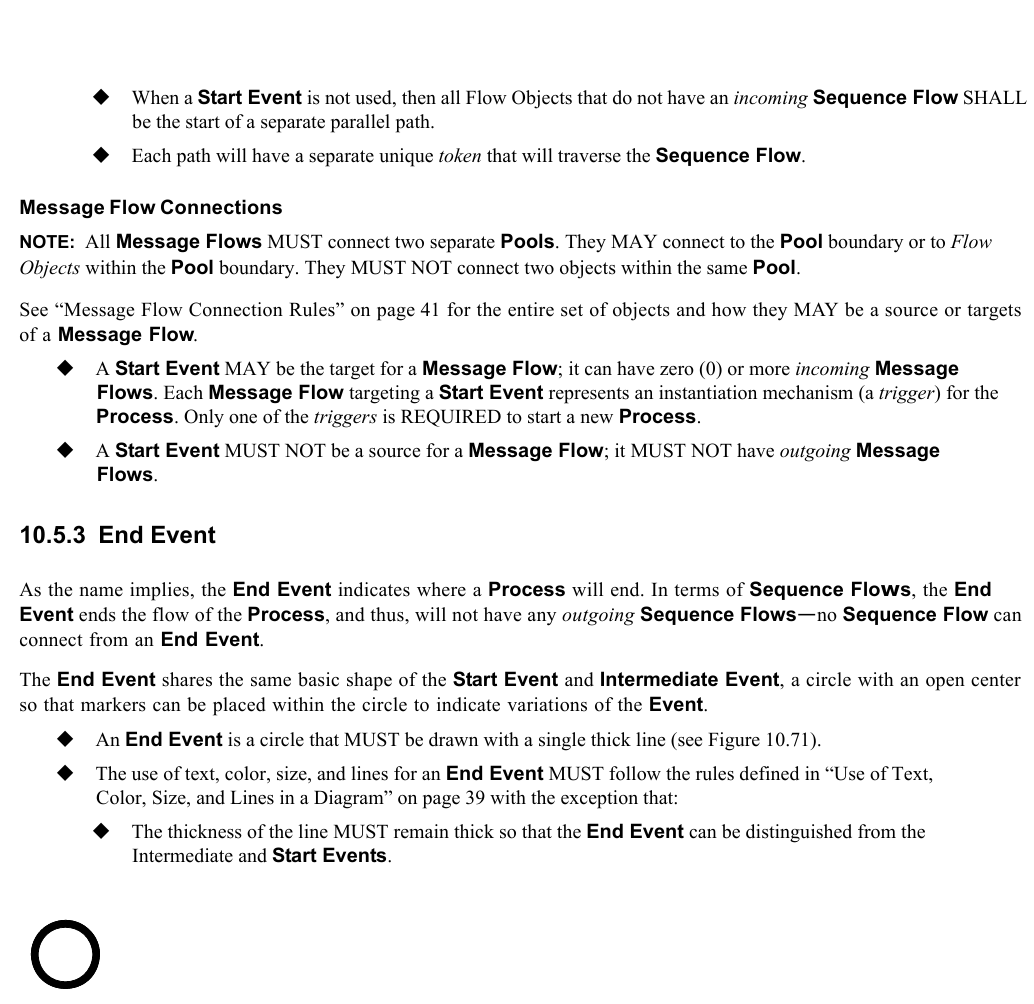
*Figure 10.71 – End Event* (p. 245)
To continue discussing how flow proceeds throughout the **Process**, an **End Event** consumes a *token* that had been generated from a **Start Event** within the same level of **Process**. If parallel **Sequence Flows** targets the **End Event**, then the *tokens* will be consumed as they arrive. All the *tokens* that were generated within the Process MUST be consumed by an **End Event** before the **Process** has been completed. In other circumstances, if the **Process** is a **Sub- Process**, it can be stopped prior to normal completion through interrupting **Intermediate Events** (See 10.2.2, “exception flow,” on page 274 for more details). In this situation the *tokens* will be consumed by an **Intermediate Event** attached to the boundary of the **Sub-Process**. Semantics of the **End Event** include:
- There MAY be multiple **End Events** within a single level of a **Process**.
- An **End Event** is OPTIONAL: a given **Process** level—a **Process** or an expanded **Sub-Process**—MAY (is NOT REQUIRED to) have this shape:
**NOTE:** A **Process** MAY have more than one **Process** level (i.e., it can include *Expanded* **Sub-Processes** or a **Call Activity** that call other **Processes**). The use of **Start** and **End Events** is independent for each level of the Diagram. For **Processes** without an **End Event**, a *token* entering a path-ending Flow Object will be consumed when the processing performed by the object is completed (i.e., when the path has completed), as if the *token* had then gone on to reach an **End Event**. When all *tokens* for a given *instance* of the **Process** are consumed, then the **Process** will reach a state of being completed.
#### End Event Results
There are nine types of **End Events** in **BPMN**: *None*, **Message**, **Escalation**, **Error**, **Cancel**, **Compensation**, **Signal**, **Terminate**, and **Multiple**. These types define the consequence of reaching an **End Event**. This will be referred to as the **End Event** *Result*.
**Table 10.88 – End Event Types**
| Trigger | Description | Marker |
| --- | --- | --- |
| None | The **None End Event** does not have a defined *result*. There is no specific EventDefinition subclass (see page 259) for **None End Events**. If the **End Event** has no associated EventDefinition, then the **Event** will be displayed without a marker (see the figure on the right). | |
| Message | This type of **End** indicates that a **Message** is sent to a *Participant* at the conclusion of the **Process**. See page 91 for more details on **Messages**. The actual *Participant* from which the **Message** is received can be identified by connecting the **Event** to a *Participant* using a **Message Flow** within the definitional **Collaboration** of the **Process** – see Table 10.1. | |
| Error | This type of **End** indicates that a named Error should be generated. All currently active threads in the particular **Sub-Process** are terminated as a result. The Error will be caught by a *Catch* Error Intermediate Event with the same errorCode or no errorCode which is on the boundary of the nearest enclosing parent **Activity** (hierarchically). The behavior of the **Process** is unspecified if no **Activity** in the hierarchy has such an **Error Intermediate Event**. The system executing the process can define additional *Error* handling in this case, a common one being termination of the **Process** *instance*. | |
| Escalation | This type of **End** indicates that an *Escalation* should be triggered. Other active threads are not affected by this and continue to be executed. The *Escalation* will be caught by a *Catch* **Escalation Intermediate Event** with the same escalationCode or no escalationCode which is on the boundary of the nearest enclosing parent **Activity** (hierarchically). The behavior of the **Process** is unspecified if no **Activity** in the hierarchy has such an **Escalation Intermediate Event**. | |
| Cancel | This type of **End** is used within a **Transaction Sub-Process**. It will indicate that the Transaction should be canceled and will trigger a **Cancel Intermediate Event** attached to the **Sub-Process** boundary. In addition, it will indicate that a TransactionProtocol Cancel **Message** should be sent to any Entities involved in the Transaction. | |
| Compensation | This type of **End** indicates that compensation is necessary. If an **Activity** is identified, and it was successfully completed, then that **Activity** will be compensated. The **Activity** MUST be visible from the **Compensation End Event**, i.e., one of the following MUST be true: • The **Compensation End Event** is contained in *normal flow* at the same level of **Sub-Process**. • The **Compensation End Event** is contained in a **Compensation Event Sub-Process** that is contained in the **Sub-Process** containing the **Activity**. • If no **Activity** is identified, all successfully completed **Activities** visible from the **Compensation End Event** are compensated, in reverse order of their **Sequence Flows**. Visible means one of the following: • The **Compensation End Event** is contained in *normal flow* and at the same level of **Sub-Process** as the **Activities**. • The **Compensation End Event** is contained in a **Compensation Event Sub-Process** that is contained in the **Sub-Process** containing the **Activities**. To be compensated, an **Activity** MUST have a boundary **Compensation Event** or contain a **Compensation Event Sub-Process**. | |
| Signal | This type of **End** indicates that a Signal will be broadcasted when the **End** has been reached. Note that the Signal, which is broadcast to any **Process** that can receive the Signal, can be sent across **Process** levels or **Pools**, but is not a **Message** (that has a specific *source* and *target*). The attributes of a Signal can be found on page 272. | |
| Terminate | This type of **End** indicates that all **Activities** in the **Process** should be immediately ended. This includes all *instances* of *multi-instances*. The **Process** is ended without *compensation* or *event handling*. | |
| Multiple | This means that there are multiple consequences of ending the **Process**. All of them will occur (e.g., there might be multiple **Messages** sent). There is no specific EventDefinition subclass (see page 259) for **Multiple End Events**. If the **End Event** has more than one associated EventDefinition, then the **Event** will be displayed with the **Multiple Event** marker (a pentagon—see the figure on the right). | |
#### Sequence Flow Connections
See “Sequence Flow Connections Rules” on page 40 for the entire set of objects and how they MAY be a *source* or *target*
An **End Event** MUST be a target for a **Sequence Flow**. An **End Event** MAY have multiple *incoming* **Sequence Flows**. The Flow MAY come from either alternative or parallel paths. For modeling convenience, each path MAY connect to a separate **End Event** object. The **End Event** is used as a Sink for all *tokens* that arrive at the **Event**. All *tokens* that are generated at the **Start Event** for that **Process** MUST eventually arrive at an **End Event**. The **Process** will be in a running state until all *tokens* are consumed. An **End Event** MUST NOT be a source for **Sequence Flows**; that is, there MUST NOT be *outgoing*
#### Message Flow Connections
See “Message Flow Connection Rules” on page 41 for the entire set of objects and how they MAY be a *source* or *target*
**NOTE:** All **Message Flows** MUST connect two separate **Pools**. They MAY connect to the **Pool** boundary or to *Flow Objects* within the **Pool** boundary. They MUST NOT connect two objects within the same **Pool**. An **End Event** MUST NOT be the target of a **Message Flow**; it can have no *incoming* **Message Flows**. An **End Event** MAY be the source of a **Message Flow**; it can have zero (0) or more *outgoing* **Message Flows**. Each **Message Flow** leaving the **End Event** will have a **Message** sent when the **Event** is triggered.
### 10.5.4 Intermediate Event
As the name implies, the **Intermediate Event** indicates where something happens (an **Event**) somewhere between the start and end of a **Process**. It will affect the flow of the **Process**, but will not start or (directly) terminate the **Process**. **Intermediate Events** can be used to:
- Show where Messages are expected or sent within the Process,
- Show delays are expected within the Process,
- Disrupt the normal flow through exception handling, or
- Show the extra work needed for compensation.
The **Intermediate Event** shares the same basic shape of the **Start Event** and **End Event**, a circle with an open center so that markers can be placed within the circle to indicate variations of the **Event**. An **Intermediate Event** is a circle that MUST be drawn with a double thin line (see Figure 10.72).
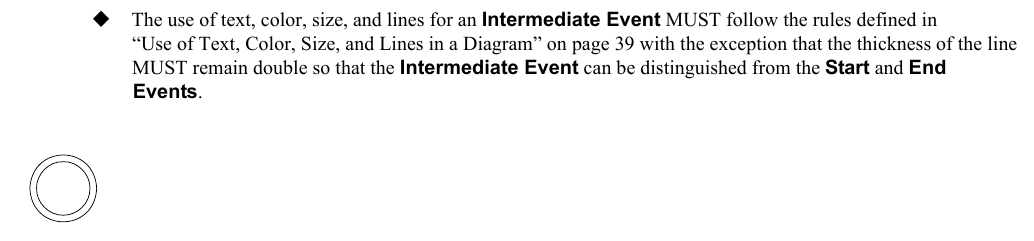
*Figure 10.72 – Intermediate Event* (p. 249)
One use of **Intermediate Events** is to represent exception or *compensation handling*. This will be shown by placing the **Intermediate Event** on the boundary of a **Task** or **Sub-Process** (either collapsed or expanded). The **Intermediate Event** can be attached to any location of the **Activity** boundary and the *outgoing* **Sequence Flows** can flow in any direction. However, in the interest of clarity of the Diagram, we RECOMMEND that the modeler choose a consistent location on the boundary. For example, if the Diagram orientation is horizontal, then the **Intermediate Events** can be attached to the bottom of the **Activity** and the **Sequence Flows** directed down, then to the right. If the Diagram orientation is vertical, then the **Intermediate Events** can be attached to the left or right side of the **Activity** and the **Sequence Flows** directed to the left or right, then down.
#### Intermediate Event Triggers
There are twelve types of **Intermediate Events** in **BPMN**: *None*, **Message**, **Timer**, **Escalation**, **Error**, **Cancel**, **Compensation**, **Conditional**, **Link**, **Signal**, **Multiple**, and **Parallel Multiple**. Each type of **Intermediate Event** will have a different icon placed in the center of the **Intermediate Event** shape to distinguish one from another. There are two ways that **Intermediate Events** are used in **BPMN**:
1. An Intermediate Event that is placed within the normal flow of a Process can be used for one of two purposes. The **Event** can respond to (“catch”) the **Event** *trigger* or the **Event** can be used to set off (“throw”) the **Event** *trigger*.
2. An Intermediate Event that is attached to the boundary of an Activity can only be used to “catch” the Event *trigger*.
#### Intermediate Events in Normal Flow
When a *token* arrives at an **Intermediate Event** that is placed within the *normal flow* of a **Process**, one of two things will happen.
- If the Event is used to “throw” the Event trigger, then trigger of the Event will immediately occur (e.g., the **Message** will be sent) and the *token* will move down the *outgoing* **Sequence Flow**.
- If the Event is used to “catch” the Event trigger, then the token will remain at the Event until the trigger occurs (e.g., the **Message** is received). Then the *token* will move down the *outgoing* **Sequence Flow**.
Ten of the twelve **Intermediate Events** can be used in *normal flow* as shown in Table 10.89.
**Table 10.89 – Intermediate Event Types in Normal Flow**
| Trigger | Description | Marker |
| --- | --- | --- |
| None | The **None Intermediate Event** is only valid in *normal flow*, i.e., it MAY NOT be used on the boundary of an **Activity**. Although there is no specific *trigger* for this **Event**, it is defined as *throw* **Event**. It is used for modeling methodologies that use **Events** to indicate some change of state in the **Process**. There is no specific EventDefinition subclass (see page 259) for **None Intermediate Events**. If the (throw) **Intermediate Event** has no associated EventDefinition, then the **Event** MUST be displayed without a marker (see the figure on the right). | ***Throw*** |
| Message | A **Message Intermediate Event** can be used to either send a **Message** or receive a **Message**. When used to “throw” the **Message**, the **Event** marker MUST be filled (see the upper figure on the right). When used to “catch” the **Message**, then the **Event** marker MUST be unfilled (see the lower figure on the right). This causes the **Process** to continue if it was waiting for the **Message**, or changes the flow for *exception handling*. The actual *Participant* from which the **Message** is received can be identified by connecting the **Event** to a *Participant* using a **Message Flow** within the *definitional* **Collaboration** of the **Process** – see Table 10.1. See page 91 for more details on **Messages**. | ***Throw*** ***Catch*** |
| Timer | In *normal flow* the **Timer Intermediate Event** acts as a delay mechanism based on a specific time-date or a specific cycle (e.g., every Monday at 9am) can be set that will trigger the **Event**. This **Event** MUST be displayed with a clock marker (see the figure on the right). | ***Catch*** |
| Escalation | In *normal flow*, the Escalation **Intermediate Event** raises an Escalation. Since this is a *Throw* **Event**, the arrowhead marker will be filled (see the figure to the right). | ***Throw*** |
| Compensation | In *normal flow*, this **Intermediate Event** indicates that *compensation* is necessary. Thus, it is used to "throw" the **Compensation Event**, and the **Event** marker MUST be filled (see figure on the right). If an **Activity** is identified, and it was successfully completed, then that **Activity** will be compensated. The **Activity** MUST be visible from the **Compensation Intermediate Event**, i.e., one of the following MUST be true: • The **Compensation Intermediate Event** is contained in *normal flow* at the same level of **Sub-Process**. • The **Compensation Intermediate Event** is contained in a **Compensation Event Sub-Process** which is contained in the **Sub- Process** containing the **Activity**. If no **Activity** is identified, all successfully completed **Activities** visible from the **Compensation Intermediate Event** are compensated, in reverse order of their **Sequence Flows**. Visible means one of the following: • The **Compensation Intermediate Event** is contained in *normal flow* and at the same level of **Sub-Process** as the **Activities**. • The **Compensation Intermediate Event** is contained in a **Compensation Event Sub-Process** which is contained in the **Sub- Process** containing the **Activities**. To be compensated, an **Activity** MUST have a *boundary* **Compensation Event**, or contain a **Compensation Event Sub-Process**. | ***Throw*** |
| Conditional | This type of **Event** is triggered when a condition becomes *true*. A condition is a type of Expression. The attributes of an Expression can be found on page 82. | ***Catch*** |
| Link | The **Link Intermediate Events** are only valid in *normal flow*, i.e., they MAY NOT be used on the boundary of an **Activity**. A **Link** is a mechanism for connecting two sections of a **Process**. **Link Events** can be used to create looping situations or to avoid long **Sequence Flow** lines. **Link Event** uses are limited to a single **Process** level (i.e., they cannot link a *parent* **Process** with a **Sub-Process**). Paired **Intermediate Events** can also be used as “Off-Page Connectors” for printing a **Process** across multiple pages. They can also be used as generic “Go To” objects within the **Process** level. There can be multiple *source* **Link Events**, but there can only be one *target* **Link Event**. When used to “throw” to the *target* **Link**, the **Event** marker will be filled (see the top figure on the right). When used to “catch” from the *source* **Link**, the **Event** marker will be unfilled (see the bottom figure on the right). | ***Throw*** ***Catch*** |
| Signal | This type of **Event** is used for sending or receiving Signals. A Signal is for general communication within and across **Process** levels, across **Pools**, and between **Business Process Diagrams**. A **BPMN** Signal is similar to a signal flare that shot into the sky for anyone who might be interested to notice and then react. Thus, there is a source of the Signal, but no specific intended target. This type of **Intermediate Event** can send or receive a Signal if the **Event** is part of a *normal flow*. The **Event** can only receive a Signal when attached to the boundary of an **Activity**. The **Signal Event** differs from an **Error Event** in that the Signal defines a more general, non-error condition for interrupting **Activities** (such as the successful completion of another **Activity**) as well as having a larger scope than **Error Events**. When used to “catch” the Signal, the **Event** marker will be unfilled (see the middle figure on the right). When used to “throw” the Signal, the **Event** marker will be filled (see the top figure on the right). The attributes of a Signal can be found on page 272. | ***Throw*** ***Catch*** |
| Multiple | This means that there are multiple *triggers* assigned to the **Event**. If used within *normal flow*, the **Event** can “catch” the *trigger* or “throw” the *trig- gers*. When attached to the boundary of an **Activity**, the **Event** can only “catch” the *trigger*. When used to “catch” the *trigger*, only one of the assigned *triggers* is REQUIRED and the **Event** marker will be unfilled (see the middle figure on the right). When used to “throw” the *trigger* (the same as a **Multiple End Event**), all the assigned *triggers* will be thrown and the **Event** marker will be filled (see the top figure on the right). There is no specific EventDefinition subclass (see page 259) for **Multiple Intermediate Events**. If the **Intermediate Event** has more than one associated EventDefinition, then the **Event** will be displayed with the **Multiple Event** marker. | ***Throw*** ***Catch*** |
| Parallel Multiple | This means that there are multiple *triggers* assigned to the **Event**. If used within *normal flow*, the **Event** can only “catch” the *trigger*. When attached to the boundary of an **Activity**, the **Event** can only “catch” the *trigger*. Unlike the normal **Multiple Intermediate Event**, all of the assigned *triggers* are REQUIRED for the **Event** to be triggered. The **Event** marker will be an unfilled plus sign (see the figure on the right). There is no specific EventDefinition subclass (see page 259) for **Parallel Multiple Intermediate Events**. If the **Intermediate Event** has more than one associated EventDefinition and the parallelMultiple attribute of the **Intermediate Event** is *true*, then the **Event** will be displayed with the **Parallel Multiple Event** marker. | ***Catch*** |
#### Intermediate Events Attached to an Activity Boundary
Table 10.90 describes the **Intermediate Events** that can be attached to the boundary of an **Activity**.
**Table 10.90 – Intermediate Event Types Attached to an Activity Boundary**
| Trigger | Description | Marker |
| --- | --- | --- |
| Message | A **Message** arrives from a participant and triggers the **Event**. If a **Message Event** is attached to the boundary of an **Activity**, it will change the *normal flow* into an *exception flow* upon being triggered. For a **Message Event** that interrupts the **Activity** to which it is attached, the boundary of the **Event** is solid (see upper figure on the right). Note that if using this notation, the attribute cancelActivity of the **Activity** to which the **Event** is attached is implicitly set to *true*. For a **Message Event** that does not interrupt the **Activity** to which it is attached, the boundary of the **Event** is dashed (see lower figure on the right). Note that if using this notation, the attribute cancelActivity of the **Activity** to which the **Event** is attached is implicitly set to *false*. The actual *Participant* from which the **Message** is received can be identified by connecting the **Event** to a *Participant* using a **Message Flow** within the definitional **Collaboration** of the **Process** – see Table 10.1. | ***Interrupting*** ***Non-*** ***Interrupting*** |
| Timer | A specific time-date or a specific cycle (e.g., every Monday at 9am) can be set that will trigger the **Event**. If a **Timer Event** is attached to the boundary of an **Activity**, it will change the *normal flow* into an *exception flow* upon being triggered. For a **Timer Event** that interrupts the **Activity** to which it is attached, the boundary of the **Event** is solid (see upper figure on the right). Note that if using this notation, the attribute cancelActivity of the **Activity** to which the **Event** is attached is implicitly set to *true*. For a **Timer Event** that does not interrupt the **Activity** to which it is attached, the boundary of the **Event** is dashed (see lower figure on the right). Note that if using this notation, the attribute cancelActivity of the **Activity** to which the **Event** is attached is implicitly set to *false*. | ***Interrupting*** ***Non-*** ***Interrupting*** |
| Escalation | This type of **Event** is used for handling a named Escalation. If attached to the boundary of an **Activity**, the **Intermediate Event** catches an Escalation. In contrast to an Error, an Escalation by default is assumed to not abort the **Activity** to which the *boundary* **Event** is attached. However, a modeler can decide to override this setting by using the notation described in the following: • For an **Escalation Event** that interrupts the **Activity** to which it is attached, the boundary of the **Event** is solid (see upper figure on the right). Note that if using this notation, the attribute cancelActivity of the **Activity** to which the **Event** is attached is implicitly set to *true*. • For an **Escalation Event** that does not interrupt the **Activity** to which it is attached, the boundary of the **Event** is dashed (see lower figure on the right). Note that if using this notation, the attribute cancelActivity of the **Activity** to which the **Event** is attached is implicitly set to *false*. | ***Interrupting*** ***Non-*** ***Interrupting*** |
| Error | A *catch* **Intermediate Error Event** can only be attached to the boundary of an **Activity**, i.e., it MAY NOT be used in *normal flow*. If used in this context, it reacts to (catches) a named Error, or to any Error if a name is not specified. Note that an **Error Event** always interrupts the **Activity** to which it is attached, i.e., there is not a non-interrupting version of this **Event**. The boundary of the **Event** thus always solid (see figure on the right). | ***Interrupting*** |
| Cancel | This type of **Intermediate Event** is used within a **Transaction Sub- Process**. This type of Event MUST be attached to the boundary of a **Sub- Process**. It SHALL be triggered if a **Cancel End Event** is reached within the **Transaction Sub-Process**. It also SHALL be triggered if a TransactionProtocol “Cancel” **Message** has been received while the *transaction* is being performed. Note that a **Cancel Event** always interrupts the **Activity** to which it is attached, i.e., there is not a non-interrupting version of this **Event**. The boundary of the **Event** thus always solid (see figure on the right). | ***Interrupting*** |
| Compensation | When attached to the boundary of an **Activity**, this **Event** is used to "catch" the **Compensation Event**, thus the **Event** marker MUST be unfilled (see figure on the right). The **Event** will be triggered by a thrown *compensation* targeting that **Activity**. When the **Event** is triggered, the **Compensation Activity** that is associated to the **Event** will be performed (see page 301). Note that the interrupting a non-interrupting aspect of other **Events** does not apply in the case of a **Compensation Event**. *Compensations* can only be triggered after completion of the **Activity** to which they are attached. Thus they cannot interrupt the **Activity**. The boundary of the **Event** is always solid. | |
| Conditional | This type of **Event** is triggered when a condition becomes *true*. A condition is a type of Expression. The attributes of an Expression can be found page 82. If a **Conditional Event** is attached to the boundary of an **Activity**, it will change the *normal flow* into an *exception flow* upon being triggered. For a **Conditional Event** that interrupts the **Activity** to which it is attached, the boundary of the **Event** is solid (see upper figure on the right). Note that if using this notation, the attribute cancelActivity of the **Activity** to which the **Event** is attached is implicitly set to *true*. For a **Conditional Event** that does not interrupt the **Activity** to which it is attached, the boundary of the **Event** is dashed (see lower figure on the right). Note that if using this notation, the attribute cancelActivity of the **Activity** to which the **Event** is attached is implicitly set to *false*. | ***Interrupting*** ***Non-*** ***Interrupting*** |
| Signal | The **Signal Event** can receive a Signal when attached to the boundary of an **Activity**. In this context, it will change the *normal flow* into an *excep- tion flow* upon being triggered. The **Signal Event** differs from an **Error Event** in that the Signal defines a more general, non-error condition for interrupting **Activities** (such as the successful completion of another **Activity**) as well as having a larger scope than **Error Events**. When used to “catch” the Signal, the **Event** marker will be unfilled. The attributes of a Signal can be found on page 272. For a **Signal Event** that interrupts the **Activity** to which it is attached, the boundary of the **Event** is solid (see upper figure on the right). Note that if using this notation, the attribute cancelActivity of the **Activity** to which the **Event** is attached is implicitly set to *true*. For a **Signal Event** that does not interrupt the **Activity** to which it is attached, the boundary of the **Event** is dashed (see lower figure on the right). Note that if using this notation, the attribute cancelActivity of the **Activity** to which the **Event** is attached is implicitly set to *false*. | ***Interrupting*** ***Non-*** ***Interrupting*** |
| Multiple | A **Multiple Event** indicates that there are multiple *triggers* assigned to the **Event**. When attached to the boundary of an Activity, the **Event** can only “catch” the *trigger*. In this case, only one of the assigned *triggers* is REQUIRED and the **Event** marker will be unfilled upon being triggered, the **Event** that occurred will change the *normal flow* into an *exception flow*. There is no specific EventDefinition subclass (see page 259) for **Multiple Intermediate Events**. If the **Intermediate Event** has more than one associated EventDefinition, then the **Event** will be displayed with the **Multiple Event** marker. For a **Multiple Event** that interrupts the **Activity** to which it is attached, the boundary of the **Event** is solid (see upper figure on the right). Note that if using this notation, the attribute cancelActivity of the **Activity** to which the **Event** is attached is implicitly set to *true*. For a **Multiple Event** that does not interrupt the **Activity** to which it is attached, the boundary of the **Event** is dashed (see lower figure on the right). Note that if using this notation, the attribute cancelActivity of the **Activity** to which the **Event** is attached is implicitly set to *false*. | ***Interrupting*** ***Non-*** ***Interrupting*** |
| Parallel | This means that there are multiple *triggers* assigned to the **Event**. When | ***Interrupting*** |
| Multiple | attached to the boundary of an **Activity**, the **Event** can only “catch” the *trigger*. Unlike the normal **Multiple Intermediate Event**, all of the assigned *triggers* are REQUIRED for the **Event** to be triggered. The **Event** marker will be an unfilled plus sign (see the figures on the right). There is no specific EventDefinition subclass (see page 259) for **Parallel Multiple Intermediate Events**. If the **Intermediate Event** has more than one associated EventDefinition and the parallelMultiple attribute of the **Intermediate Event** is *true*, then the **Event** will be displayed with the **Parallel Multiple Event** marker. For a **Parallel Multiple Event** that interrupts the **Activity** to which it is attached, the boundary of the **Event** is solid (see the upper figure to the right). Note that if using this notation, the attribute cancelActivity of the **Activity** to which the **Event** is attached is implicitly set to *true*. For a **Parallel Multiple Event** that does not interrupt the **Activity** to which it is attached, the boundary of the **Event** is dashed (see the lower figure to the right). Note that if using this notation, the attribute cancelActivity of the **Activity** to which the **Event** is attached is implicitly set to *false*. | ***Non-*** ***Interrupting*** |
#### Attributes for Boundary Events
For boundary **Events**, the following additional attributes exists:
- The BoundaryEvent element inherits the attributes and model associations of CatchEvent (see Table 8.44). Table 8.46 presents the additional attributes and model associations of the Boundary Event element.
**Table 10.91 – Boundary Event attributes**
| Attribute Name | Description/Usage |
| --- | --- |
| **attachedTo**: Activity | Denotes the **Activity** that boundary **Event** is attached to. |
| **cancelActivity:** boolean | Denotes whether the **Activity** should be canceled or not, i.e., whether the *boundary catch* **Event** acts as an Error or an Escalation. If the **Activity** is not canceled, multiple *instances* of that handler can run concurrently. This attribute cannot be applied to **Error Events** (where it’s always *true*), or **Compensation Events** (where it doesn’t apply). |
Table 10.92 specifies whether the cancel **Activity** attribute can be set on a boundary **Event** depending on the
**Table 10.92 – Possible Values of the cancelActivity Attribute**
| Trigger | Possible Values for the cancelActivity Attribute |
| --- | --- |
| None | N/A as this event cannot be attached to the **Activity** border. |
| Message | *True*/*false* |
| Timer | *True*/*false* |
| Escalation | *True*/*false* |
| Error | *True* |
| Cancel | *True* |
| Compensation | N/A as the scope was already executed and can no longer be canceled when *compensation* is triggered. |
| Conditional | *True*/*false* |
| Signal | *True*/*false* |
| Multiple | *True*/*false* if all **Event** *triggers* allow this option (see this table for details). Otherwise the more restrictive option, i.e., Yes in case any Error or cancel *triggers* are used. |
#### Activity Boundary Connections
An **Intermediate Event** can be attached to the boundary of an **Activity** under the following conditions:
- (One or more) **Intermediate Events** MAY be attached directly to the boundary of an **Activity**.
- An **Intermediate Event** with a Cancel *trigger* MAY be attached to a **Sub-Process** boundary only if the Transaction attribute of the **Sub-Process** is set to *true*.
#### Sequence Flow Connections
See “Sequence Flow Connections Rules” on page 40 for the entire set of objects and how they MAY be a *source* or *target*
If the **Intermediate Event** is attached to the boundary of an **Activity**:
- The **Intermediate Events** with the following *triggers* (EventDefinition) MAY be used in *normal flow*: ParallelMultiple. Thus, the following MUST NOT: Cancel and Error.
**NOTE:** This is a change from **BPMN 1.2** semantics, which allowed some **Intermediate Events** to not have an *incoming*
**NOTE:** If the **Event** has multiple *incoming* **Sequence Flows**, then this is considered *uncontrolled flow*. This means that when a *token* arrives from one of the Paths, the **Event** will be enabled (to *catch* or *throw*). It will not wait for the arrival of *tokens* from the other paths. If another *token* arrives from the same path or another path, then a separate *instance* of the **Event** will be created. If the flow needs to be controlled, then the flow should converge with a **Gateway** that precedes the **Event** (see page 286 for more information on **Gateways**). An **Intermediate Event** MUST be a source for a **Sequence Flow**. Multiple **Sequence Flows** MAY originate from an **Intermediate Event**. For each **Sequence Flow** that has the **Intermediate Event** as a source, a new parallel path SHALL be generated.
A **Link Intermediate Event** MUST NOT be both a *target* and a *source* of a **Sequence Flow**. To define the use of a **Link Intermediate Event** as an “Off-Page Connector” or a “Go To” object:
- A **Link Intermediate Event** MAY be the target (*target* **Link**) or a source (*source* **Link**) of a **Sequence Flow**, but MUST NOT be both a *target* and a *source*.
#### Message Flow Connections
See “Message Flow Connection Rules” on page 41 for the entire set of objects and how they MAY be a *source* or *target*
**NOTE:** All **Message Flows** MUST connect two separate **Pools**. They MAY connect to the **Pool** boundary or to Flow Objects within the **Pool** boundary. They MUST NOT connect two objects within the same **Pool**. A **Message Intermediate Event** MAY be the *target* for a **Message Flow**; it can have one *incoming* A **Message Intermediate Event** MAY be a *source* for a **Message Flow**; it can have one *outgoing* A **Message Intermediate Event** MAY have an *incoming* **Message Flow** or an *outgoing* **Message Flow**, but not both.
### 10.5.5 Event Definitions
Event Definitions refers to the *triggers* of *Catch* **Events (Start** and *receive* **Intermediate Events**) and the Results of *Throw* **Events** (**End Events** and *send* **Intermediate Events**). The types of **Event** Definitions are:
TimerEventDefinition (see Table 10.93). A **None Event** is determined by an **Event** that does not specify an **Event** Definition. A **Multiple Event** is determined by an **Event** that specifies more than one **Event** Definition. The different types of **Events (Start, End,** and **Intermediate**) utilize a subset of the available types of **Event** Definitions.
**Table 10.93 – Types of Events and their Markers**
| Types | Start | Intermediate | End |
| --- | --- | --- | --- |
| Top- Event | Event Catching Boundary | Boundary Throwing | |
| Level Sub-Process | Sub-Process *Interrupting* | *Non-* | |
| *Interrupting* | *Non- Interrupting* | *Interrupting* | |
| None Message Timer Error Escalation Cancel **Types** | **Start** | **Intermediate** | **End** |
| Top- Event | Event Catching Boundary | Boundary Throwing | |
| Level Sub-Process | Sub-Process *Interrupting* | *Non-* | |
| *Interrupting* | *Non- Interrupting* | *Interrupting* | |
| Compensation Conditional Link Signal Terminate Multiple Parallel Multiple | | | |
The following sub clauses will present the attributes common to all **Event** Definitions and the specific attributes for the **Event** Definitions that have additional attributes. Note that the Cancel and Terminate **Event** Definitions do not have additional attributes.
#### Event Definition Metamodel
Figure 10.73 shows the class diagram for the abstract class EventDefinition. When one of the EventDefinition sub-types (e.g., TimerEventDefinition) is defined it is contained in Definitions, or a contained EventDefinition contained in a *throw*/*catch* **Event**.
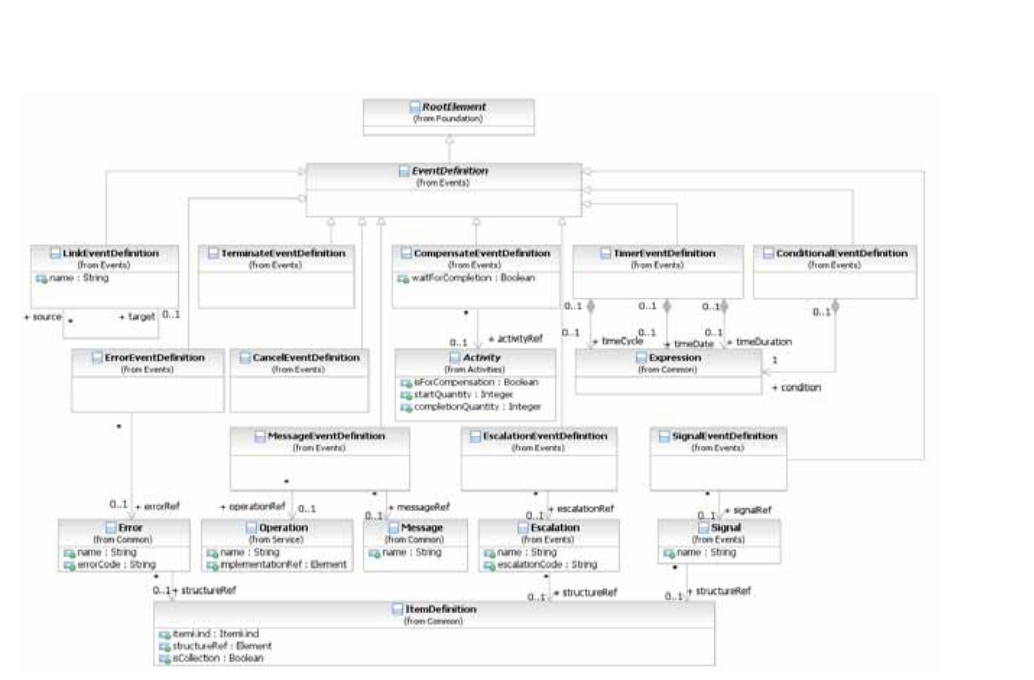
*Figure 10.73 – EventDefinition Class Diagram* (p. 261)
The EventDefinition element inherits the attributes and model associations of BaseElement (see Table 8.5) through its relationship to RootElement, but does not contain any additional attributes or model associations.
comprise of attributes to carry data. The data is defined as part of the **Events** package. The MessageEventDefinition subclass comprises of an attribute that refers to a **Message** which is defined as part of the **Collaboration** package. The following sub clauses will present the sub-types of EventDefinitions.
#### Cancel Event
**Cancel Events** are only used in the context of modeling **Transaction Sub-Processes** (see page 176 for more details on *Transactions*). There are two variations: a *catch* **Intermediate Event** and an **End Event**. The *catch* **Cancel Intermediate Event** MUST only be attached to the boundary of a **Transaction Sub- Process** and, thus, MAY NOT be used in *normal flow*. The **Cancel End Event** MUST only be used within a **Transaction Sub-Process** and, thus, MAY NOT be used in any other type of **Sub-Process** or **Process**. Figure 10.74 shows the variations of **Cancel Events**.

*Figure 10.74 – Cancel Events* (p. 262)
The CancelEventDefinition element inherits the attributes and model associations of BaseElement (see Table 8.5) through its relationship to the EventDefinition element (see page 259).
#### Compensation Event
**Compensation Events** are used in the context of triggering or handling *compensation* (see page 301 for more details on *compensation*). There are four variations: a **Start Event**, both a *catch* and *throw* **Intermediate Event**, and an **End**
The **Compensation Start Event** MAY NOT be used for a *top-level* **Process**. The **Compensation Start Event** MAY be used for an **Event Sub-Process**. The *catch* **Compensation Intermediate Event** MUST only be attached to the boundary of an **Activity** and, thus, MAY NOT be used in *normal flow*. The *throw* **Compensation Intermediate Event** MAY be used in *normal flow*. The **Compensation End Event** MAY be used within any **Sub-Process** or **Process**. Figure 10.75 shows the variations of **Compensation Events**.
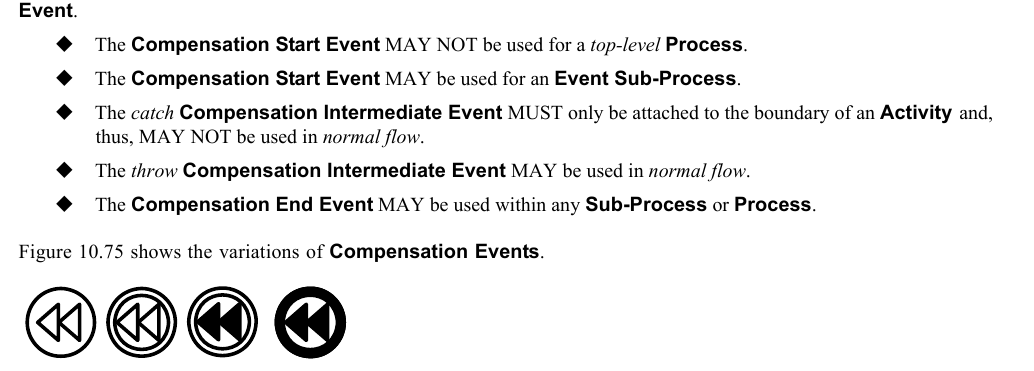
*Figure 10.75 – Compensation Events* (p. 262)
Figure 10.76 displays the class diagram for the CompensationEventDefinition.
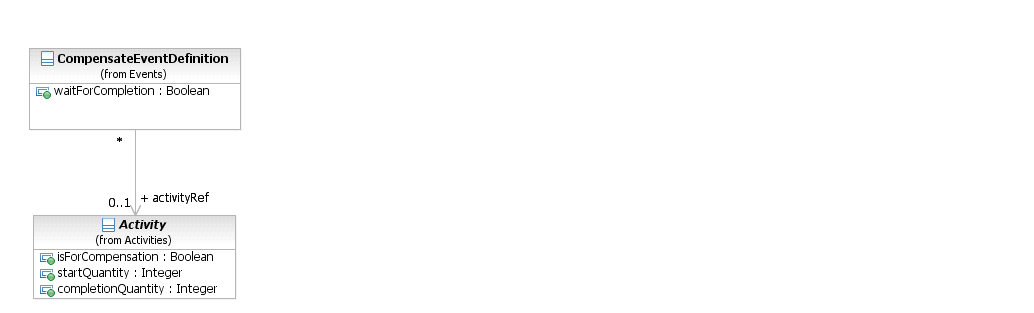
*Figure 10.76 – CompensationEventDefinition Class Diagram* (p. 262)
The CompensationEventDefinition element inherits the attributes and model associations of BaseElement (see Table 8.5) through its relationship to the EventDefinition element (see page 259). Table 10.94 presents the additional attributes and model associations of the CompensationEventDefinition element.
**Table 10.94 – CompensationEventDefinition attributes and model associations**
| Attribute Name | Description/Usage |
| --- | --- |
| **activityRef**: Activity [0..1] | For a **Start Event**: This **Event** “catches” the *compensation* for an **Event Sub-Process**. No further information is REQUIRED. The **Event Sub-Process** will provide the Id necessary to match the **Compensation Event** with the **Event** that *threw* the *compensation*, or the *compensation* will have been a broadcast. For an **End Event**: The **Activity** to be compensated MAY be supplied. If an **Activity** is not supplied, then the *compensation* is broadcast to all completed **Activities** in the current **Sub- Process** (if present), or the entire **Process** *instance* (if at the global level). For an **Intermediate Event** within *normal flow*: The **Activity** to be compensated MAY be supplied. If an **Activity** is not supplied, then the *compensation* is broadcast to all completed **Activities** in the current **Sub- Process** (if present), or the entire **Process** *instance* (if at the global level). This “throws” the *compensation*. For an **Intermediate Event** attached to the boundary of an **Activity**: This Event “catches” the *compensation*. No further information is REQUIRED. The **Activity** the **Event** is attached to will provide the Id necessary to match the **Compensation Event** with the **Event** that *threw* the *compensation*, or the *compensation* will have been a broadcast. |
| **waitForCompletion**: boolean = true | For a *throw* **Compensation Event**, this flag determines whether the *throw* **Intermediate Event** waits for the triggered *compensation* to complete (the default), or just triggers the *compensation* and immediately continues (the BPMN 1.2 behavior). |
#### Conditional Event
Figure 10.77 shows the variations of **Conditional Events**.

*Figure 10.77 – Conditional Events* (p. 263)
The ConditionalEventDefinition element inherits the attributes and model associations of BaseElement (see Table 8.5) through its relationship to the EventDefinition element (see page 259). Table 10.95 presents the additional model associations of the ConditionalEventDefinition element. Figure 10.78 displays the class diagram for the ConditionalEventDefinition.
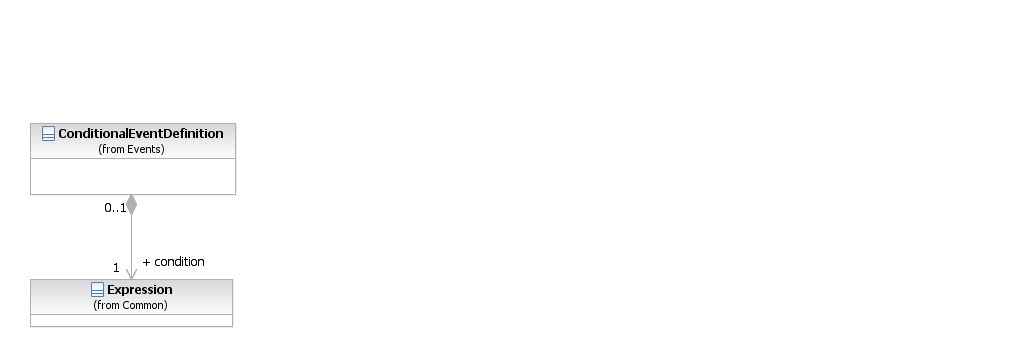
*Figure 10.78 – ConditionalEventDefinition Class Diagram* (p. 264)
The ConditionalEventDefinition element inherits the attributes and model associations of BaseElement (see Table 8.5) through its relationship to the EventDefinition element (see page 259). Table 10.95 presents the additional model associations of the ConditionalEventDefinition element.
**Table 10.95 – ConditionalEventDefinition model associations**
| Attribute Name | Description/Usage |
| --- | --- |
| **condition**: Expression | The Expression might be underspecified and provided in the form of natural language. For executable **Processes** (isExecutable = true), if the *trigger* is Conditional, then a FormalExpression MUST be entered. |
#### Error Event
Figure 10.79 shows the variations of **Conditional Events**.

*Figure 10.79 – Error Events* (p. 264)
Figure 10.80 displays the class diagram for the ErrorEventDefinition.
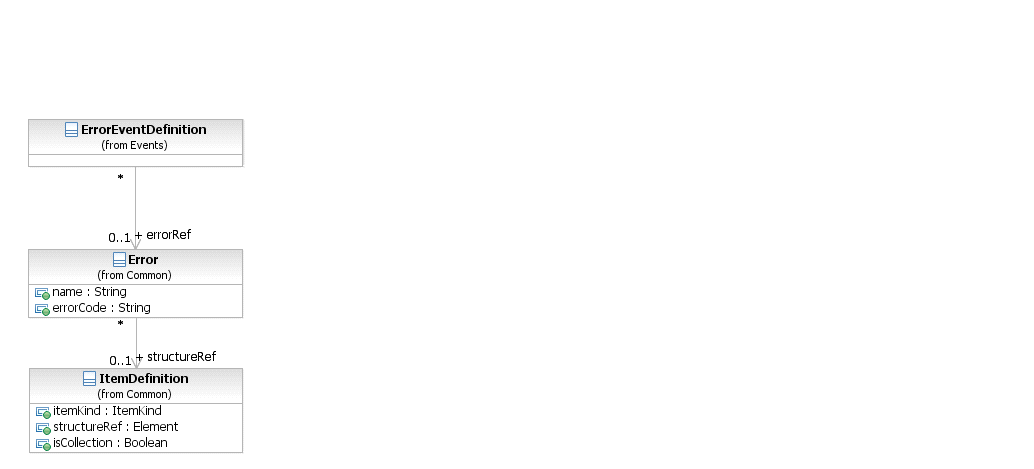
*Figure 10.80 – ErrorEventDefinition Class Diagram* (p. 265)
The ErrorEventDefinition element inherits the attributes and model associations of BaseElement (see Table 8.5) through its relationship to the EventDefinition element (see page 259). Table 10.96 presents the additional attributes and model associations of the ErrorEventDefinition element.
**Table 10.96 – ErrorEventDefinition attributes and model associations**
| Attribute Name | Description/Usage |
| --- | --- |
| **error**: Error [0..1] | If the *trigger* is an Error, then an Error payload MAY be provided. |
#### Escalation Event Definition
Figure 10.81 shows the variations of **Escalation Events**.

*Figure 10.81 – Escalation Events* (p. 265)
Figure 10.82 displays the class diagram for the EscalationEventDefinition.
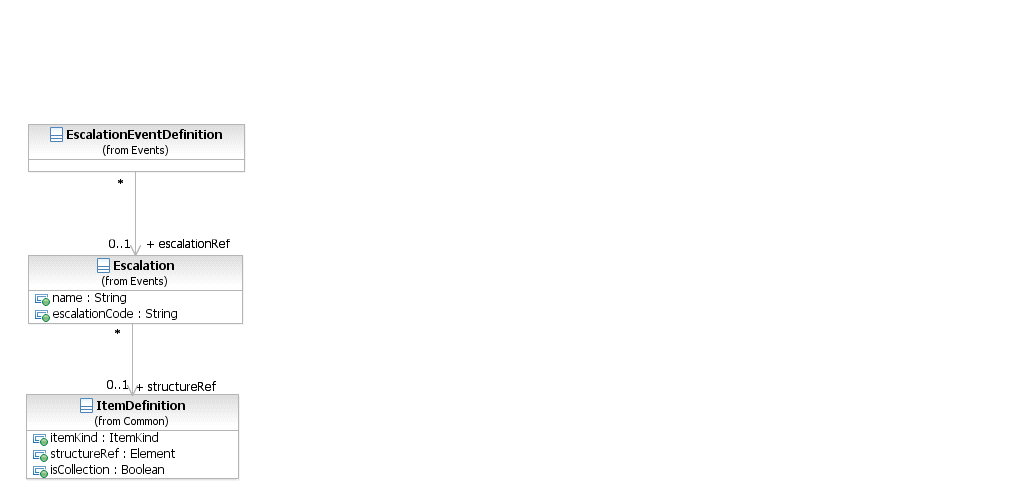
*Figure 10.82 – EscalationEventDefinition Class Diagram* (p. 266)
The EscalationEventDefinition element inherits the attributes and model associations of BaseElement (see Table 8.5) through its relationship to the EventDefinition element (see page 259). Table 10.97 presents the additional attributes and model associations of the EscalationEventDefinition element.
**Table 10.97 – EscalationEventDefinition attributes and model associations**
| Attribute Name | Description/Usage |
| --- | --- |
| **escalationRef**: Escalation | If the *trigger* is an Escalation, then an Escalation payload MAY be |
| [0..1] | provided. |
#### Link Event Definition
A **Link Event** is a mechanism for connecting two sections of a **Process**. **Link Events** can be used to create looping situations or to avoid long **Sequence Flow** lines. The use of **Link Events** is limited to a single **Process** level (i.e., they cannot link a *parent* **Process** with a **Sub-Process**). Figure 10.83 shows the variations of **Link Events**.

*Figure 10.83 – Link Events* (p. 266)
Paired **Link Events** can also be used as “Off-Page Connectors” for printing a **Process** across multiple pages. They can also be used as generic “Go To” objects within the **Process** level. There can be multiple *source* **Link Events**, but there can only be one *target* **Link Event**. When used to “catch” from the *source* **Link**, the **Event** marker will be unfilled (see Figure 10.84: upper right). When used to “throw” to the *target* **Link**, the **Event** marker will be filled (see Figure 10.84: upper: lower Left).
Since **Process** models often extend beyond the length of one printed page, there is often a concern about showing how **Sequence Flow** connections extend across the page breaks. One solution that is often employed is the use of Off-Page connectors to show where one page leaves off and the other begins. **BPMN** provides **Intermediate Events** of type **Link** for use as Off-Page connectors (see Figure 10.84 --Note that the figure shows two different printed pages, not two **Pools** in one diagram). A pair of **Link Events** is used. One of the pair is shown at the end of one page. This **Event** is named and has an *incoming* **Sequence Flow** and no *outgoing* **Sequence Flows**. The second **Link Event** is at the beginning of the next page, shares the same name, and has an *outgoing* **Sequence Flow** and no *incoming* **Sequence Flow**.
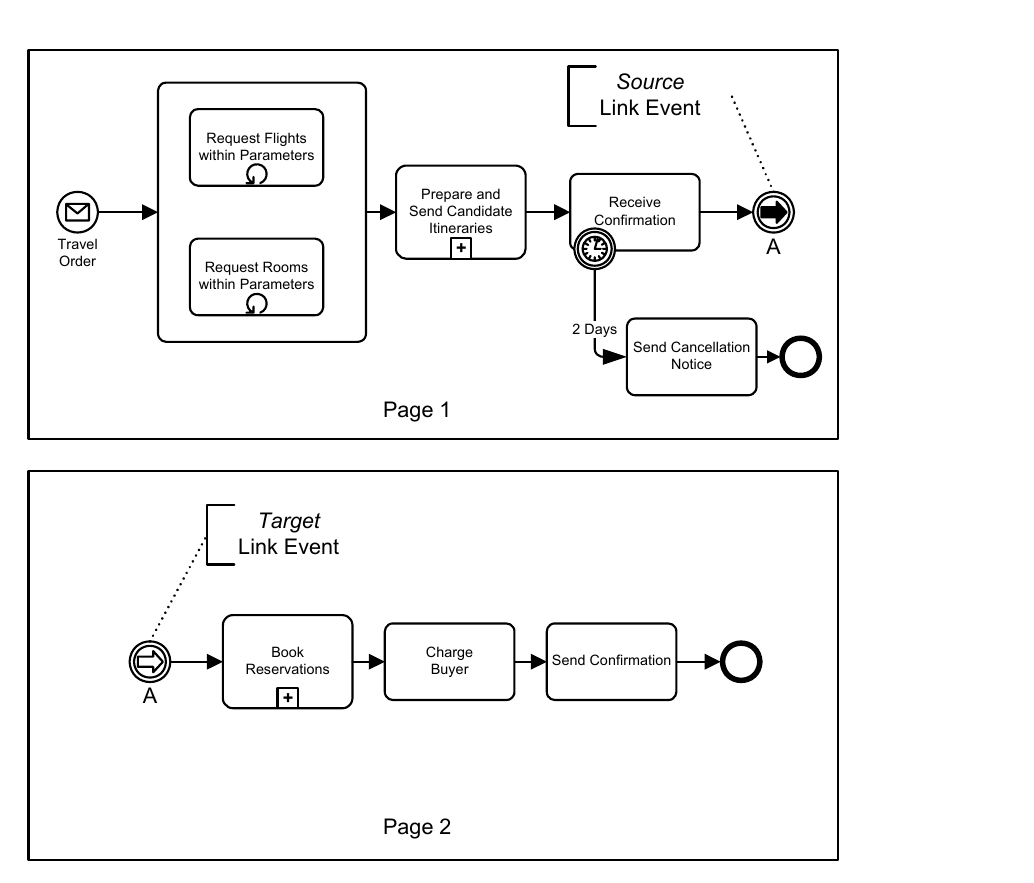
*Figure 10.84 – Link Events Used as Off-Page Connector* (p. 267)
Another way that **Link Events** can be used is as “Go To” objects. Functionally, they would work the same as for Off- Page Connectors (described above), except that they could be used anywhere in the diagram on the same page or across multiple pages. The general idea is that they provide a mechanism for reducing the length of **Sequence Flow** lines. Some modelers can consider long lines as being hard to follow or trace. Go To Objects can be used to avoid very long
**Sequence Flows** (see Figure 10.85 and Figure 10.86). Both diagrams will behave equivalently. For Figure 10.86, if the “Order Rejected” path is taken from the Decision, then the *token* traversing the **Sequence Flow** would reach the *source* **Link Event** and then “jump” to the *target* **Link Event** and continue down the **Sequence Flow**. The **Process** would continue as if the **Sequence Flow** had directly connected the two objects.
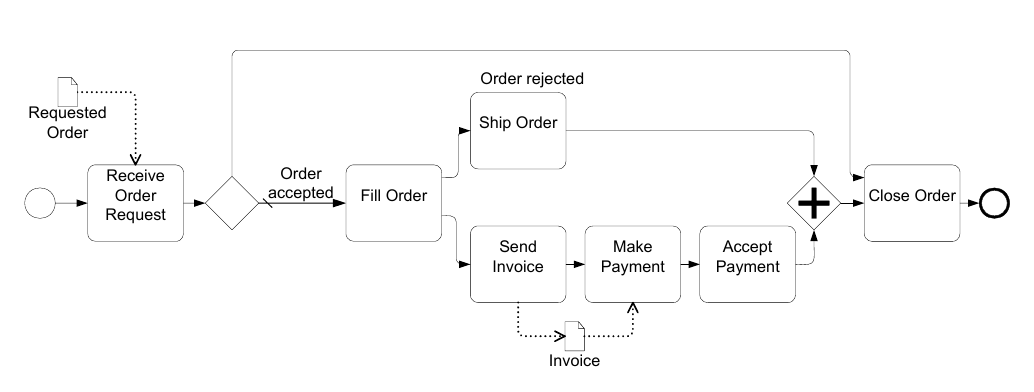
*Figure 10.85 – A Process with a long Sequence Flow* (p. 268)
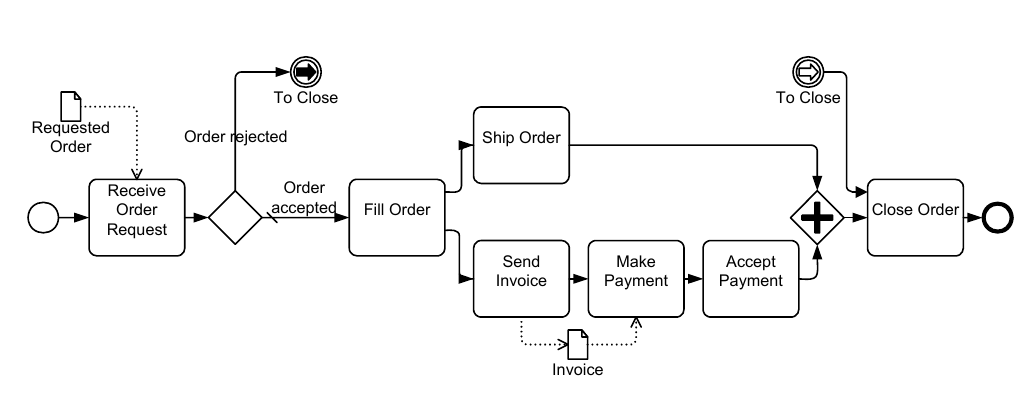
*Figure 10.86 – A Process with Link Intermediate Events used as Go To Objects* (p. 268)
Some methodologies prefer that all **Sequence Flows** only move in one direction; that is, forward in time. These methodologies do not allow **Sequence Flows** to connect directly to upstream objects. Some consistency in modeling can be gained by such a methodology, but situations that require looping become a challenge. **Link Events** can be used to make upstream connections and create *loops* without violating the **Sequence Flow** direction restriction (see Figure 10.87).
Reconfigure Reconfigure
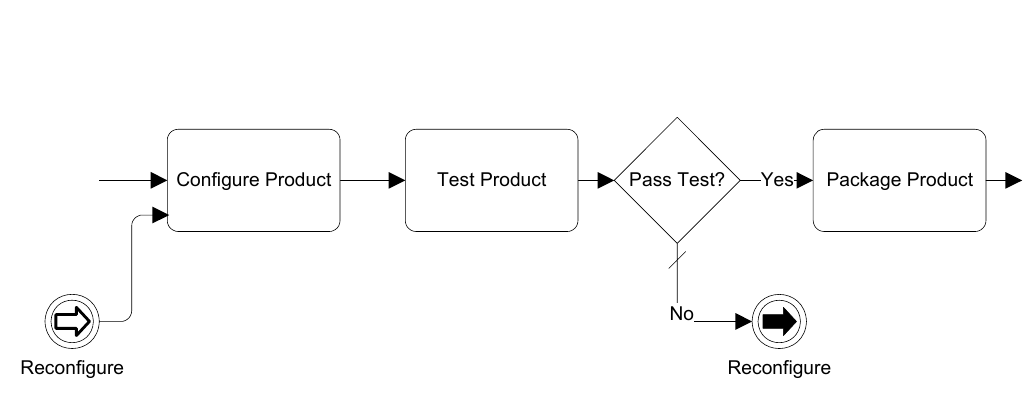
*Figure 10.87 – Link Events Used for looping* (p. 269)
The LinkEventDefinition element inherits the attributes and model associations of BaseElement (see Table 8.5) through its relationship to the EventDefinition element (see page 259). Table 10.98 presents the additional attributes
**Table 10.98 – LinkEventDefinition attributes**
| Attribute Name | Description/Usage |
| --- | --- |
| **name**: string | If the *trigger* is a *Link*, then the name MUST be entered. |
| **sources**: LinkEventDefinition [1..*] | Used to reference the corresponding 'catch' or 'target' LinkEventDefinition, when this LinkEventDefinition represents a 'throw' or 'source' LinkEventDefinition. |
| **target**: LinkEventDefinition [1] | Used to reference the corresponding 'throw' or 'source' LinkEventDefinition, when this LinkEventDefinition represents a 'catch' or 'target' LinkEventDefinition. |
#### Message Event Definition
Figure 10.88 shows the variations of **Message Events**.
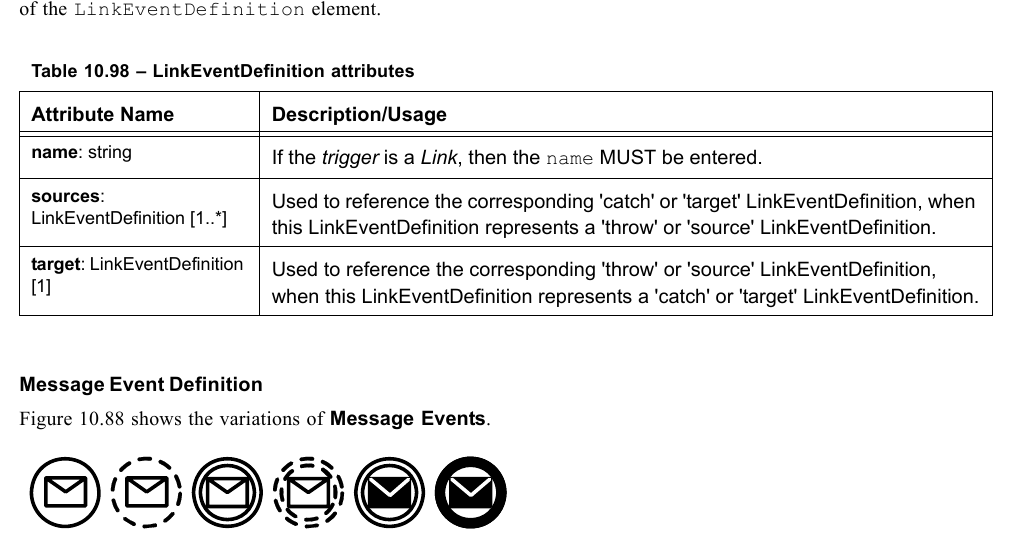
*Figure 10.88 – Message Events* (p. 269)
Figure 10.89 displays the class diagram for the MessageEventDefinition.
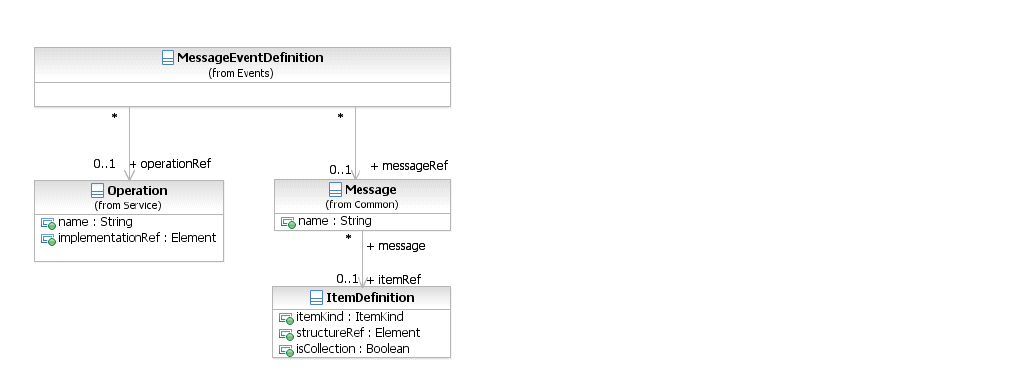
*Figure 10.89 – MessageEventDefinition Class Diagram* (p. 270)
The MessageEventDefinition element inherits the attributes and model associations of BaseElement (see Table 8.5) through its relationship to the EventDefinition element (see page 259). Table 10.99 presents the additional model associations of the MessageEventDefinition element.
**Table 10.99 – MessageEventDefinition model associations**
| Attribute Name | Description/Usage |
| --- | --- |
| **messageRef**: Message [0..1] | The **Message** MUST be supplied (if the isExecutable attribute of the **Process** is set to *true*). |
| **operationRef**: Operation [0..1] | This attribute specifies the Operation that is used by the **Message Event**. It MUST be specified for executable **Processes**. |
#### Multiple Event
If the *trigger* is Multiple, there are multiple ways of starting the **Process**. Only one of them is necessary to trigger the start of the **Process**. The EventDefinition subclasses will define which *triggers* apply
If the *Result* is Multiple, there are multiple consequences of ending the **Process**. All of them will occur. The EventDefinition subclasses will define which *Results* apply. For an **Intermediate Event** within *normal flow*: If the *trigger* is Multiple, only one EventDefinition is REQUIRED to *catch* the *trigger*. When used to *throw*, all of the EventDefinitions are considered and the subclasses will define which *Results* apply.
For an **Intermediate Event** attached to the boundary of an **Activity**: If the *trigger* is Multiple, only one EventDefinition is REQUIRED to “catch” the *trigger*. Figure 10.90 shows the variations of **Multiple Events**.

*Figure 10.90 – Multiple Events* (p. 271)
#### None Event
**None Events** are **Events** that do not have a defined EventDefinition. There are three (3) variations of **None Events**: a **Start Event**, a *catch* **Intermediate Event**, and an **End Event** (see Figure 10.91). The **None Start Event** MAY be used for a *top-level* **Process** or any type of **Sub-Process** (except an
The **None Start Event** MAY NOT be used for an **Event Sub-Process**. The *catch* **None Intermediate Event** MUST only be used in *normal flow* and, thus, MAY NOT be attached to the boundary of an **Activity**. The **None End Event** MAY be used within any **Sub-Process** or **Process**. Figure 10.91 shows the variations of **None Events**.
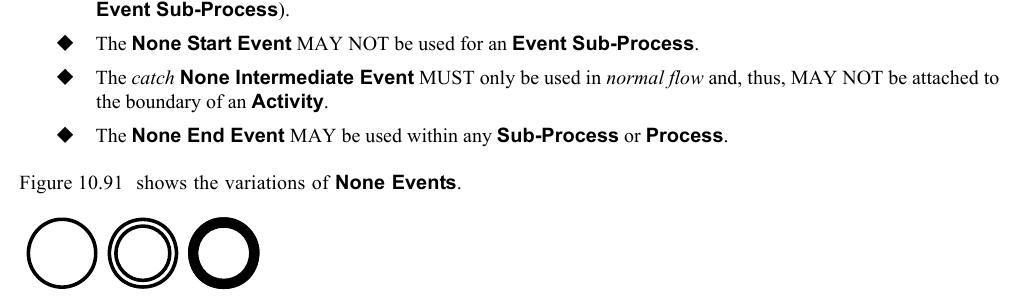
*Figure 10.91 – None Events* (p. 271)
#### Parallel Multiple Event
- If the trigger is Multiple, there are multiple triggers REQUIRED to start the Process. All of them are necessary to trigger the start of the **Process**. The EventDefinition subclasses will define which *triggers* apply. In addition, the parallelMultiple attribute of the **Start Event** MUST be set to *true*.
For an **Intermediate Event** within *normal flow*:
- If the trigger is Multiple, all of the defined EventDefinitions are REQUIRED to trigger the Event. In addition, the parallelMultiple attribute of the **Intermediate Event** MUST be set to *true*.
For an **Intermediate Event** attached to the boundary of an **Activity**:
- If the trigger is Multiple, all of the defined EventDefinitions are REQUIRED to trigger the Event. In addition, the parallelMultiple attribute of the **Intermediate Event** MUST be set to *true*.
Figure 10.92 shows the variations of **Parallel Multiple Events**.

*Figure 10.92 – Multiple Events* (p. 272)
#### Signal Event
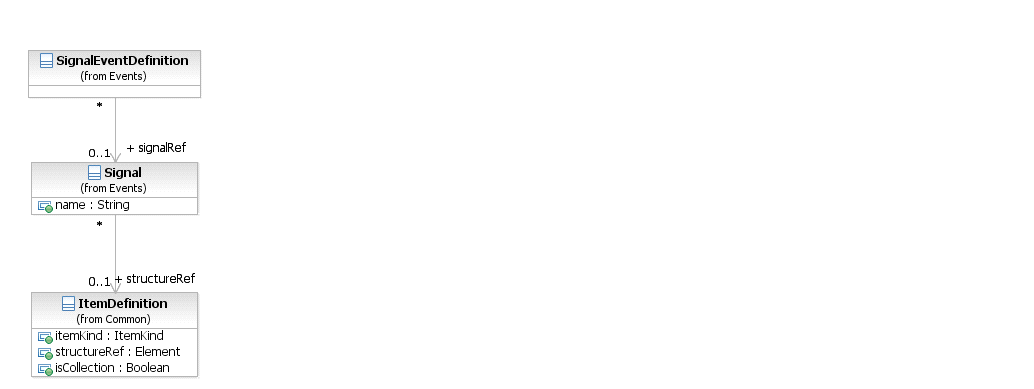
*Figure 10.93 – SignalEventDefinition Class Diagram* (p. 272)
Figure 10.94 shows the variations of **Signal Events**.

*Figure 10.94 – Signal Events* (p. 272)
The SignalEventDefinition element inherits the attributes and model associations of BaseElement (see Table 8.5) through its relationship to the EventDefinition element (see page 259). Table 10.100 presents the additional model associations of the ConditionalSignalDefinition element.
**Table 10.100 – SignalEventDefinition model associations**
| Attribute Name | Description/Usage |
| --- | --- |
| **signalRef**: Signal [0..1] | If the *trigger* is a Signal, then a Signal is provided. |
#### Terminate Event
Figure 10.95 shows the **Terminate Event**.

*Figure 10.95 – Terminate Event* (p. 273)
The TerminateEventDefinition element inherits the attributes and model associations of BaseElement (see Table 8.5) through its relationship to the EventDefinition element (see page 259).
#### Timer Event
Figure 10.96 shows the variations of **Timer Events**.

*Figure 10.96 – Timer Events* (p. 273)
The TimerEventDefinition element inherits the attributes and model associations of BaseElement (see Table 8.5) through its relationship to the EventDefinition element (see page 259). Table 10.101 presents the additional model associations of the TimerEventDefinition element.
**Table 10.101 – TimerEventDefinition model associations**
| Attribute Name | Description/Usage |
| --- | --- |
| **timeDate**: Expression [0..1] | If the *trigger* is a Timer, then a timeDate MAY be entered. Timer attributes are mutually exclusive and if any of the other Timer attributes is set, timeDate MUST NOT be set (if the isExecutable attribute of the **Process** is set to *true*). The return type of the attribute timeDate MUST conform to the ISO-8601 format for date and time representations. |
| **timeCycle**: Expression [0..1] | If the *trigger* is a Timer, then a timeCycle MAY be entered. Timer attributes are mutually exclusive and if any of the other Timer attributes is set, timeCycle MUST NOT be set (if the isExecutable attribute of the **Process** is set to *true*). The return type of the attribute timeCycle MUST conform to the ISO-8601 format for recurring time interval representations. |
| **timeDuration**: Expression [0..1] | If the *trigger* is a Timer, then a timeDuration MAY be entered. Timer attributes are mutually exclusive and if any of the other Timer attributes is set, timeDuration MUST NOT be set (if the isExecutable attribute of the **Process** is set to *true*). The return type of the attribute timeDuration MUST conform to the ISO-8601 format for time interval representations. |
### 10.5.6 Handling Events
**BPMN** provides advanced constructs for dealing with **Events** that occur during the execution of a **Process** (i.e., the “catching” of an **Event**). Furthermore, **BPMN** supports the explicit creation of an **Event** in the **Process** (i.e., the “throwing” of an **Event**). Both *catching* and *throwing* of an **Event** as well as the resulting **Process** behavior is referred to as *Event handling*. There are three types of *Event handlers*: those that start a **Process**, those that are part of the normal **Sequence Flow**, and those that are attached to **Activities**, either via boundary **Events** or via separate *inline handlers* in case of an **Event Sub-Process**.
#### Handling Start Events
There are multiple ways in which a **Process** can be started. For single **Start Events**, handling consists of starting a new **Process** *instance* each time the **Event** occurs. **Sequence Flows** leaving the **Event** are then followed as usual. For multiple **Start Events**, **BPMN** supports several modeling scenarios that can be applied depending on the scenario. **Exclusive start:** the most common scenario for starting a **Process** is its instantiation by exactly one out of many possible **Start Events**. Each occurrence of one of these **Events** will lead to the creation of a new **Process** *instance*. The following example shows two **Events** connected to a single **Activity** (see Figure 10.97). At runtime, each occurrence of one of the **Events** will lead to the creation of a new *instance* of the **Process** *instance* and activation of the **Activity**. Note that a single **Multiple Start Event** that contains the Message Event Definitions would behave in the same way.
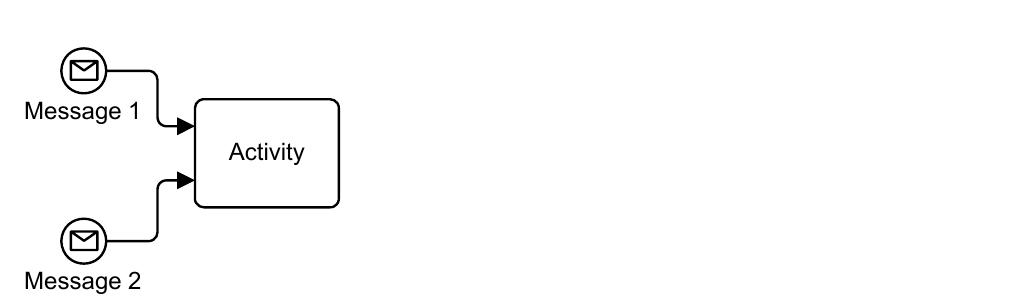
*Figure 10.97 – Exclusive start of a Process* (p. 274)
A Process can also be started via an Event-Based Gateway, as in the following example (Figure 10.98).
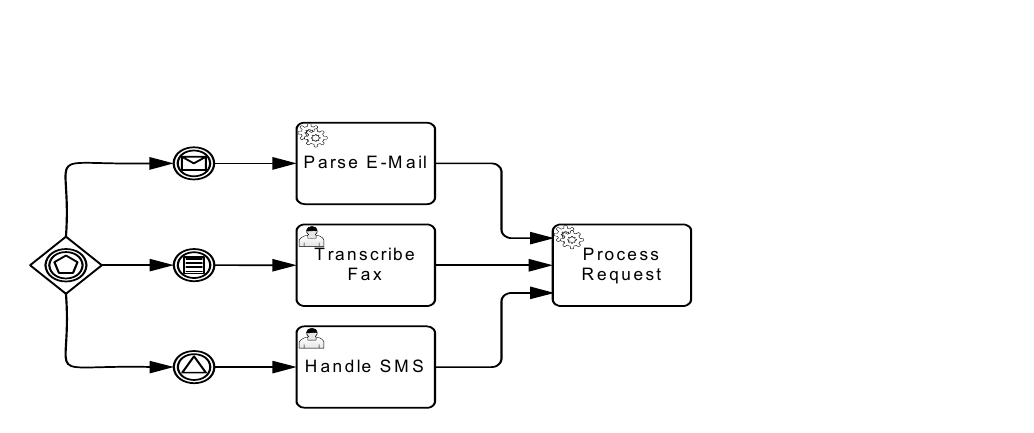
*Figure 10.98 – A Process initiated by an Event-Based Gateway* (p. 275)
In that case, the first matching **Event** will create a new *instance* of the **Process**, and waiting for the other **Events** originating from the same decision stops, following the usual semantics of the **Event-Based Exclusive Gateway**. Note that this is the only scenario where a **Gateway** can exist without an *incoming* **Sequence Flows**. It is possible to have multiple groups of **Event-Based Gateways** starting a **Process**, provided they participate in the same **Conversation** and hence share the same correlation information. In that case, one **Event** out of each group needs to arrive; the first one creates a new **Process** *instance*, while the subsequent ones are routed to the existing *instance*, which is identified through its correlation information. **Event synchronization**: if the modeler requires several disjoint **Start Events** to be merged into a single **Process** *instance*, then the following notation MUST be applied (Figure 10.99).

*Figure 10.99 – Event synchronization at Process start* (p. 275)
The **Parallel Start Event** MAY group several disjoint **Start Events** each of which MUST occur once in order for an *instance* of the **Process** to be created. **Sequence Flows** leaving the **Event** are then followed as usual. See page 440 for the execution semantics for the *Event Handling* of **Start Events**.
#### Handling Events within normal Sequence Flow (Intermediate Events)
For **Intermediate Events**, the handling consists of waiting for the **Event** to occur. Waiting starts when the **Intermediate Event** is reached. Once the **Event** occurs, it is consumed. **Sequence flows** leaving the **Event** are followed as usual.
**Handling Events attached to an Activity (Intermediate boundary Events and Event Sub-Processes)** For boundary **Events**, handling consists of consuming the **Event** occurrence and either canceling the **Activity** the **Event** is attached to, followed by normal **Sequence Flows** leaving that **Activity**, or by running an *Event Handler* without canceling the **Activity** (only for **Message**, **Signal**, **Timer** and **Conditional Events**, not for **Error Events**). An interrupting boundary **Event** is defined by a *true* value of its cancelActivity attribute. Whenever the **Event** occurs, the associated **Activity** is terminated. A downstream *token* is then generated, which activates the next element of the **Process** (connected to the **Event** by an unconditional **Sequence Flow** called an *exception flow*). For non-interrupting boundary **Events**, the cancelActivity attribute is set to *false*. Whenever the **Event** occurs, the associated **Activity** continues to be active. As a *token* is generated for the **Sequence Flow** from the boundary **Event** in parallel to the continuing execution of the **Activity**, care MUST be taken when this flow is merged into the main flow of the **Process** – typically it should be ended with its own **End Event**. The following example shows a fragment (see Figure 10.100) from a trip booking **Process**. It contains a **Sub-Process** that consists of a main part, and three **Event Sub-Processes** to deal with **Events** within the same context: an error **Event Sub-Process** that cancels the **Sub-Process**, a **Message Event Sub-Process** that updates the state of the **Sub-Process** while allowing it to continue, and a **Compensation Event Sub-Process**.
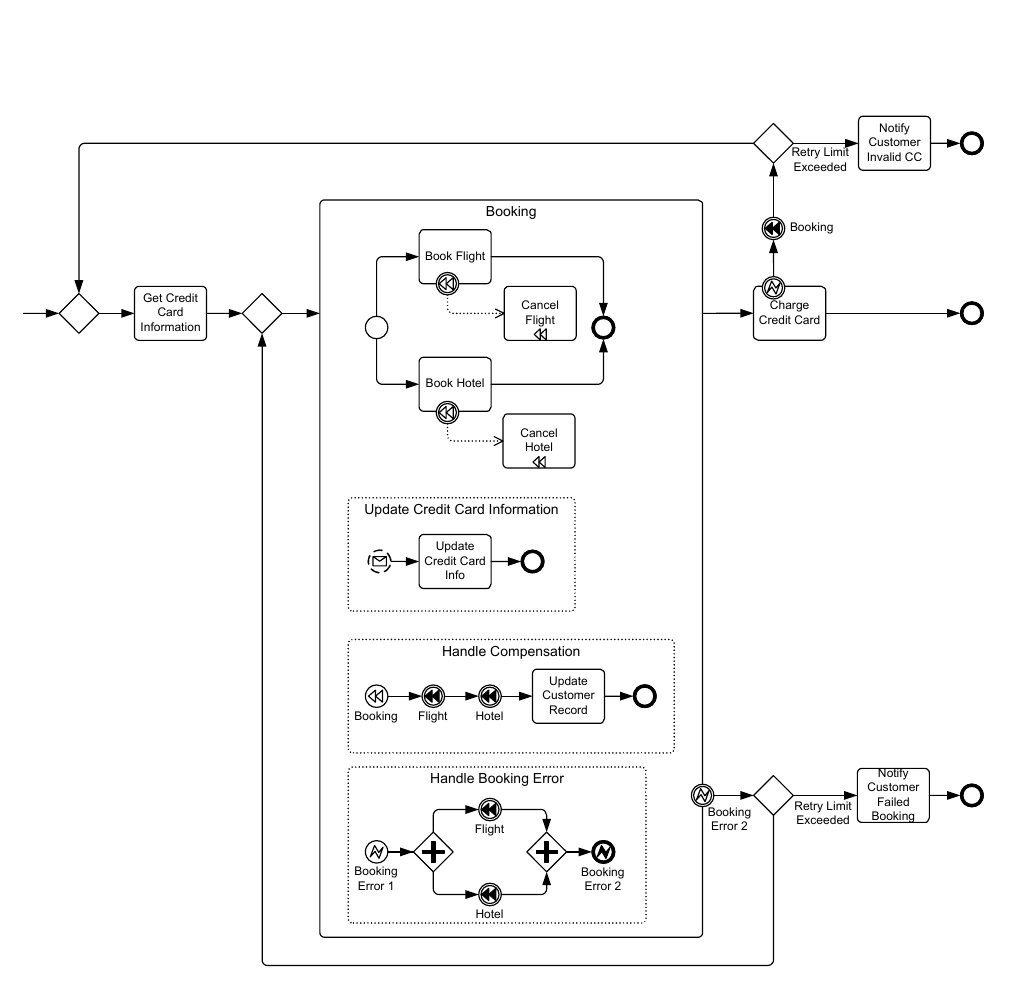
*Figure 10.100 – Example of inline Event Handling via Event Sub-Processes* (p. 277)
The following example (see Figure 10.101) shows the same fragment of that **Process**, using boundary **Event** handlers rather than inline **Event Sub-Processes**. Note that in this example, the handlers do not have access to the context of the “Booking” **Sub-Process**, as they run outside of it. Therefore, the actually *compensation* logic is shown as a black box.
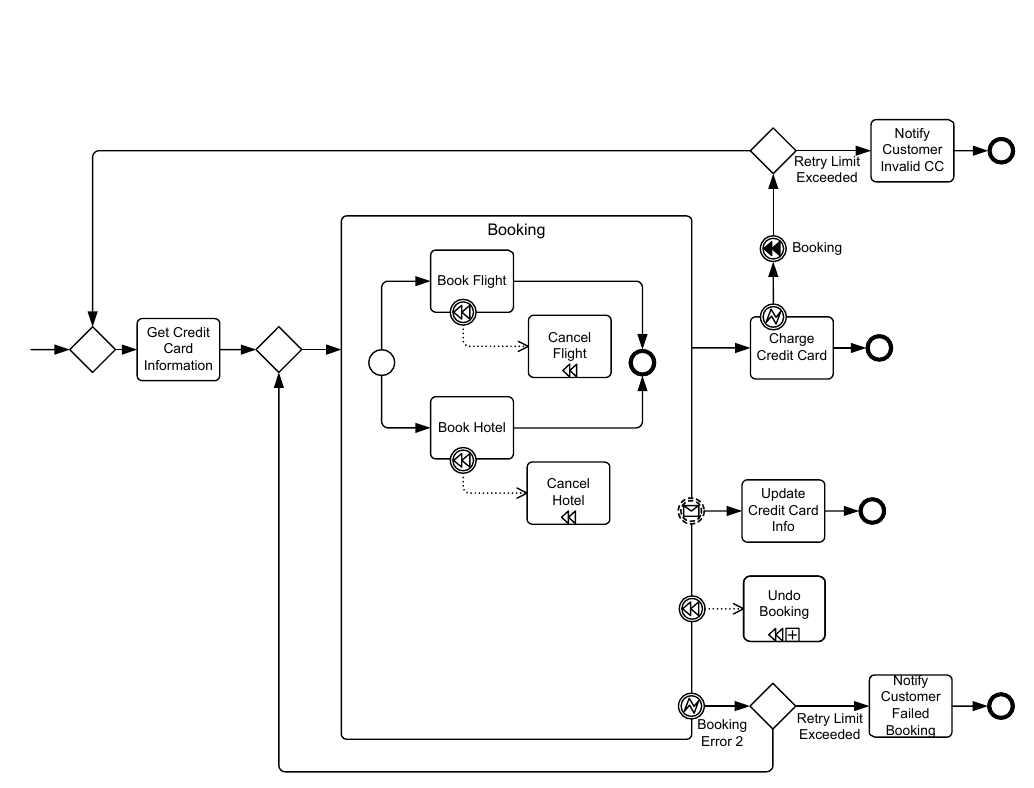
*Figure 10.101 – Example of boundary Event Handling* (p. 278)
Note that there is a distinction between *interrupting* and *non-interrupting* **Events** and the handling of these **Events**, which is described in the sub clauses below. For an interrupting **Event** (**Error**, **Escalation**, **Message**, **Signal**, **Timer**, **Conditional**, **Multiple**, and **Parallel Multiple**), only one **Event Sub-Process** for the same **Event Declaration** MUST be modeled. This excludes any further non-interrupting handlers for that **Event Declaration**. The reason for this restriction lies in the nature of interrupting **Event Sub-Processes** and boundary **Events**. They interrupt normal execution of the parent **Activity** and after their completion, the parent **Activity** is immediately terminated. This implies that only one such handler can be executed at a time. However, this does not restrict the modeler in specifying several interrupting handlers, if each handler refers to a different Event Declaration. For non-interrupting **Events** (**Escalation**, **Message**, **Signal**, **Timer**, **Conditional**, **Multiple**, and **Parallel Multiple**), an unlimited number of **Event Sub-Processes** for the same **Event Declaration** can be modeled and executed in parallel. At runtime, they will be invoked in a non-deterministic order. The same restrictions apply for boundary **Events**. During execution of a non-interrupting Event Sub-Process, execution of the parent Activity continues as normal. If for a given **Sub-Process**, both an inline **Event Sub-Process** and a boundary **Event** handler are modeled that **Process** the same EventDefinition, the following semantics apply:
- If the inline **Event Sub-Process** “re-throws” the **Event** after completion, the boundary **Event** is triggered.
- If the inline **Event Sub-Process** completes without “re-throwing” the **Event**, the **Activity** is considered to have completed and normal **Sequence Flow** resumes. In other terms, the **Event Sub-Process** “absorbs” the
**Interrupting Event Handlers (Error, Escalation, Message, Signal, Timer, Conditional, Multiple, and Parallel**
#### Multiple)
Interrupting *Event Handlers* are those that have the cancelActivity attribute is set to *true*. Whenever the **Event** occurs, regardless of whether the **Event** is handled inline or on the boundary, the associated **Activity** is interrupted. If an inline error handler is specified (in case of a **Sub-Process**), it is run within the context of that **Sub-Process**. If a boundary **Error Event** is present, **Sequence Flows** from that boundary **Event** are then followed. The parent **Activity** is canceled after either the error handler completes or **Sequence Flow** from the boundary **Event** is followed. In the example above, the “Booking” **Sub-Process** has an *Error handler* that defines what should happen in case a “Booking” Error occurs within the **Sub-Process**, namely, the already performed bookings are canceled using *compensation*. The *Error handler* is then continued outside the **Sub-Process** through a boundary **Error Event**. **Non-interrupting Event Handlers (Escalation, Message, Signal, Timer, Conditional, Multiple, and Parallel**
#### Multiple)
Interrupting *Event Handlers* are those that have the cancelActivity attribute is set to *false*. For **Event Sub-Processes**, whenever the **Event** occurs it is consumed and the associated **Event Sub-Process** is performed. If there are several **Events** that happen in parallel, then they are handled concurrently, i.e., several **Event Sub-Process** *instances* are created concurrently. The *non-interrupting* **Start Event** indicates that the **Event Sub- Process** *instance* runs concurrently to the **Sub-Process** proper. For boundary **Events**, whenever the **Event** occurs the handler runs concurrently to the **Activity**. If an **Event Sub- Process** is also specified for that **Event** (in case of a **Sub-Process**), it is run within the context of that **Sub-Process**. Then, **Sequence Flows** from the boundary **Event** are followed. As a *token* is generated for the **Sequence Flow** from the boundary **Event** in parallel to the continuing execution of the **Activity**, care MUST be taken when this flow is merged into the main flow of the **Process** – typically it should be ended with its own **End Event**. In the example above, an *Event Handler* allows to update the credit card information during the “Booking” **Sub- Process**. It is triggered by a credit card information **Message**: such a **Message** can be received whenever the control flow is within the main body of the **Sub-Process**. Once such a **Message** is received, the **Activities** within the corresponding *Event Handler* run concurrently with the **Activities** within the body of the **Sub-Process**. See “Intermediate Events” on page 440 for the exact semantics of boundary **Intermediate Events** and “Event Sub- Processes” on page 440 for the operational semantics of non-interrupting **Event Sub-Processes**.
#### Handling End Events
For a **Terminate End Event**, all remaining active **Activities** within the **Process** are terminated. A **Cancel End Event** is only allowed in the context of a **Transaction Sub-Process** and, as such, cancels the **Sub- Process** and aborts an associated *Transaction* of the **Sub-Process**. For all other **End Events**, the behavior associated with the EventDefinition is performed. When there are no further active **Activities**, then the **Sub-Process** or **Process** *instance* is completed. See page 443 for exact semantics.
### 10.5.7 Scopes
A *scope* describes the context in which execution of an **Activity** happens. This consists of the set of:
- Data Objects available (including DataInput and DataOutput)
- Events available for catching or throwing triggers
- Conversations going on in that scope
In general, a *scope* contains exactly one main flow of **Activities** which is started, when the *scope* gets activated. Vice versa, all **Activities** are enclosed by a *scope*. *Scopes* are hierarchically nested. *Scopes* can have several *scope instances* at runtime. They are also hierarchically nested according to their generation. In a *scope instance* several *tokens* can be active. *Scope instances* in turn have a **lifecycle** containing among others the states:
- Activated
- In execution
- Completed
- In Compensation
- Compensation
- In Error
- In Cancellation
- Cancelled
**BPMN** has the following model elements with *scope* characteristics:
- Choreography
- Pool
- Sub-Process
- Task
- Activity
- Multi-instances body
*Scopes* are used to define the semantics of:
- Visibility of Data Objects (including DataInput and DataOutput)
- Event resolution
- Starting/stopping of token execution
The **Data Objects**, **Events**, and correlation keys described by a *scope* can be explicitly modeled or implicitly defined.
### 10.5.8 Events Package XML Schemas
**Table 10.102 – BoundaryEvent XML schema**
```xml
```
**Table 10.103 – CancelEventDefinition XML schema**
```xml
```
**Table 10.104 – CatchEvent XML schema**
```xml
```
**Table 10.105 – CancelEventDefinition XML schema**
```xml
```
**Table 10.106 – CompensateEventDefinition XML schema**
```xml
```
**Table 10.107 – ConditionalEventDefinition XML schema**
```xml
```
**Table 10.108 – ErrorEventDefinition XML schema**
```xml
]
```
**Table 10.109 – EscalationEventDefinition XML schema**
```xml
```
**Table 10.110 – Event XML schema**
```xml
```
**Table 10.111 – EventDefinition XML schema**
```xml
```
**Table 10.112 – ImplicitThrowEvent XML schema**
```xml
```
**Table 10.113 – IntermediateCatchEvent XML schema**
```xml
```
**Table 10.114 – IntermediateThrowEvent XML schema**
```xml
```
**Table 10.115 – LinkEventDefinition XML schema**
```xml
```
**Table 10.116 – MessageEventDefinition XML schema**
```xml
```
**Table 10.117 – Signal XML schema**
```xml
```
**Table 10.118 – SignalEventDefinition XML schema**
```xml
```
**Table 10.119 – StartEvent XML schema**
```xml
```
**Table 10.120 – TerminateEventDefinition XML schema**
```xml
```
**Table 10.121 – ThrowEvent XML schema**
```xml
```
**Table 10.122 – TimerEventDefinition XML schema**
```xml
```