---
title: "10.3 Activities"
chapter: "10 Process"
source: "OMG BPMN 2.0.2 — formal/2013-12-09"
pages: "149-202"
---
> 10 Process · páginas 149-202 · [índice](../README.md)
## 10.3 Activities
An **Activity** is work that is performed within a **Business Process**. An **Activity** can be atomic or non-atomic (compound). The types of **Activities** that are a part of a **Process** are: **Task**, **Sub-Process**, and Call **Activity**, which allows the inclusion of re-usable **Tasks** and **Processes** in the diagram. However, a **Process** is not a specific graphical object. Instead, it is a set of graphical objects. The following sub clauses will focus on the graphical objects **Sub-**
**Activities** represent points in a **Process** flow where work is performed. They are the executable elements of a **BPMN**
The **Activity** class is an abstract element, sub-classing from FlowElement (as shown in Figure 10.6). Concrete sub-classes of **Activity** specify additional semantics above and beyond that defined for the generic **Activity**.
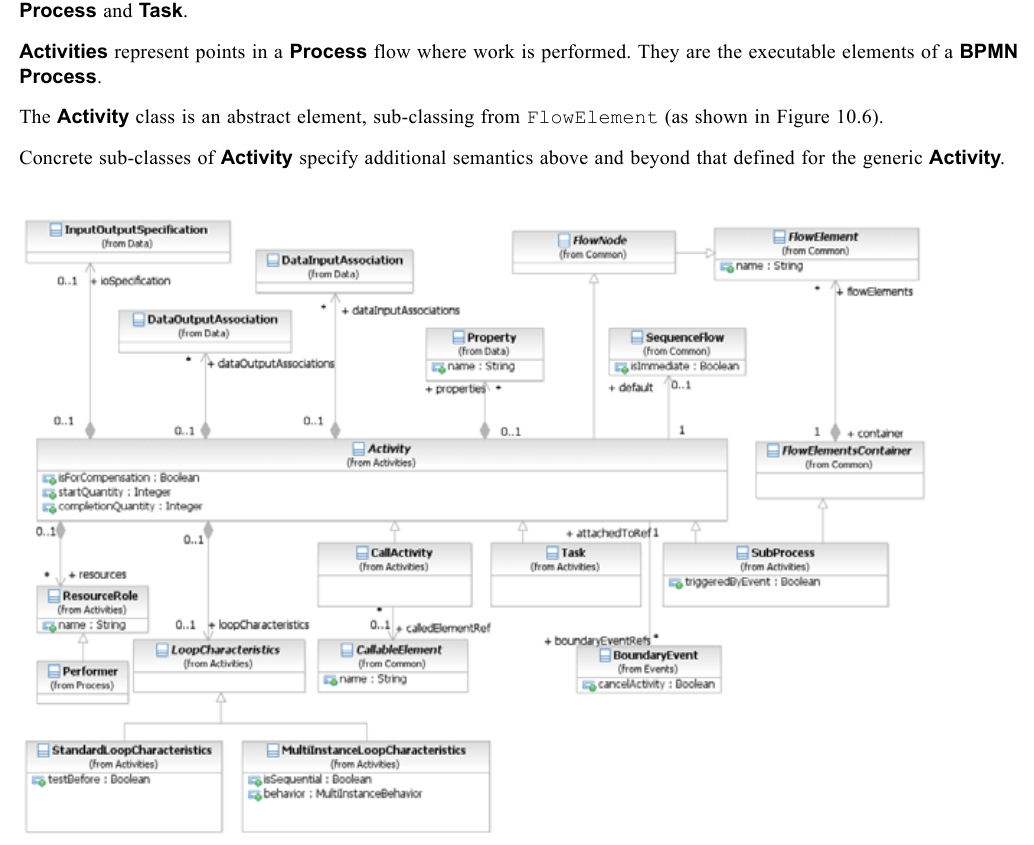
*Figure 10.6 – Activity class diagram* (p. 149)
The **Activity** class is the abstract super class for all concrete **Activity** types. The **Activity** element inherits the attributes and model associations of FlowElement (see Table 8.44). Table 10.3 presents the additional attributes and model associations of the **Activity** element.
**Table 10.3 – Activity attributes and model associations**
| Attribute Name | Description/Usage |
| --- | --- |
| **isForCompensation**: boolean = false | A flag that identifies whether this **Activity** is intended for the purposes of *compensation*. If *false*, then this **Activity** executes as a result of normal execution flow. If *true*, this **Activity** is only activated when a **Compensation Event** is detected and initiated under **Compensation Event** visibility scope (see page 280 for more information on *scopes*). |
| **loopCharacteristics**: LoopCharacteristics [0..1] | An **Activity** MAY be performed once or MAY be repeated. If repeated, the **Activity** MUST have loopCharacteristics that define the repetition criteria (if the isExecutable attribute of the **Process** is set to *true*). |
| **resources**: ResourceRole [0..*] | Defines the resource that will perform or will be responsible for the **Activity**. The resource, e.g., a performer, can be specified in the form of a specific individual, a group, an organization role or position, or an organization. |
| **default**: SequenceFlow [0..1] | The **Sequence Flow** that will receive a *token* when none of the conditionExpressions on other *outgoing* **Sequence Flows** evaluate to *true*. The *default* **Sequence Flow** should not have a conditionExpression. Any such Expression SHALL be ignored. |
| **ioSpecification**: Input | The defines the *inputs* and *outputs* and InputOutputSpecification |
| OutputSpecification [0..1] | the InputSets and OutputSets for the **Activity**. See page 210 for more information on the InputOutputSpecification. |
| **properties**: Property [0..*] | Modeler-defined properties MAY be added to an **Activity**. These properties are contained within the **Activity.** |
| **boundaryEventRefs**: BoundaryEvent [0..*] | This references the **Intermediate Events** that are attached to the boundary of the **Activity**. |
| **dataInputAssociations**: DataInputAssociation [0..*] | An optional reference to the DataInputAssociations. A DataInputAssociation defines how the DataInput of the **Activity’s** InputOutputSpecification will be populated. |
| **dataOutputAssociations**: DataOutputAssociation [0..*] | An optional reference to the DataOutputAssociations. |
| **startQuantity**: integer = 1 | The default value is 1. The value MUST NOT be less than 1. This attribute defines the number of *tokens* that MUST arrive before the **Activity** can begin. Note that any value for the attribute that is greater than 1 is an advanced type of modeling and should be used with caution. |
| **completionQuantity**: integer = 1 | The default value is 1. The value MUST NOT be less than 1. This attribute defines the number of *tokens* that MUST be generated from the **Activity**. This number of tokens will be sent done any *outgoing* **Sequence Flow** (assuming any **Sequence Flow** conditions are satisfied). Note that any value for the attribute that is greater than 1 is an advanced type of modeling and should be used with caution. |
In addition, an **Activity** *instance* has attributes whose values MAY be referenced by Expressions. These values are only available when the **Activity** is being executed. Table 10.4 presents the *instance* attributes of the **Activity** element.
**Table 10.4 – Activity instance attributes**
| Attribute Name | Description/Usage |
| --- | --- |
| **state**: string = None | See Figure 13.2 ("The Lifecycle of a BPMN Activity") in Section 13.3.2 for permissible values. |
#### Sequence Flow Connections
See “Sequence Flow Connections Rules” on page 40 for the entire set of objects and how they MAY be *sources* or *targets* An **Activity** MAY be a target for **Sequence Flows**; it can have multiple *incoming* **Sequence Flows**. *Incoming* **Sequence Flows** MAY be from an alternative path and/or parallel paths.
**NOTE:** If the **Activity** has multiple *incoming* **Sequence Flows**, then this is considered uncontrolled flow. This means that when a *token* arrives from one of the Paths, the **Activity** will be instantiated. It will not wait for the arrival of *tokens* from the other paths. If another *token* arrives from the same path or another path, then a separate *instance* of the **Activity** will be created. If the flow needs to be controlled, then the flow should converge on a **Gateway** that precedes the **Activities** (see “Gateways” on page 286 for more information on **Gateways**). An **Activity** MAY be a source for **Sequence Flows**; it can have multiple *outgoing* **Sequence Flows**. If there are multiple *outgoing* **Sequence Flows**, then this means that a separate parallel path is being created for each **Sequence Flow** (i.e., *tokens* will be generated for each *outgoing* **Sequence Flow** from the **Activity**).
#### Message Flow Connections
See “Message Flow Connection Rules” on page 41 for the entire set of objects and how they MAY be *sources* or *targets*
**NOTE:** All **Message Flows** MUST connect two separate **Pools**. They MAY connect to the **Pool** boundary or to Flow Objects within the **Pool** boundary. They MUST NOT connect two objects within the same **Pool**. An **Activity** MAY be the target of a **Message Flow**; it can have zero (0) or more *incoming* **Message Flows**. An **Activity** MAY be a source of a **Message Flow**; it can have zero (0) or more *outgoing* **Message Flows**.
### 10.3.1 Resource Assignment
The following sub clauses define how Resources can be defined for an **Activity**. Figure 10.7 displays the class diagram for the **BPMN** elements used for Resource assignment.
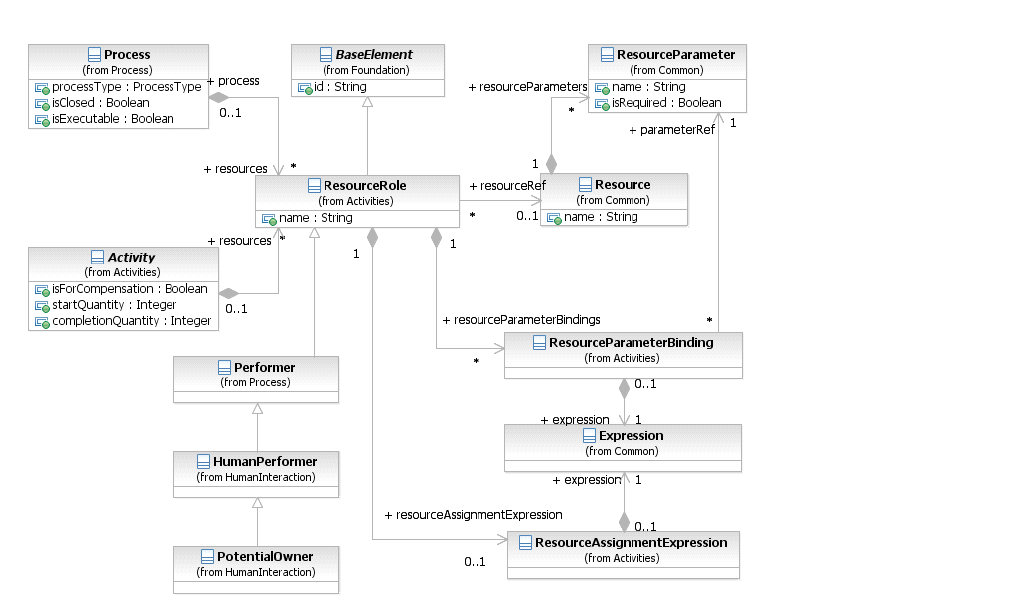
*Figure 10.7 – The class diagram for assigning Resources* (p. 152)
#### Resource Role
The ResourceRole element inherits the attributes and model associations of BaseElement (see Table 8.5). Table 10.5 presents the additional model associations of the ResourceRole element.
**Table 10.5 – Resource Role model associations**
| Attribute Name | Description/Usage |
| --- | --- |
| **resourceRef**: Resource [0..1] | The Resource that is associated with **Activity**. Should not be specified when resourceAssignmentExpression is provided. |
| **resourceAssignmentExpression**: ResourceAssignmentExpression [0..1] | This defines the Expression used for the Resource assignment (see below). Should not be specified when a resourceRef is provided. |
| **resourceParameterBindings**: Resource- | This defines the Parameter bindings used for the |
| ParameterBinding [0..*] | Resource assignment (see below). Is only applicable if a resourceRef is specified. |
#### Expression Assignment
Resources can be assigned to an **Activity** using Expressions. These Expressions MUST return Resource entity related data types, like Users or Groups. Different Expressions can return multiple Resources. All of them are assigned to the respective subclass of the ResourceRole element, for example as potential owners. The semantics is defined by the subclass. The ResourceAssignmentExpression element inherits the attributes and model associations of BaseElement (see Table 8.5). Table 10.6 presents the additional model associations of the ResourceAssignmentExpression element.
**Table 10.6 – ResourceAssignmentExpression model associations**
| Attribute Name | Description/Usage |
| --- | --- |
| **expression**: Expression | The element ResourceAssignmentExpression MUST contain an Expression which is used at runtime to assign resource(s) to a ResourceRole element. |
#### Parameterized Resource Assignment
Resources support query parameters that are passed to the Resource query at runtime. Parameters MAY refer to **Task** *instance* data using Expressions. During Resource query execution, an infrastructure can decide which of the Parameters defined by the Resource are used. It MAY use zero (0) or more of the Parameters specified. It MAY also override certain Parameters with values defined during Resource deployment. The deployment mechanism for **Tasks** and Resources is out of scope for this document. Resource queries are evaluated to determine the set of Resources, e.g., people, assigned to the **Activity**. Failed Resource queries are treated like Resource queries that return an empty result set. Resource queries return one Resource or a set of Resources. The ResourceParameterBinding element inherits the attributes and model associations of BaseElement (see Table 8.5). Table 10.7 presents the additional model associations of the ResourceParameterBinding element.
**Table 10.7 – ResourceParameterBinding model associations**
| Attribute Name | Description/Usage |
| --- | --- |
| **parameterRef**: ResourceParameter | Reference to the parameter defined by the Resource. |
| **expression**: Expression | The Expression that evaluates the value used to bind the ResourceParameter. |
### 10.3.2 Performer
The Performer class defines the resource that will perform or will be responsible for an **Activity**. The performer can be specified in the form of a specific individual, a group, an organization role or position, or an organization. The Performer element inherits the attributes and model associations of BaseElement (see Table 8.5) through its relationship to ResourceRole, but does not have any additional attributes or model associations.
### 10.3.3 Tasks
A **Task** is an *atomic* **Activity** within a **Process** flow. A **Task** is used when the work in the **Process** cannot be broken down to a finer level of detail. Generally, an end-user and/or applications are used to perform the **Task** when it is executed. A **Task** object shares the same shape as the **Sub-Process**, which is a rectangle that has rounded corners (see Figure 10.8). A **Task** is a rounded corner rectangle that MUST be drawn with a single thin line.
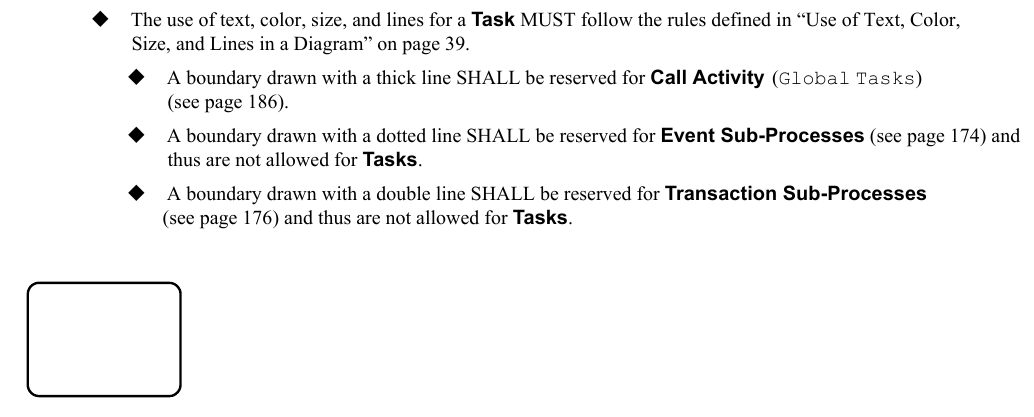
*Figure 10.8 – A Task object* (p. 154)
**BPMN** specifies three types of markers for **Task**: a **Loop** marker or a **Multi-Instance** marker and a **Compensation** marker. A **Task** MAY have one or two of these markers (see Figure 10.9).
The marker for a **Task** that is a standard *loop* MUST be a small line with an arrowhead that curls back upon itself. See page 188 for more information on *loop* **Activities**.
The marker for a **Task** that is a *multi-instance* MUST be a set of three vertical lines. See page 190 for more information on *multi-instance* **Activities**.
The marker for a **Task** that is used for *compensation* MUST be a pair of left facing triangles (like a tape player “rewind” button). See page 301 for more information on *compensation*.
All the markers that are present MUST be grouped and the whole group centered at the bottom of the shape.
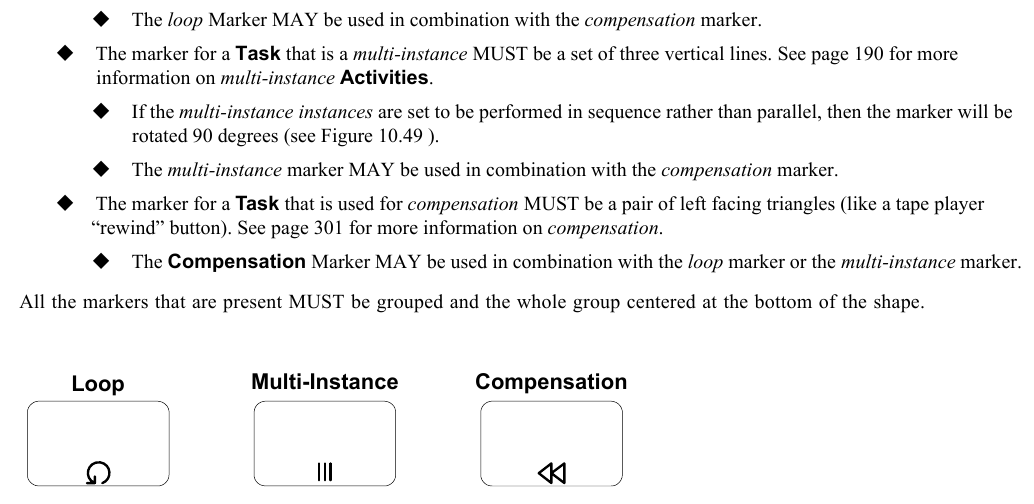
*Figure 10.9 – Task markers* (p. 155)
Figure 10.10 displays the class diagram for the Task element.
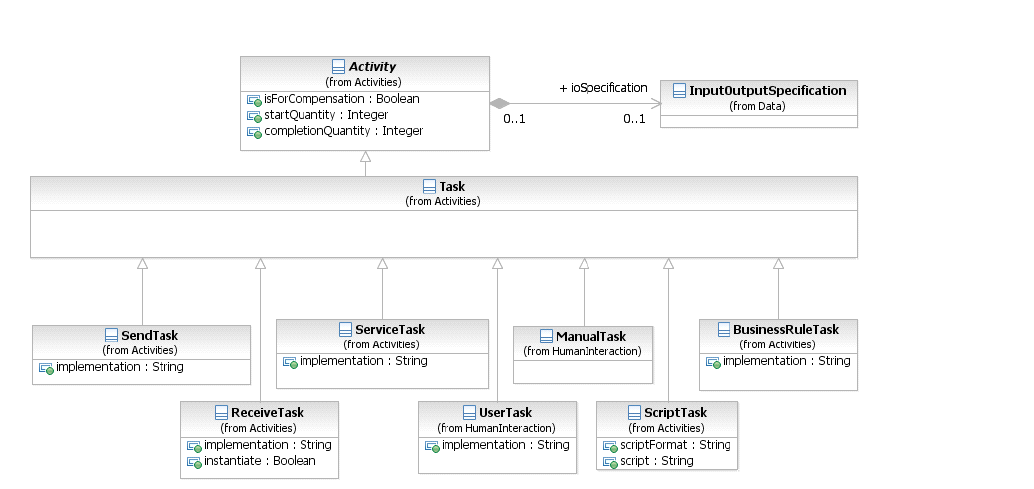
*Figure 10.10 – The Task class diagram* (p. 155)
The **Task** inherits the attributes and model associations of **Activity** (see Table 10.3). There are no further attributes or model associations of the **Task**.
#### 10.3.3.1 Types of Tasks
There are different types of **Tasks** identified within **BPMN** to separate the types of inherent behavior that **Tasks** might represent. The list of **Task** types MAY be extended along with any corresponding indicators. A **Task** which is not further specified is called **Abstract Task** (this was referred to as the **None Task** in **BPMN 1.2**). The notation of the **Abstract Task** is shown in Figure 10.8.
#### Service Task
A **Service Task** is a **Task** that uses some sort of service, which could be a Web service or an automated application. A **Service Task** object shares the same shape as the **Task**, which is a rectangle that has rounded corners. However, there is a graphical marker in the upper left corner of the shape that indicates that the **Task** is a **Service Task** (see Figure 10.11). A **Service Task** is a rounded corner rectangle that MUST be drawn with a single thin line and includes a marker that distinguishes the shape from other **Task** types (as shown in Figure 10.11).
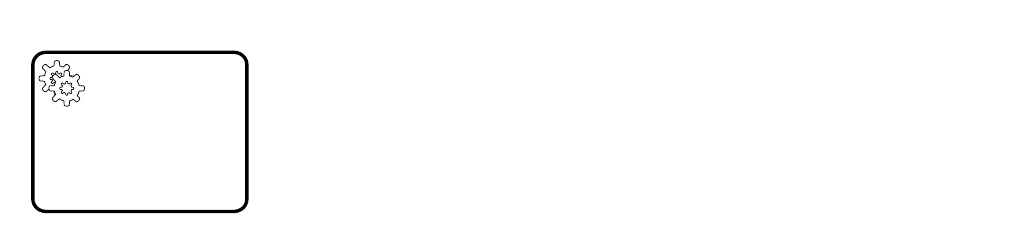
*Figure 10.11 – A Service Task Object* (p. 156)
The **Service Task** inherits the attributes and model associations of **Activity** (see Table 10.3). In addition the following constraints are introduced when the **Service Task** references an Operation: The **Service Task** has exactly one inputSet and at most one outputSet. It has a single **Data Input** with an ItemDefinition equivalent to the one defined by the **Message** referenced by the inMessageRef attribute of the associated Operation. If the Operation defines output **Messages**, the **Service Task** has a single **Data Output** that has an ItemDefinition equivalent to the one defined by the **Message** referenced by the outMessageRef attribute of the associated
The actual *Participant* whose service is used can be identified by connecting the **Service Task** to a *Participant* using a **Message Flows** within the definitional **Collaboration** of the **Process** – see Table 10.1.
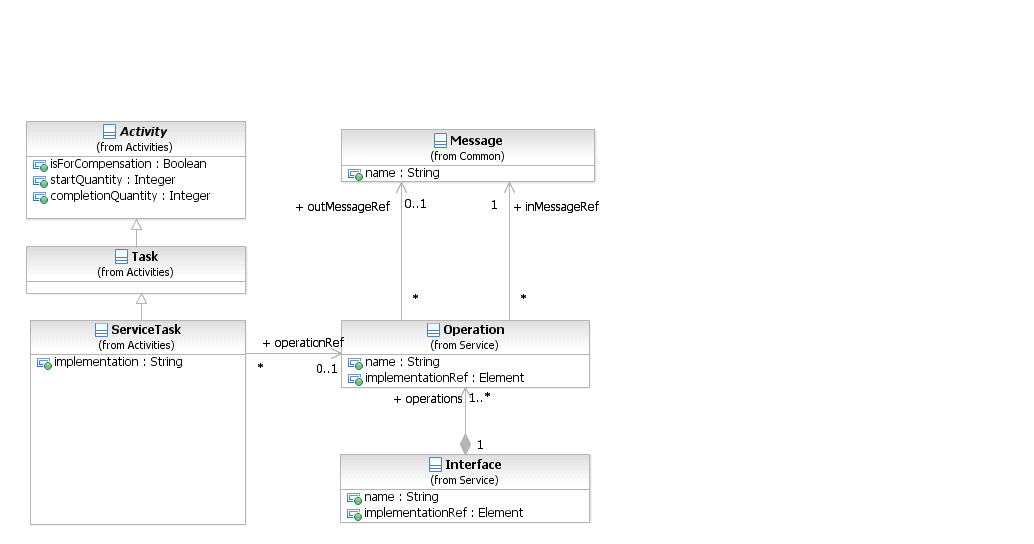
*Figure 10.12 – The Service Task class diagram* (p. 157)
The **Service Task** inherits the attributes and model associations of **Activity** (see Table 10.3). Table 10.8 presents additional the model associations of the **Service Task**.
**Table 10.8 – Service Task model associations**
| Attribute Name | Description/Usage |
| --- | --- |
| **implementation**: string = ##webService | This attribute specifies the technology that will be used to send and receive the **Messages**. Valid values are "##unspecified" for leaving the implementation technology open, "##WebService" for the Web service technology or a URI identifying any other technology or coordination protocol. A Web service is the default technology. |
| **operationRef**: Operation [0..1] | This attribute specifies the operation that is invoked by the Service Task. |
#### Send Task
A **Send Task** is a simple **Task** that is designed to send a **Message** to an external Participant (relative to the **Process**). Once the **Message** has been sent, the **Task** is completed. The actual *Participant* which the **Message** is sent can be identified by connecting the **Send Task** to a *Participant* using a **Message Flows** within the definitional **Collaboration** of the **Process** (see Table 10.1). A **Send Task** object shares the same shape as the **Task**, which is a rectangle that has rounded corners. However, there is a filled envelope marker (the same marker as a *throw* **Message Event**) in the upper left corner of the shape that indicates that the **Task** is a **Send Task**.
A **Send Task** is a rounded corner rectangle that MUST be drawn with a single thin line and includes a filled envelope marker that distinguishes the shape from other **Task** types (as shown in Figure 10.13).

*Figure 10.13 – A Send Task Object* (p. 158)
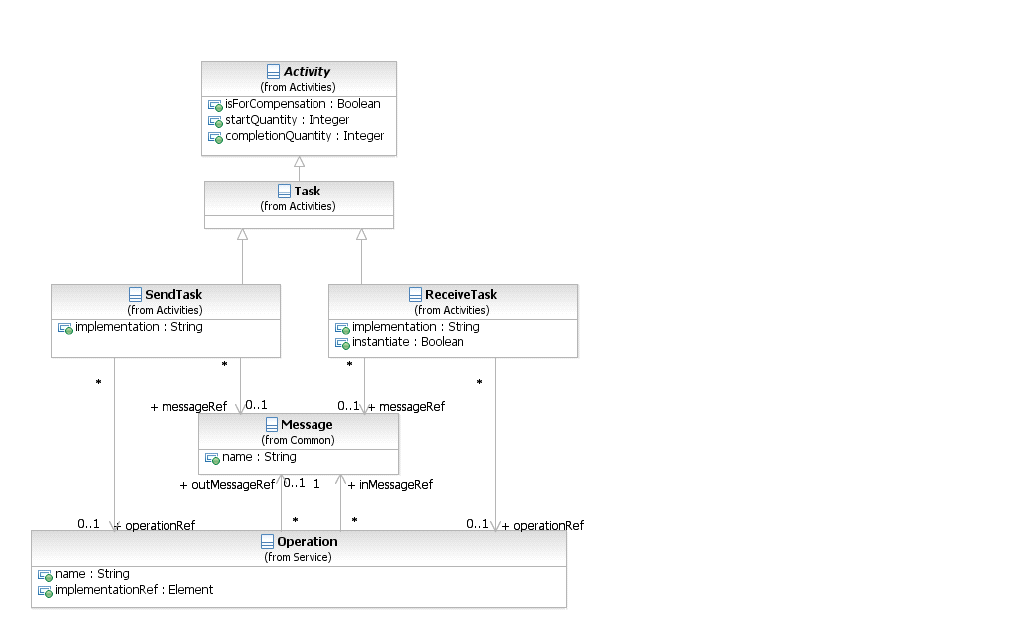
*Figure 10.14 – The Send Task and Receive Task class diagram* (p. 158)
The **Send Task** inherits the attributes and model associations of **Activity** (see Table 10.3). In addition the following constraints apply when the **Send Task** references a **Message**: The **Send Task** has at most one inputSet and one **Data Input**. If the **Data Input** is present, it MUST have an ItemDefinition equivalent to the one defined by the associated **Message**. At execution time, when the **Send Task** is executed, the data automatically moves from the **Data Input** on the **Send Task** into the **Message** to be sent. If the **Data Input** is not present, the **Message** will not be populated with data from the **Process**. Table 10.9 presents the additional model associations of the **Send Task**.
**Table 10.9 – Send Task model associations**
| Attribute Name | Description/Usage |
| --- | --- |
| **messageRef**: Message [0..1] | A **Message** for the messageRef attribute MAY be entered. This indicates that the **Message** will be sent by the **Task**. The **Message** in this context is equivalent to an *out-only* message pattern (Web service). One or more corresponding *outgoing* **Message Flows** MAY be shown on the diagram. However, the display of the **Message Flows** is NOT REQUIRED. The **Message** is applied to all *outgoing* **Message Flows** and the **Message** will be sent down all *outgoing* **Message Flows** at the completion of a single *instance* of the **Task**. |
| **operationRef**: Operation | This attribute specifies the operation that is invoked by the **Send Task**. |
| **implementation**: string = | This attribute specifies the technology that will be used to send and receive the |
| ##webService | **Messages**. Valid values are "##unspecified" for leaving the implementation technology open, "##WebService" for the Web service technology or a URI identifying any other technology or coordination protocol A Web service is the default technology. |
#### Receive Task
A **Receive Task** is a simple **Task** that is designed to wait for a **Message** to arrive from an external Participant (relative to the **Process**). Once the **Message** has been received, the **Task** is completed. The actual *Participant* from which the **Message** is received can be identified by connecting the **Receive Task** to a *Participant* using a **Message Flows** within the definitional **Collaboration** of the **Process** – see Table 10.1. A **Receive Task** is often used to start a **Process**. In a sense, the **Process** is bootstrapped by the receipt of the **Message**. In order for the **Receive Task** to instantiate the **Process** its instantiate attribute MUST be set to *true* and it MUST NOT have any incoming **Sequence Flow**. A **Receive Task** object shares the same shape as the **Task**, which is a rectangle that has rounded corners. However, there is an unfilled envelope marker (the same marker as a *catch* **Message Event**) in the upper left corner of the shape that indicates that the **Task** is a **Receive Task**. A **Receive Task** is a rounded corner rectangle that MUST be drawn with a single thin line and includes an unfilled envelope marker that distinguishes the shape from other **Task** types (as shown in Figure 10.15). If the instantiate attribute is set to *true*, the envelope marker looks like a **Message Start Event** (as shown in Figure 10.16).
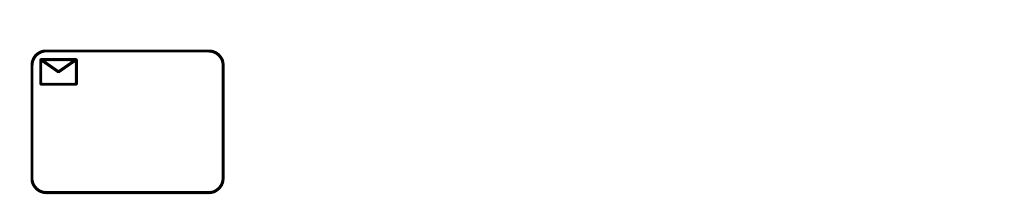
*Figure 10.15 – A Receive Task Object* (p. 159)
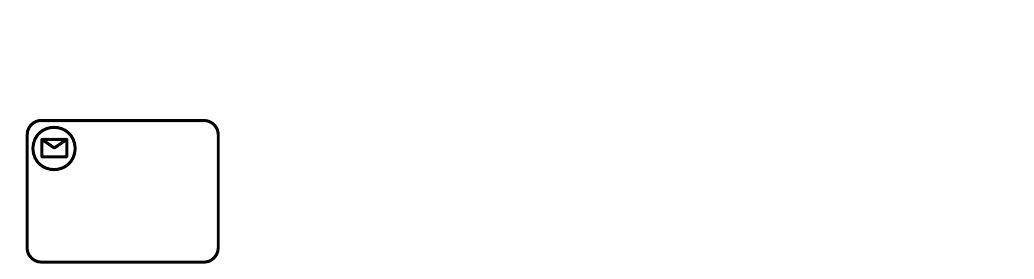
*Figure 10.16 – A Receive Task Object that instantiates a Process* (p. 160)
The **Receive Task** inherits the attributes and model associations of **Activity** (see Table 10.3). In addition the following constraints apply when the **Receive Task** references a **Message**: The **Receive Task** has at most one outputSet and at most one **Data output**. If the **Data output** is present, it MUST have an ItemDefinition equivalent to the one defined by the associated **Message**. At execution time, when the **Receive Task** is executed, the data automatically moves from the **Message** to the **Data Output** on the **Receive Task**. If the **Data Output** is not present, the payload within the **Message** will not flow out of the **Receive Task** and into the **Process**. Table 10.10 presents the additional attributes and model associations of the **Receive Task**.
**Table 10.10 – Receive Task attributes and model associations**
| Attribute Name | Description/Usage |
| --- | --- |
| **messageRef**: Message [0..1] | A **Message** for the messageRef attribute MAY be entered. This indicates that the **Message** will be received by the **Task**. The **Message** in this context is equivalent to an *in-only* message pattern (Web service). One (1) or more corresponding *incoming* **Message Flows** MAY be shown on the diagram. However, the display of the **Message Flows** is NOT REQUIRED. The **Message** is applied to all *incoming* **Message Flows**, but can arrive for only one (1) of the *incoming* **Message Flows** for a single *instance* of the **Task**. |
| **instantiate**: boolean = false | **Receive Tasks** can be defined as the instantiation mechanism for the Process with the instantiate attribute. This attribute MAY be set to *true* if the **Task** is the first **Activity** (i.e., there are no *incoming* **Sequence Flows**). Multiple **Tasks** MAY have this attribute set to *true*. |
| **operationRef**: Operation | This attribute specifies the operation through which the **Receive Task** receives the **Message**. |
| **implementation**: string = | This attribute specifies the technology that will be used to send and receive |
| ##webService | the **Messages**. Valid values are "##unspecified" for leaving the implementation technology open, "##WebService" for the Web service technology or a URI identifying any other technology or coordination protocol A Web service is the default technology. |
#### User Task
A **User Task** is a typical “workflow” **Task** where a human performer performs the **Task** with the assistance of a software application and is scheduled through a task list manager of some sort.
A **User Task** is a rounded corner rectangle that MUST be drawn with a single thin line and includes a human figure marker that distinguishes the shape from other **Task** types (as shown in Figure 10.17).
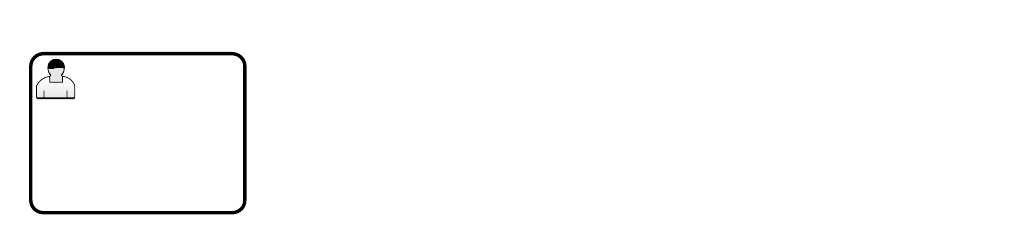
*Figure 10.17 – A User Task Object* (p. 161)
See “User Task” on page 160 within the larger section of “Human Interactions” for the details of **User Tasks**.
#### Manual Task
A **Manual Task** is a **Task** that is expected to be performed without the aid of any business process execution engine or any application. An example of this could be a telephone technician installing a telephone at a customer location. A **Manual Task** is a rounded corner rectangle that MUST be drawn with a single thin line and includes a hand figure marker that distinguishes the shape from other **Task** types (as shown in Figure 10.17).
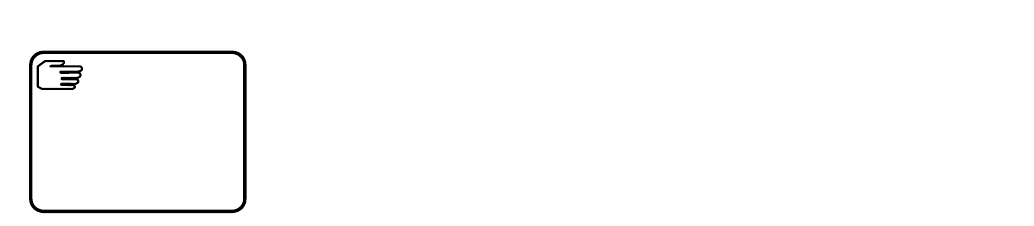
*Figure 10.18 – A Manual Task Object* (p. 161)
See “Manual Task” on page 163 within the larger section of “Human Interactions” for the details of **Manual Tasks**.
#### Business Rule
A **Business Rule Task** provides a mechanism for the **Process** to provide input to a Business Rules Engine and to get the output of calculations that the Business Rules Engine might provide. The InputOutputSpecification of the **Task** (see page 210) will allow the **Process** to send data to and receive data from the Business Rules Engine. A **Business Rule Task** object shares the same shape as the **Task**, which is a rectangle that has rounded corners. However, there is a graphical marker in the upper left corner of the shape that indicates that the **Task** is a **Business Rule Task** (see Figure 10.11). A **Business Rule Task** is a rounded corner rectangle that MUST be drawn with a single thin line and includes a marker that distinguishes the shape from other **Task** types (as shown in Figure 10.19).
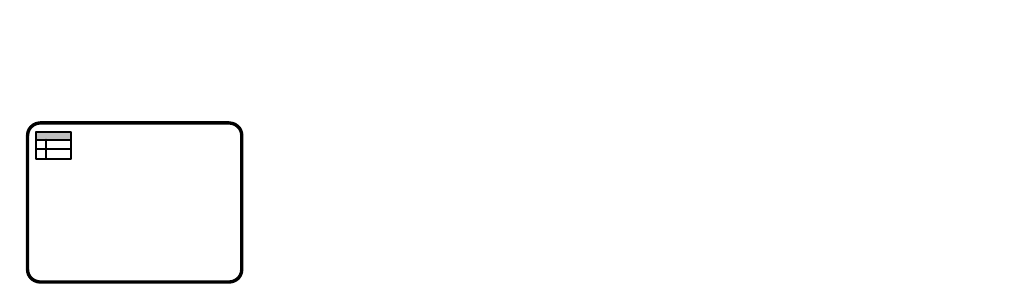
*Figure 10.19 – A Business Rule Task Object* (p. 162)
The **Business Rule Task** inherits the attributes and model associations of **Activity** (see Table 10.3). Table 10.11 presents the additional attributes of the **Business Rule Task**.
**Table 10.11 – Business Rule Task attributes and model associations**
| Attribute Name | Description/Usage |
| --- | --- |
| **implementation**: string = | This attribute specifies the technology that will be used to implement the |
| ##unspecified | **Business Rule Task**. Valid values are "##unspecified" for leaving the implementation technology open, "##WebService" for the Web service technology or a URI identifying any other technology or coordination protocol. The default technology for this task is unspecified. |
#### Script Task
A **Script Task** is executed by a business process engine. The modeler or implementer defines a script in a language that the engine can interpret. When the **Task** is ready to start, the engine will execute the script. When the script is completed, the **Task** will also be completed. A **Script Task** object shares the same shape as the **Task**, which is a rectangle that has rounded corners. However, there is a graphical marker in the upper left corner of the shape that indicates that the **Task** is a **Script Task** (see Figure 10.11). A **Script Task** is a rounded corner rectangle that MUST be drawn with a single thin line and includes a marker that distinguishes the shape from other **Task** types (as shown in Figure 10.20).
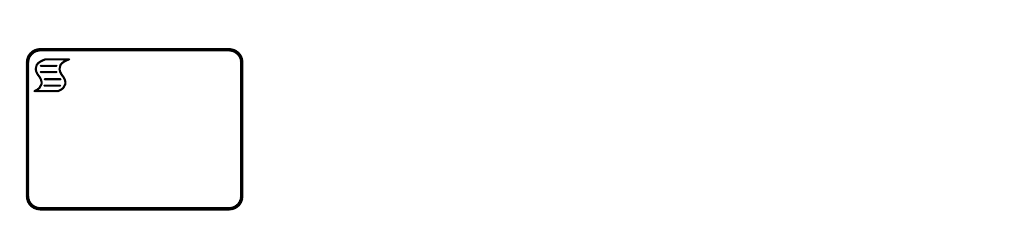
*Figure 10.20 – A Script Task Object* (p. 162)
The **Script Task** inherits the attributes and model associations of **Activity** (see Table 10.3). Table 10.12 presents the additional attributes of the **Script Task**.
**Table 10.12 – Script Task attributes**
| Attribute Name | Description/Usage |
| --- | --- |
| **scriptFormat**: string [0..1] | Defines the format of the script. This attribute value MUST be specified with a mime-type format. And it MUST be specified if a script is provided. |
| **script**: string [0..1] | The modeler MAY include a script that can be run when the **Task** is performed. If a script is not included, then the **Task** will act as the equivalent of an **Abstract Task**. |
### 10.3.4 Human Interactions
#### 10.3.4.1 Tasks with Human involvement
In many business workflows, human involvement is needed to complete certain **Tasks** specified in the workflow model. **BPMN** specifies two different types of **Tasks** with human involvement, the **Manual Task** and the **User Task**. A **User Task** is executed by and managed by a business process runtime. Attributes concerning the human involvement, like people assignments and UI rendering can be specified in great detail. A **Manual Task** is neither executed by nor managed by a business process runtime.
#### Notation
Both, the **Manual Task** and **User Task** share the same shape, which is a rectangle that has rounded corners. **Manual Tasks** and **User Tasks** have a Icons to indicate the human involvement is REQUIRED to complete the **Task** (see Figure 10.15 and Figure 10.17).
#### Manual Task
A **Manual Task** is a **Task** that is not managed by any business process engine. It can be considered as an unmanaged **Task**, unmanaged in the sense of that the business process engine doesn’t track the start and completion of such a **Task**. An example of this could be a paper based instruction for a telephone technician to install a telephone at a customer location.
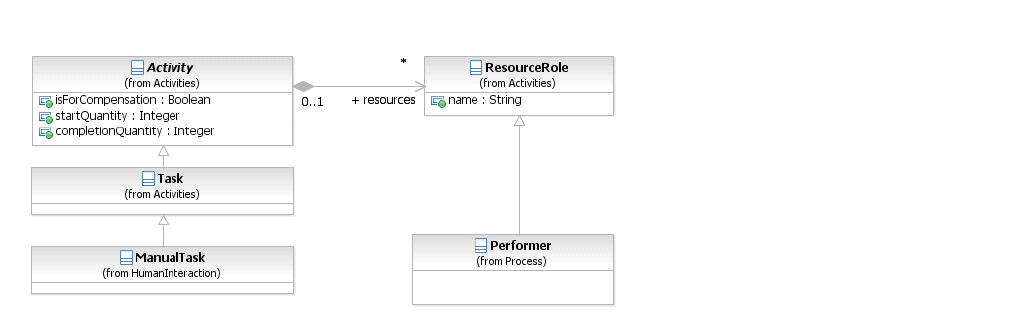
*Figure 10.21 – Manual Task class diagram* (p. 163)
The **User Task** inherits the attributes and model associations of **Activity** (see Table 10.3), but does not have any additional attributes or model associations.
#### User Task
A **User Task** is a typical “workflow” **Task** where a human performer performs the **Task** with the assistance of a software application. The lifecycle of the **Task** is managed by a software component (called task manager) and is typically executed in the context of a **Process**.
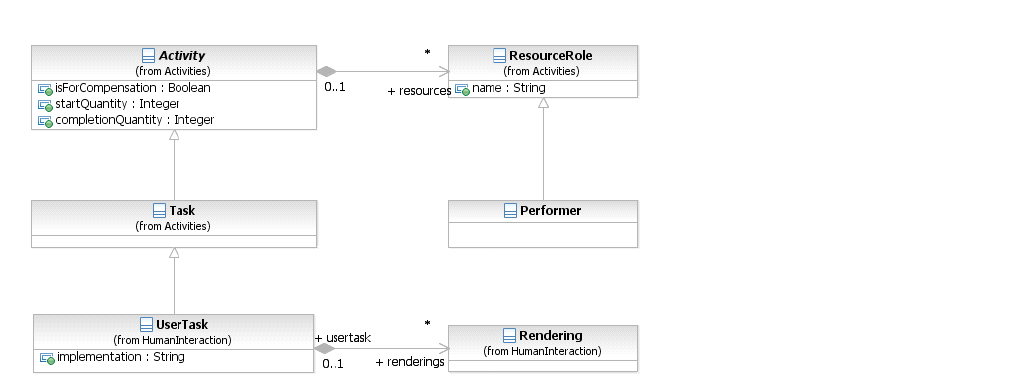
*Figure 10.22 – User Task class diagram* (p. 164)
The **User Task** can be implemented using different technologies, specified by the implementation attribute. Besides the Web service technology, any technology can be used. A **User Task** for instance can be implemented using WS- HumanTask by setting the implementation attribute to “http://docs.oasis-open.org/ns/bpel4people/ws-humantask/protocol/ 200803.” The **User Task** inherits the attributes and model associations of **Activity** (see Table 10.3). Table 10.13 presents the additional attributes and model associations of the **User Task**. If implementations extend these attributes (e.g., to introduce subjects or descriptions with presentation parameters), they SHOULD use attributes defined by the OASIS WS- HumanTask specification.
**Table 10.13 – User Task attributes and model associations**
| Attribute Name | Description/Usage |
| --- | --- |
| **implementation**: string = | This attribute specifies the technology that will be used to implement the |
| ##unspecified | **User Task**. Valid values are "##unspecified" for leaving the implementation technology open, "##WebService" for the Web service technology or a URI identifying any other technology or coordination protocol. The default technology for this task is unspecified. |
| **renderings**: Rendering [0..*] | This attributes acts as a hook which allows **BPMN** adopters to specify task rendering attributes by using the **BPMN** Extension mechanism. |
The **User Task** inherits the *instance* attributes of **Activity** (see Table 8.49). Table 10.14 presents the *instance* attributes of the **User Task** element.
**Table 10.14 – User Task instance attributes**
| Attribute Name | Description/Usage |
| --- | --- |
| **actualOwner**: string | Returns the “user” who picked/claimed the User task and became the actual owner of it. The value is a literal representing the user’s id, email address etc. |
| **taskPriority**: integer | Returns the priority of the **User Task**. |
#### Rendering of User Tasks
**BPMN User Tasks** need to be rendered on user interfaces like forms clients, portlets, etc. The Rendering element provides an extensible mechanism for specifying UI renderings for **User Tasks** (Task UI). The element is optional. One or more rendering methods can be provided in a **Task** definition. A **User Task** can be deployed on any compliant implementation, irrespective of the fact whether the implementation supports specified rendering methods or not. The Rendering element is the extension point for renderings. Things like language considerations are opaque for the Rendering element because the rendering applications typically provide Multilanguage support. Where this is not the case, providers of certain rendering types can decide to extend the rendering type in order to provide language information for a given rendering. The content of the rendering element is not defined by this International Standard.
#### Human Performers
People can be assigned to **Activities** in various roles (called “generic human roles” in WS-HumanTask). **BPMN 1.2** traditionally only has the *Performer* role. In addition to supporting the *Performer* role, **BPMN 2.0** defines a specific HumanPerformer element allowing specifying more specific human roles as specialization of *HumanPerformer*, such as *PotentialOwner*.
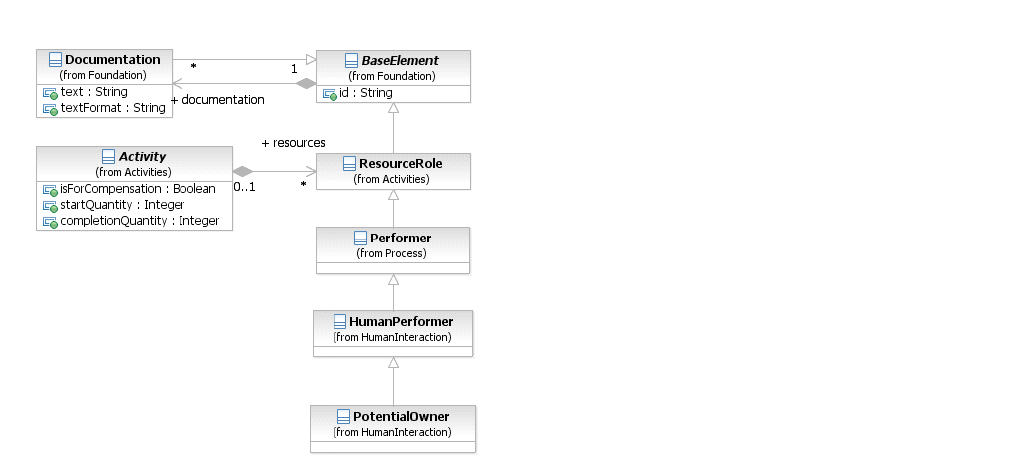
*Figure 10.23 – HumanPerformer class diagram* (p. 165)
The HumanPerformer element inherits the attributes and model associations of ResourceRole (see Table 10.5), through its relationship to Performer, but does not have any additional attributes or model associations.
#### Potential Owners
Potential owners of a **User Task** are persons who can claim and work on it. A potential owner becomes the actual owner of a **Task**, usually by explicitly claiming it.
#### XML Schema for Human Interactions
**Table 10.15 – ManualTask XML schema**
```xml
```
**Table 10.16 – UserTask XML schema**
```xml
```
**Table 10.17 – HumanPerformer XML schema**
```xml
```
**Table 10.18 – PotentialOwner XML schema**
```xml
```
#### Examples
Consider the following sample procurement **Process** from the Buyer perspective (see Figure 10.24).
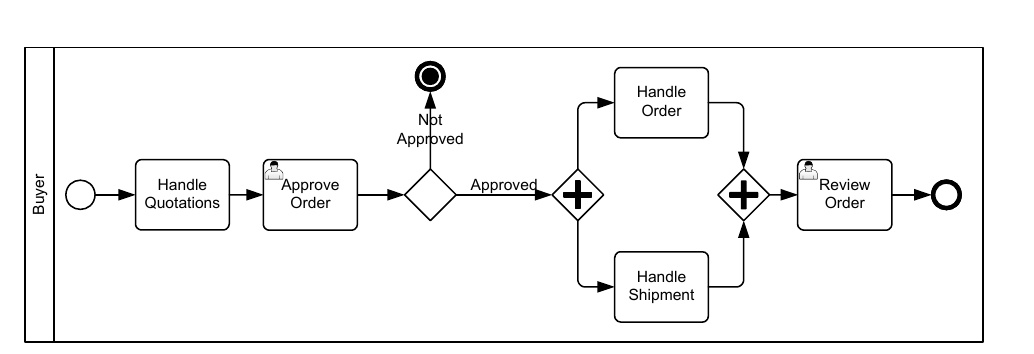
*Figure 10.24 – Procurement Process Example* (p. 168)
The **Process** comprises of two **User Tasks**
- Approve Order: After the quotation handling, the order needs to be approved by some regional manager to continue with the order and shipment handling.
- Review Order: Once the order has been shipped to the Buyer, the order and shipment documents will be reviewed again by someone.
The details of the Resource and resource assignments are not shown in the **BPMN** above. See below XML sample of the “Buyer” **Process** for the Resource usage and resource assignments for potential owners.
**Table 10.19 – XML serialization of Buyer process**
```xml
StartProcess
QuotationHandling
ApproveOrder
OrderApprovedDecision
TerminateProcess
OrderAndShipment
OrderHandling
ShipmentHandling
OrderAndShipmentMerge
ReviewOrder
EndProcess
tns:regionalManager
getDataInput('order')/address/name
getDataInput('order')/address/country
Was the Order Approved?
Was the Order NOT Approved?
[
tns:departmentalReviewer
getDataInput('order')/address/name
```
### 10.3.5 Sub-Processes
A **Sub-Process** is an **Activity** whose internal details have been modeled using **Activities**, **Gateways**, **Events**, and **Sequence Flows**. A **Sub-Process** is a graphical object within a **Process**, but it also can be “opened up” to show a lower-level **Process**. **Sub-Processes** define a contextual *scope* that can be used for attribute visibility, transactional *scope*, for the handling of *exceptions* (see page 274 for more details), of **Events**, or for *compensation* (see page 301 for more details). There are different types of **Sub-Processes**, which will be described in the next five sub clauses.
#### Embedded Sub-Process (Sub-Process)
A **Sub-Process** object shares the same shape as the **Task** object, which is a rounded rectangle. A **Sub-Process** is a rounded corner rectangle that MUST be drawn with a single thin line.
The **Sub-Process** can be in a collapsed view that hides its details (see Figure 10.25 ) or a **Sub-Process** can be in an expanded view that shows its details within the view of the **Process** in which it is contained (see Figure 10.26 ). In the collapsed form, the **Sub-Process** object uses a marker to distinguish it as a **Sub-Process**, rather than a **Task**.
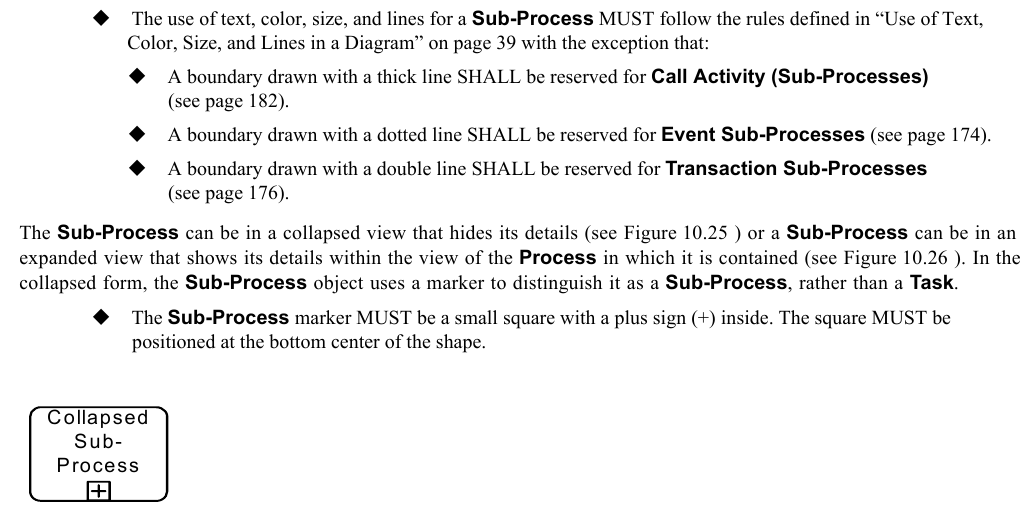
*Figure 10.25 – A Sub-Process object (collapsed)* (p. 171)
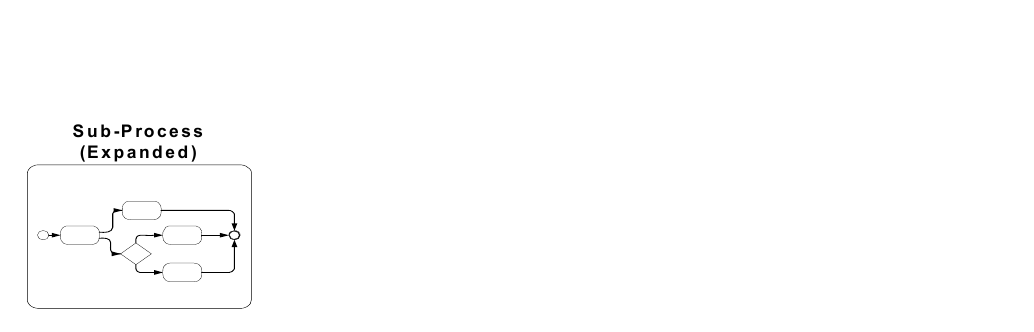
*Figure 10.26 – A Sub-Process object (expanded)* (p. 172)
They are used to create a context for exception handling that applies to a group of **Activities** (see page 274 for more details). *Compensations* can be handled similarly (see page 301 for more details). Expanded **Sub-Processes** can be used as a mechanism for showing a group of parallel **Activities** in a less-cluttered, more compact way. In Figure 10.27, **Activities** “C” and “D” are enclosed in an unlabeled expanded **Sub-Process**. These two **Activities** will be performed in parallel. Notice that the expanded **Sub-Process** does not include a **Start Event** or an **End Event** and the **Sequence Flow**s to/from these **Events**. This usage of expanded **Sub-Processes** for “parallel boxes” is the motivation for having **Start** and **End Events** being optional objects.
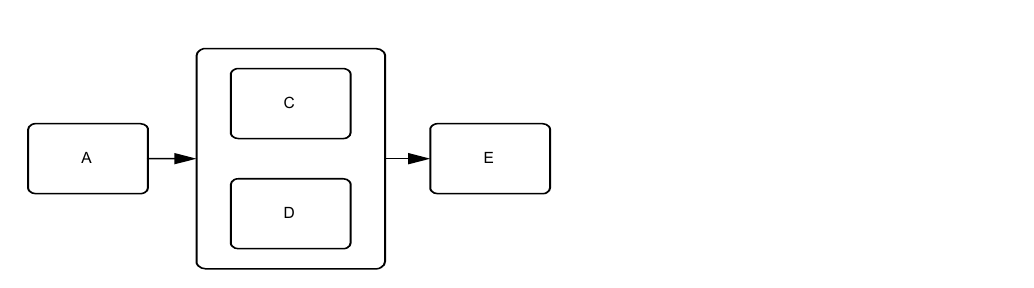
*Figure 10.27 – Expanded Sub-Process used as a “Parallel Box”* (p. 172)
**BPMN** specifies five types of standard markers for **Sub-Processes**. The (Collapsed) **Sub-Process** marker, seen in Figure 10.24, can be combined with four other markers: a *loop* marker or a *multi-instance* marker, a **Compensation** marker, and an **Ad-Hoc** marker. A collapsed **Sub-Process** MAY have one to three of these other markers, in all combinations except that *loop* and *multi-instance* cannot be shown at the same time (see Figure 10.28). The marker for a **Sub-Process** that *loops* MUST be a small line with an arrowhead that curls back upon itself.
The marker for a **Sub-Process** that has multiple *instances* MUST be a set of three vertical lines in parallel.
The marker for an *ad-hoc* **Sub-Process** MUST be a “tilde” symbol.
The marker for a **Sub-Process** that is used for *compensation* MUST be a pair of left facing triangles (like a tape player “rewind” button).
All the markers that are present MUST be grouped and the whole group centered at the bottom of the
**L o o p M u lti-In s ta n c e C o m p e n s a tio n A d -H o c**
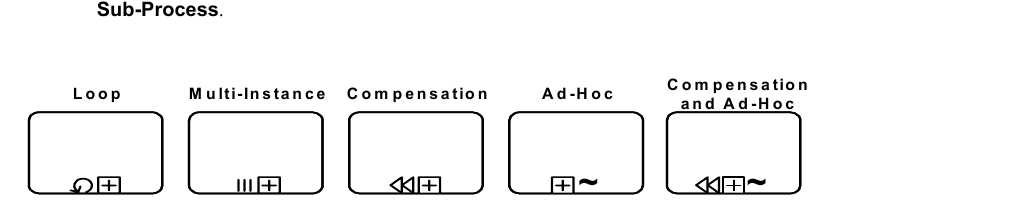
*Figure 10.28 – Collapsed Sub-Process Markers* (p. 173)
The Sub-Process now corresponds to the Embedded Sub-Process of BPMN 1.2. The Reusable Sub-Process of BPMN 1.2 corresponds to the Call Activity (calling a Process - see page 182). Figure 10.29 shows the class diagram related to Sub- Processes.
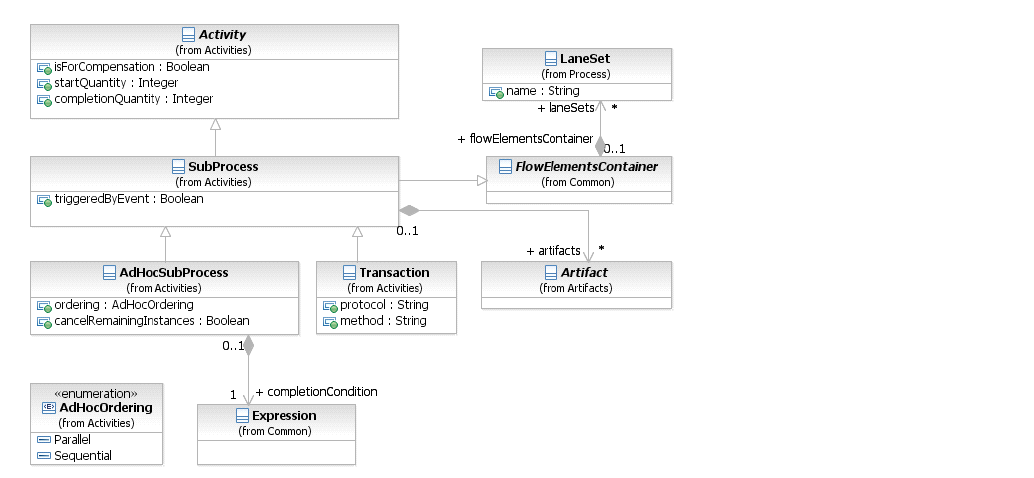
*Figure 10.29 – The Sub-Process class diagram* (p. 173)
The **Sub-Process** element inherits the attributes and model associations of **Activity** (see Table 10.3) and of FlowElementContainer (see Table 8.45). Table 10.3 presents the additional attributes of the **Sub-Process** element.
**Table 10.20 – Sub-Process attributes**
| Attribute Name | Description/Usage |
| --- | --- |
| **triggeredByEvent**: boolean = false | A flag that identifies whether this **Sub-Process** is an **Event Sub-Process**. • If *false*, then this **Sub-Process** is a normal **Sub-Process**. • If *true*, then this **Sub-Process** is an **Event Sub-Process** and is subject to additional constraints (see page 174). |
| **artifacts**: Artifact [0..*] | This attribute provides the list of **Artifacts** that are contained within the **Sub- Process**. |
#### Reusable Sub-Process (Call Activity)
The *reusable* **Sub-Process** of **BPMN 1.2** corresponds to the **Call Activity** that calls a predefined **Process**. See details of a **Call Activity** on page 182.
#### Event Sub-Process
An **Event Sub-Process** is a specialized **Sub-Process** that is used within a **Process** (or **Sub-Process**). A **Sub- Process** is defined as an **Event Sub-Process** when its triggeredByEvent attribute is set to *true*. An **Event Sub-Process** is not part of the *normal flow* of its parent **Process**—there are no *incoming* or *outgoing*
An **Event Sub-Process** MUST NOT have any *incoming* or *outgoing* **Sequence Flows**. An **Event Sub-Process** MAY or MAY NOT occur while the parent **Process** is active, but it is possible that it will occur many times. Unlike a standard **Sub-Process**, which uses the flow of the parent **Process** as a *trigger*, an **Event Sub-Process** has a **Start Event** with a *trigger*. Each time the **Start Event** is triggered while the parent **Process** is active, then the **Event Sub-Process** will start. The **Start Event** of an **Event Sub-Process** MUST have a defined *trigger*.
An **Event Sub-Process** MUST have one and only one **Start Event**. An **Event Sub-Process** object shares the same basic shape as the **Sub-Process** object, which is a rounded rectangle. An **Event Sub-Process** is a rounded corner rectangle that MUST be drawn with a single thin dotted line (see Figure 10.30 and Figure 10.31).
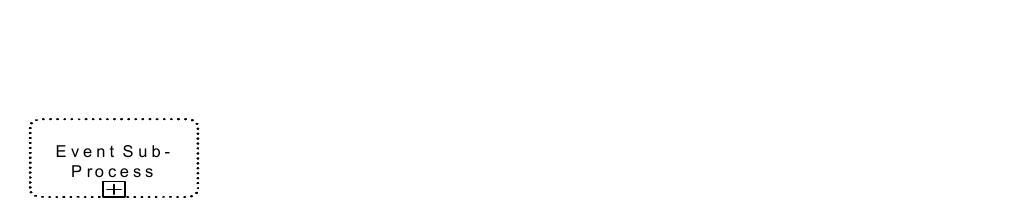
*Figure 10.30 – An Event Sub-Process object (Collapsed)* (p. 175)
E x p a n d e d E v e n t S u b -P ro c e s s

*Figure 10.31 – An Event Sub-Process object (expanded)* (p. 175)
There are two possible consequences to the parent **Process** when an **Event Sub-Process** is triggered: 1) the parent **Process** can be interrupted, and 2) the parent **Process** can continue its work (not interrupted). This is determined by the type of **Start Event** that is used. See page 241 for the list of interrupting and non-interrupting **Event Sub-Process**
Figure 10.32 provides an example of a **Sub-Process** that includes three **Event Sub-Processes**. The first **Event Sub- Process** is triggered by a **Message**, does not interrupt the **Sub-Process**, and can occur multiple times. The second **Event Sub-Process** is used for *compensation* and will only occur after the **Sub-Process** has completed. The third **Event Sub-Process** handles errors that occur while the **Sub-Process** is active and will stop (interrupt) the **Sub- Process** if triggered.
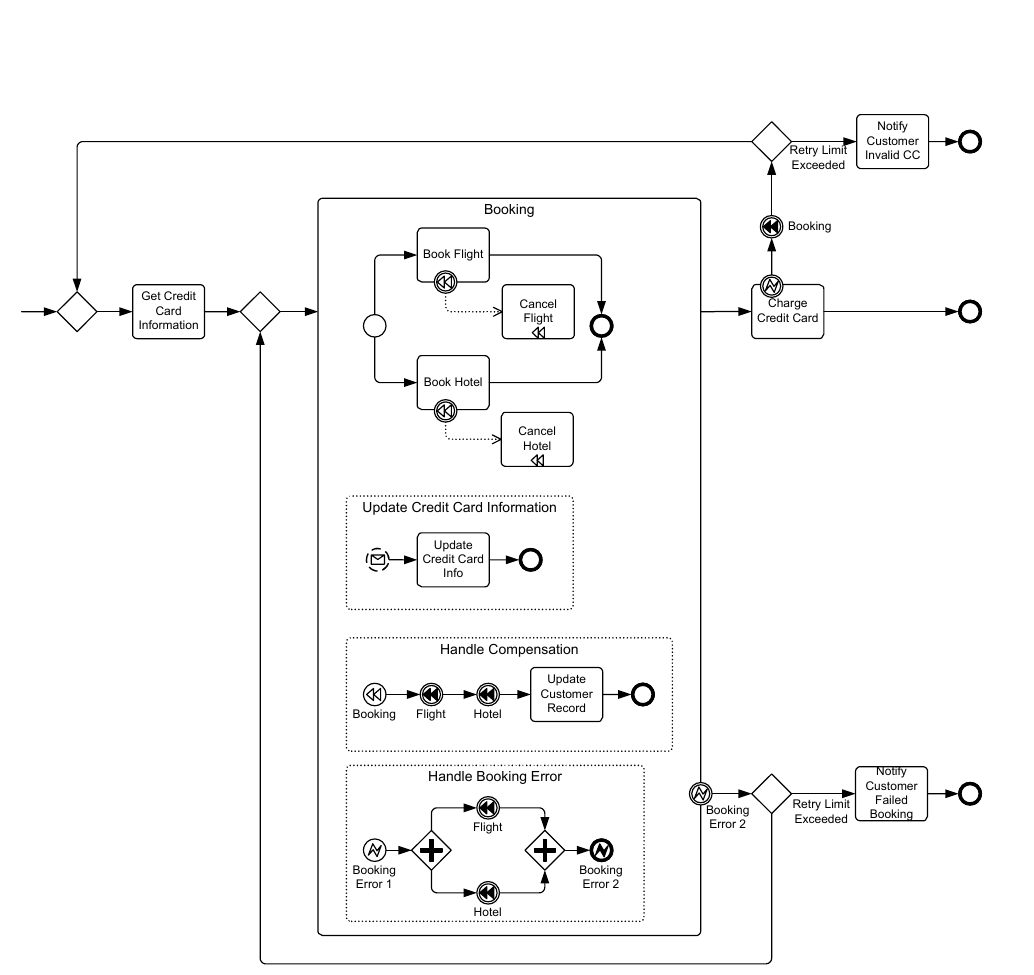
*Figure 10.32 – An example that includes Event Sub-Processes* (p. 176)
#### Transaction
A **Transaction** is a specialized type of **Sub-Process** that will have a special behavior that is controlled through a transaction protocol (such as WS-Transaction). The boundary of the **Sub-Process** will be double-lined to indicate that it is a **Transaction** (see Figure 10.33).
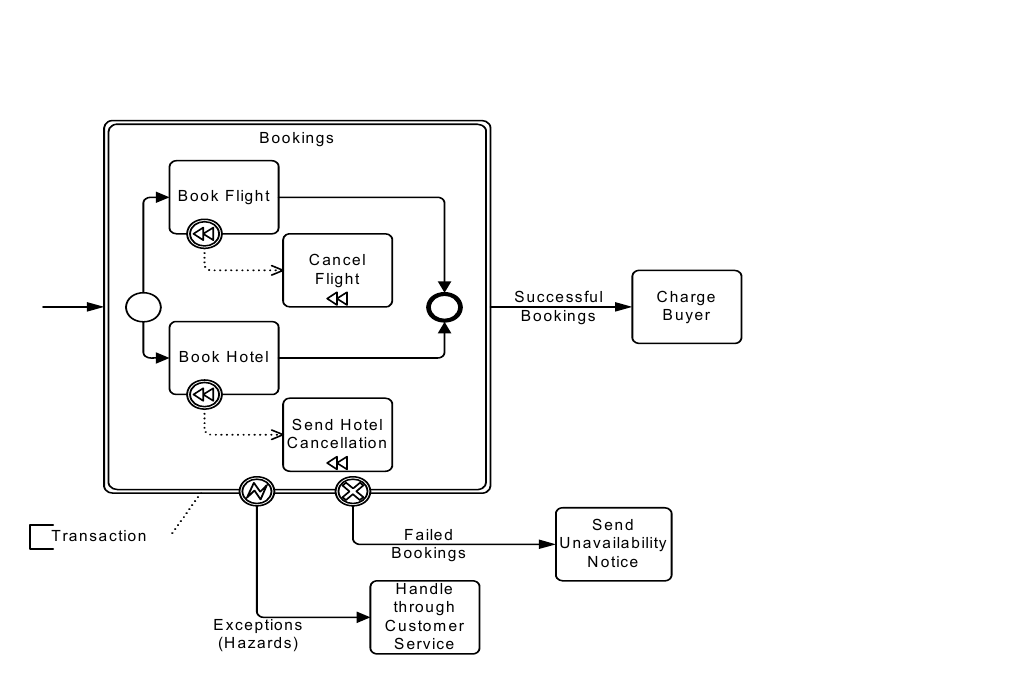
*Figure 10.33 – A Transaction Sub-Process* (p. 177)
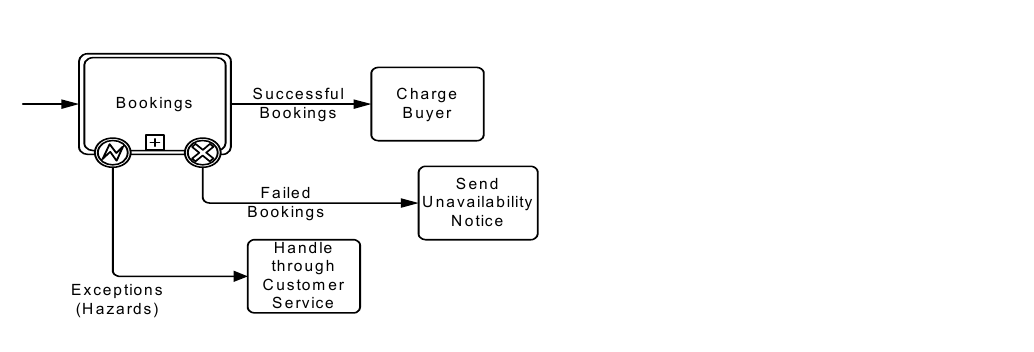
*Figure 10.34 – A Collapsed Transaction Sub-Process* (p. 177)
The **Transaction Sub-Process** element inherits the attributes and model associations of **Activities** (see Table 10.3) through its relationship to **Sub-Process**. Table 10.21 presents the additional attributes and model associations of the **Transaction Sub-Process**.
**Table 10.21 – Transaction Sub-Process attributes and model associations**
| Attribute Name | Description/Usage |
| --- | --- |
| **method**: TransactionMethod | The method is an attribute that defines the **Transaction** method used to commit or cancel a **Transaction**. For executable **Processes**, it SHOULD be set to a technology specific URI, e.g., http://schemas.xmlsoap.org/ ws/2004/10/wsat for WS-AtomicTransaction**, or** http:// docs.oasis-open.org/ws-tx/wsba/2006/06/AtomicOutcome for WS-BusinessActivity. For compatibility with BPMN 1.1, it can also be set to "##compensate," "##store**," or "**##image." |
There are three basic outcomes of a **Transaction**:
1. Successful completion: this will be shown as a normal Sequence Flow that leaves the Transaction Sub-
2. Failed completion (Cancel): When a Transaction is canceled, the Activities inside the Transaction will be subjected to the cancellation actions, which could include rolling back the **Process** and *compensation* (see page 301 for more information on *compensation*) for specific **Activities**. Note that other mechanisms for interrupting a **Transac- tion Sub-Process** will not cause *compensation* (e.g., Error, Timer, and anything for a non-Transaction **Activity**). A **Cancel Intermediate Event**, attached to the boundary of the **Activity**, will direct the flow after the **Transac- tion** has been rolled back and all *compensation* has been completed. The **Cancel Intermediate Event** can only be used when attached to the boundary of a **Transaction Sub-Process**. It cannot be used in any *normal flow* and cannot be attached to a non-**Transaction Sub-Process**. There are two mechanisms that can signal the cancellation of A Cancel End Event is reached within the transaction Sub-Process. A Cancel End Event can only A cancel Message can be received via the transaction protocol that is supporting the execution of the
3. Hazard: This means that something went terribly wrong and that a normal success or cancel is not possible. Error **Intermediate Events** are used to show *Hazards*. When a *Hazard* happens, the **Activity** is interrupted (without *compensation*) and the flow will continue from the **Error Intermediate Event**.
The behavior at the end of a successful **Transaction Sub-Process** is slightly different than that of a normal **Sub- Process**. When each path of the **Transaction Sub-Process** reaches a non-**Cancel End Event(s)**, the flow does not immediately move back up to the higher-level *parent* **Process**, as does a normal **Sub-Process**. First, the transaction protocol needs to verify that all the *Participants* have successfully completed their end of the **Transaction**. Most of the time this will be true and the flow will then move up to the higher-level **Process**. But it is possible that one of the *Participants* can end up with a problem that causes a *Cancel* or a *Hazard*. In this case, the flow will then move to the appropriate I**ntermediate Event**, even though it had apparently finished successfully.
#### Ad-Hoc Sub-Process
An **Ad-Hoc Sub-Process** is a specialized type of **Sub-Process** that is a group of **Activities** that have no REQUIRED sequence relationships. A set of **Activities** can be defined for the **Process**, but the sequence and number of performances for the **Activities** is determined by the performers of the **Activities**. A **Sub-Process** is marked as being *ad-hoc* with a “tilde” symbol placed at the bottom center of the **Sub-Process** shape (see Figure 10.35 and Figure 10.36). The marker for an **Ad-Hoc Sub-Process** MUST be a “tilde” symbol.
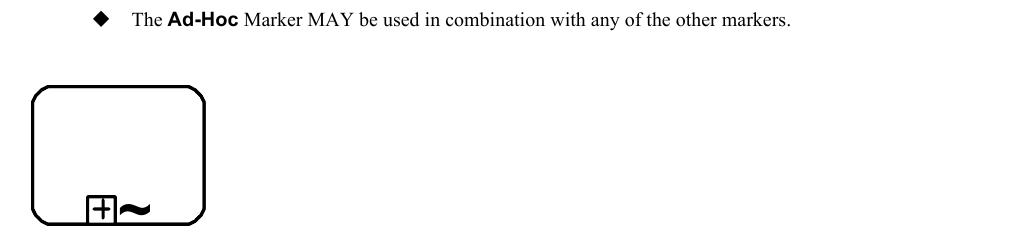
*Figure 10.35 – A collapsed Ad-Hoc Sub-Process* (p. 179)

*Figure 10.36 – An expanded Ad-Hoc Sub-Process* (p. 179)
The **Ad-Hoc Sub-Process** element inherits the attributes and model associations of **Activities** (see Table 10.3) through its relationship to **Sub-Process**. Table 10.22 presents the additional model associations of the **Ad-Hoc Sub-Process**.
**Table 10.22 – Ad-hoc Sub-Process model associations**
| Attribute Name | Description/Usage |
| --- | --- |
| **completionCondition**: Expression | This Expression defines the conditions when the **Process** will end. When the Expression is evaluated to *true*, the **Process** will be terminated. |
| **ordering**: AdHocOrdering = | This attribute defines if the **Activities** within the **Process** can be performed in |
| Parallel | parallel or MUST be performed sequentially. The default setting is parallel |
| { Parallel \| Sequential } | and the setting of sequential is a restriction on the performance that can be needed due to shared resources. When the setting is sequential, then only one Activity can be performed at a time. When the setting is parallel, then zero (0) to all the **Activities** of the **Sub-Process** can be performed in parallel. |
| **cancelRemaining-Instances**: boolean = true | This attribute is used only if ordering is parallel. It determines whether running *instances* are canceled when the completionCondition becomes *true*. |
**Activities** within the **Process** are generally disconnected from each other. During execution of the **Process**, any one or more of the **Activities** MAY be active and they MAY be performed multiple times. The *performers* determine when **Activities** will start, what the next **Activity** will be, and so on. Examples of the types of **Processes** that are **Ad-Hoc** include computer code development (at a low level), sales support, and writing a book chapter. If we look at the details of writing a book chapter, we could see that the **Activities** within this **Process** include: researching the topic, writing text, editing text, generating graphics, including graphics in the text, organizing references, etc. (see Figure 10.37). There MAY be some dependencies between **Tasks** in this **Process**, such as writing text before editing text, but there is not necessarily any correlation between an *instance* of writing text to an *instance* of editing text. Editing can occur infrequently and based on the text of many *instances* of the writing text **Task**.
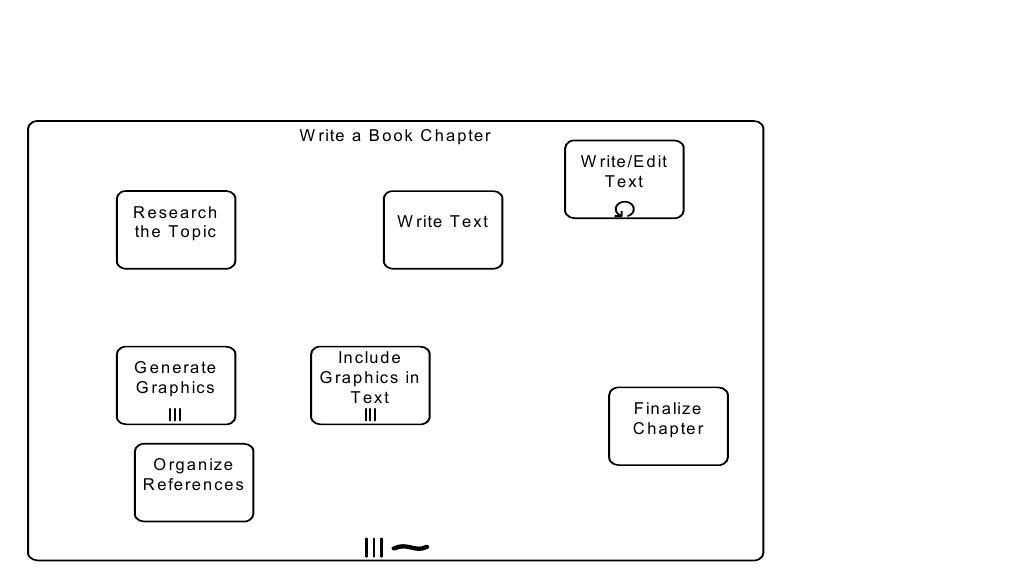
*Figure 10.37 – An Ad-Hoc Sub-Process for writing a book chapter* (p. 181)
Although there is no explicit **Process** structure, some sequence and data dependencies can be added to the details of the **Process**. For example, we can extend the book chapter **Ad-Hoc Sub-Process** shown above and add **Data Objects**, **Data Associations**, and even **Sequence Flows** (Figure 10.38). **Ad-Hoc Sub-Processes** restrict the use of **BPMN** elements that would normally be used in **Sub-Processes**. The list of **BPMN** elements that MUST be used in an **Ad-Hoc Sub-Process: Activity**. The list of **BPMN** elements that MAY be used in an **Ad-Hoc Sub-Process: Data Object, Sequence Flow, Association, Data Association, Group, Message Flow** (as a *source* or *target*), **Gateway**, and The list of **BPMN** elements that MUST NOT be used in an **Ad-Hoc Sub-Process: Start Event, End Event, Conversations** (graphically), **Conversation Links** (graphically), and **Choreography Activities**.
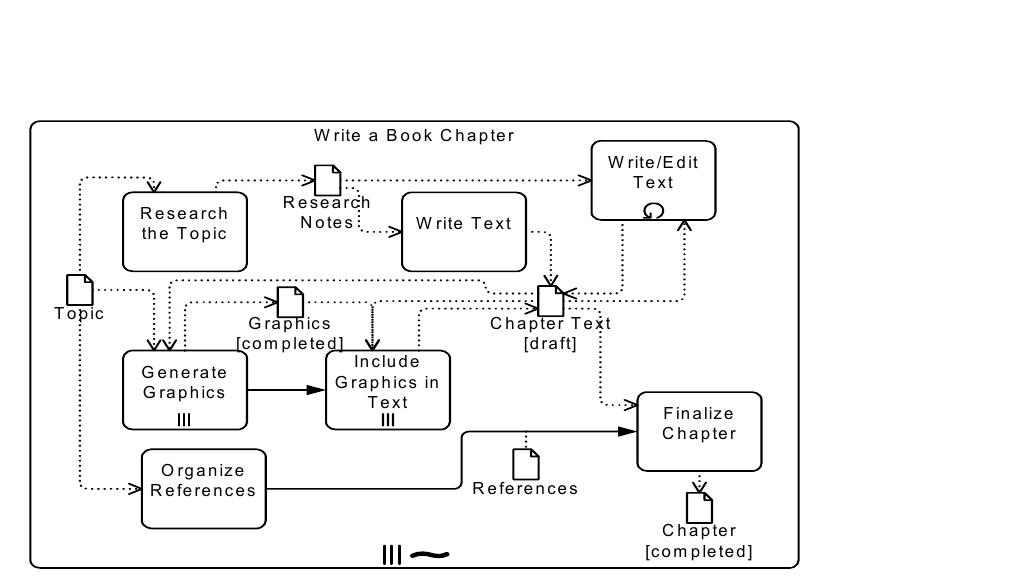
*Figure 10.38 – An Ad-Hoc Sub-Process with data and sequence dependencies* (p. 182)
The **Data Objects** as *inputs* into the **Tasks** act as an additional constraint for the performance of those **Tasks**. The *performers* still determine when the **Tasks** will be performed, but they are now constrained in that they cannot start the **Task** without the appropriate *input*. The addition of **Sequence Flows** between the **Tasks** (e.g., between “Generate Graphics” and “Include Graphics in Text”) creates a dependency where the performance of the first **Task** MUST be followed by a performance of the second **Task**. This does not mean that the second **Task** is to be performed immediately, but there MUST be a performance of the second **Task** after the performance of the first **Task**. It is a challenge for a BPM engine to monitor the status of **Ad-Hoc Sub-Processes**, usually these kind of **Processes** are handled through groupware applications (such as e-mail), but **BPMN** allows modeling of **Processes** that are not necessarily executable, although there are some process engines that can follow an **Ad-Hoc Sub-Process**. Given this, at some point the **Ad-Hoc Sub-Process** will have complete and this can be determined by evaluating a completionCondition that evaluates **Process** attributes that will have been updated by an **Activity** in the
### 10.3.6 Call Activity
A **Call Activity** identifies a point in the **Process** where a global **Process** or a Global Task is used. The **Call Activity** acts as a ‘wrapper’ for the invocation of a global **Process** or Global Task within the execution. The activation of a call **Activity** results in the transfer of control to the called global **Process** or Global Task. The **BPMN 2.0 Call Activity** corresponds to the *Reusable* **Sub-Process** of **BPMN 1.2**. A **BPMN 2.0 Sub-Process** corresponds to the *Embedded* **Sub-Process** of **BPMN 1.2** (see the previous sub clause). A **Call Activity** object shares the same shape as the **Task** and **Sub-Process**, which is a rectangle that has rounded corners. However, the target of what the **Activity** calls will determine the details of its shape. If the **Call Activity** calls a Global Task, then the shape will be the same as a **Task**, but the boundary of the shape will MUST have a thick line (see Figure 10.39).
If the **Call Activity** calls a **Process**, then there are two options:
If the details of the called **Process** are available, then the shape of the **Call Activity** will be the same as a *expanded* **Sub-Process**, but the boundary of the shape MUST have a thick line (see Figure 10.41).
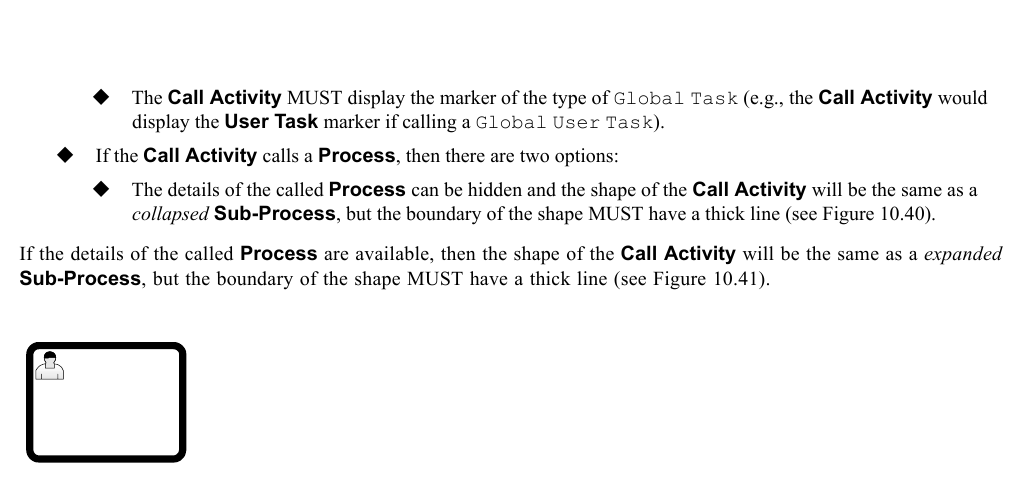
*Figure 10.39 – A Call Activity object calling a Global Task* (p. 183)

*Figure 10.40 – A Call Activity object calling a Process (Collapsed)* (p. 183)
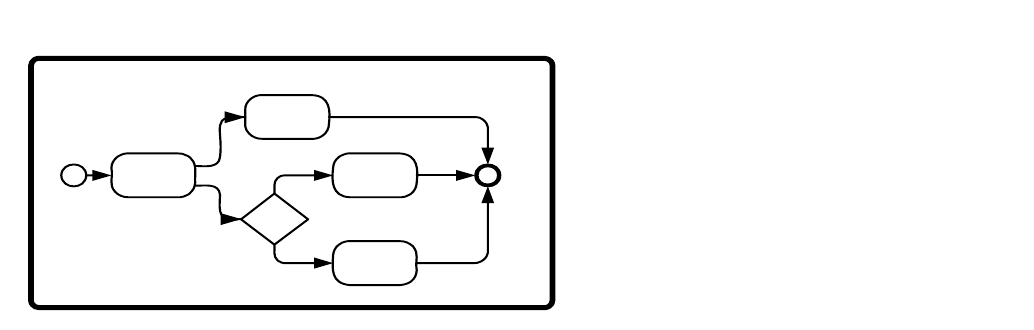
*Figure 10.41 – A Call Activity object calling a Process (Expanded)* (p. 183)
When a **Process** with a *definitional* **Collaboration**, calls a **Process** that also has a *definitional* **Collaboration**, the *Participants* of the two **Collaborations** can be matched to each other using ParticipantAssociations of the **Collaboration** of the calling **Process**.
A **Call Activity** MUST fulfill the data requirements, as well as return the data produced by the CallableElement being invoked (see Figure 10.41). This means that the elements contained in the **Call Activity**’s InputOutputSpecification MUST exactly match the elements contained in the referenced CallableElement.
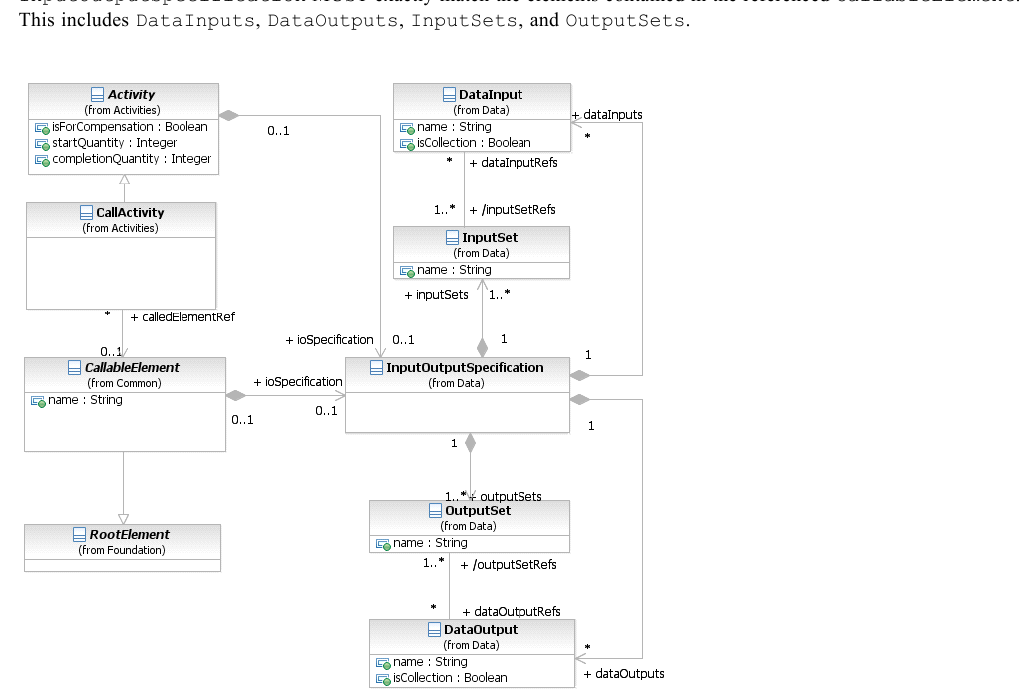
*Figure 10.42 – The Call Activity class diagram* (p. 184)
A **Call Activity** can override properties and attributes of the element being called, potentially changing the behavior of the called element based on the calling context. For example, when the **Call Activity** defines one or more ResourceRole elements, the elements defined by the CallableElement are ignored and the elements defined in the **Call Activity** are used instead. Also, **Events** that are propagated along the hierarchy (errors and escalations) are propagated from the called element to the **Call Activity** (and can be handled on its boundary). The **Call Activity** inherits the attributes and model associations of **Activity** (see Table 10.3). Table 10.23 presents the additional model associations of the **Call Activity**.
**Table 10.23 – CallActivity model associations**
| Attribute Name | Description/Usage |
| --- | --- |
| **calledElement**: CallableElement | The element to be called, which will be either a **Process** or a |
| [0..1] | GlobalTask. Other CallableElements, such as **Choreography**, GlobalChoreographyTask, **Conversation**, and GlobalCommunication MUST NOT be called by the **Call Conversation** element. |
#### Callable Element
CallableElement is the abstract super class of all **Activities** that have been defined outside of a **Process** or **Choreography** but which can be called (or reused), by a **Call Activity**, from within a **Process** or **Choreography**. It MAY reference Interfaces that define the service operations that it provides. The **BPMN** elements that can be called by **Call Activities** (i.e., are CallableElements) are: **Process** and GlobalTask (see Figure 10.43). CallableElements are RootElements, which can be imported and used in other Definitions. When CallableElements (e.g., **Process**) are defined, they are contained within Definitions.
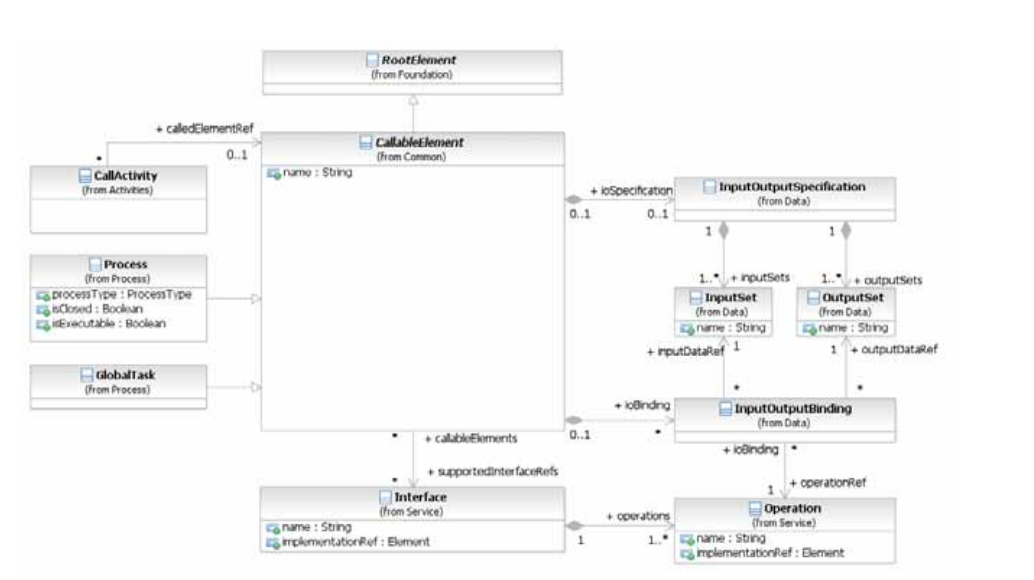
*Figure 10.43 – CallableElement class diagram* (p. 185)
The CallableElement inherits the attributes and model associations of BaseElement (see Table 8.5) through its relationship to RootElement. Table 10.24 presents the additional attributes and model associations of the
**Table 10.24 – CallableElement attributes and model associations**
| Attribute Name | Description/Usage |
| --- | --- |
| **name**: string [0..1] | The descriptive name of the element. |
| **supportedInterfaceRefs**: Interface [0..*] | The Interfaces describing the external behavior provided by this element. |
| **ioSpecification**: Input | The InputOutputSpecification defines the *inputs* and *outputs* and the |
| OutputSpecification [0..1] | InputSets and OutputSets for the **Activity**. |
| **ioBinding**: InputOutput | The InputOutputBinding defines a combination of one InputSet and |
| Binding [0..*] | one OutputSet in order to bind this to an operation defined in an interface. |
When a CallableElement is exposed as a Service, it has to define one or more InputOutputBinding elements. An InputOutputBinding element binds one *Input* and one *Output* of the model associations of the InputOutputBinding.
**Table 10.25 – InputOutputBinding model associations**
| Attribute Name | Description/Usage |
| --- | --- |
| **inputDataRef**: DataInput | A reference to one specific DataInput defined as part of the InputOutputSpecification of the **Activity**. |
| **outputDataRef**: DataOutput | A reference to one specific DataOutput defined as part of the InputOutputSpecification of the **Activity**. |
| **operationRef**: Operation | A reference to one specific Operation defined as part of the Interface of the **Activity**. |
### 10.3.7 Global Task
A Global Task is a reusable, *atomic* **Task** definition that can be called from within any **Process** by a **Call Activity**.
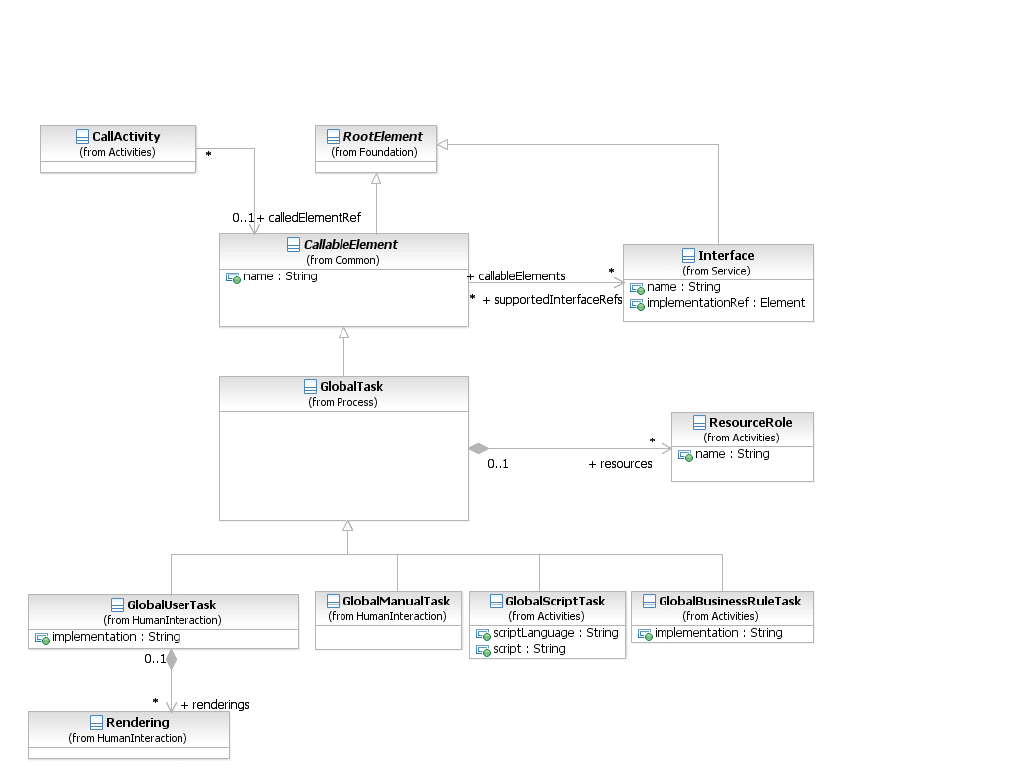
*Figure 10.44 – Global Tasks class diagram* (p. 187)
The GlobalTask inherits the attributes and model associations of Callable Element (see Table 10.24). Table 10.26 presents the additional model associations of the GlobalTask.
**Table 10.26 – Global Task model associations**
| Attribute Name | Description/Usage |
| --- | --- |
| **resources**: ResourceRole [0..*] | Defines the resource that will perform or will be responsible for the GlobalTask. In the case where the **Call Activity** that references this GlobalTask defines its own resources, they will override the ones defined here. |
#### Types of Global Task
There are different types of **Tasks** identified within **BPMN** to separate the types of inherent behavior that **Tasks** might represent. The types of Global Tasks are only a subset of standard **Tasks** types. Only GlobalUserTask, GlobalManualTask, GlobalScriptTask, and GlobalBusinessRuleTask are defined in BPMN. For the sake of efficiency in this document, the list of **Task** types is presented once on page 154. The behavior, attributes, and model associations defined in that sub clause also apply to the corresponding types of **Global Tasks**.
### 10.3.8 Loop Characteristics
**Activities** MAY be repeated sequentially, essentially behaving like a *loop*. The presence of LoopCharacteristics signifies that the **Activity** has looping behavior. LoopCharacteristics is an abstract class. Concrete subclasses define specific kinds of looping behavior. The LoopCharacteristics inherits the attributes and model associations of BaseElement (see Table 8.5). There are no further attributes or model associations of the LoopCharacteristics. However, each **Loop Activity** *instance* has attributes whose values MAY be referenced by Expressions. These values are only available when the **Loop Activity** is being executed. Figure 10.45 displays the class diagram for an **Activity’s** *loop* characteristics, including the details of both the standard *loop* and a *multi-instance*.
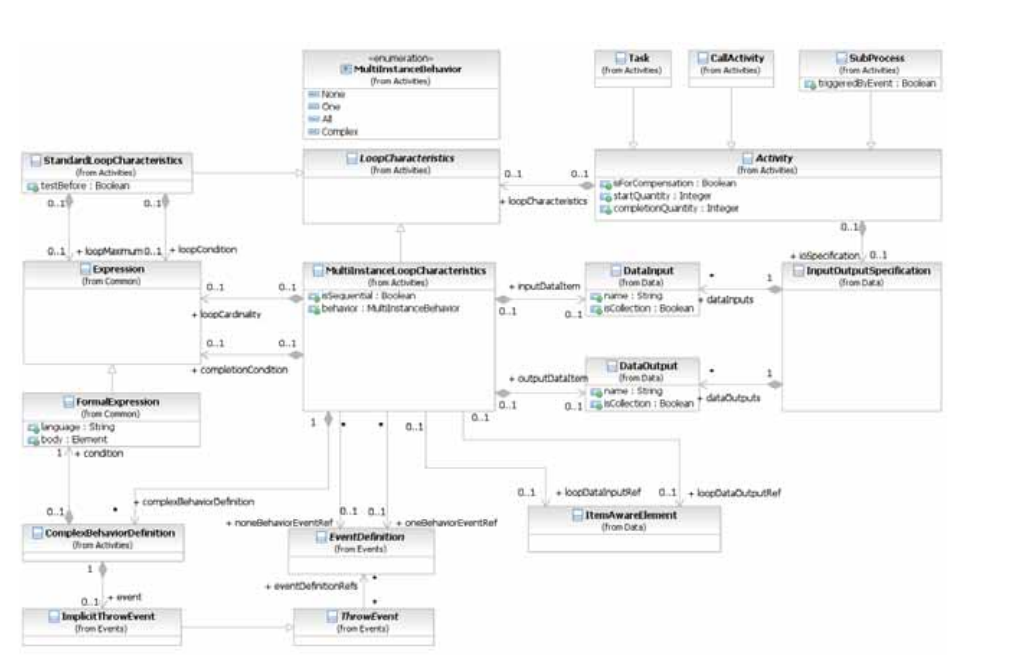
*Figure 10.45 – LoopCharacteristics class diagram* (p. 188)
The LoopCharacteristics element inherits the attributes and model associations of BaseElement (see Table 8.5), but does not have any further attributes or model associations. However, a **Loop Activity** does have additional *instance* attributes as shown in Table 10.27.
**Table 10.27 – Loop Activity instance attributes**
| Attribute Name | Description/Usage |
| --- | --- |
| **loopCounter**: integer | The LoopCounter attribute is used at runtime to count the number of loops and is automatically updated by the process engine. |
#### Standard Loop Characteristics
The StandardLoopCharacteristics class defines looping behavior based on a boolean condition. The **Activity** will *loop* as long as the boolean condition is *true*. The condition is evaluated for every *loop* iteration, and MAY be evaluated at the beginning or at the end of the iteration. In addition, a numeric cap can be optionally specified. The number of iterations MAY NOT exceed this cap. The marker for a **Task** or a **Sub-Process** that is a standard *loop* MUST be a small line with an arrowhead that curls back upon itself (see Figure 10.46 and Figure 10.47).

*Figure 10.46 – A Task object with a Standard Loop Marker* (p. 189)

*Figure 10.47 – A Sub-Process object with a Standard Loop Marker* (p. 189)
The StandardLoopCharacteristics element inherits the attributes and model associations of BaseElement (see Figure 8.5), through its relationship to LoopCharacteristics. Table 10.28 presents the additional attributes and model associations for the StandardLoopCharacteristics element.
**Table 10.28 – StandardLoopCharacteristics attributes and model associations**
| Attribute Name | Description/Usage |
| --- | --- |
| **testBefore**: boolean = false | Flag that controls whether the loop condition is evaluated at the beginning (testBefore = *true*) or at the end (testBefore = *false*) of the loop iteration. |
| **loopMaximum**: integer [0..1] | Serves as a cap on the number of iterations. |
| **loopCondition**: Expression [0..1] | A boolean Expression that controls the loop. The **Activity** will only loop as long as this condition is *true*. The looping behavior MAY be underspecified, meaning that the modeler can simply document the condition, in which case the loop cannot be formally executed. |
#### Multi-Instance Characteristics
The MultiInstanceLoopCharacteristics class allows for creation of a desired number of **Activity** *instances*. The *instances* MAY execute in parallel or MAY be sequential. Either an Expression is used to specify or calculate the desired number of *instances* or a data driven setup can be used. In that case a data input can be specified, which is able to handle a collection of data. The number of items in the collection determines the number of **Activity** *instances*. This data input can be produced by an input **Data Association**. The modeler can also configure this *loop* to control the *tokens* produced. The marker for a **Task** or **Sub-Process** that is a *multi-instance* MUST be a set of three vertical lines.
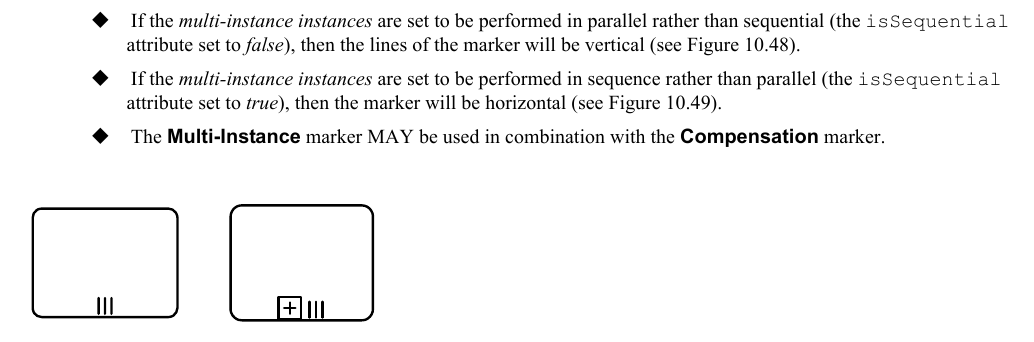
*Figure 10.48 – Activity Multi-Instance marker for parallel instances* (p. 190)

*Figure 10.49 – Activity Multi-Instance marker for sequential instances* (p. 190)
The MultiInstanceLoopCharacteristics element inherits the attributes and model associations of BaseElement (see Table 8.5), through its relationship to LoopCharacteristics. Table 10.29 presents the additional attributes and model associations for the MultiInstanceLoopCharacteristics element.
**Table 10.29 – MultiInstanceLoopCharacteristics attributes and model associations**
| Attribute Name | Description/Usage |
| --- | --- |
| **isSequential**: boolean = false | This attribute is a flag that controls whether the **Activity** *instances* will execute sequentially or in parallel. |
| **loopCardinality**: Expression [0..1] | A numeric Expression that controls the number of **Activity** *instances* that will be created. This Expression MUST evaluate to an *integer*. This MAY be underspecified, meaning that the modeler MAY simply document the condition. In such a case the *loop* cannot be formally executed. In order to initialize a valid *multi-instance,* either the loopCardinality Expression or the loopDataInput MUST be specified. |
| **loopDataInputRef**: ItemAwareElement [0..1] | This is used to determine the number of **Activity** ItemAwareElement *instances*, one **Activity** *instance* per item in the collection of data stored in that ItemAwareElement element. For **Tasks** it is a reference to a **Data Input** which is part of the **Activity**’s InputOutputSpecification. For **Sub-Processes** it is a reference to a collection-valued **Data Object** in the context that is visible to the **Sub-Processes**. In order to initialize a valid *multi-instance*, either the loopCardinality Expression or the loopDataInput MUST be specified. |
| **loopDataOutputRef**: ItemAwareElement [0..1] | This specifies the collection of data, which will be ItemAwareElement produced by the *multi-instance*. For **Tasks** it is a reference to a **Data Output** which is part of the **Activity**’s InputOutputSpecification. For **Sub-Processes** it is a reference to a collection-valued **Data Object** in the context that is visible to the **Sub-Processes**. |
| **inputDataItem**: DataInput [0..1] | A **Data Input**, representing for every **Activity** *instance* the single item of the collection stored in the loopDataInput. This **Data Input** can be the source of DataInputAssociation to a data input of the **Activity**’s InputOutputSpecification. The type of this **Data Input** MUST the scalar of the type defined for the loopDataInput. |
| **outputDataItem**: DataOutput [0..1] | A **Data Output**, representing for every **Activity** *instance* the single item of the collection stored in the loopDataOutput. This **Data Output** can be the target of DataOutputAssociation to a data output of the **Activity**’s InputOutputSpecification. The type of this **Data Output** MUST the scalar of the type defined for the loopDataOutput. |
| **behavior**: MultiInstanceBehavior = all { | The attribute behavior acts as a shortcut for specifying when events |
| None \| One \| All \| Complex } | SHALL be thrown from an **Activity** *instance* that is about to complete. It can assume values of None, One, All, and Complex, resulting in the following behavior: • **None**: the EventDefinition which is associated through the noneEvent association will be thrown for each *instance* completing. • **One**: the EventDefinition referenced through the oneEvent association will be thrown upon the first *instance* completing. • **All**: no **Event** is ever thrown; a *token* is produced after completion of all *instances*. • **Complex**: the complexBehaviorDefinitions are consulted to determine if and which **Events** to throw. For the behaviors of none and one, a default SignalEventDefini-tion will be thrown which automatically carries the current runtime attributes of the **MI Activity**. Any thrown **Events** can be caught by *boundary* **Events** on the **Multi- Instance Activity**. |
| **complexBehaviorDefinition**: ComplexBehaviorDefinition [0..*] | Controls when and which **Events** are thrown in case is set to behavior complex. |
| **completionCondition**: Expression | This attribute defines a boolean Expression that when evaluated to |
| [0..1] | *true*, cancels the remaining **Activity** *instances* and produces a *token*. |
| **oneBehaviorEventRef**: EventDefinition [0..1] | The which is thrown when behavior is set to EventDefinition one and the first internal **Activity** *instance* has completed. |
| **noneBehaviorEventRef**: EventDefinition [0..1] | The which is thrown when the behavior is set to EventDefinition none and an internal **Activity** *instance* has completed. |
Table 10.30 lists all *instance* attributes available at runtime. For each *instance* of the **Multi-Instance Activity** (outer *instance*), there exists a number of generated (inner) *instances* of the **Activity** at runtime.
**Table 10.30 – Multi-instance Activity instance attributes**
| Attribute Name | Description/Usage |
| --- | --- |
| **loopCounter**: integer | This attribute is provided for each generated (inner) *instance* of the **Activity**. It contains the sequence number of the generated *instance*, i.e., if this value of some *instance* in n, the *instance* is the n-th *instance* that was generated. |
| **numberOfInstances**: integer | This attribute is provided for the outer *instance* of the **Multi-Instance Activity** only. This attribute contains the total number of inner *instances* created for the **Multi-Instance Activity**. |
| **numberOfActiveInstances**: integer | This attribute is provided for the outer *instance* of the **Multi-Instance Activity** only. This attribute contains the number of currently active inner *instances* for the **Multi-Instance Activity**. In case of a sequential **Multi-Instance Activity**, this value can’t be greater than 1. For parallel **Multi-Instance Activities**, this value can’t be greater than the value contained in numberOfInstances. |
| **numberOfCompletedInstances**: integer | This attribute is provided for the outer *instance* of the **Multi-Instance Activity** only. This attribute contains the number of already completed inner *instances* for the **Multi-Instance Activity**. |
| **numberOfTerminatedInstances**: integer | This attribute is provided for the outer *instance* of the **Multi-Instance Activity** only. This attribute contains the number of terminated inner *instances* for the **Multi-Instance Activity**. The sum of numberOfTerminatedInstances, numberOfCompletedInstances, and numberOfActiveInstances always sums up to numberOfInstances. |
#### Complex Behavior Definition
This element controls when and which **Events** are thrown in case behavior of the **Multi-Instance Activity** is set to
The ComplexBehaviorDefinition element inherits the attributes and model associations of BaseElement (see Table 8.5). Table 10.31 presents the additional attributes and model associations for the
**Table 10.31 – ComplexBehaviorDefinition attributes and model associations**
| Attribute Name | Description/Usage |
| --- | --- |
| **condition**: Formal Expression | This attribute defines a boolean Expression that when evaluated to *true*, cancels the remaining **Activity** *instances* and produces a *token*. |
| **event**: ImplicitThrowEvent | If the condition is *true*, this identifies the **Event** that will be thrown (to be caught by a *boundary* **Event** on the **Multi-Instance Activity**). |
### 10.3.9 XML Schema for Activities
**Table 10.32 – Activity XML schema**
```xml
```
**Table 10.33 – AdHocSubProcess XML schema**
```xml
```
**Table 10.34 – BusinessRuleTask XML schema**
```xml
```
**Table 10.35 – CallableElement XML schema**
```xml
```
**Table 10.36 – CallActivity XML schema**
```xml
```
**Table 10.37 – GlobalBusinessRuleTask XML schema**
```xml
```
**Table 10.38 – GlobalScriptTask XML schema**
```xml
```
**Table 10.39 – GlobalTask XML schema**
```xml
```
**Table 10.40 – LoopCharacteristics XML schema**
```xml
```
**Table 10.41 – MultiInstanceLoopCharacteristics XML schema**
```xml
```
**Table 10.42 – ReceiveTask XML schema**
```xml
```
**Table 10.43 – ResourceRole XML schema**
```xml
```
**Table 10.44 – ScriptTask XML schema**
```xml
```
**Table 10.45 – SendTask XML schema**
```xml
```
**Table 10.46 – ServiceTask XML schema**
```xml
```
**Table 10.47 – StandardLoopCharacteristics XML schema**
```xml
```
**Table 10.48 – SubProcess XML schema**
```xml
```
**Table 10.49 – Task XML schema**
```xml
```
**Table 10.50 – Transaction XML schema**
```xml
```