---
title: "8.4 Common Elements"
chapter: "8 BPMN Core Structure"
source: "OMG BPMN 2.0.2 — formal/2013-12-09"
pages: "64-101"
---
> 8 BPMN Core Structure · páginas 64-101 · [índice](../README.md)
## 8.4 Common Elements
The following sub clauses define **BPMN** elements that MAY be used in more than one type of diagram (e.g., **Process**, **Collaboration**, and **Choreography**).
### 8.4.1 Artifacts
**BPMN** provides modelers with the capability of showing additional information about a Process that is not directly related to the **Sequence Flows** or **Message Flows** of the Process. At this point, **BPMN** provides three standard Artifacts: **Associations**, **Groups**, and **Text Annotations**. Additional Artifacts MAY be added to the **BPMN** International Standard in later versions. A modeler or modeling tool MAY extend a **BPMN** diagram and add new types of Artifacts to a Diagram. Any new Artifact MUST follow the **Sequence Flow** and **Message Flow** connection rules (listed below). **Associations** can be used to link
Figure 8.8 shows the Artifacts class diagram. When an Artifact is defined it is contained within a **Collaboration**
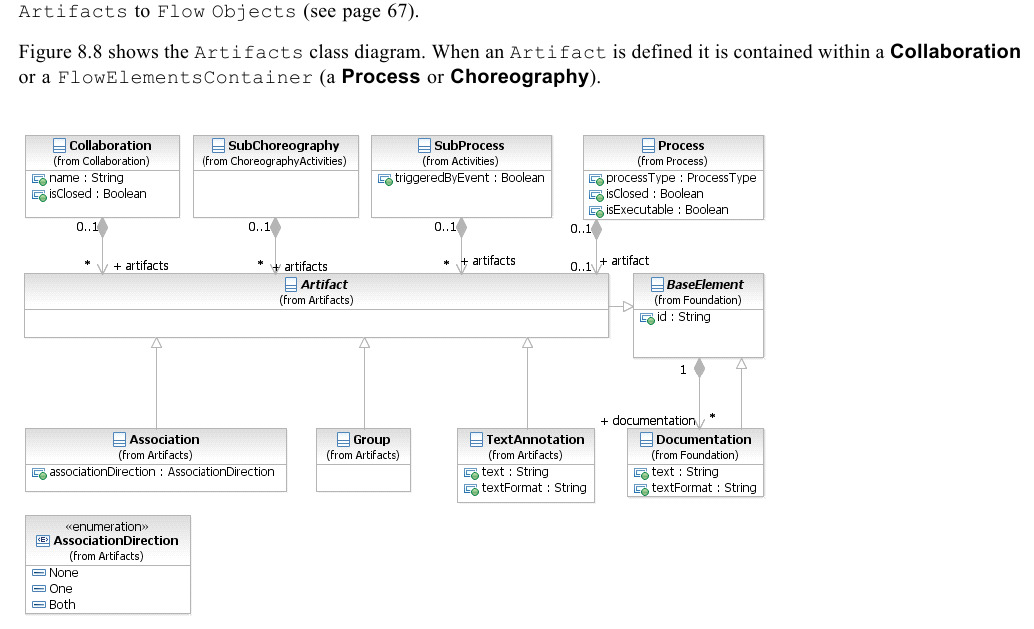
*Figure 8.8 – Artifacts Metamodel* (p. 64)
#### Common Artifact Definitions
The following sub clauses provide definitions that are common to all Artifacts.
#### Artifact Sequence Flow Connections
See “Sequence Flow Connections Rules” on page 40 for the entire set of objects and how they MAY be source or targets
An Artifact MUST NOT be a target for a **Sequence Flow**. An Artifact MUST NOT be a source for a **Sequence Flow**.
#### Artifact Message Flow Connections
See “Message Flow Connection Rules” on page 41 for the entire set of objects and how they MAY be source or targets of
An Artifact MUST NOT be a target for a **Message Flow**. An Artifact MUST NOT be a source for a **Message Flow**.
#### Association
An **Association** is used to associate information and Artifacts with *Flow Objects*. Text and graphical non-*Flow Objects* can be associated with the *Flow Objects* and Flow. An **Association** is also used to show the **Activity** used for *compensation*. More information about *compensation* can be found on page 300. An **Association** is line that MUST be drawn with a dotted single line (see Figure 8.9). The use of text, color, size, and lines for an Association MUST follow the rules defined in “Use of Text, Color, Size, and Lines in a Diagram” on page 39.
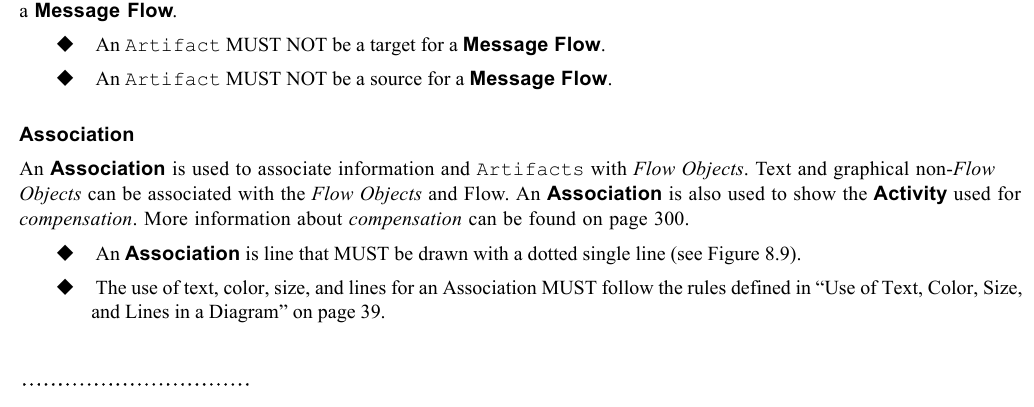
*Figure 8.9 – An Association* (p. 65)
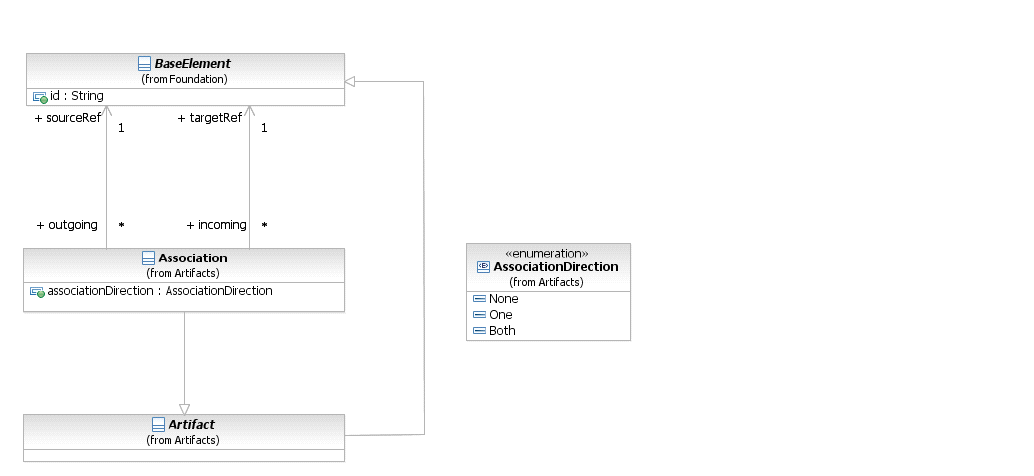
*Figure 8.10 – The Association Class Diagram* (p. 65)
If there is a reason to put directionality on the **Association** then:
4. A line arrowhead MAY be added to the **Association** line (see Figure 8.11).

*Figure 8.11 – A Directional Association* (p. 66)
Note that directional **Associations** were used in **BPMN 1.2** to show how **Data Objects** were inputs or outputs to **Activities**. In **BPMN 2.0.2**, a **Data Association** connector is used to show inputs and outputs (see page 220). A **Data Association** uses the same notation as a directed **Association** (as in Figure 8.11, above). An **Association** is used to connect user-defined text (an **Annotation**) with a *Flow Object* (see Figure 8.12).
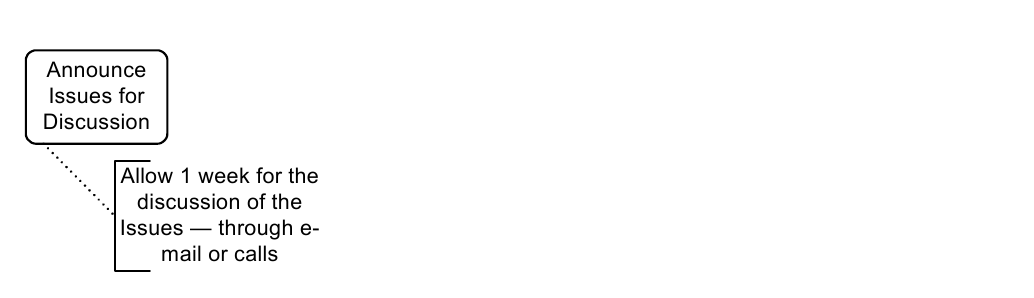
*Figure 8.12 – An Association of Text Annotation* (p. 66)
The **Association** element inherits the attributes and model associations of BaseElement (see Table 8.5). Table 8.20 presents the additional attributes and model associations for an **Association**.
**Table 8.20 – Association attributes and model associations**
| Attributes | Description |
| --- | --- |
| **associationDirection**: AssociationDirection = None {None \| | associationDirection is an attribute that defines whether or not the Association shows any directionality with an arrowhead. The default is |
| One \| Both} | None (no arrowhead). A value of One means that the arrowhead SHALL be at the Target Object. A value of Both means that there SHALL be an arrowhead at both ends of the Association line. |
| **sourceRef**: BaseElement | The BaseElement that the **Association** is connecting from. |
| **targetRef**: BaseElement | The BaseElement that the **Association** is connecting to. |
#### Group
The **Group** object is an Artifact that provides a visual mechanism to group elements of a diagram informally. The grouping is tied to the CategoryValue supporting element. That is, a **Group** is a visual depiction of a single CategoryValue. The graphical elements within the **Group** will be assigned the CategoryValue of the **Group**. (NOTE - CategoryValues can be highlighted through other mechanisms, such as color, as defined by a modeler or a modeling tool). A **Group** is a rounded corner rectangle that MUST be drawn with a solid dashed line (as seen in Figure 8.13).
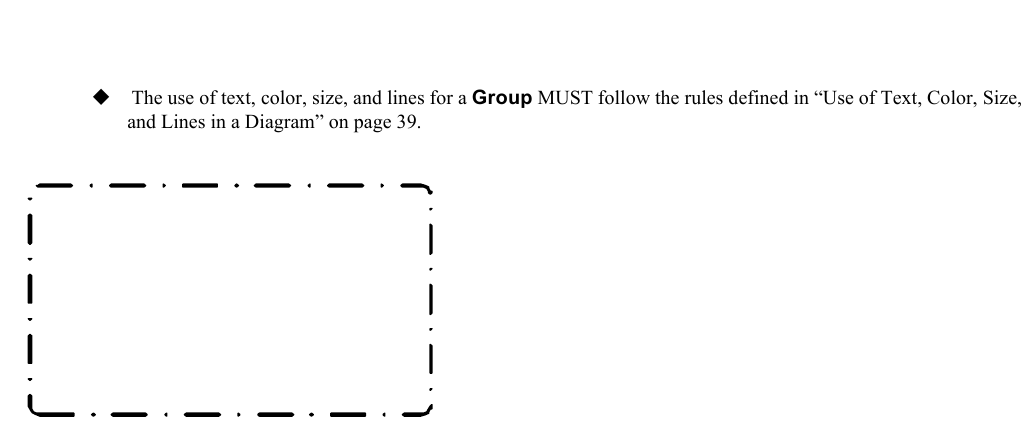
*Figure 8.13 – A Group Artifact* (p. 67)
As an Artifact, a **Group** is not an **Activity** or any Flow Object, and, therefore, cannot connect to **Sequence Flows** or **Message Flows**. In addition, **Groups** are not constrained by restrictions of **Pools** and **Lanes**. This means that a **Group** can stretch across the boundaries of a **Pool** to surround **Diagram** elements (see Figure 8.14), often to identify **Activities** that exist within a distributed business-to-business transaction.
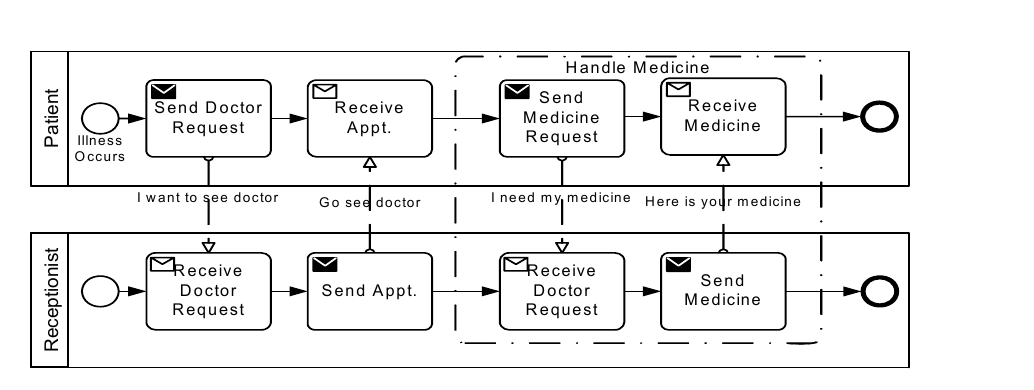
*Figure 8.14 – A Group around Activities in different Pools* (p. 67)
**Groups** are often used to highlight certain sub clauses of a Diagram without adding additional constraints for performance, as a **Sub-Process** would. The highlighted (grouped) sub clause of the Diagram can be separated for reporting and analysis purposes. **Groups** do not affect the flow of the Process. Figure 8.15 shows the **Group** class diagram.
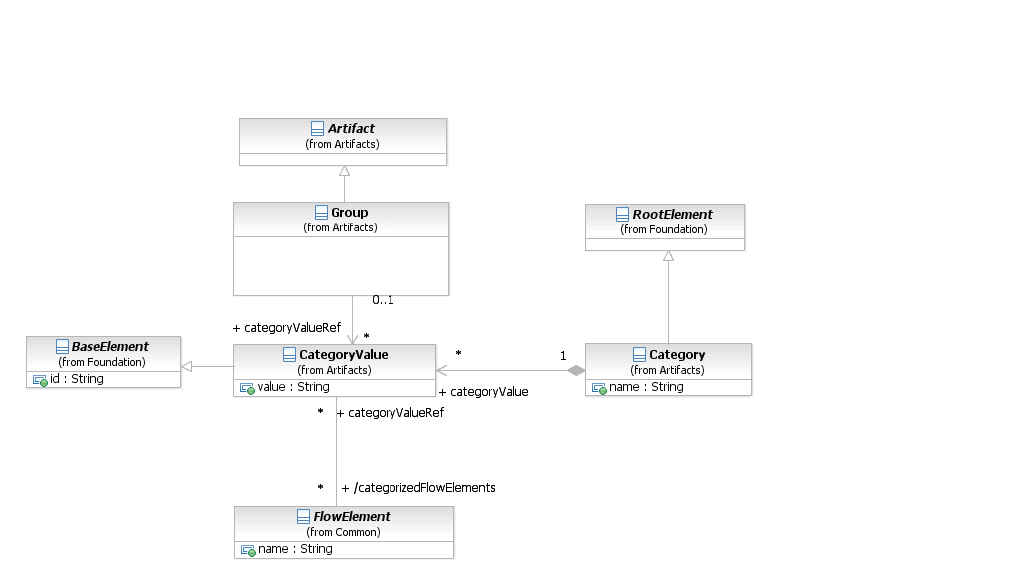
*Figure 8.15 – The Group class diagram* (p. 68)
The **Group** element inherits the attributes and model associations of BaseElement (see Table 8.5), through its relationship to **Artifact**. Table 8.21 presents the additional model associations for a **Group**.
**Table 8.21 – Group model associations**
| Attributes | Description |
| --- | --- |
| **categoryValueRef**: CategoryValue [0..1] | The categoryValueRef attribute specifies the CategoryValue that the **Group** represents. (Further details about the definition of a Category and CategoryValue can be found on page 70.) The name of the Category and the value of the CategoryValue separated by delineator "." provides the label for the **Group**. The graphical elements within the boundaries of the **Group** will be assigned the CategoryValue. |
#### Category
Categories, which have user-defined semantics, can be used for documentation or analysis purposes. For example, FlowElements can be categorized as being customer oriented vs. support oriented. Furthermore, the cost and time of **Activities** per Category can be calculated. **Groups** are one way in which Categories of objects can be visually displayed on the diagram. That is, a **Group** is a visual depiction of a single CategoryValue. The graphical elements within the **Group** will be assigned the CategoryValue of the **Group**. The value of the CategoryValue, optionally prepended by the Category name and delineator ":", appears on the diagram as the **Group** label. (NOTE - Categories can be highlighted through other mechanisms, such as color, as defined by a modeler or a modeling tool). A single Category can be used for multiple **Groups** in a diagram.
The Category element inherits the attributes and model associations of BaseElement (see Table 8.5) through its relationship to RootElement. Table 8.22 displays the additional model associations of the Category element.
**Table 8.22 – Category model associations**
| Attributes | Description |
| --- | --- |
| **name**: string | The descriptive name of the element. |
| **categoryValue**: CategoryValue [0..*] | The categoryValue attribute specifies one or more values of the Category. For example, the Category is “Region” then this Category could specify values like “North,” “South,” “West,” and “East.” |
The CategoryValue element inherits the attributes and model associations of BaseElement (see Table 8.5). Table 8.23 displays the attributes and model associations of the CategoryValue element.
**Table 8.23 – CategoryValue attributes and model associations**
| Attributes | Description |
| --- | --- |
| **value**: string | This attribute provides the value of the CategoryValue element. |
| **category**: Category [0..1] | The category attribute specifies the Category representing the Category as such and contains the CategoryValue (Further details about the definition of a Category can be found on page 70). |
| **categorizedFlowElements**: FlowElement [0..*] | The FlowElements attribute identifies all of the elements (e.g., Events, Activities, Gateways, and Artifacts) that are within the boundaries of the Group. |
#### Text Annotation
**Text Annotations** are a mechanism for a modeler to provide additional information for the reader of a **BPMN** Diagram. A **Text Annotation** is an open rectangle that MUST be drawn with a solid single line (as seen in Figure 8.16).
The **Text Annotation** object can be connected to a specific object on the Diagram with an **Association**, but does not affect the flow of the **Process**. Text associated with the **Annotation** can be placed within the bounds of the open rectangle.
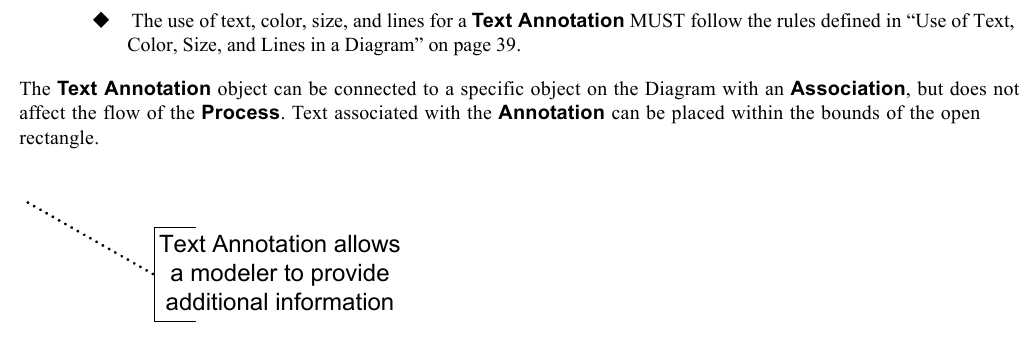
*Figure 8.16 – A Text Annotation* (p. 69)
The **Text Annotation** element inherits the attributes and model associations of BaseElement (see Table 8.5). Table 8.24 presents the additional attributes for a **Text Annotation**.
**Table 8.24 – Text Annotation attributes**
| Attributes | Description |
| --- | --- |
| **text**: string | Text is an attribute that is text that the modeler wishes to communicate to the reader of the Diagram. |
| **textFormat**: string | This attribute identifies the format of the text. It MUST follow the mime-type format. The default is "text/plain." |
#### XML Schema for Artifacts
**Table 8.25 – Artifact XML schema**
```xml
```
**Table 8.26 – Association XML schema**
```xml
```
**Table 8.27 – Category XML schema**
```xml
\
```
**Table 8.28 – CategoryValue XML schema**
```xml
\
```
**Table 8.29 – Group XML schema**
```xml
```
**Table 8.30 – Text Annotation XML schema**
```xml
```
### 8.4.2 Correlation
**Business Processes** typically can run for days or even months, requiring asynchronous communication via **Message**. Also, many *instances* of a particular **Process** will typically run in parallel, e.g., many *instances* of an order process, each representing a particular order. *Correlation* is used to associate a particular **Message** to an ongoing **Conversation** between two particular **Process** *instances*. **BPMN** allows using existing **Message** data for *correlation* purposes, e.g., for the order process, a particular *instance* can be identified by means of its orderID and/or customerID, rather than requiring the introduction of technical *correlation* data. The concept of *Correlation* facilitates the association of a **Message** to a **Send Task** or **Receive Task**1 often in the context of a **Conversation**, which is also known as *instance routing*. It is a particular useful concept where there is no infrastructure support for *instance* routing. Note that this association can be viewed at multiple levels, namely the **Collaboration** (**Conversation**), **Choreography**, and **Process** level. However, the actual correlation happens during runtime (e.g., at the **Process** level). *Correlations* describe a set of predicates on a **Message** (generally on the application payload) that need to be satisfied in order for that **Message** to be associated to a distinct **Send Task** or **Receive Task**. By the same token, each **Send Task** and each **Receive Task** participates in one or many **Conversations**. Furthermore, it identifies the **Message** it sends or receives and thereby establishes the relationship to
There are two, non-exclusive correlation mechanisms in place:
1. In plain, key-based correlation, Messages that are exchanged within a Conversation are logically correlated by means of one or more common CorrelationKeys. That is, any **Message** that is sent or received within this **Conversation** needs to carry the value of at least one of these CorrelationKey instances within its payload. A CorrelationKey basically defines a (composite) key. The first **Message** that is initially sent or received initializes one or more CorrelationKey instances associated with the **Conversation**, i.e., assigns values to its CorrelationProperty instances that are the fields (partial keys) of the CorrelationKey. A CorrelationKey is only considered valid for use, if the **Message** has resulted in all CorrelationProperty fields within the key being populated with a value. If a follow-up **Message** derives a CorrelationKey instance, where that CorrelationKey had previously been initialized within the **Conversation**, then the CorrelationKey value in the **Message** and **Conversation** MUST match. If the follow-up **Message** derives a CorrelationKey instance associated with the **Conversation**, that had not previously been initialized, then the CorrelationKey value will become associated with the **Conversation**. As a **Conversation** can comprise different **Messages** that can be differently structured, each CorrelationProperty comes with as many extraction rules (CorrelationPropertyRetrievalExpression) for the respective partial key as there are different
1. All references to Send or Receive Tasks in this sub clause also include message catch or throw Events; they behave identically with respect to correlation.
2. In context-based correlation, the Process context (i.e., its Data Objects and Properties) can dynamically influence the matching criterion. That is, a CorrelationKey can be complemented by a **Process**-specific FormalExpression that denotes a dynamic extraction rule atop the **Process** context. At runtime, the CorrelationKey instance for a particular **Conversation** is populated (and dynamically updated) from the **Process** context using these FormalExpressions. In that sense, changes in the **Process** context can alter the correlation condition.
*Correlation* can be applied to **Message Flows** in **Collaboration** and **Choreography**, as described in Clause 9, ’Collaboration’ and 11, ’Choreography’. The keys applying to a **Message Flow** are the keys of containers or groupings of the **Message Flow**, such as **Collaborations**, **Choreographies**, and **Conversation Nodes**, and **Choreography Activities**. This might result in multiple CorrelationKeys applying to the same **Message Flow**, perhaps due to multiple layers of containment. In particular, calls of **Collaborations** and **Choreographies** are special kinds of **Conversation Nodes** and **Choreography Activities**, respectively, and are considered a kind of containment for the purposes of *correlation*. The CorrelationKeys specified in the caller apply to **Message Flow** in a called **Collaboration** or **Choreography**.
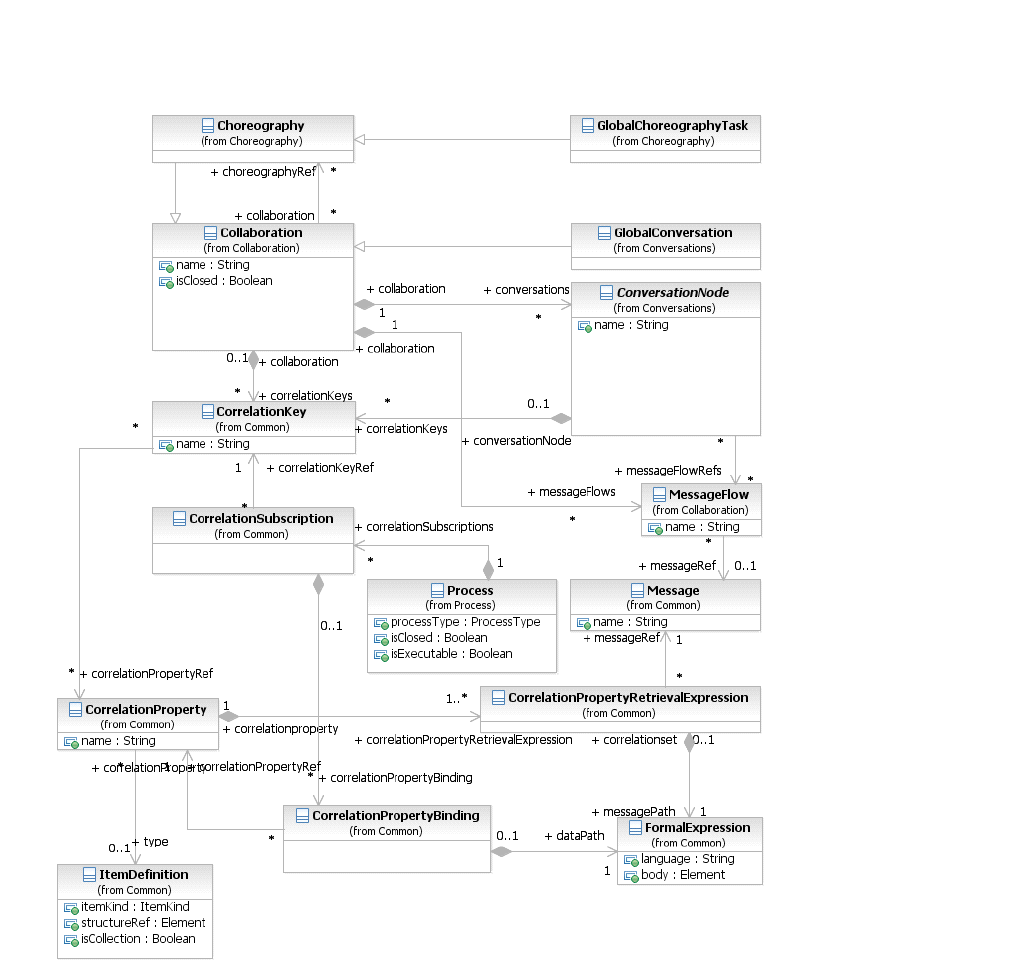
*Figure 8.17 – The Correlation Class Diagram* (p. 74)
#### CorrelationKey
A CorrelationKey represents a composite key out of one or many CorrelationProperties that essentially specify extraction Expressions atop **Messages**. As a result, each CorrelationProperty acts as a partial key for the *correlation*. For each **Message** that is exchanged as part of a particular **Conversation**, the references a FormalExpression to the **Message** payload. That is, for each **Message** (that is used in a **Conversation**) there is an Expression, which extracts portions of the respective **Message’s** payload. The CorrelationKey element inherits the attributes and model associations of BaseElement (see Table 8.5). Table 8.31 displays the additional model associations of the CorrelationKey element.
**Table 8.31 – CorrelationKey model associations**
| Attribute Name | Description/Usage |
| --- | --- |
| **name**: string [0..1] | Specifies the name of the CorrelationKey. |
| **correlationPropertyRef**: CorrelationProperty [0..*] | The CorrelationProperties, representing the partial keys of this CorrelationKey. |
#### Key-based Correlation
Key-based *correlation* is a simple and efficient form of *correlation*, where one or more keys are used to identify a **Conversation**. Any incoming **Message** can be matched against the CorrelationKey by extracting the CorrelationProperties from the **Message** according to the corresponding CorrelationPropertyRetrievalExpression and comparing the resulting composite key with the CorrelationKey instance for this **Conversation**. The idea is to use a joint **Conversation** “token” which is used (passed to and received from) and *outgoing* and *incoming* **Message**. **Messages** are associated to a particular **Conversation** if the composite key extracted from their payload matches the CorrelationKey initialized for this
At runtime the first **Send Task** or **Receive Task** in a **Conversation** MUST populate at least one of the CorrelationKey instances by extracting the values of the CorrelationProperties according to the CorrelationPropertyRetrievalExpression from the initially sent or received **Message**. Later in the **Conversation**, the populated CorrelationKey instances are used for the described matching procedure where from incoming **Messages** a composite key is extracted and used to identify the associated **Conversation**. Where these non-initiating **Messages** derive values for CorrelationKeys, associated with the **Conversation** but not yet populated, then the derived value will be associated with the **Conversation** instance. The CorrelationProperty element inherits the attributes and model associations of BaseElement (see Table 8.5) through its relationship to RootElement. Table 8.32 displays the additional model associations of the
**Table 8.32 – CorrelationProperty model associations**
| Attribute Name | Description/Usage |
| --- | --- |
| **name**: string [0..1] | Specifies the name of the CorrelationProperty. |
| **type**: string [0..1] | Specifies the type of the CorrelationProperty. |
| **correlationPropertyRetrieval-** | The CorrelationPropertyRetrievalExpressions for |
| **Expression**: CorrelationPropertyRetrievalExpression [1..*] | this CorrelationProperty, representing the associations of FormalExpressions (extraction paths) to specific Messages occurring in this **Conversation**. |
The CorrelationPropertyRetrievalExpression element inherits the attributes and model associations of BaseElement (see Table 8.5). Table 8.33 displays the additional model associations of the
**Table 8.33 – CorrelationPropertyRetrievalExpression model associations**
| Attribute Name | Description/Usage |
| --- | --- |
| **messagePath**: FormalExpression | The FormalExpression that defines how to extract a CorrelationProperty from the Message payload. |
| **messageRef**: Message | The specific Message the FormalExpression extracts the CorrelationProperty from. |
#### Context-based Correlation
Context-based *correlation* is a more expressive form of *correlation* on top of key-based *correlation*. In addition to implicitly populating the CorrelationKey *instance* from the first sent or received **Message**, another mechanism relates the CorrelationKey to the **Process** context. That is, a **Process** MAY provide a CorrelationSubscription that acts as the **Process**-specific counterpart to a specific CorrelationKey. In this way, a **Conversation** MAY additionally refer to explicitly updateable **Process** context data to determine whether or not a **Message** needs to be received. At runtime, the CorrelationKey instance holds a composite key that is dynamically calculated from the **Process** context and automatically updated whenever the underlying **Data Objects** or
how that CorrelationProperty *instance* is populated and updated at runtime from the **Process** context (i.e., its **Data Objects** and Properties). The CorrelationSubscription element inherits the attributes and model associations of BaseElement (see Table 8.5). Table 8.34 displays the additional model associations of the CorrelationSubscription element.
**Table 8.34 – CorrelationSubscription model associations**
| Attribute Name | Description/Usage |
| --- | --- |
| **correlationKeyRef**: CorrelationKey | The CorrelationKey this CorrelationSubscription refers to. |
| **correlationPropertyBinding**: CorrelationPropertyBinding [0..*] | The bindings to specific CorrelationProperties and FormalExpressions (extraction rules atop the Process context). |
The CorrelationPropertyBinding element inherits the attributes and model associations of BaseElement (see Table 8.5). Table 8.35 displays the additional model associations of the CorrelationPropertyBinding element.
**Table 8.35 – CorrelationPropertyBinding model associations**
| Attribute Name | Description/Usage |
| --- | --- |
| **dataPath**: FormalExpression | The FormalExpression that defines the extraction rule atop the Process context. |
| **correlationPropertyRef**: CorrelationProperty | The specific CorrelationProperty, this CorrelationPropertyBinding refers to. |
At runtime, the correlation mechanism works as follows: When a **Process** instance is created the CorrelationKey instances of all **Conversations** are initialized with some initial values that specify to correlate *any* incoming **Message** for these **Conversations**. A SubscriptionProperty is updated whenever any of the **Data Objects** or Properties changes that are referenced from the respective FormalExpression. As a result, incoming **Messages** are matched against the now populated CorrelationKey instance. Later in the **Process** run, the SubscriptionProperties can again change and implicitly change the correlation criterion. Alternatively, the established mechanism of having the first **Send Task** or **Receive Task** populate the CorrelationKey *instance* applies.
#### XML Schema for Correlation
**Table 8.36 – Correlation Key XML schema**
```xml
```
**Table 8.37 – Correlation Property XML schema**
```xml
```
**Table 8.38 – Correlation Property Binding XML schema**
```xml
```
**Table 8.39 – Correlation Property Retrieval Expression XML schema**
```xml
```
**Table 8.40 – Correlation Subscription XML schema**
```xml
```
### 8.4.3 Error
An Error represents the content of an **Error Event** or the Fault of a failed Operation. An ItemDefinition is used to specify the structure of the Error. An Error is generated when there is a critical problem in the processing of an **Activity** or when the execution of an Operation failed.
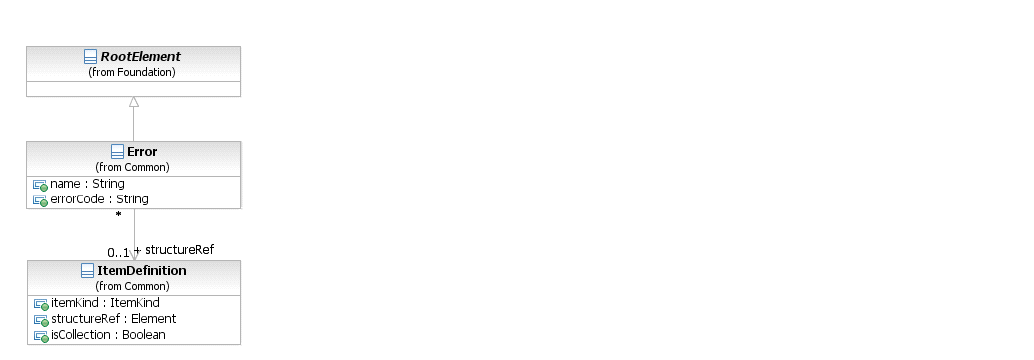
*Figure 8.18 – Error class diagram* (p. 79)
The Error element inherits the attributes and model associations of BaseElement (see Table 8.5), through its relationship to RootElement. Table 8.41 presents the additional attributes and model associations of the Error element.
**Table 8.41 – Error attributes and model associations**
| Attribute Name | Description/Usage |
| --- | --- |
| **structureRef** : ItemDefinition [0..1] | An ItemDefinition is used to define the “payload” of the Error. |
| **name** : string | The descriptive name of the Error. |
| **errorCode**: string | For an **End Event**: If the *result* is an Error, then the errorCode MUST be supplied (if the processType attribute of the Process is set to executable) This “throws” the Error. For an **Intermediate Event** within *normal flow*: If the *trigger* is an Error, then the errorCode MUST be entered (if the processType attribute of the **Process** is set to executable). This “throws” the Error. For an **Intermediate Event** attached to the boundary of an **Activity**: If the *trigger* is an Error, then the errorCode MAY be entered. This **Event** “catches” the Error. If there is no errorCode, then any error SHALL trigger the **Event**. If there is an errorCode, then only an Error that matches the errorCode SHALL trigger the **Event**. |
### 8.4.4 Escalation
An Escalation identifies a business situation that a **Process** might need to react to. An ItemDefinition is used to specify the structure of the Escalation.
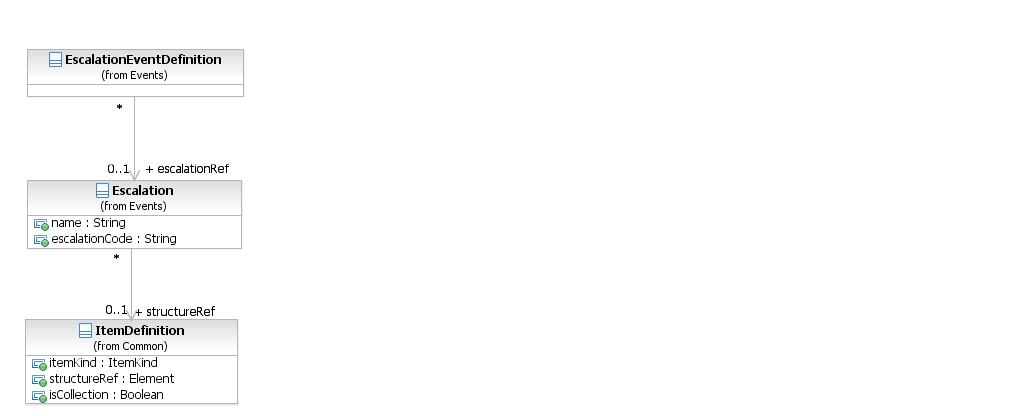
*Figure 8.19 – Escalation class diagram* (p. 80)
The Escalation element inherits the attributes and model associations of BaseElement (see Table 8.5), through its relationship to RootElement. Table 8.41 presents the additional model associations of the Error element.
**Table 8.42 – Escalation attributes and model associations**
| Attribute Name | Description/Usage |
| --- | --- |
| **structureRef** : ItemDefinition [0..1] | An ItemDefinition is used to define the “payload” of the Escalation. |
| **name** : string | The descriptive name of the Escalation. |
| **escalationCode**: string | For an **End Event**: If the Result is an Escalation, then the escalationCode MUST be supplied (if the processType attribute of the **Process** is set to executable). This “throws” the Escalation. For an **Intermediate Event** within *normal flow*: If the *trigger* is an Escalation, then the escalationCode MUST be entered (if the processType attribute of the **Process** is set to executable). This “throws” the Escalation. For an **Intermediate Event** attached to the boundary of an **Activity**: If the *trigger* is an Escalation, then the escalationCode MAY be entered. This **Event** “catches” the Escalation. If there is no escalationCode, then any Escalation SHALL trigger the **Event**. If there is an escalationCode, then only an Escalation that matches the escalationCode SHALL trigger the **Event**. |
### 8.4.5 Events
An **Event** is something that happens during the course of a **Process**. These **Events** affect the flow of the **Process** and usually have a cause or an impact. The term event is general enough to cover many things in a **Process**. The start of an **Activity**, the end of an **Activity**, the change of state of a document, a **Message** that arrives, etc., all could be considered **Events**. However, **BPMN** has restricted the use of **Events** to include only those types of **Events** that will affect the sequence or timing of **Activities** of a **Process**.
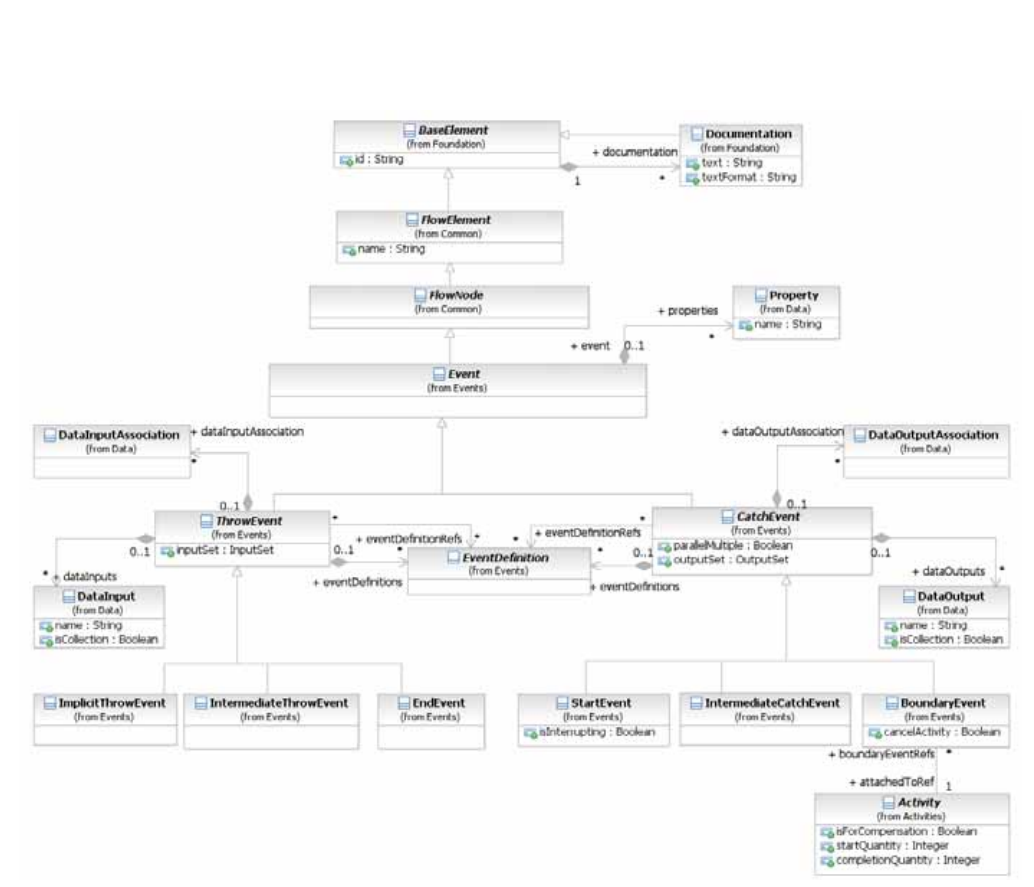
*Figure 8.20 – Event class diagram* (p. 82)
The **Event** element inherits the attributes and model associations of FlowElement (see Table 8.44), but adds no additional attributes or model associations. The details for the types of **Events** (**Start**, **Intermediate**, and **End**) are defined in “Event Definitions” on page 258.
### 8.4.6 Expressions
The Expression class is used to specify an Expression using natural-language text. These Expressions are not executable. The natural language text is captured using the documentation attribute, inherited from BaseElement. Expression inherits the attributes and model associations of BaseElement (see Table 8.5), but adds no additional attributes or model associations.
Expressions are used in many places within **BPMN** to extract information from the different elements, normally data elements. The most common usage is when modeling decisions, where conditional Expressions are used to direct the flow along specific paths based on some criteria. **BPMN** supports underspecified Expressions, where the logic is captured as natural-language descriptive text. It also supports formal Expressions, where the logic is captured in an executable form using a specified Expression language.
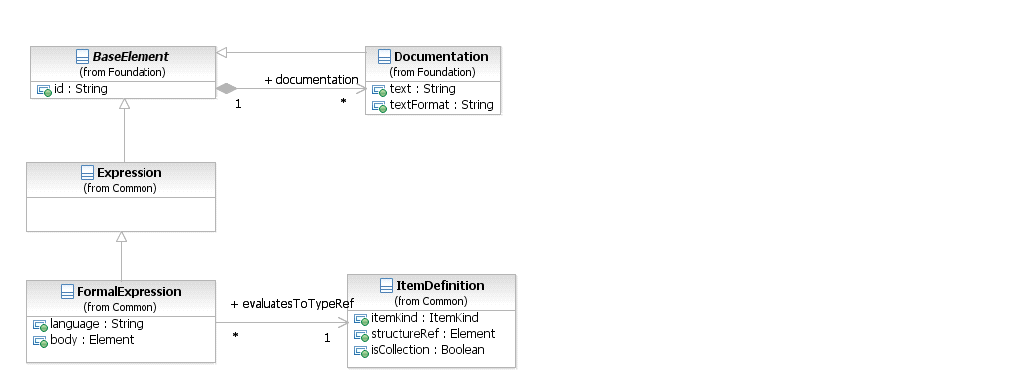
*Figure 8.21 – Expression class diagram* (p. 83)
#### Expression
The Expression class is used to specify an Expression using natural-language text. These Expressions are not executable and are considered underspecified. The definition of an Expression can be done in two ways: it can be contained where it is used, or it can be defined at the **Process** level and then referenced where it is used. The Expression element inherits the attributes and model associations of BaseElement (see Table 8.5), but does not have any additional attributes or model associations.
#### Formal Expression
The FormalExpression class is used to specify an executable Expression using a specified Expression language. A natural-language description of the Expression can also be specified, in addition to the formal specification. The default Expression language for all Expressions is specified in the Definitions element, using the expressionLanguage attribute. It can also be overridden on each individual FormalExpression using the same attribute. The FormalExpression element inherits the attributes and model associations of BaseElement (see Table 8.5), through the Expression element. Table 8.43 presents the additional attributes and model associations of the
**Table 8.43 – FormalExpression attributes and model associations**
| Attribute Name | Description/Usage |
| --- | --- |
| **language**: string [0..1] | Overrides the Expression language specified in the Definitions. The language MUST be specified in a URI format. |
| **body**: Element | The body of the Expression. Note that this attribute is not relevant when the XML Schema is used for interchange. Instead, the FormalExpression complex type supports mixed content. The body of the Expression would be specified as element content. For example: **count(../dataObject[id="CustomerRecord_1"]/emailAddress) > 0** |
| **evaluatesToTypeRef**: ItemDefinition | The type of object that this Expression returns when evaluated. For example, *conditional* Expressions evaluate to a *boolean*. |
### 8.4.7 Flow Element
FlowElement is the abstract super class for all elements that can appear in a **Process** flow, which are FlowNodes (see page 99, which consist of **Activities** (see page 149), **Choreography Activities** (see page 319) **Gateways** (see page 285), and **Events** (see page 231), **Data Objects** (see page 204), **Data Associations** (see page 220), and **Sequence Flows** (see page 97).
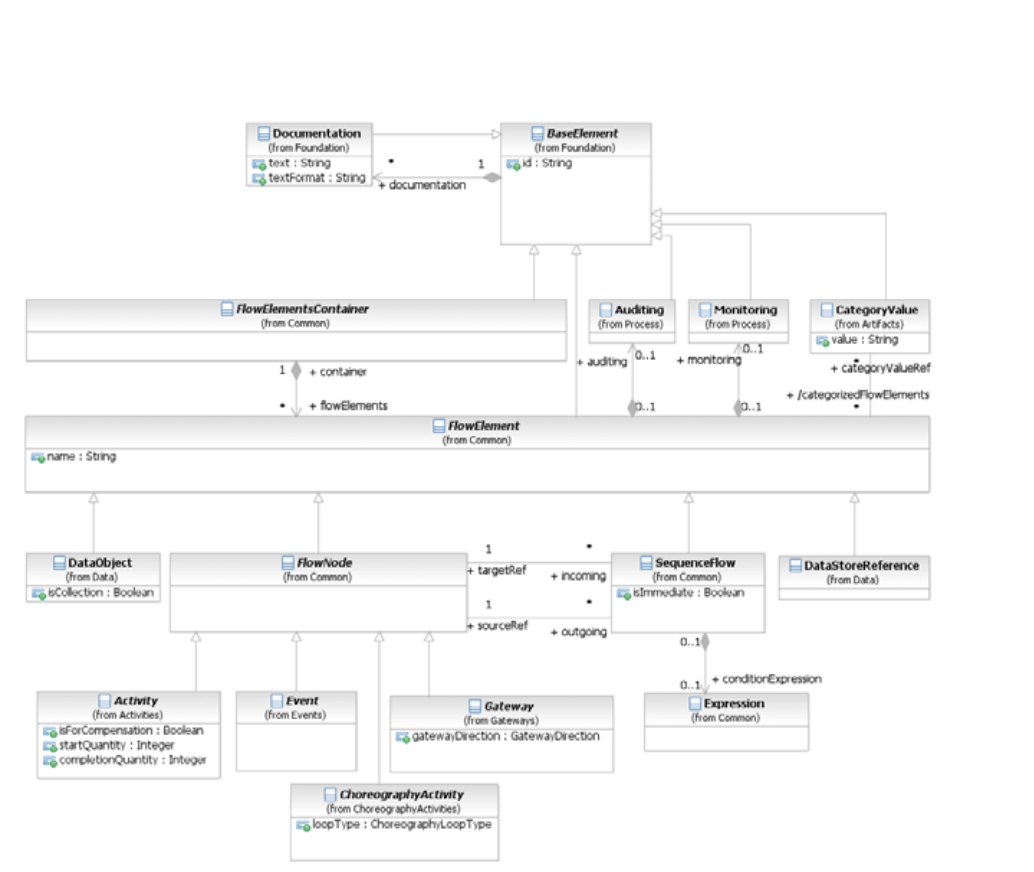
*Figure 8.22 – FlowElement class diagram* (p. 85)
The FlowElement element inherits the attributes and model associations of BaseElement (see Table 8.5). Table 8.44 presents the additional attributes and model associations of the FlowElement element.
**Table 8.44 – FlowElement attributes and model associations**
| Attribute Name | Description/Usage |
| --- | --- |
| **name**: string [0..1] | The descriptive name of the element. |
| **categoryValueRef**: CategoryValue | A reference to the Category Values that are associated with this Flow |
| [0..*] | Element. |
| **auditing**: Auditing [0..1] | A hook for specifying audit related properties. Auditing can only be defined for a **Process**. |
| **monitoring**: Monitoring [0..1] | A hook for specifying monitoring related properties. Monitoring can only be defined for a **Process**. |
### 8.4.8 Flow Elements Container
FlowElementsContainer is an abstract super class for **BPMN** diagrams (or views) and defines the superset of elements that are contained in those diagrams. Basically, a FlowElementsContainer contains FlowElements, which are **Events** (see page 231), **Gateways** (see page 285), **Sequence Flows** (see page 97), **Activities** (see page 149), and **Choreography Activities** (see page 319). There are four (4) types of FlowElementsContainers (see Figure 8.23): **Process**, **Sub-Proces****s**, **Choreography**, and **Sub-Choreography**.
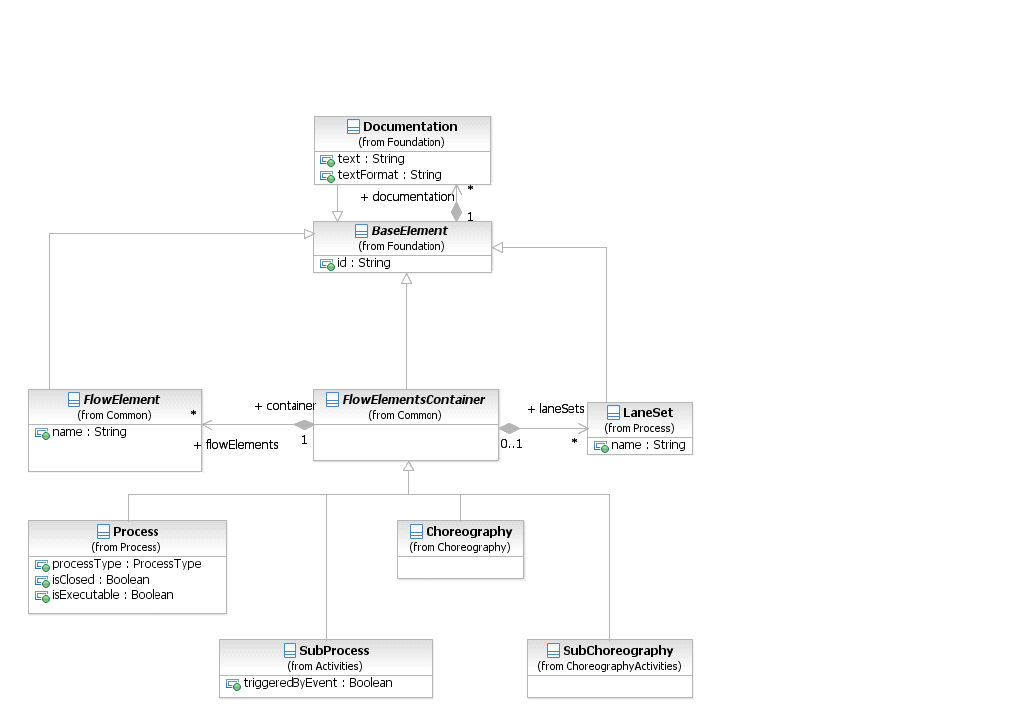
*Figure 8.23 – FlowElementContainers class diagram* (p. 87)
The FlowElementsContainer element inherits the attributes and model associations of BaseElement (see Table 8.5). Table 8.45 presents the additional model associations of the FlowElementsContainer element.
**Table 8.45 – FlowElementsContainer model associations**
| Attribute Name | Description/Usage |
| --- | --- |
| **flowElements**: Flow | This association specifies the particular **flow elements** contained in a |
| Element [0..*] | FlowElementContainer. *Flow elements* are **Events**, **Gateways**, **Sequence Flows**, **Activities**, **Data Objects**, **Data Associations**, and **Choreography Activities**. Note that: • **Choreography Activities** MUST NOT be included as a flowElement for a **Process**. • **Activities**, **Data Associations**, and **Data Objects** MUST NOT be included as a flowElement for a **Choreography**. |
| **laneSets**: LaneSet [0..*] | This attribute defines the list of LaneSets used in the FlowElementsContainer LaneSets are not used for **Choreographies** or **Sub-Choreographies**. |
### 8.4.9 Gateways
**Gateways** are used to control how the **Process** flows (how *Tokens* flow) through **Sequence Flows** as they converge and diverge within a **Process**. If the flow does not need to be controlled, then a **Gateway** is not needed. The term “gateway” implies that there is a gating mechanism that either allows or disallows passage through the **Gateway**; that is, as *tokens* arrive at a **Gateway**, they can be merged together on input and/or split apart on output as the **Gateway** mechanisms are invoked. **Gateways**, like **Activities**, are capable of consuming or generating additional control *tokens*, effectively controlling the execution semantics of a given **Process**. The main difference is that **Gateways** do not represent ‘work’ being done and they are considered to have zero effect on the operational measures of the **Process** being executed (cost, time, etc.). The **Gateway** controls the flow of both diverging and converging **Sequence Flows**. That is, a single **Gateway** could have multiple input and multiple output flows. Modelers and modeling tools might want to enforce a best practice of a **Gateway** only performing one of these functions. Thus, it would take two sequential **Gateways** to first converge and then to diverge the **Sequence Flows**.
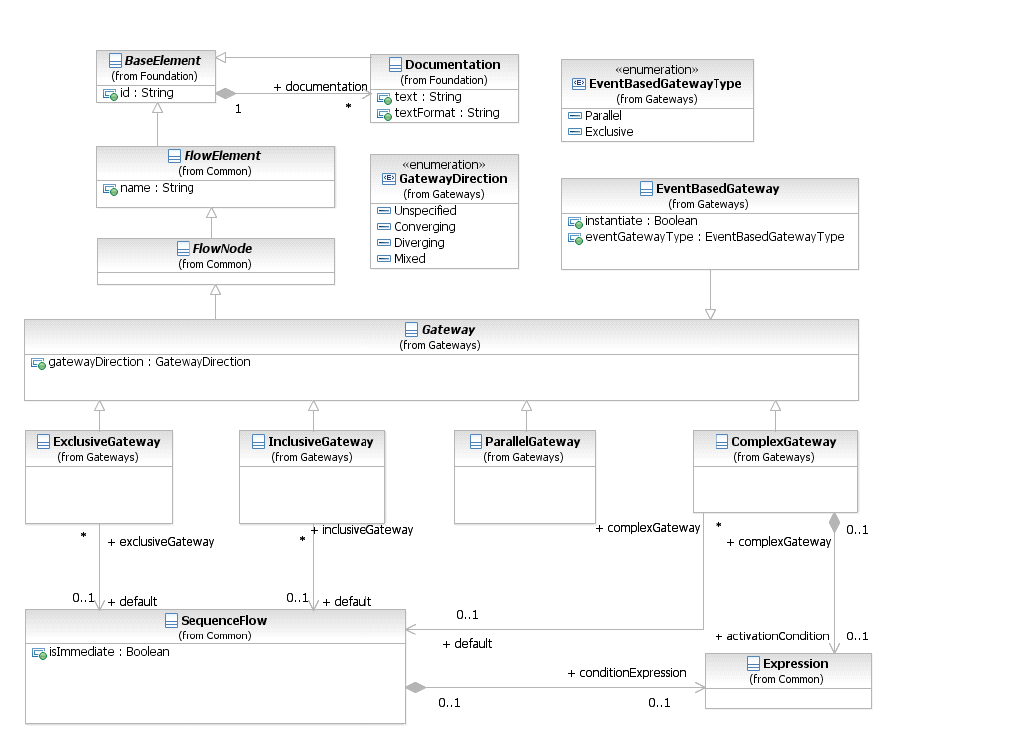
*Figure 8.24 – Gateway class diagram* (p. 88)
The details for the types of **Gateways** (**Exclusive**, **Inclusive**, **Parallel**, **Event-Based**, and **Complex**) is defined on page 285 for **Processes** and on page 342 for **Choreographies**.
The **Gateway** class is an abstract type. Its concrete subclasses define the specific semantics of individual **Gateway** types, defining how the **Gateway** behaves in different situations. The **Gateway** element inherits the attributes and model associations of FlowElement (see Table 8.44). Table 8.46 presents the additional attributes of the **Gateway** element.
**Table 8.46 – Gateway attributes**
| Attribute Name | Description/Usage |
| --- | --- |
| **gatewayDirection**: GatewayDirection = | An attribute that adds constraints on how the **Gateway** MAY be |
| Unspecified { Unspecified \| Converging \| Diverging \| Mixed } | used. • **Unspecified**: There are no constraints. The **Gateway** MAY have any number of *incoming* and *outgoing* **Sequence Flows**. • **Converging**: This **Gateway** MAY have multiple *incoming* **Sequence Flows** but MUST have no more than one (1) *outgoing* **Sequence Flow**. • **Diverging**: This **Gateway** MAY have multiple *outgoing* **Sequence Flows** but MUST have no more than one (1) *incoming* **Sequence Flow**. • **Mixed**: This **Gateway** contains multiple *outgoing* and multiple *incoming* **Sequence Flows**. |
### 8.4.10 Item Definition
**BPMN** elements, such as DataObjects and Messages, represent items that are manipulated, transferred, transformed, or stored during **Process** flows. These items can be either physical items, such as the mechanical part of a vehicle, or information items such the catalog of the mechanical parts of a vehicle. An important characteristics of items in **Process** is their structure. **BPMN** does not require a particular format for this data structure, but it does designate XML Schema as its default. The structure attribute references the actual data structure. The default format of the data structure for all elements can be specified in the Definitions element using the indicates that the data structures using by elements within that Definitions are in the form of XML Schema types. If unspecified, the default is XML schema. An Import is used to further identify the location of the data structure (if applicable). For example, in the case of data structures contributed by an XML schema, an Import would be used to specify the file location of that schema. Structure definitions are always defined as separate entities, so they cannot be inlined in one of their usages. You will see that in every mention of structure definition there is a “reference” to the element. This is why this class inherits from
An ItemDefinition element can specify an import reference where the proper definition of the structure is defined.
In cases where the data structure represents a collection, the multiplicity can be projected into the attribute isCollection. If this attribute is set to “*true,*” but the actual type is not a collection type, the model is considered as invalid. **BPMN** compliant tools might support an automatic check for these inconsistencies and report this as an error. The default value for this element is “*false.*” The itemKind attribute specifies the nature of an item which can be a physical or an information item. Figure 8.25 shows the ItemDefinition class diagram. When an ItemDefinition is defined it is contained in
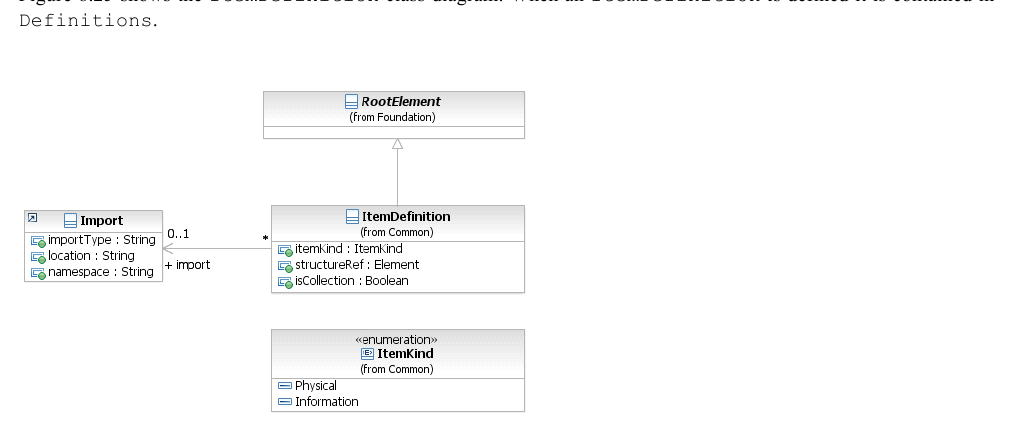
*Figure 8.25 – ItemDefinition class diagram* (p. 90)
The ItemDefinition element inherits the attributes and model associations BaseElement (see Table 8.5) through its relationship to RootElement. Table 8.47 presents the additional attributes and model associations for the
**Table 8.47 – ItemDefinition attributes & model associations**
| Attribute Name | Description/Usage |
| --- | --- |
| **itemKind**: ItemKind = Information | This defines the nature of the Item. Possible values are physical or |
| { Information \| Physical } | information. The default value is information. |
| **structureRef**: [Element [0..1] | The concrete data structure to be used. |
| **import**: Import [0..1] | Identifies the location of the data structure and its format. If the importType attribute is left unspecified, the typeLanguage specified in the Definitions that contains this ItemDefinition is assumed. |
| **isCollection:** boolean = False | Setting this flag to *true* indicates that the actual data type is a collection. |
### 8.4.11 Message
A **Message** represents the content of a communication between two *Participants*. In **BPMN 2.0.2**, a **Message** is a graphical decorator (it was a supporting element in **BPMN 1.**2). An ItemDefinition is used to specify the **Message** structure. When displayed in a diagram:
2. In a **Message** is a rectangle with converging diagonal lines in the upper half of the rectangle to give the appearance of an envelope (see Figure 8.26). It MUST be drawn with a single thin line.

*Figure 8.26 – A Message* (p. 91)
In addition, when used in a **Choreography** Diagram more than one **Message** MAY be used for a single **Choreography Task**. In this case, it is important to know the first (initiating) **Message** of the interaction. For return (non-initiating) **Messages** the symbol of the **Message** is shaded with a light fill (see Figure 8.27).

*Figure 8.27 – A non-initiating Message* (p. 91)
Any **Message** sent by the non-initiating *Participant* or **Sub-Choreography** MUST be shaded with a light fill. In a **Collaboration**, the communication itself is represented by a **Message Flow** (see “Message Flow” below for more details). The **Message** can be optionally depicted as a graphical decorator on a **Message Flow** in a **Collaboration** (see Figure 8.28 and Figure 8.29).
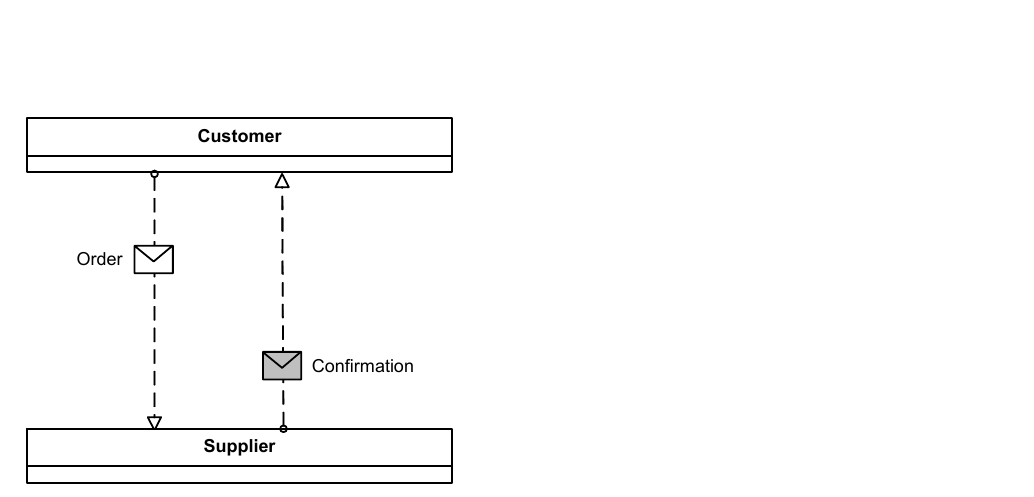
*Figure 8.28 – Messages Association overlapping Message Flows* (p. 92)
In a **Choreography**, the communication is represented by a **Choreography Task** (see page 321). The **Message** can be depicted as a decorator with a **Choreography Task** in a **Choreography** (see Figure 8.29).
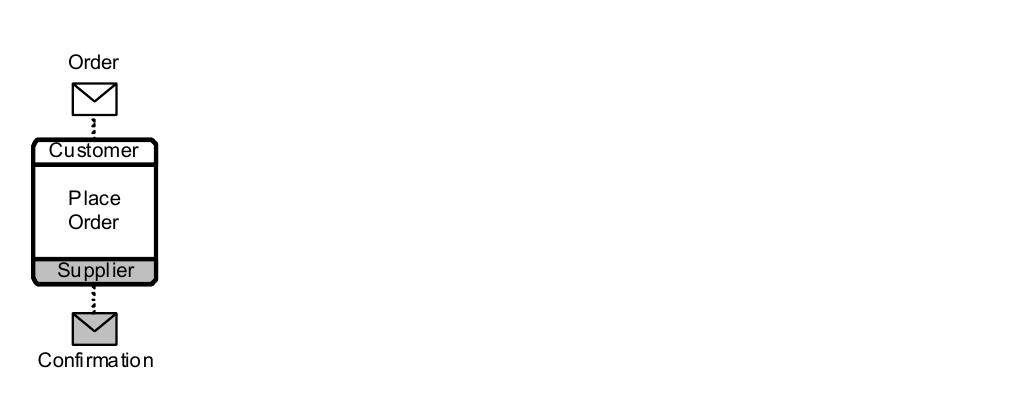
*Figure 8.29 – Messages shown Associated with a Choreography Task* (p. 92)
Figure 8.30 displays the class diagram showing the attributes and model associations for the **Message** element.
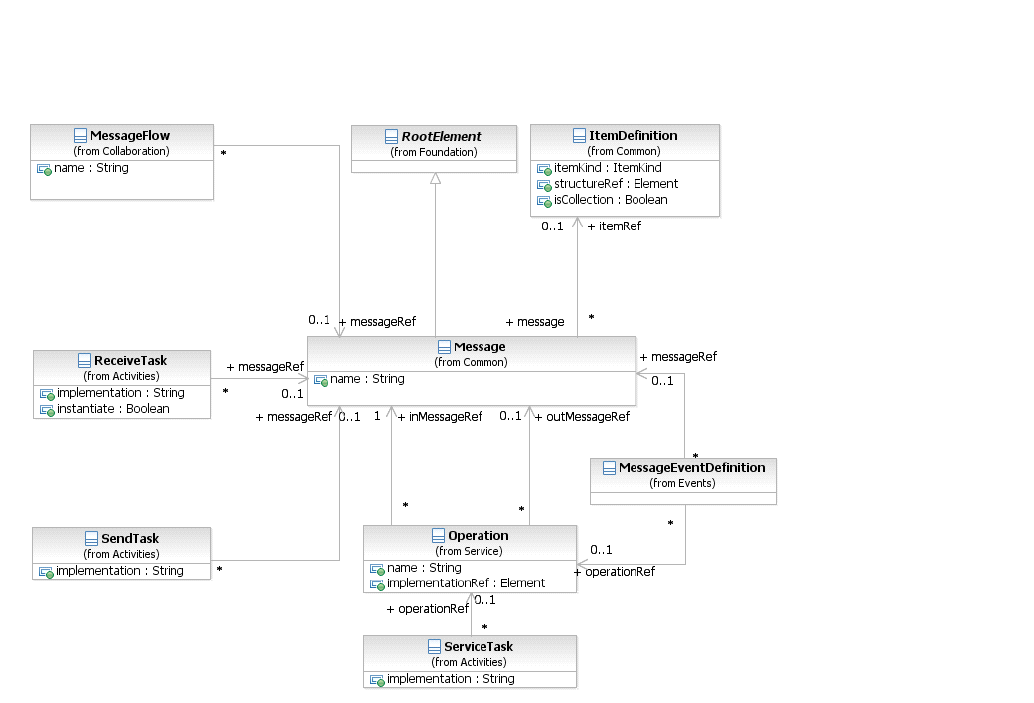
*Figure 8.30 – The Message class diagram* (p. 93)
The **Message** element inherits the attributes and model associations of BaseElement (see Table 8.5) through its relationship to RootElement. Table 8.48 presents the additional attributes and model associations for the **Message** element.
**Table 8.48 – Message attributes and model associations**
| Attribute Name | Description/Usage |
| --- | --- |
| **name:** string | Name is a text description of the **Message.** |
| **itemRef** : ItemDefinition [0..1] | An ItemDefinition is used to define the “payload” of the **Message**. |
### 8.4.12 Resources
The Resource class is used to specify resources that can be referenced by **Activities**. These Resources can be Human Resources as well as any other resource assigned to **Activities** during **Process** execution time. The definition of a Resource is “abstract,” because it only defines the Resource, without detailing how e.g., actual user IDs are associated at runtime. Multiple **Activities** can utilize the same Resource.
Every Resource can define a set of ResourceParameters. These parameters can be used at runtime to define query e.g., into an Organizational Directory. Every **Activity** referencing a parameterized Resource can bind values available in the scope of the **Activity** to these parameters.
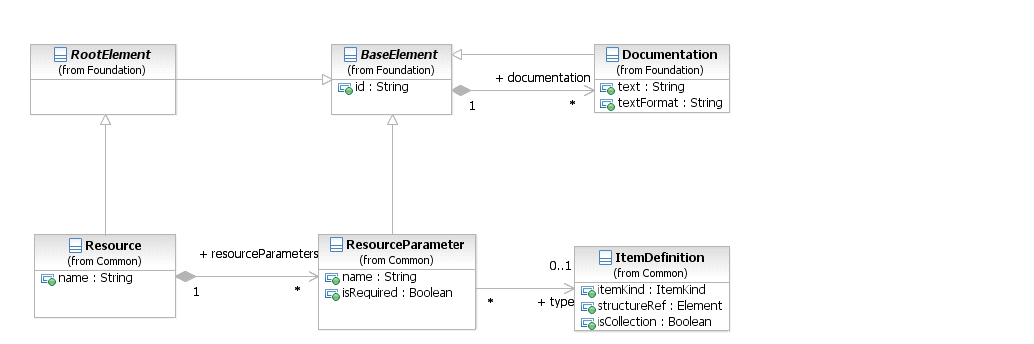
*Figure 8.31 – Resource class diagram* (p. 94)
The Resource element inherits the attributes and model associations of BaseElement (see Table 8.5) through its relationship to RootElement. Table 8.51 presents the additional model associations for the Resource element.
**Table 8.49 – Resource attributes and model associations**
| Attribute Name | Description/Usage |
| --- | --- |
| **name**: string | This attribute specifies the name of the Resource. |
| **resourceParameters**: ResourceParameter [0..*] | This model association specifies the definition of the parameters needed at runtime to resolve the Resource. |
As mentioned before, the Resource can define a set of parameters to define a query to resolve the actual resources (e.g., user ids). The ResourceParameter element inherits the attributes and model associations of BaseElement (see Table 8.5) through its relationship to RootElement. Table 8.51 presents the additional model associations for the
**Table 8.50 – ResourceParameter attributes and model associations**
| Attribute Name | Description/Usage |
| --- | --- |
| **name**: string | Specifies the name of the query parameter. |
| **type:** ItemDefinition | Specifies the type of the query parameter. |
| **isRequired:** boolean | Specifies, if a parameter is optional or mandatory. |
### 8.4.13 Sequence Flow
A **Sequence Flow** is used to show the order of Flow Elements in a **Process** or a **Choreography**. Each **Sequence Flow** has only one *source* and only one *target*. The *source* and *target* MUST be from the set of the following Flow Elements: **Events** (**Start**, **Intermediate**, and **End**), **Activities** (**Task** and **Sub-Process**; for **Processes**),
#### Choreography Activities (Choreography Task and Sub-Choreography; for Choreographies), and
A **Sequence Flow** is line with a solid arrowhead that MUST be drawn with a solid single line (as seen in Figure 8.32).
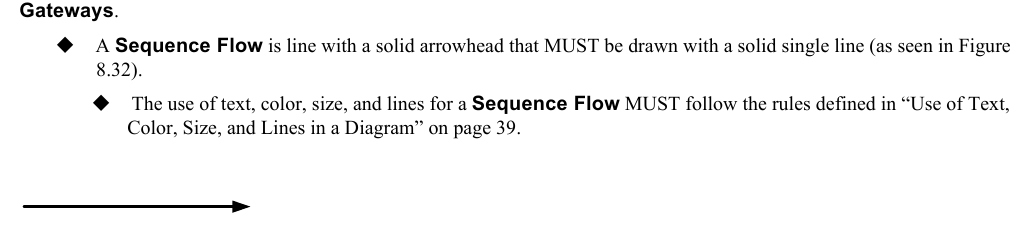
*Figure 8.32 – A Sequence Flow* (p. 95)
A **Sequence Flow** can optionally define a condition Expression, indicating that the *token* will be passed down the **Sequence Flow** only if the Expression evaluates to *true*. This Expression is typically used when the source of the **Sequence Flow** is a **Gateway** or an **Activity**. A *conditional outgoing* **Sequence Flow** from an **Activity** MUST be drawn with a mini-diamond marker at the beginning of the connector (as seen in Figure 8.33).
*Conditional outgoing* **Sequence Flows** from a **Gateway** MUST NOT be drawn with a mini-diamond marker at the beginning of the connector.
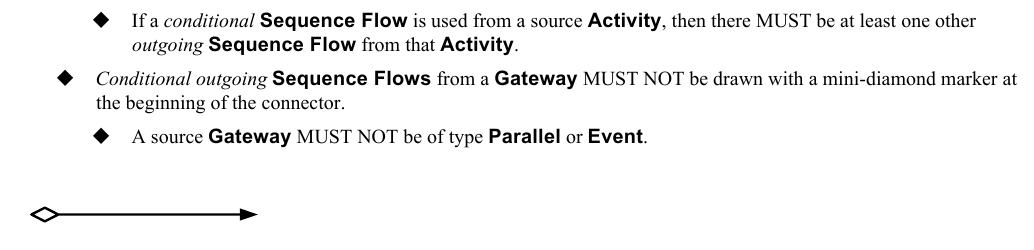
*Figure 8.33 – A Conditional Sequence Flow* (p. 95)
A **Sequence Flow** that has an **Exclusive**, **Inclusive**, or **Complex Gateway** or an **Activity** as its source can also be defined with as *default*. Such a **Sequence Flow** will have a marker to show that it is a *default* flow. The *default* **Sequence Flow** is taken (a token is passed) only if all the other outgoing **Sequence Flows** from the **Activity** or **Gateway** are not valid (i.e., their condition Expressions are *false*). A *default outgoing* **Sequence Flow** MUST be drawn with a slash marker at the beginning of the connector (as seen in Figure 8.34).

*Figure 8.34 – A Default Sequence Flow* (p. 96)
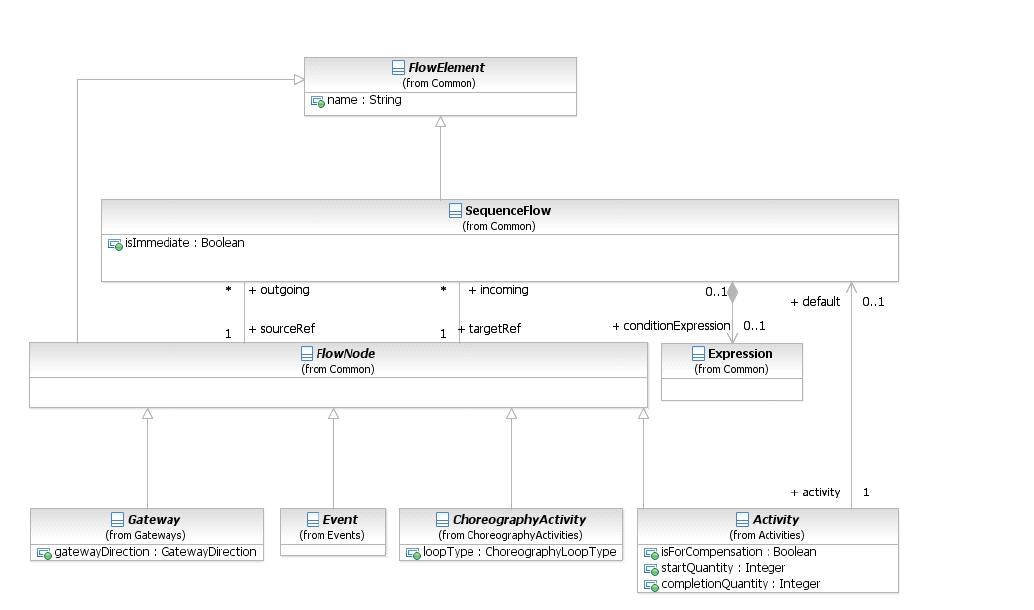
*Figure 8.35 – SequenceFlow class diagram* (p. 96)
The **Sequence Flow** element inherits the attributes and model associations of FlowElement (see Table 8.44). Table 8.51 presents the additional attributes and model associations of the **Sequence Flow** element.
**Table 8.51 – SequenceFlow attributes and model associations**
| Attribute Name | Description/Usage |
| --- | --- |
| **sourceRef**: FlowNode | The FlowNode that the **Sequence Flow** is connecting from. For a **Process**: Of the types of FlowNode, only **Activities**, **Gateways**, and **Events** can be the *source*. However, **Activities** that are **Event Sub-Processes** are not allowed to be a *source*. For a **Choreography**: Of the types of FlowNode, only Choreography **Activities**, **Gateways**, and **Events** can be the *source*. |
| **targetRef**: FlowNode | The FlowNode that the **Sequence Flow** is connecting to. For a **Process**: Of the types of FlowNode, only **Activities**, **Gateways**, and **Events** can be the target. However, **Activities** that are **Event Sub-Processes** are not allowed to be a target. For a **Choreography**: Of the types of FlowNode, only Choreography **Activities**, **Gateways**, and **Events** can be the target. |
| **conditionExpression**: Expression [0..1] | An optional boolean Expression that acts as a gating condition. A *token* will only be placed on this **Sequence Flow** if this conditionExpression evaluates to true. |
| **isImmediate**: boolean | An optional boolean value specifying whether **Activities** or **Choreography** |
| [0..1] | **Activities** not in the model containing the **Sequence Flow** can occur between the elements connected by the **Sequence Flow**. If the value is true, they MAY NOT occur. If the value is false, they MAY occur. Also see the isClosed attribute on Process, Choreography, and Collaboration. When the attribute has no value, the default semantics depends on the kind of model containing **Sequence Flows**: • For non-executable **Processes** (public **Processes** and non-executable private **Processes**) and **Choreographies** no value has the same semantics as if the value were *false*. • For an executable **Processes** no value has the same semantics as if the value were *true*. • For executable **Processes**, the attribute MUST NOT be *false*. |
#### Flow Node
The FlowNode element is used to provide a single element as the source and target **Sequence Flow** associations (see Figure 8.35) instead of the individual associations of the elements that can connect to **Sequence Flows** (see above). Only the **Gateway**, **Activity**, **Choreography Activity**, and **Event** elements can connect to **Sequence Flows** and thus, these elements are the only ones that are sub-classes of FlowNode. Since **Gateway**, **Activity**, **Choreography Activity**, and **Event** have their own attributes, model associations, and inheritances; the FlowNode element does not inherit from any other **BPMN** element. Table 8.52 presents the additional model associations of the FlowNode element.
**Table 8.52 – FlowNode model associations**
| Attribute Name | Description/Usage |
| --- | --- |
| **incoming**: Sequence Flow [0..*] | This attribute identifies the *incoming* **Sequence Flow** of the FlowNode. |
| **outgoing**: Sequence Flow [0..*] | This attribute identifies the *outgoing* **Sequence Flow** of the FlowNode. This is an ordered collection. |
### 8.4.14 Common Package XML Schemas
**Table 8.53 – Error XML schema**
```xml
```
**Table 8.54 – Escalation XML schema**
```xml
```
**Table 8.55 – Expression XML schema**
```xml
```
**Table 8.56 – FlowElement XML schema**
```xml
```
**Table 8.57 – FlowNode XML schema**
```xml
```
**Table 8.58 – FormalExpression XML schema**
```xml
```
**Table 8.59 – InputOutputBinding XML schema**
```xml
```
**Table 8.60 – ItemDefinition XML schema**
```xml
```
**Table 8.61 – Message XML schema**
```xml
```
**Table 8.62 – Resources XML schema**
```xml
```
**Table 8.63 – ResourceParameter XML schema**
```xml
```
**Table 8.64 – SequenceFlow XML schema**
```xml
```